# transparent objects not rendered with vtk9 and mesa 18.3.4 & 20.1.8
**URL:** https://discourse.vtk.org/t/transparent-objects-not-rendered-with-vtk9-and-mesa-18-3-4-20-1-8/4417
**Category:** Support
**Created:** [October 14, 2020, 9:51am UTC](https://discourse.vtk.org/t/transparent-objects-not-rendered-with-vtk9-and-mesa-18-3-4-20-1-8/4417 "2020-10-14T09:51:24Z")
**Posts on this page:** 5
**Page:** 1
### Author:  [@andreasbuykx](https://discourse.vtk.org/u/andreasbuykx)
#### Post date: [October 14, 2020, 9:51am UTC](https://discourse.vtk.org/t/transparent-objects-not-rendered-with-vtk9-and-mesa-18-3-4-20-1-8/4417/1 "2020-10-14T09:51:24Z")
I am trying to get VTK 9.0.1 to show transparent objects on our CentOS-7 with mesa but the transparent objects are not rendered at all apparently due to texture errors.
The attached script shows a red cube and a green sphere. Initially both are opaque. By pressing any key the green sphere is supposed to toggle between opaque and transparent. Instead the green sphere toggles between opaque and not rendered. An error trace (both for mesa 18.3.4 and 20.1.8) is attached too. I experienced similar problems already on VTK 8.2 (see [issue 17456](https://gitlab.kitware.com/vtk/vtk/-/issues/17456)).
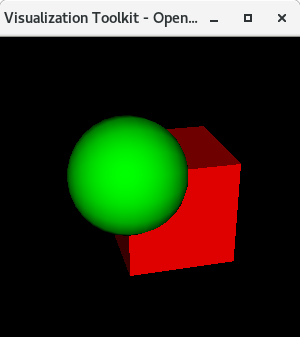
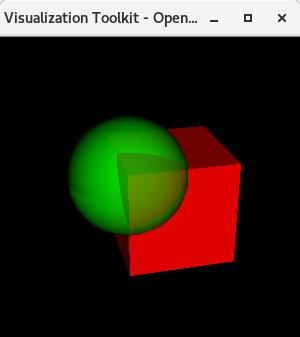 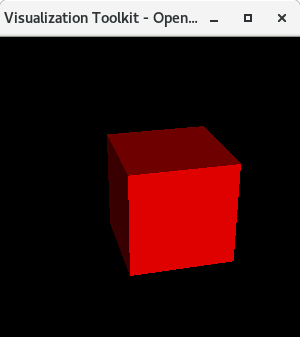
Has anyone using mesa experienced similar problems, or used transparency successfully?
[opacity.py](https://discourse.vtk.org/uploads/short-url/otah2DjoZPE0JNKZpHv0ZWxZs3e.py) (1.3 KB)
[trace-mesa-18.3.4.out](https://discourse.vtk.org/uploads/short-url/lknAsNuwB6VmdkE8L56ycw80fD8.out) (8.4 KB)
[trace-mesa-20.1.8.out](https://discourse.vtk.org/uploads/short-url/uLKEXbovhaJ8QCyc03k7E7mlkK4.out) (8.4 KB)
---
### Author:  [@zandarina](https://discourse.vtk.org/u/zandarina)
#### Post date: [October 15, 2020, 9:20am UTC](https://discourse.vtk.org/t/transparent-objects-not-rendered-with-vtk9-and-mesa-18-3-4-20-1-8/4417/2 "2020-10-15T09:20:43Z")
Hello, I don’t know about mesa, but I detected some errors in texture in vtk9. Check my post if it can help you
> [@vtkGPUVolumeRayCastMapper only consider the last label defined in a mask](https://discourse.vtk.org/t/vtkgpuvolumeraycastmapper-only-consider-the-last-label-defined-in-a-mask/4386/5):
>
> Hi thank you for answering. I would like to enable the transfer voxel for regions of the mask not intensity values. But it only allows me to define one label the second is ignored. To click one region for example make it red, to click + shift make it green. If I define only the red label it works if I define green and red it does not work. I wonder what it is the reason. Thanks I added the interpolation in my code.
If you define labels in a mask all the labels must be defined otherwise it fails. This is bug. But doing this, you can go around the problem.
Cheers
---
### Author:  [@andreasbuykx](https://discourse.vtk.org/u/andreasbuykx)
#### Post date: [October 15, 2020, 9:28am UTC](https://discourse.vtk.org/t/transparent-objects-not-rendered-with-vtk9-and-mesa-18-3-4-20-1-8/4417/3 "2020-10-15T09:28:11Z")
Thanks for your reply. Honestly I don’t understand how your post is related to textures, and also I am not using volume mapping but `vtkPolyDataMapper` and `vtkCompositePolyDataMapper2` so the rendering passes are very much different I suppose. In vtk 8.1 the rendering of textures with mesa worked fine.
---
### Author:  [@tigarmo](https://discourse.vtk.org/u/tigarmo)
#### Post date: [October 19, 2020, 2:46pm UTC](https://discourse.vtk.org/t/transparent-objects-not-rendered-with-vtk9-and-mesa-18-3-4-20-1-8/4417/4 "2020-10-19T14:46:29Z")
For what it’s worth I have this transparency problem too: [Problem with transparency with VTK \>= 8.0 on Linux](https://discourse.vtk.org/t/problem-with-transparency-with-vtk-8-0-on-linux/3309/6) . Opaque objects render fine but the moment that opacity is different from 1.0 they disappear. In my report I talked about Mesa versions and mine being possibly too old but it looks like you reproduced it with Mesa 20.1.8, so I don’t have any other leads at the moment, unfortunately.
---
### Author:  [@andreasbuykx](https://discourse.vtk.org/u/andreasbuykx)
#### Post date: [October 30, 2020, 2:31pm UTC](https://discourse.vtk.org/t/transparent-objects-not-rendered-with-vtk9-and-mesa-18-3-4-20-1-8/4417/5 "2020-10-30T14:31:36Z")
@tigarmo I’ve posted some [followup](https://discourse.vtk.org/t/opengl-errors-rendering-transparency-on-mesa/4523) in the developers section which may be of interest for you as well.