# Transport mesh from .vtu file to Blender
**URL:** https://discourse.vtk.org/t/transport-mesh-from-vtu-file-to-blender/9072
**Category:** Support
**Created:** [August 3, 2022, 2:54pm UTC](https://discourse.vtk.org/t/transport-mesh-from-vtu-file-to-blender/9072 "2022-08-03T14:54:40Z")
**Posts on this page:** 2
**Page:** 1
### Author:  [@Manuel\_Prova](https://discourse.vtk.org/u/Manuel_Prova)
#### Post date: [August 3, 2022, 2:54pm UTC](https://discourse.vtk.org/t/transport-mesh-from-vtu-file-to-blender/9072/1 "2022-08-03T14:54:40Z")
I’m trying to transport a mesh from a .vtu file to blender, i’m able to transport the vertices but i’m having problems with faces. What i need is the ids of the vertices of every face so i can create the mesh in blender. Also i don’t understand if in my .vtu file faces are triangles, quads or something else… So far my code in python (answers in C/C++ are fine too) looks like this.
```nohighlight
import vtkmodules.all as vtk
# The source file
file_name = r"C:/Users/manue/Desktop/Frohne_box/initial_solution_data_001.0.vtu"
# Read the source file.
reader = vtk.vtkXMLUnstructuredGridReader()
reader.SetFileName(file_name)
reader.Update()
mesh = reader.GetOutput()
points = mesh.GetPoints()
# get vertices
verts = []
if points:
for x in range(points.GetNumberOfPoints()):
a=[0,0,0]
p=points.GetPoint(x,a)
verts.append(a)
# get faces
faces = []
# Here i have to do something with cells i think, i've made many attempts but
# none of them worked well, this is the last one
for i in range(mesh.GetNumberOfCells()):
face = mesh.GetCell(i)
face_points_ids = []
for p in range(8):
face_points_ids.append(face.GetPointId(p))
faces.append(face_points_ids)
mesh = bpy.data.meshes.new("New object")
obj = bpy.data.objects.new("New object",mesh)
col = bpy.data.collections.get("Collection")
col.objects.link(obj)
bpy.context.view_layer.objects.active = obj
#mesh.from_pydata(verts, [], faces)
mesh.from_pydata(verts, [], [])
```
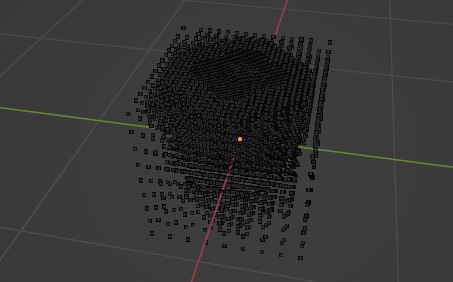
The output of that code is this:
---
### Author:  [@rdbrn](https://discourse.vtk.org/u/rdbrn)
#### Post date: [August 13, 2022, 6:07pm UTC](https://discourse.vtk.org/t/transport-mesh-from-vtu-file-to-blender/9072/2 "2022-08-13T18:07:57Z")
easiest is to export the mesh from python to VRML (using the vtk exporter )and then import that into blender. Is that an option for you?