`. I’ll assume that you know which.
To this array, you will need to append the entire contents of each of your images (i.e. all the pixels). This could be done by calling `insert()` repeatedly, but probably the most efficient way would be to `resize()` the vector to make it large enough to hold all the pixels of all the images, and then use `memcpy()` calls to copy the pixels from the images into the array.
I have to ask, what type does `getRawPixelData(x)` return? And what does its argument do? And how do you get the size of the data that it returns?
---
### Author:  [@Bandark](https://discourse.vtk.org/u/Bandark)
#### Post date: [July 4, 2020, 9:25am UTC](https://discourse.vtk.org/t/trying-to-load-custom-loaded-images-into-vtkimageimport/3704/4 "2020-07-04T09:25:29Z")
First of all, thank you for your time and your reply ^^
- The folder I am using to test this import contain 16bit images, so either `short` or `unsigned short`. I can check with `image.bitsStored()` that in this case is `16`. Also `image.pixelRepresentation()` returns `int16` (so probably `short` because the flag `UInt16` exist for unsigned).
- The argument of `getRawPixelData(x)` is the frame, this because there might be a case where all the frames of the volume are in a single “image”. In this case every image has a single frame so it’s always 0.
- `getRawPixelData(x)` returns a buffer `void*` that points to the raw pixel data of the frame
- About the size, I am not 100% sure, the best way seems doing `image.pixelData(0)->size()`. This returns 524’288 (512x512x2), and I am being told that is \*2 because is 16bit.
Why? How should i use this size?
---
### Author:  [@dgobbi](https://discourse.vtk.org/u/dgobbi)
#### Post date: [July 4, 2020, 3:23pm UTC](https://discourse.vtk.org/t/trying-to-load-custom-loaded-images-into-vtkimageimport/3704/5 "2020-07-04T15:23:13Z")
From what you’ve told me, I’m going to use these assumptions:
- `image.pixelData(0)->size()` returns the buffer size (in bytes) of the first frame
- `image.getRawPixelData(0)` returns the pointer to the buffer itself
What VTK needs is a buffer for the entire image volume. To keep things simple, let’s assume that each image has just one frame. So the buffer size that VTK needs is the buffer size per image frame, multiplied by the total number of images.
So you’re going to need a huge buffer, large enough to store all the images. At this point, let’s forget about vtkImageImport. The most efficient way to approach this is to directly access the vtkImageData’s buffer, rather than creating a temporary buffer. Then vtkImageImport becomes completely unnecessary.
```auto
// VTK will allocate a buffer of the desired size and type
int dataType = VTK_SHORT; // make sure this is correct!
int dataTypeSize = 2; // each 'short' is 2 bytes
int numberOfComponents = 1;
m_imageData->SetDimensions(imageSize.width(), imageSize.height(), dicomStack.size());
m_imageData->AllocateScalars(dataType, numberOfComponents); // allocate buffer
m_imageData->SetSpacing(spacing.x(), spacing.y(), spacing.z());
// compute the number of bytes required to store each slice of the volume
size_t bytesPerSlice = dataTypeSize * numberOfComponents;
bytesPerSlice *= imageSize.width();
bytesPerSlice *= imageSize.height();
for (int i=0; i < dicomStack.size(); i++) {
// are you sure that you don't want to use a reference here?
DcmImage currentImage = dicomStack.image(i);
if (currentImage.numFrames() > 0) {
size_t bytesPerFrame = image.pixelData(0)->size();
// do a sanity check on the size
if (bytesPerFrame == bytesPerSlice) {
// copy the image into the correct slice of the vtkImageData buffer
memcpy(m_imageData->GetScalarPointer(0, 0, i), currentImage.getRawPixelData(0), bytesPerSlice);
}
}
}
```
This works because `m_imageData->GetScalarPointer(k, j, i)` returns a `void*` to the correct position within the vtkImageData’s buffer (where k=column, j=row, i=slice).
Please note that I just typed this code and haven’t compiled it, so it probably contains typos.
---
### Author:  [@Bandark](https://discourse.vtk.org/u/Bandark)
#### Post date: [July 4, 2020, 7:44pm UTC](https://discourse.vtk.org/t/trying-to-load-custom-loaded-images-into-vtkimageimport/3704/6 "2020-07-04T19:44:29Z")
Thank you **so much** for your suggestions, I will try this version in the next days and I will see what i can get.
In the worst case i’ll read the pixels one by one to create the correct buffer.
I will update you as soon as i will be able to make something work.
---
### Author:  [@Bandark](https://discourse.vtk.org/u/Bandark)
#### Post date: [July 4, 2020, 8:11pm UTC](https://discourse.vtk.org/t/trying-to-load-custom-loaded-images-into-vtkimageimport/3704/7 "2020-07-04T20:11:48Z")
First of all, thank you so much again.
I couldn’t resist but try your solution as soon as possible.
The result is interesting, it actually work, for the most part. The result is this (on the right):

As you can see, most of the data kinda seems to be there but looks like there’s something wrong.
Any idea of what could cause this problem, or is something about spacing/order i should investigate on my end?
---
### Author:  [@dgobbi](https://discourse.vtk.org/u/dgobbi)
#### Post date: [July 4, 2020, 9:06pm UTC](https://discourse.vtk.org/t/trying-to-load-custom-loaded-images-into-vtkimageimport/3704/8 "2020-07-04T21:06:38Z")
The spacing looks correct, but the order looks wrong. What guarantees do you have that the dicomStack is in the correct order? Take a look at the InstanceNumber of each image, or even better look at the ImagePositionPatient of each image.
The other thing to look at is the RescaleIntercept and RescaleSlope of each image in the stack. The vtkDICOMImageReader will use these to rescale the raw data (multiply by slope, and add intercept). So if you directly copy the raw DICOM data into a vtkImageData, without rescaling the data values, then the values you get will not be the same as vtkDICOMImageReader (i.e. you will get the raw, uncalibrated data values).
---
### Author:  [@Bandark](https://discourse.vtk.org/u/Bandark)
#### Post date: [July 4, 2020, 9:39pm UTC](https://discourse.vtk.org/t/trying-to-load-custom-loaded-images-into-vtkimageimport/3704/9 "2020-07-04T21:39:40Z")
Can confirm the order was wrong, reordering the images result in a more “correct” result:
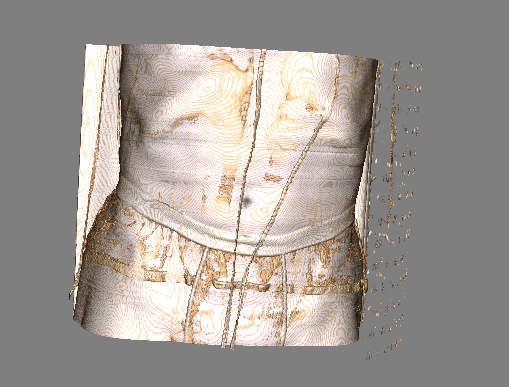
Will investigate more stuff stuch as RescaleIntercept and RescaleSlope in the next days to see if i can understand why the result is still different. (Every other suggestion is welcome if you have any)
Thank you again and have a nice weekend
_Edit: Changing the transfer function to visualize more inside in that model, all the bones and the data is correctly there, but why it need a different preset? I’d like to utilize the presets i already have, so maybe i have to edit the data as you said(?)_
---
### Author:  [@Bandark](https://discourse.vtk.org/u/Bandark)
#### Post date: [July 7, 2020, 1:26pm UTC](https://discourse.vtk.org/t/trying-to-load-custom-loaded-images-into-vtkimageimport/3704/10 "2020-07-07T13:26:09Z")
Let’s assume I get RescaleIntercept and RescaleSlope data.
There’s any VTK filter/way to apply them or should I just find a way to apply them to raw data?
Edit1: (Like using vtkImageShiftScale?)
Edit2: Made it work using vtkImageShiftScale, that’s all for now, thank you so much
---
### Author:  [@dgobbi](https://discourse.vtk.org/u/dgobbi)
#### Post date: [July 7, 2020, 3:36pm UTC](https://discourse.vtk.org/t/trying-to-load-custom-loaded-images-into-vtkimageimport/3704/11 "2020-07-07T15:36:29Z")
Yes, you can use vtkImageShiftScale, but be careful because vtkImageShiftScale applies the equation `y = (x + Shift)*Scale`, but DICOM uses the equation `y = x*RescaleSlope + RescaleIntercept`. Usually you won’t see a difference because the RescaleSlope will almost always be 1 for Hounsfield units, but it’s still important to get the math right.
Also, be sure to use `vtkImageShiftScale::ClampOverflowOn()` to ensure that the rescaling doesn’t overflow the data type.
* * *
I’ll add a few caveats here.
- DICOM defines the CT RescaleSlope and RescaleIntercept per image, not per stack, and in some rare cases the values won’t be the same for all images in the stack. So if you want your code to be 100%, you would need to do the rescaling ‘per image’ when you create the vtkImageData, instead of doing it afterwards with vtkImageShiftScale.
- In general the RescaleSlope and RescaleIntercept should not be used for MR images.
- To be absolutely correct, the DICOM standard requires that you mask the raw data values so that all bits except the BitsStored are zero. Then, if PixelRepresentation is 1, it is necessary to sign extend the value. This should be done before applying any rescaling.
---
### Author:  [@Bandark](https://discourse.vtk.org/u/Bandark)
#### Post date: [July 8, 2020, 10:20am UTC](https://discourse.vtk.org/t/trying-to-load-custom-loaded-images-into-vtkimageimport/3704/12 "2020-07-08T10:20:36Z")
Thank you so much for this explanation
How would you implement point 3?
_Because i have a problem in importing 12bit images and i think it could be related to that somehow_
---
### Author:  [@dgobbi](https://discourse.vtk.org/u/dgobbi)
#### Post date: [July 8, 2020, 11:47am UTC](https://discourse.vtk.org/t/trying-to-load-custom-loaded-images-into-vtkimageimport/3704/13 "2020-07-08T11:47:51Z")
The bit-masking code that I use in my own DICOM reader is located [here](https://github.com/dgobbi/vtk-dicom/blob/a510fd1b/Source/vtkDICOMReader.cxx#L1492) and [here](https://github.com/dgobbi/vtk-dicom/blob/a510fd1b/Source/vtkDICOMReader.cxx#L1209) on github.
---
### Author:  [@Bandark](https://discourse.vtk.org/u/Bandark)
#### Post date: [July 9, 2020, 6:59am UTC](https://discourse.vtk.org/t/trying-to-load-custom-loaded-images-into-vtkimageimport/3704/14 "2020-07-09T06:59:40Z")
That looks very helpful but apparently is not the problem (or i am calling it wrong).
My problem is that a 12bit TC with some transfer functions looks like this:

Instead of this:
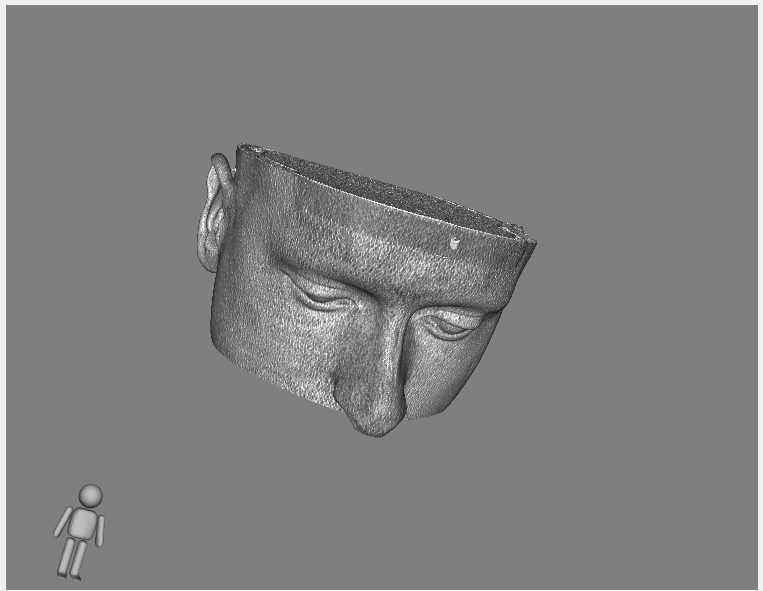
Any idea where the error comes from?
---
### Author:  [@dgobbi](https://discourse.vtk.org/u/dgobbi)
#### Post date: [July 9, 2020, 1:05pm UTC](https://discourse.vtk.org/t/trying-to-load-custom-loaded-images-into-vtkimageimport/3704/15 "2020-07-09T13:05:14Z")
After you apply the RescaleSlope and RescaleIntercept, make sure that the output data type is signed, because CT values are signed. Usually they range from -1000 to around +3000.
If you do not do this, but instead use unsigned values and clamp all negative values to zero, then the result will look like your first image above.
If you are using vtkImageShiftScale, use [SetOutputScalarTypeToShort()](https://vtk.org/doc/nightly/html/classvtkImageShiftScale.html#aaec585781d9348811cebd1dd9bc97ed5) or even [SetOutputScalarTypeToFloat()](https://vtk.org/doc/nightly/html/classvtkImageShiftScale.html#ad5a62b0eafdc115a066b362fb97cbf87).
---
### Author:  [@Bandark](https://discourse.vtk.org/u/Bandark)
#### Post date: [July 9, 2020, 1:20pm UTC](https://discourse.vtk.org/t/trying-to-load-custom-loaded-images-into-vtkimageimport/3704/16 "2020-07-09T13:20:28Z")
This solved it, thank you so much again