# Trying to make a temporal vtkhdf polydata using Python
**URL:** https://discourse.vtk.org/t/trying-to-make-a-temporal-vtkhdf-polydata-using-python/15298
**Category:** Support
**Created:** [February 23, 2025, 1:20pm UTC](https://discourse.vtk.org/t/trying-to-make-a-temporal-vtkhdf-polydata-using-python/15298 "2025-02-23T13:20:13Z")
**Posts on this page:** 11
**Page:** 1
### Author:  [@Ahmed\_Salih](https://discourse.vtk.org/u/Ahmed_Salih)
#### Post date: [February 23, 2025, 1:20pm UTC](https://discourse.vtk.org/t/trying-to-make-a-temporal-vtkhdf-polydata-using-python/15298/1 "2025-02-23T13:20:13Z")
Hello!
I am about to lose my mind (exaggeration) in regards to how to properly make a temporal polydata dataset. I have found:
[https://www.kitware.com/how-to-write-time-dependent-data-in-vtkhdf-files/](https://www.kitware.com/how-to-write-time-dependent-data-in-vtkhdf-files/)
But it is way to convoluted and unclear, for me to properly use for anything and depends too much on “VTK”.
I am making this post to kindly ask, if anyone has had any success with making a temporal vtkhdf polydata with just a few points (vertices) moving in space and changing colours.
Nothing fancier, just that.
Kind regards
---
### Author:  [@lgivord](https://discourse.vtk.org/u/lgivord)
#### Post date: [February 24, 2025, 8:10am UTC](https://discourse.vtk.org/t/trying-to-make-a-temporal-vtkhdf-polydata-using-python/15298/2 "2025-02-24T08:10:47Z")
Hello @Ahmed_Salih,
To help user to switch from the classic xml file format to the vtkhdf one, we provide a repository containing several python script to generate data: [https://gitlab.kitware.com/keu-public/vtkhdf/vtkhdf-scripts/-/tree/main/scripts?ref\_type=heads](https://gitlab.kitware.com/keu-public/vtkhdf/vtkhdf-scripts/-/tree/main/scripts?ref_type=heads)
you can generate a temporal vtkhdf polydata with `python scripts/generate_polydata.py` (needs numpy, h5py and vtkpython) :
[polydata\_transient.vtkhdf](https://discourse.vtk.org/uploads/short-url/n0P3BeBAhRhP7GLoT1iyF5inToP.vtkhdf) (309.8 KB)
here is what I have in paraview :
Let me know if it helps you or not. If you have any suggestion to improve the documentation of the file format do not hesitate, I know that the temporal part could be tedious.
---
### Author:  [@Ahmed\_Salih](https://discourse.vtk.org/u/Ahmed_Salih)
#### Post date: [February 24, 2025, 9:23pm UTC](https://discourse.vtk.org/t/trying-to-make-a-temporal-vtkhdf-polydata-using-python/15298/3 "2025-02-24T21:23:20Z")
Hi Lucas,
Thank you very much for the reference, this seems much better suited for me. My challenge is that I am using Julia at the end, and hoped there would be a “self contained” VTK example, which for example does not use the nice VTK functionalities to generate (for example the sphere), but raw python code.
I think that example is simpler and with time, I can make some Julia code (using `HDF5.jl`) which in theory should be able to do all the hdf commands to make the same output - but harder for me to copy over since Julia cannot use the fancy python VTK statements.
That is why I had hoped there was an even simpler Python example, with no external VTK functionality, only the raw `h5py`
I will think about if I have more suggestions for the documentation, thank you.
Kind regards
---
### Author:  [@lgivord](https://discourse.vtk.org/u/lgivord)
#### Post date: [February 25, 2025, 8:07am UTC](https://discourse.vtk.org/t/trying-to-make-a-temporal-vtkhdf-polydata-using-python/15298/4 "2025-02-25T08:07:52Z")
Hi Ahmed,
Thanks for these inputs, initially we aim to provide script only with h5py/numpy as dependency. This one is the only one which require vtkpython.
I open an issue to not forget to change it : [https://gitlab.kitware.com/keu-public/vtkhdf/vtkhdf-scripts/-/issues/2](https://gitlab.kitware.com/keu-public/vtkhdf/vtkhdf-scripts/-/issues/2)
---
### Author:  [@Ahmed\_Salih](https://discourse.vtk.org/u/Ahmed_Salih)
#### Post date: [February 25, 2025, 10:35pm UTC](https://discourse.vtk.org/t/trying-to-make-a-temporal-vtkhdf-polydata-using-python/15298/5 "2025-02-25T22:35:12Z")
Amazing to see the fast update, thank you so much.
To prepare for the example, I have started coding what I can into Julia, code below:
> **Julia code**
>
> ```python
> using HDF5
>
> fType = Float64
> idType = Int8
>
> connectivities = ["Vertices", "Lines", "Polygons", "Strips"]
>
> function generate_geometry_structure(root)
> # Write version of VTKHDF format as an attribute
> HDF5.attrs(root)["Version"] = [2, 0]
>
> # Write type of dataset ("PolyData") as an ASCII string to a "Type" attribute.
> # This is a bit tricky because VTK/ParaView don't support UTF-8 strings here, which is
> # the default in HDF5.jl.
> let s = "PolyData"
> dtype = HDF5.datatype(s)
> HDF5.API.h5t_set_cset(dtype.id, HDF5.API.H5T_CSET_ASCII)
> dspace = HDF5.dataspace(s)
> attr = HDF5.create_attribute(root, "Type", dtype, dspace)
> HDF5.write_attribute(attr, dtype, s)
> end
>
> NumberOfPoints = HDF5.create_dataset(root, "NumberOfPoints" , idType , ((0,),(-1,)), chunk=(100,))
> Points = HDF5.create_dataset(root, "Points" , fType , ((0,3), (-1,3)), chunk=(100,3))
>
> for connect in connectivities
> group = HDF5.create_group(root, connect)
>
> NumberOfConnectivityIds = HDF5.create_dataset(group, "NumberOfConnectivityIds", idType, ((0,),(-1,)), chunk=(100,) )
> NumberOfCells = HDF5.create_dataset(group, "NumberOfCells ", idType, ((0,),(-1,)), chunk=(100,) )
> Offsets = HDF5.create_dataset(group, "Offsets ", idType, ((0,),(-1,)), chunk=(100,) )
> Connectivity = HDF5.create_dataset(group, "Connectivity ", idType, ((0,),(-1,)), chunk=(100,) )
> end
>
> pData = HDF5.create_group(root, "PointData")
> Warping = HDF5.create_dataset(pData, "Warping", fType, ((0,3),(-1,3)), chunk=(100,3))
> Normals = HDF5.create_dataset(pData, "Normals", fType, ((0,3),(-1,3)), chunk=(100,3))
>
> cData = HDF5.create_group(root, "CellData")
> Materials = HDF5.create_dataset(cData, "Materials", idType, ((0,),(-1,)), chunk=(100,))
>
> return nothing
> end
>
> function generate_step_structure(root)
> steps = HDF5.create_group(root, "steps")
> steps["NSteps"] = 0
>
> Values = HDF5.create_dataset(steps, "Values", fType , ((0,),(-1,)), chunk=(100,))
>
> singleDSs = ["PartOffsets", "NumberOfParts", "PointOffsets"]
> for name in singleDSs
> HDF5.create_dataset(steps, name, idType, ((0,),(-1,)), chunk=(100,))
> end
>
> nTopoDSs = ["CellOffsets", "ConnectivityIdOffsets"]
> for name in nTopoDSs
> HDF5.create_dataset(steps, name, idType, ((0,4),(-1,4)), chunk=(100,4))
> end
>
> pData = HDF5.create_group(steps, "PointDataOffsets")
> Warping = HDF5.create_dataset(pData, "Warping", idType, ((0,),(-1,)), chunk=(100,))
> Normals = HDF5.create_dataset(pData, "Normals", idType, ((0,),(-1,)), chunk=(100,))
>
> cData = HDF5.create_group(steps, "CellDataOffsets")
> Materials = HDF5.create_dataset(cData, "Materials", idType, ((0,),(-1,)), chunk=(100,))
> end
>
> function generate_data(root)
> generate_geometry_structure(root)
> generate_step_structure(root)
> end
>
> f = h5open("test.vtkhdf", "w")
> root = HDF5.create_group(f, "VTKHDF")
> generate_data(root)
> display(f)
>
> close(f)
>
> ```
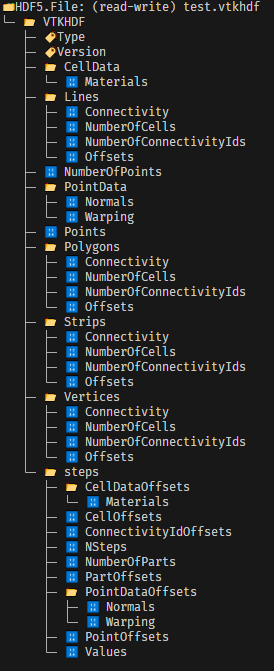
And now I am hitting the wall I tried to describe above, that I have to go through very slowly the part of how to add data etc. since I am unfamilar with the vtk python package. I also want to remind everyone, not everyone who uses VTK uses VTK directly, a lot of us use it indirectly in our work, which is why it is nice to have examples who can support both groups.
Kind regards
---
### Author:  [@Ahmed\_Salih](https://discourse.vtk.org/u/Ahmed_Salih)
#### Post date: [February 27, 2025, 10:28pm UTC](https://discourse.vtk.org/t/trying-to-make-a-temporal-vtkhdf-polydata-using-python/15298/6 "2025-02-27T22:28:07Z")
Just kindly keeping this thread up, in hope of an easier example to follow 😊
---
### Author:  [@Ahmed\_Salih](https://discourse.vtk.org/u/Ahmed_Salih)
#### Post date: [March 4, 2025, 4:13pm UTC](https://discourse.vtk.org/t/trying-to-make-a-temporal-vtkhdf-polydata-using-python/15298/7 "2025-03-04T16:13:16Z")
I have tried for a few days to move past the wall I’ve hit, so without being too annoying, I am just stating I would really appreciate an easier to follow example 😊
I am trying through Python now, but a lot of extra work
---
### Author:  [@lgivord](https://discourse.vtk.org/u/lgivord)
#### Post date: [March 5, 2025, 7:33am UTC](https://discourse.vtk.org/t/trying-to-make-a-temporal-vtkhdf-polydata-using-python/15298/8 "2025-03-05T07:33:49Z")
Sadly without funding, it will be hard for me to produce that but I can try next week to write something usable for you
---
### Author:  [@Ahmed\_Salih](https://discourse.vtk.org/u/Ahmed_Salih)
#### Post date: [March 10, 2025, 9:40pm UTC](https://discourse.vtk.org/t/trying-to-make-a-temporal-vtkhdf-polydata-using-python/15298/9 "2025-03-10T21:40:29Z")
In the blessed month of Ramadan, I was Alhamdu lillah able to make something in Julia which works:
> **Julia code**
>
> using HDF5
> using StaticArrays
>
> fType = Float64
> idType = Int64
>
> connectivities = [“Vertices”, “Lines”, “Polygons”, “Strips”]
>
> Positions = SVector{3, Float64}[
> [0.0, 0.0, 0.5],
> [0.0, 0.0, -0.5],
> [0.5, 0.0, 3.061617e-17],
> [-0.25, 0.4330127, 3.061617e-17],
> [-0.25, -0.4330127, 3.061617e-17]
> ]
>
> Normals = SVector{3, Float64}[
> [0.0, 0.0, 1.0],
> [0.0, 0.0, -1.0],
> [1.0, 0.0, 6.123234e-17],
> [-0.5, 0.8660254, 6.123234e-17],
> [-0.5, -0.8660254, 6.123234e-17]
> ]
>
> Warping = SVector{3, Float64}[
> [0.0, 0.0, 0.0],
> [0.0, -0.0, 0.0],
> [0.0, -0.5, 0.0],
> [0.4330127, 0.25, -0.0],
> [-0.4330127, 0.25, 0.0]
> ]
>
> function generate\_geometry\_structure(root)
> # Write version of VTKHDF format as an attribute
> HDF5.attrs(root)[“Version”] = Int32.([2, 3])
>
> ```
> # Write type of dataset ("PolyData") as an ASCII string to a "Type" attribute.
> # This is a bit tricky because VTK/ParaView don't support UTF-8 strings here, which is
> # the default in HDF5.jl.
> let s = "PolyData"
> dtype = HDF5.datatype(s)
> HDF5.API.h5t_set_cset(dtype.id, HDF5.API.H5T_CSET_ASCII)
> dspace = HDF5.dataspace(s)
> attr = HDF5.create_attribute(root, "Type", dtype, dspace)
> HDF5.write_attribute(attr, dtype, s)
> end
>
> NumberOfPoints = HDF5.create_dataset(root, "NumberOfPoints" , idType , ((0,),(-1,)), chunk=(100,))
> Points = HDF5.create_dataset(root, "Points" , fType , ((3,0), (3,-1)), chunk=(3,100))
>
> for connect in connectivities
> group = HDF5.create_group(root, connect)
>
> NumberOfConnectivityIds = HDF5.create_dataset(group, "NumberOfConnectivityIds", idType, ((0,),(-1,)), chunk=(100,) )
> NumberOfCells = HDF5.create_dataset(group, "NumberOfCells", idType, ((0,),(-1,)), chunk=(100,) )
> Offsets = HDF5.create_dataset(group, "Offsets", idType, ((0,),(-1,)), chunk=(100,) )
> Connectivity = HDF5.create_dataset(group, "Connectivity", idType, ((0,),(-1,)), chunk=(100,) )
> end
>
> pData = HDF5.create_group(root, "PointData")
> Warping = HDF5.create_dataset(pData, "Warping", fType, ((3,0),(3,-1)), chunk=(3,100))
> Normals = HDF5.create_dataset(pData, "Normals", fType, ((3,0),(3,-1)), chunk=(3,100))
>
> return nothing
>
> ```
>
> end
>
> function generate\_step\_structure(root)
> steps = HDF5.create\_group(root, “Steps”)
>
> ```
> NSteps, _ = HDF5.create_attribute(steps, "NSteps", Int32)
>
> Values = HDF5.create_dataset(steps, "Values", fType , ((0,),(-1,)), chunk=(100,))
>
> singleDSs = ["PartOffsets", "NumberOfParts", "PointOffsets"]
> for name in singleDSs
> HDF5.create_dataset(steps, name, idType, ((0,),(-1,)), chunk=(100,))
> end
>
> nTopoDSs = ["CellOffsets", "ConnectivityIdOffsets"]
> for name in nTopoDSs
> HDF5.create_dataset(steps, name, idType, ((4,0),(4, -1)), chunk=(4, 100))
> end
>
> pData = HDF5.create_group(steps, "PointDataOffsets")
> Warping = HDF5.create_dataset(pData, "Warping", idType, ((0,),(-1,)), chunk=(100,))
> Normals = HDF5.create_dataset(pData, "Normals", idType, ((0,),(-1,)), chunk=(100,))
>
> ```
>
> end
>
> function append\_data(root, newStep, Positions)
> steps = root[“Steps”]
>
> ```
> # To update attributes, this is the best way I've found so far
> old_NSteps = HDF5.read_attribute(steps, "NSteps")
> steps_attr_dict = attributes(steps)
> NSteps = steps_attr_dict["NSteps"]
> write_attribute(NSteps,HDF5.datatype(idType), old_NSteps + 1)
>
> HDF5.set_extent_dims(steps["Values"], (length(steps["Values"]) + 1,))
> steps["Values"][end] = newStep
>
> PointsStartIndex = size(root["Points"])[2] + 1
> PositionLength = length(Positions)
>
> HDF5.set_extent_dims(root["Points"], (length(first(Positions)), size(root["Points"])[2] + PositionLength))
> root["Points"][:, PointsStartIndex:(PointsStartIndex+PositionLength-1)] = stack(Positions) * rand()
>
> HDF5.set_extent_dims(steps["PointOffsets"], (length(steps["PointOffsets"]) + 1,))
> steps["PointOffsets"][end] = PointsStartIndex - 1
>
> HDF5.set_extent_dims(root["NumberOfPoints"], (length(root["NumberOfPoints"]) + 1,))
> root["NumberOfPoints"][end] = PositionLength
>
> NumberOfPartsStartIndex = length(steps["NumberOfParts"]) + 1
> HDF5.set_extent_dims(steps["NumberOfParts"], (length(steps["NumberOfParts"]) + 1,))
> steps["NumberOfParts"][NumberOfPartsStartIndex] = 1
>
> PartOffsetsStartIndex = length(steps["PartOffsets"]) + 1
> PartOffsetsLength = length(steps["PartOffsets"]) + 1
> HDF5.set_extent_dims(steps["PartOffsets"], (PartOffsetsLength,))
> steps["PartOffsets"][PartOffsetsStartIndex] = PartOffsetsLength - 1
>
> CellOffsetsStartIndex = size(steps["CellOffsets"])[2] + 1
> HDF5.set_extent_dims(steps["CellOffsets"], (4, CellOffsetsStartIndex))
> steps["CellOffsets"][:, CellOffsetsStartIndex] = zeros(4)
>
> ConnectivityIdOffsetsStartIndex = size(steps["ConnectivityIdOffsets"])[2] + 1
> HDF5.set_extent_dims(steps["ConnectivityIdOffsets"], (4, ConnectivityIdOffsetsStartIndex))
> steps["ConnectivityIdOffsets"][:, ConnectivityIdOffsetsStartIndex] = zeros(4)
>
> NumberOfPartsStartIndex = length(steps["NumberOfParts"]) + 1
> HDF5.set_extent_dims(steps["NumberOfParts"], (length(steps["NumberOfParts"]) + 1,))
> steps["NumberOfParts"][NumberOfPartsStartIndex] = 1
>
> for point_data_name in keys(steps["PointDataOffsets"])
> HDF5.set_extent_dims(steps["PointDataOffsets"][point_data_name], (length(steps["PointDataOffsets"][point_data_name]) + 1,))
> steps["PointDataOffsets"][point_data_name][end] = PointsStartIndex - 1
> end
>
> HDF5.set_extent_dims(root["PointData"]["Normals"], (length(first(Normals)), size(root["PointData"]["Normals"])[2] + length(Normals)))
> root["PointData"]["Normals"][:, PointsStartIndex:(PointsStartIndex+PositionLength-1)] = stack(Normals) * rand()
>
> HDF5.set_extent_dims(root["PointData"]["Warping"], (length(first(Warping)), size(root["PointData"]["Warping"])[2] + length(Warping)))
> root["PointData"]["Warping"][:, PointsStartIndex:(PointsStartIndex+PositionLength-1)] = stack(Warping) * rand()
>
> for connect in connectivities
> for dataset in ["NumberOfCells", "NumberOfConnectivityIds", "Offsets", "Connectivity"]
> HDF5.set_extent_dims(root[connect][dataset], (length(root[connect][dataset]) + 1,))
> root[connect][dataset][end] = idType(0)
> end
> end
>
> ```
>
> end
>
> function generate\_data(root, Positions)
> generate\_geometry\_structure(root)
> generate\_step\_structure(root)
>
> ```
> ts = range(0,0.5,100)
>
> for (iT, t) in enumerate(ts)
> append_data(root, t, Positions)
> end
>
> ```
>
> end
>
> f = h5open(“test.vtkhdf”, “w”)
> root = HDF5.create\_group(f, “VTKHDF”)
> generate\_data(root, Positions)
>
> # display(f)
>
> close(f)
This will produce a few points in space, which will displace 100 time steps with a `rand` factor multiplied, just to simulate some motion. This example excels in showing:
- How this vtkhdf format can be used in Julia
- How to apply data and set the right dimensions
- How to actually append data, when you do not know all the data before hand (i.e. not precomputed warps)
I have also written an exporter, which can be found in `https://github.com/AhmedSalih3d/SPHExample/tree/test/formulation` and in sometime when merged into main in:
`https://github.com/AhmedSalih3d/SPHExample/blob/test/formulation/src/ProduceHDFVTK.jl`
I will have to be honest and say that this took way too long to figure out. The guide should really have been a simple step by step, showing how to add a few points. This took me ~3 months of thinking until I had understood enough with the format, that I could sit down with a hdfviewer software and continously compare the Python output and Julia one until it made sense / matches.
Why did I care so much about having it? On Windows, opening and closing a lot of vtkhdf files, is so extremely slow. For example for my simulation software, it would take 29 s (!) to close 1600 files. By saving data into one, it would take only ~0.5s!
I understand that funding is important for VTK to succeed etc., but please do not forget that all of us in open source, personal projects or even non directly funded commercial endevaours, by using the formats you provide, provide a legitimacy to the software format - and VTKHDF has been one of the harder file formats to crack, so I hope VTK does a bit more to promote it, because it is actually really great - just way way way too difficult, for someone who is not a VTK expert.
Kind regards
---
### Author:  [@lgivord](https://discourse.vtk.org/u/lgivord)
#### Post date: [March 11, 2025, 7:30am UTC](https://discourse.vtk.org/t/trying-to-make-a-temporal-vtkhdf-polydata-using-python/15298/10 "2025-03-11T07:30:52Z")
I’m happy to see that you manage to write a temporal polydata in vtkhdf in Julia. Thanks also for sharing this code, I’m sure it will help other potential user in the future.
> Why did I care so much about having it? On Windows, opening and closing a lot of vtkhdf files, is so extremely slow. For example for my simulation software, it would take 29 s (!) to close 1600 files. By saving data into one, it would take only ~0.5s!
I’m not so surprise opening file one by one will load the geometry each time and you’ll compute a whole geometry representation each time, this is indeed the perfect use case for the temporal vtkhdf in a single file.
> I will have to be honest and say that this took way too long to figure out. The guide should really have been a simple step by step, showing how to add a few points. This took me ~3 months of thinking until I had understood enough with the format, that I could sit down with a hdfviewer software and continously compare the Python output and Julia one until it made sense / matches.
Honest return from the community is always welcome, as I said, I know that this documentation is difficult and I really want to improve it. However I lack on user feedback, if you can take some time to write in this issue [https://gitlab.kitware.com/vtk/vtk/-/issues/19242](https://gitlab.kitware.com/vtk/vtk/-/issues/19242) what is difficult/strange/don’t make sense for you it would be great.
> I understand that funding is important for VTK to succeed etc., but please do not forget that all of us in open source, personal projects or even non directly funded commercial endevaours, by using the formats you provide, provide a legitimacy to the software format - and VTKHDF has been one of the harder file formats to crack, so I hope VTK does a bit more to promote it, because it is actually really great - just way way way too difficult, for someone who is not a VTK expert.
and that’s why even if you succeed to make a temporal polydata vtkhdf file in Julia, I’ll make sure to create a simpler example soon.
In any case, thanks for your feedback and your time! 🙂
FYI @Louis_Gombert @mwestphal @Francois_Mazen
---
### Author:  [@Ahmed\_Salih](https://discourse.vtk.org/u/Ahmed_Salih)
#### Post date: [March 11, 2025, 9:22am UTC](https://discourse.vtk.org/t/trying-to-make-a-temporal-vtkhdf-polydata-using-python/15298/11 "2025-03-11T09:22:08Z")
Thanks a lot Lucas and also thank you for your time, was more fun to figure out “together” than alone. I will do as you ask later this week I hope.
Kind regards