# Unexpected background due to opacity in volume rendering
**URL:** https://discourse.vtk.org/t/unexpected-background-due-to-opacity-in-volume-rendering/13714
**Category:** Support
**Tags:** release-process
**Created:** [April 15, 2024, 5:53pm UTC](https://discourse.vtk.org/t/unexpected-background-due-to-opacity-in-volume-rendering/13714 "2024-04-15T17:53:52Z")
**Posts on this page:** 1
**Page:** 1
### Author:  [@huaweiping](https://discourse.vtk.org/u/huaweiping)
#### Post date: [April 15, 2024, 5:53pm UTC](https://discourse.vtk.org/t/unexpected-background-due-to-opacity-in-volume-rendering/13714/1 "2024-04-15T17:53:52Z")
Hi all, I’m using the vtkVolume to render my oceanography dataset. The valid scalar value is originally in a NetCDF file accompanied by NaN, so I read it in C++ and convert it into a vtkImageData. It seems the NaN is set to zero based on my check, and I even manually set the value around zero to zero for the scalar data.
```auto
double s[1];
if(OW_vals_Vec[z][y][x]<0.0001 && OW_vals_Vec[z][y][x]>-0.0001)
s[0] = 0;
else
s[0] = OW_vals_Vec[z][y][x];
scalars->InsertTuple(omegaIndex,s);
```
However, when I do the volume rendering, I use the vtkPieceWiseFunction to set the opacity. The opacity function is coded as below:
```auto
vtkNew opacityFunc;
opacityFunc->AddPoint(-0.0001, 0.1);
opacityFunc->AddPoint(0, 0);
```
Since most of my data is between (-0.01, -0.001), I expect to see the volume itself with a clean background. However, the result is covered by a whole cube where it is supposed to be the NaN value in the original dataset.
Here are some examples of the rendering results covered by the NaN value.

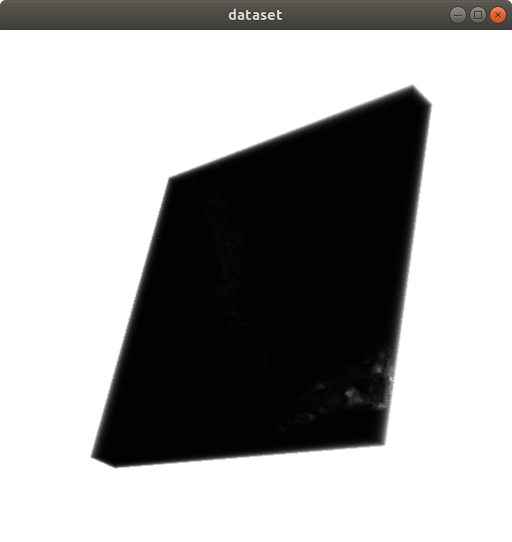
The weirdest thing is that if I set the upper bound of PieceWiseFunction to -0.000095, then the problem disappeared, and I get what I expected.
```auto
vtkNew opacityFunc;
opacityFunc->AddPoint(-0.000096, 0.1);
opacityFunc->AddPoint(-0.000095, 0);
```
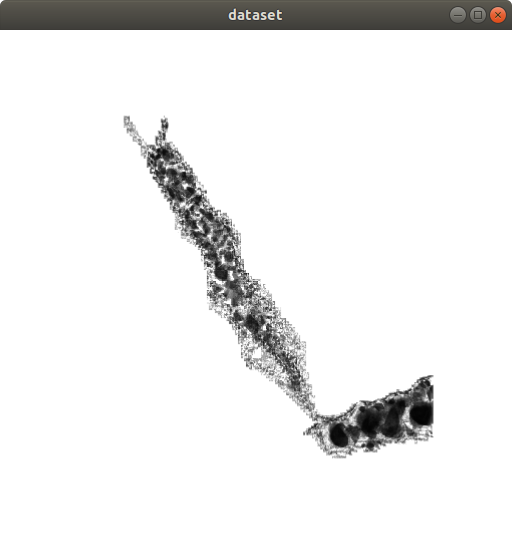
If I tweak the upper bound of the opacityFunc closer to zero (such as (-0.000095, -0.000094)), the problem will return. I believe that all the background values are between (-0.000095 and -0.000094), but I’m not sure what happened since there is not supposed to be any value (and I even manually set it to zero). Meanwhile, if I manually set the value to 0, then I will not see the black background or any data in the volume rendering.
Here are some of my guesses:
(a) Something is wrong when converting the data to the vtkImageData. However, the value is manually checked and doesn’t have any value in that range.
(b) A bug in the volume rendering function?
(c) Precision of the data. (Such as some internal problem in the C++ or something else).
Sorry, I can’t create a minimal reproducible example as this is a huge project related to a bunch of data files but I’ll be really appreciate if someone can give me some ideas about this.