# unexpected behavior when selecting (and "highlighting") cells in trame
**URL:** https://discourse.vtk.org/t/unexpected-behavior-when-selecting-and-highlighting-cells-in-trame/10333
**Category:** Support
**Tags:** python
**Created:** [December 28, 2022, 5:21pm UTC](https://discourse.vtk.org/t/unexpected-behavior-when-selecting-and-highlighting-cells-in-trame/10333 "2022-12-28T17:21:10Z")
**Posts on this page:** 9
**Page:** 1
### Author:  [@Robert\_Collar](https://discourse.vtk.org/u/Robert_Collar)
#### Post date: [December 28, 2022, 5:21pm UTC](https://discourse.vtk.org/t/unexpected-behavior-when-selecting-and-highlighting-cells-in-trame/10333/1 "2022-12-28T17:21:10Z")
Hi VTK Community! I’m attempting to adapt the selection highlighting functionality used in [this](https://github.com/Kitware/trame/tree/master/examples/06_vtk/Applications/RemoteSelection) trame example, but the exhibited behavior is unexpected. I’m trying to select cells in a `vtkPolyData` Object consisting of a simple 3-sided tube filter applied to a simple, two-line segment `vtkPolyLine` object using a `vtkRenderedAreaPicker` and toggling visibility of the associated “selection actor” to highlight the selected cells. However, selecting a particular cell sometimes results in only a subset of the tube sides for that cell being highlighted, as seen below.

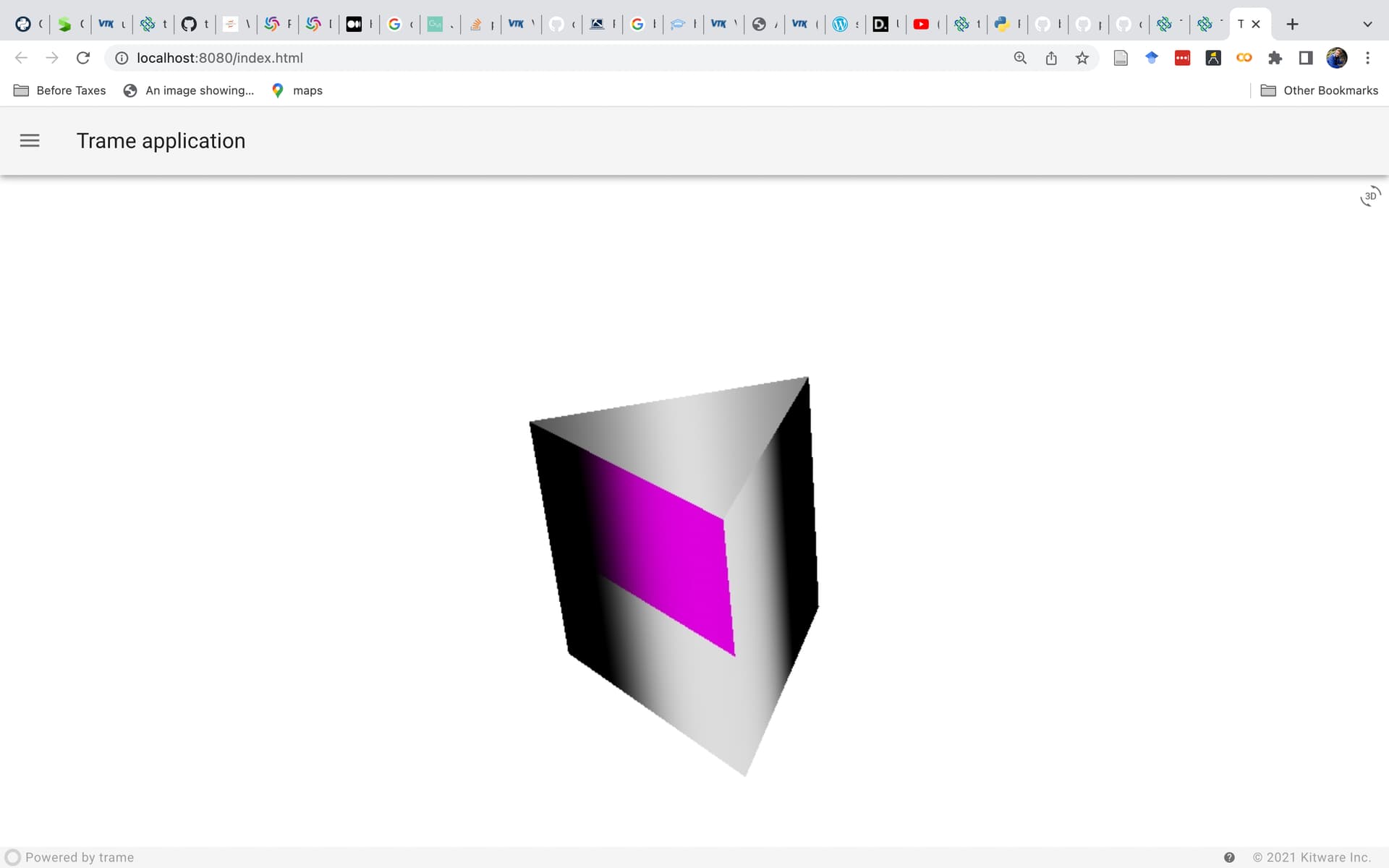
Is this expected behavior? How can I ensure that all sides are highlighted upon selection of a cell?
Other times, selecting a cell highlights sides of a different cell, as seen below.
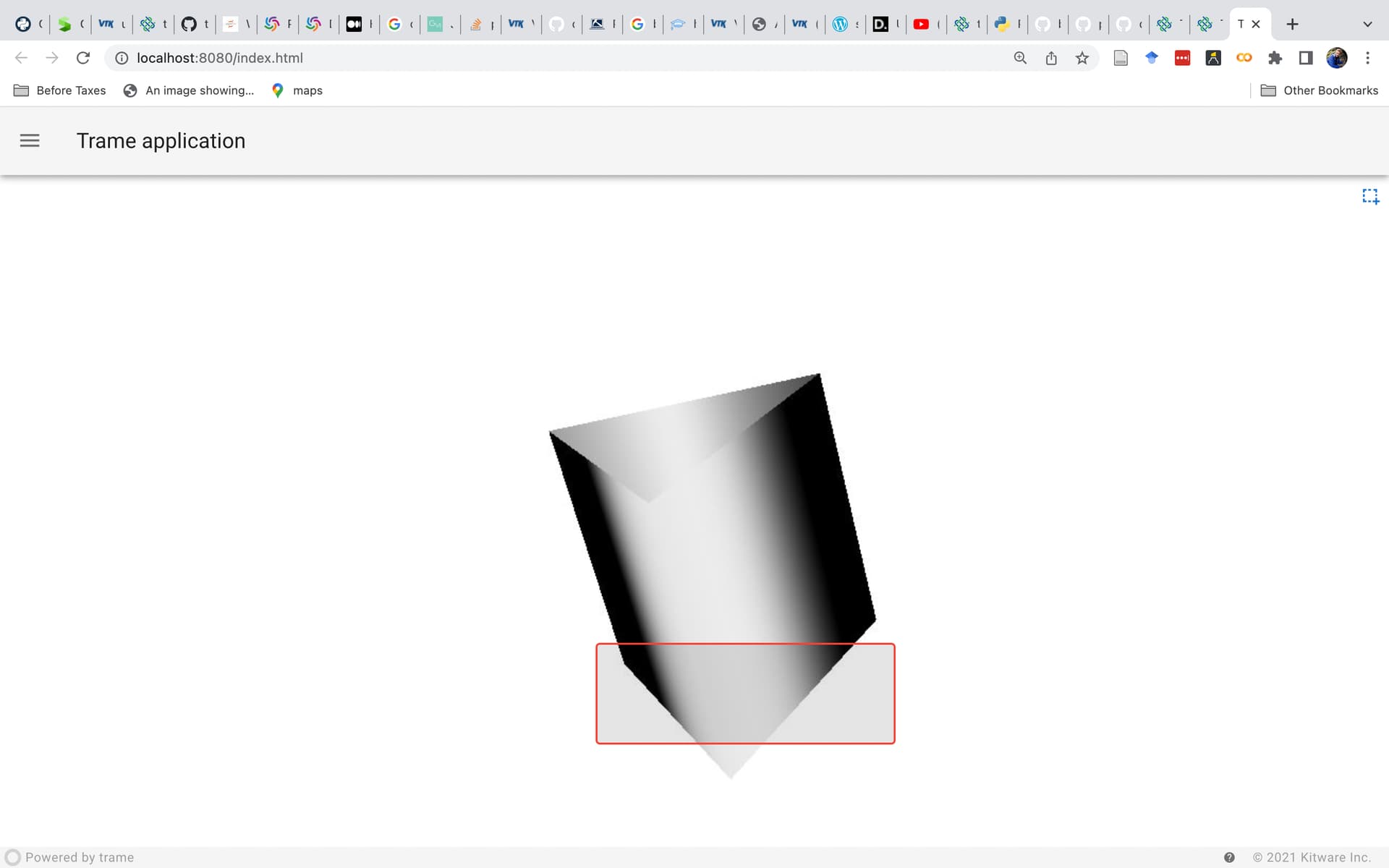
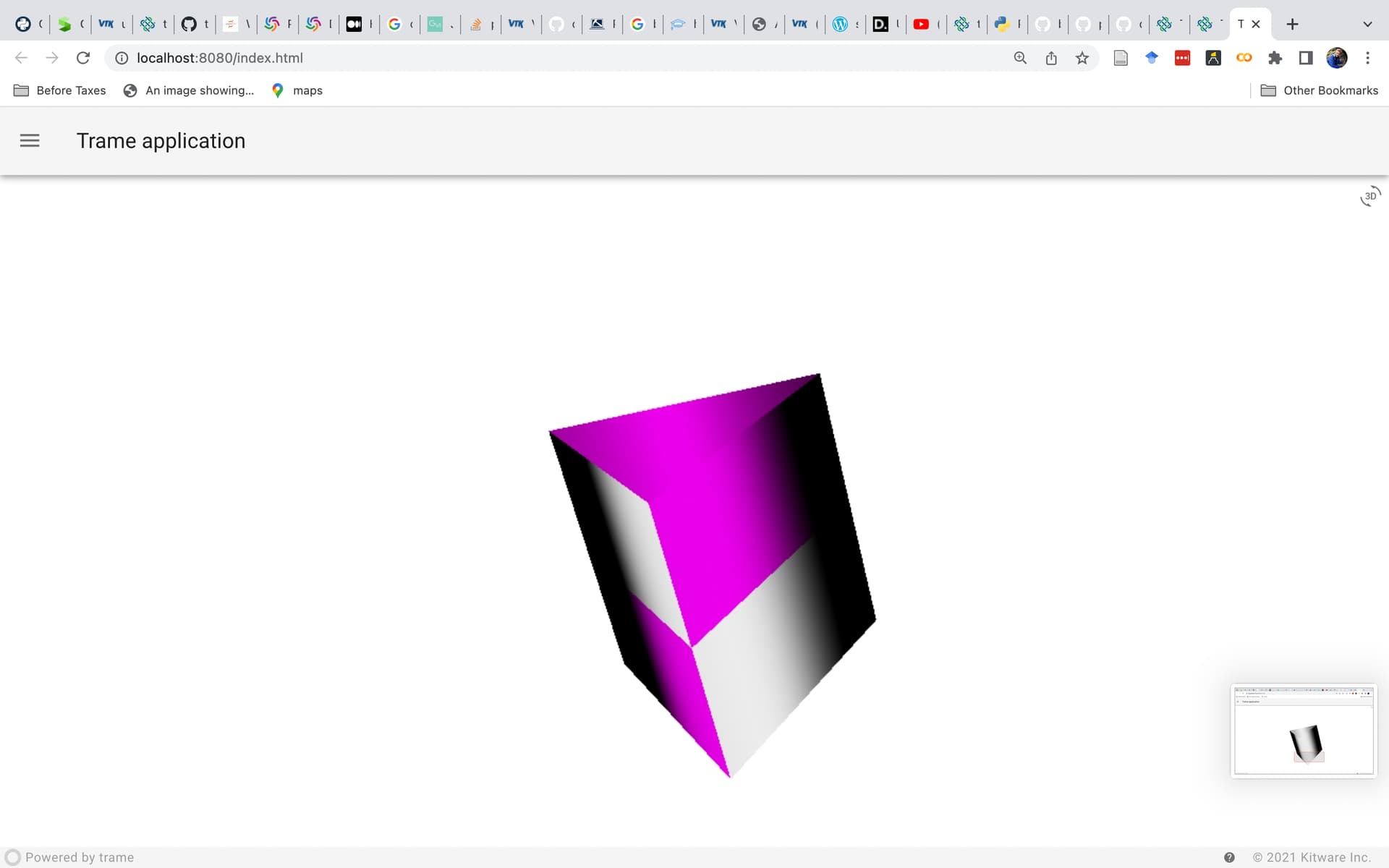
Why is this occurring?
Please consider the MRE app below, which reproduces the behavior described above and was used to generate the screenshots:
```auto
import vtk
from trame.app import get_server, jupyter # noqa (jupyter must be installed or error results)
from trame.widgets import vuetify, vtk as vtk_widgets
from trame.ui.vuetify import SinglePageLayout
from vtkmodules.vtkRenderingCore import (
vtkActor,
vtkDataSetMapper,
vtkRenderer,
vtkRenderWindow,
vtkRenderWindowInteractor,
vtkHardwareSelector,
vtkRenderedAreaPicker
)
from vtkmodules.vtkFiltersCore import vtkTubeFilter
from vtkmodules.vtkFiltersExtraction import vtkExtractSelection
from vtkmodules.vtkInteractionStyle import (
vtkInteractorStyleRubberBandPick,
vtkInteractorStyleSwitch) # noqa (needed for swtiching style of interaction to trackball camera)
from vtkmodules.vtkCommonDataModel import vtkDataObject
import vtkmodules.vtkRenderingOpenGL2 # noqa (needed for vtkHardwareSelector)
# -----------------------------------------------------------------------------
# Generate dataset
# -----------------------------------------------------------------------------
points = vtk.vtkPoints()
points.SetNumberOfPoints(4)
line = vtk.vtkLine()
lines = vtk.vtkCellArray()
# create first line segment
points.SetPoint(0, 0, 0, 0)
line.GetPointIds().SetId(0, 0)
points.SetPoint(1, 1, 1, 1)
line.GetPointIds().SetId(1, 1)
lines.InsertNextCell(line)
# create second line segment
points.SetPoint(2, 1, 1, 1)
line.GetPointIds().SetId(0, 2)
points.SetPoint(3, 2, 2, 2)
line.GetPointIds().SetId(1, 3)
lines.InsertNextCell(line)
linesPolyData = vtk.vtkPolyData()
linesPolyData.SetPoints(points)
linesPolyData.SetLines(lines)
# -----------------------------------------------------------------------------
# Trame initialization
# -----------------------------------------------------------------------------
server = get_server()
state, ctrl = server.state, server.controller
# -----------------------------------------------------------------------------
# VTK pipeline
# -----------------------------------------------------------------------------
renderer = vtkRenderer()
renderer.SetBackground(1, 1, 1)
render_window = vtkRenderWindow()
render_window.AddRenderer(renderer)
rw_interactor = vtkRenderWindowInteractor()
rw_interactor.SetRenderWindow(render_window)
rw_interactor.GetInteractorStyle().SetCurrentStyleToTrackballCamera()
interactor_trackball = rw_interactor.GetInteractorStyle()
interactor_selection = vtkInteractorStyleRubberBandPick() #
area_picker = vtkRenderedAreaPicker()
rw_interactor.SetPicker(area_picker)
tubes = vtkTubeFilter()
tubes.SetInputData(linesPolyData)
tubes.SetRadius(2)
tubes.SetNumberOfSides(3)
tubes.Update()
print(tubes)
mapper = vtkDataSetMapper()
mapper.SetInputConnection(tubes.GetOutputPort())
actor = vtkActor()
actor.SetMapper(mapper)
# Selection
selection_extract = vtkExtractSelection()
selection_mapper = vtkDataSetMapper()
selection_mapper.SetInputConnection(selection_extract.GetOutputPort())
selection_actor = vtkActor()
selection_actor.GetProperty().SetColor(1, 0, 1)
selection_actor.SetMapper(selection_mapper)
selection_actor.SetVisibility(0)
renderer.AddActor(actor)
renderer.AddActor(selection_actor)
renderer.ResetCamera()
selector = vtkHardwareSelector()
selector.SetRenderer(renderer)
# -----------------------------------------------------------------------------
# Callbacks
# -----------------------------------------------------------------------------
@state.change("vtk_selection")
def update_interactor(vtk_selection, **kwargs):
if vtk_selection:
rw_interactor.SetInteractorStyle(interactor_selection)
interactor_selection.StartSelect()
else:
rw_interactor.SetInteractorStyle(interactor_trackball)
# -----------------------------------------------------------------------------
def on_box_selection_change(selection):
actor.GetProperty().SetOpacity(1)
selector.SetArea(
int(renderer.GetPickX1()),
int(renderer.GetPickY1()),
int(renderer.GetPickX2()),
int(renderer.GetPickY2()),
)
s = selector.Select()
print(s)
selection_extract.SetInputConnection(tubes.GetOutputPort())
selection_extract.SetInputDataObject(1, s)
selection_extract.Update()
selection_actor.SetVisibility(1)
actor.GetProperty().SetOpacity(1)
# Update 3D view
ctrl.view_update()
# disable selection mode
state.vtk_selection = False
# -----------------------------------------------------------------------------
# GUI layout
# -----------------------------------------------------------------------------
VTK_VIEW_SETTINGS = {
"interactive_ratio": 1,
"interactive_quality": 80,
}
with SinglePageLayout(server) as layout:
layout.icon.click = ctrl.view_reset_camera
with layout.content:
with vuetify.VContainer(fluid=True, classes="fill-height pa-0 ma-0"):
with vuetify.VRow(dense=True, style="height: 100%;"):
with vuetify.VCol(
classes="pa-0",
style="border-right: 1px solid #ccc; position: relative;",
):
view = vtk_widgets.VtkRemoteView(
render_window,
box_selection=("vtk_selection",),
box_selection_change=(on_box_selection_change, "[$event]"),
**VTK_VIEW_SETTINGS,
)
ctrl.view_update = view.update
ctrl.view_reset_camera = view.reset_camera
vuetify.VCheckbox(
small=True,
on_icon="mdi-selection-drag",
off_icon="mdi-rotate-3d",
v_model=("vtk_selection", False),
style="position: absolute; top: 0; right: 0; z-index: 1;",
dense=True,
hide_details=True,
)
# -----------------------------------------------------------------------------
# Main
# -----------------------------------------------------------------------------
if __name__ == " __main__":
server.start()
```
---
### Author:  [@Sebastien\_Jourdain](https://discourse.vtk.org/u/Sebastien_Jourdain)
#### Post date: [December 30, 2022, 5:22pm UTC](https://discourse.vtk.org/t/unexpected-behavior-when-selecting-and-highlighting-cells-in-trame/10333/2 "2022-12-30T17:22:08Z")
Any idea @berk.geveci ?
---
### Author:  [@Robert\_Collar](https://discourse.vtk.org/u/Robert_Collar)
#### Post date: [January 6, 2023, 3:13am UTC](https://discourse.vtk.org/t/unexpected-behavior-when-selecting-and-highlighting-cells-in-trame/10333/4 "2023-01-06T03:13:38Z")
> [@Sebastien\_Jourdain](#):
>
> @berk.geveci
Happy New Year @berk.geveci! Might you have any suggestions for resolving the unexpected behavior described above?
---
### Author:  [@berk.geveci](https://discourse.vtk.org/u/berk.geveci)
#### Post date: [January 6, 2023, 8:13pm UTC](https://discourse.vtk.org/t/unexpected-behavior-when-selecting-and-highlighting-cells-in-trame/10333/5 "2023-01-06T20:13:17Z")
Happy New Year!
I debugged it and found two issues.
1. You need to make sure that the selection actor is not selectable by doing SetPickable(0) on it. Otherwise, if you highlight an already selected area, it will select cells from both actors.
2. You need to use vtkPolyDataMapper for the tube and not vtkDataSetMapper. For some reason that I did not investigate, vtkDataSetMapper transforms the original tube so what is being selected is different. If you switch to vtkPolyDataMapper, the tube is directly rendered and the selection matches.
Cheers.
---
### Author:  [@Robert\_Collar](https://discourse.vtk.org/u/Robert_Collar)
#### Post date: [January 8, 2023, 8:11pm UTC](https://discourse.vtk.org/t/unexpected-behavior-when-selecting-and-highlighting-cells-in-trame/10333/7 "2023-01-08T20:11:26Z")
Hi @berk.geveci, replacing the main actor’s mapper with `vtkPolyDataMapper`—and leaving the selection actor’s mapper as `vtkDataSetMapper`— resolved the issue, thanks for the help!
One last thing — while the selector now correctly selects and highlights the faces that fall within the rectangle, I’d like to highlight all faces of a given segment along the tube, as long as at least one face from that segment was picked. The behavior I’m looking for is exhibited in the screenshots below, in which a pick such as:
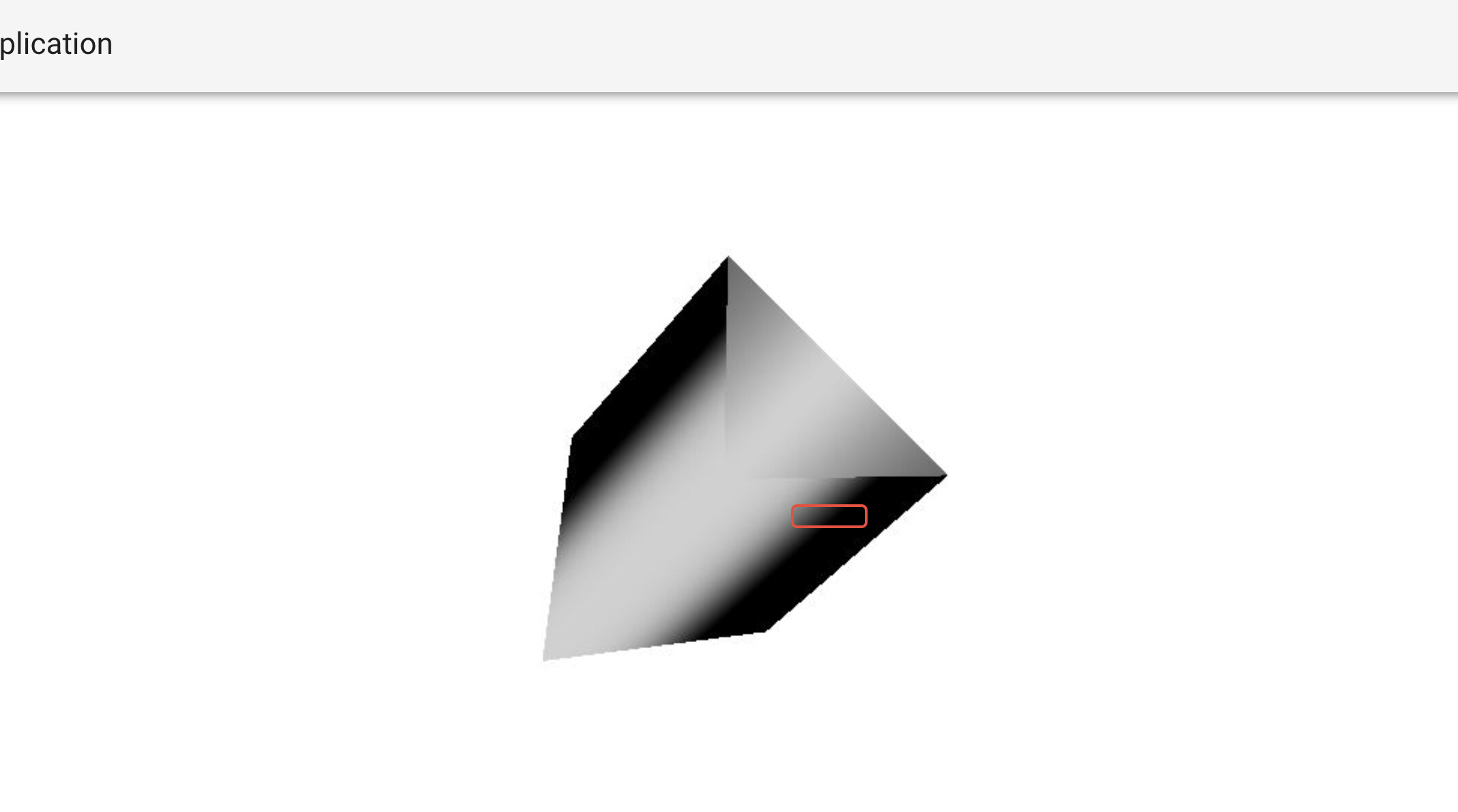
would result in highlighting the entire segment:
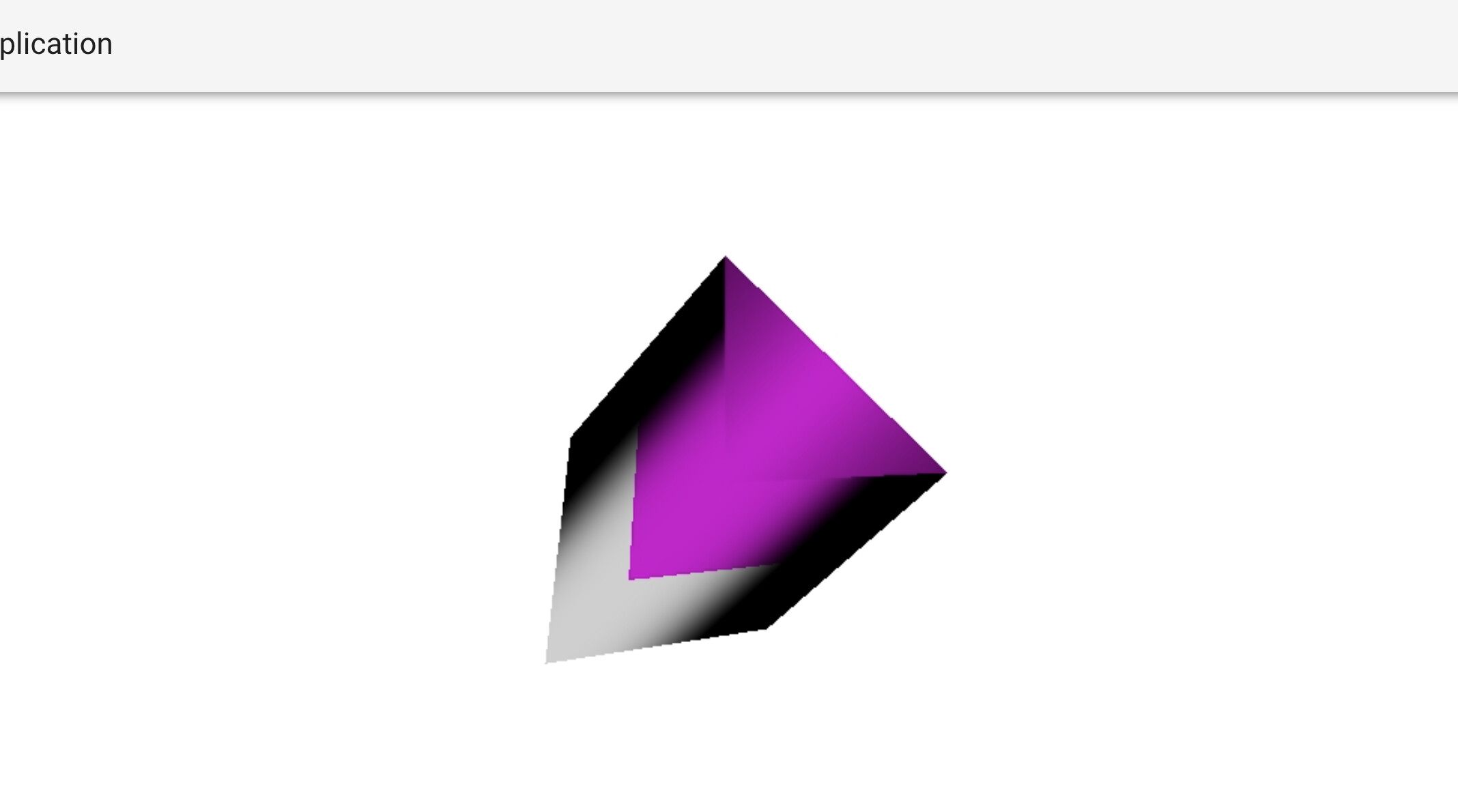
rather than just the picked face, as is currently the case:
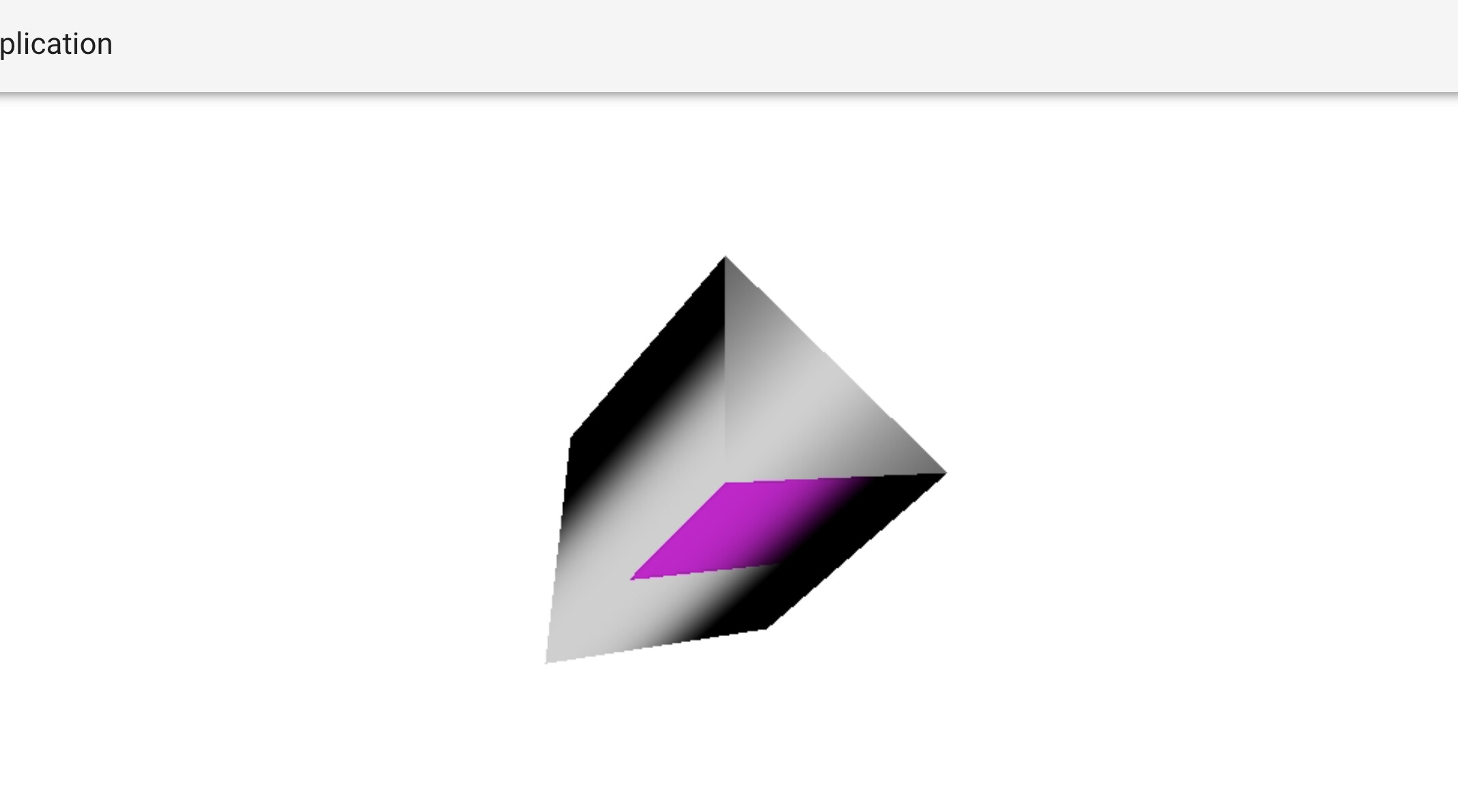
It seems this gets complicated as the tube filter creates a cell for each face. Thus, it’s not clear how picking one cell might be translated into highlighting all three for that line segment. Would you be able to provide any suggestions for how to move forward?
Thanks, Robert
---
### Author:  [@Robert\_Collar](https://discourse.vtk.org/u/Robert_Collar)
#### Post date: [January 16, 2023, 1:26am UTC](https://discourse.vtk.org/t/unexpected-behavior-when-selecting-and-highlighting-cells-in-trame/10333/8 "2023-01-16T01:26:44Z")
Hi all,
I’ve managed to resolve my second question above using the code found at the end of this message. The gist is that I assigned an “ID” to each cell of the `vtkPolyLine` object by attaching a data array to the object. As this array persists through the application of the tube filter, I can then conduct a selection based on this ID array, thus allowing me to grab all cells in the output of the tube filter that correspond to one cell in the `vtkPolyLine` object!
```nohighlight
import vtk
from trame.app import get_server
from trame.widgets import vuetify, vtk as vtk_widgets
from trame.ui.vuetify import SinglePageLayout
from vtkmodules.vtkRenderingCore import (
vtkActor,
vtkPolyDataMapper,
vtkDataSetMapper,
vtkRenderer,
vtkRenderWindow,
vtkRenderWindowInteractor,
vtkCellPicker
)
from vtkmodules.numpy_interface import dataset_adapter as dsa
from vtkmodules.vtkFiltersCore import vtkTubeFilter
from vtkmodules.vtkFiltersExtraction import vtkExtractSelection
from vtkmodules.vtkCommonDataModel import vtkSelection, vtkSelectionNode
import vtk.util.numpy_support as vtknumpy
import numpy as np
# -----------------------------------------------------------------------------
# Generate dataset
# -----------------------------------------------------------------------------
points = vtk.vtkPoints()
points.SetNumberOfPoints(4)
line = vtk.vtkLine()
lines = vtk.vtkCellArray()
# create first line segment
points.SetPoint(0, 0, 0, 0)
line.GetPointIds().SetId(0, 0)
points.SetPoint(1, 1, 1, 1)
line.GetPointIds().SetId(1, 1)
lines.InsertNextCell(line)
# create second line segment
points.SetPoint(2, 1, 1, 1)
line.GetPointIds().SetId(0, 2)
points.SetPoint(3, 2, 2, 2)
line.GetPointIds().SetId(1, 3)
lines.InsertNextCell(line)
linesPolyData = vtk.vtkPolyData()
linesPolyData.SetPoints(points)
linesPolyData.SetLines(lines)
vtkfields= vtknumpy.numpy_to_vtk([0,1])
vtkfields.SetName("og_id")
vtkfields.SetNumberOfComponents(1)
og_ids = vtknumpy.numpy_to_vtk([0,1]) # TODO: change to be a function of number of lines
og_ids.SetName("og_id")
og_ids.SetNumberOfComponents(1)
linesPolyData.GetCellData().AddArray(og_ids)
# -----------------------------------------------------------------------------
# Trame initialization
# -----------------------------------------------------------------------------
server = get_server()
state, ctrl = server.state, server.controller
# -----------------------------------------------------------------------------
# Interactions
# -----------------------------------------------------------------------------
def update_selection(pickData, **kwargs):
data = pickData
picker = vtkCellPicker()
picker.SetTolerance(0.0005) # based on example
pos = data["position"]
picker.Pick(pos["x"], pos["y"], pos["z"], renderer)
idx = picker.GetCellId()
if idx != -1:
SELECTED_IDX = np.array(tubes_filter.GetOutput().GetCellData().GetArray("og_id"))[idx].tolist()
else:
SELECTED_IDX = []
sel_node = vtkSelectionNode()
sel_node.GetProperties().Set(vtkSelectionNode.CONTENT_TYPE(), vtkSelectionNode.VALUES)
sel_node.GetProperties().Set(vtkSelectionNode.FIELD_TYPE(), vtkSelectionNode.CELL)
sel_node.GetProperties().Set(vtkSelectionNode.COMPONENT_NUMBER(), 0)
selected_cells = vtknumpy.numpy_to_vtk(SELECTED_IDX)
selected_cells.SetName("og_id")
selected_cells.SetNumberOfComponents(1)
sel_node.SetSelectionList(selected_cells)
sel = vtkSelection()
sel.AddNode(sel_node)
selection_extract.SetInputConnection(tubes_filter.GetOutputPort())
selection_extract.SetInputDataObject(1, sel)
selection_extract.Update()
selection_actor.SetVisibility(1)
# Update 3D view
ctrl.view_update()
# -----------------------------------------------------------------------------
# VTK pipeline
# -----------------------------------------------------------------------------
tubes_filter = vtkTubeFilter()
tubes_filter.SetInputData(linesPolyData)
radius = 2
tubes_filter.SetRadius(radius)
n_of_sides = 3
tubes_filter.SetNumberOfSides(n_of_sides)
tubes_filter.Update()
mapper = vtkPolyDataMapper()
mapper.SetInputConnection(tubes_filter.GetOutputPort())
actor = vtkActor()
actor.SetMapper(mapper)
# Selection
selection_extract = vtkExtractSelection()
selection_mapper = vtkDataSetMapper()
selection_mapper.SetInputConnection(selection_extract.GetOutputPort())
selection_actor = vtkActor()
selection_actor.GetProperty().SetColor(1, 0, 1)
selection_actor.SetMapper(selection_mapper)
selection_actor.SetVisibility(0)
selection_actor.SetPickable(0)
renderer = vtkRenderer()
renderer.SetBackground(1, 1, 1)
render_window = vtkRenderWindow()
render_window.AddRenderer(renderer)
rw_interactor = vtkRenderWindowInteractor()
rw_interactor.SetRenderWindow(render_window)
rw_interactor.GetInteractorStyle().SetCurrentStyleToTrackballCamera()
renderer.AddActor(actor)
renderer.AddActor(selection_actor)
renderer.ResetCamera()
# -----------------------------------------------------------------------------
# GUI layout
# -----------------------------------------------------------------------------
VTK_VIEW_SETTINGS = {
"interactive_ratio": 1,
"interactive_quality": 100,
}
with SinglePageLayout(server) as layout:
layout.icon.click = ctrl.view_reset_camera
with layout.content:
with vuetify.VContainer(fluid=True, classes="fill-height pa-0 ma-0"):
view = vtk_widgets.VtkRemoteView(
render_window,
interactor_events=("events", ["LeftButtonPress"]),
LeftButtonPress=(update_selection, "[utils.vtk.event($event)]"),
**VTK_VIEW_SETTINGS,
)
ctrl.view_update = view.update
ctrl.view_reset_camera = view.reset_camera
# -----------------------------------------------------------------------------
# Main
# -----------------------------------------------------------------------------
if __name__ == " __main__":
server.start(port=0)
```
---
### Author:  [@rocky\_ly](https://discourse.vtk.org/u/rocky_ly)
#### Post date: [April 25, 2026, 8:51am UTC](https://discourse.vtk.org/t/unexpected-behavior-when-selecting-and-highlighting-cells-in-trame/10333/9 "2026-04-25T08:51:06Z")
Hello author,
I am trying to migrate the local VTK rendering pipeline to the web using Trame. I copied your code and ran it in my local environment, but I cannot reproduce the same results.
Could you please let me know which version of Trame your code is based on? I suspect there are version conflicts with my current Trame installation.
---
### Author:  [@Robert\_Collar](https://discourse.vtk.org/u/Robert_Collar)
#### Post date: [April 25, 2026, 12:38pm UTC](https://discourse.vtk.org/t/unexpected-behavior-when-selecting-and-highlighting-cells-in-trame/10333/10 "2026-04-25T12:38:26Z")
Hey! I don’t recall, and it’ll probably be a challenge to nail it down exactly on my end. But I’d recommend trying the stable release(s) from November/December 2022 or January 2023, when I was working on this prior to posting!
Best, Robert
---
### Author:  [@rocky\_ly](https://discourse.vtk.org/u/rocky_ly)
#### Post date: [May 7, 2026, 4:16am UTC](https://discourse.vtk.org/t/unexpected-behavior-when-selecting-and-highlighting-cells-in-trame/10333/11 "2026-05-07T04:16:18Z")
Hi Robert,
Got it, thanks a lot for your kind suggestion! I’ll test the stable releases from Nov/Dec 2022 and Jan 2023 as you recommended.
Really appreciate your help.
Best regards,