# Unwanted interpolation in vtkTexture
**URL:** https://discourse.vtk.org/t/unwanted-interpolation-in-vtktexture/5556
**Category:** Support
**Created:** [April 16, 2021, 11:37am UTC](https://discourse.vtk.org/t/unwanted-interpolation-in-vtktexture/5556 "2021-04-16T11:37:45Z")
**Posts on this page:** 11
**Page:** 1
### Author:  [@marcomusy](https://discourse.vtk.org/u/marcomusy)
#### Post date: [April 16, 2021, 11:37am UTC](https://discourse.vtk.org/t/unwanted-interpolation-in-vtktexture/5556/1 "2021-04-16T11:37:45Z")
In applying a texture to a mesh artifacts show up for edges linking different regions of the uv texture plane:
```python
import numpy as np
txu = 'SMPL_sampleTex_m.jpg'
uvmap = np.load('uv_table.npy')
import vtk
from vtk.util.numpy_support import numpy_to_vtk
mreader = vtk.vtkPolyDataReader()
mreader.SetFileName('guy.vtk')
mreader.Update()
pd = mreader.GetOutput()
mesh = vtk.vtkActor()
mapper = vtk.vtkPolyDataMapper()
mapper.SetInputData(pd)
mesh.SetMapper(mapper)
reader = vtk.vtkJPEGReader()
reader.SetFileName(txu)
reader.Update()
pd.GetPointData().SetTCoords(numpy_to_vtk(uvmap))
tu = vtk.vtkTexture()
tu.SetInputData(reader.GetOutput())
tu.SetInterpolate(False)
mesh.SetTexture(tu)
renderer = vtk.vtkRenderer()
renderer.AddActor(mesh)
render_window = vtk.vtkRenderWindow()
render_window.AddRenderer(renderer)
interactor = vtk.vtkRenderWindowInteractor()
interactor.SetRenderWindow(render_window)
renderer.SetBackground(1, 1, 1)
renderer.ResetCamera()
render_window.Render()
interactor.Start()
#######################
####### vedo:
# from vedo import Mesh, Picture, show
# mesh = Mesh('guy.vtk', c='w').lw(0.1).texture(txu, uvmap)
# mlab = mesh.labels(uvmap, precision=2, font="VTK", c='k')
# show([(mesh,mlab), Picture(txu)], N=2, axes=1, sharecam=False)
```

zooming:
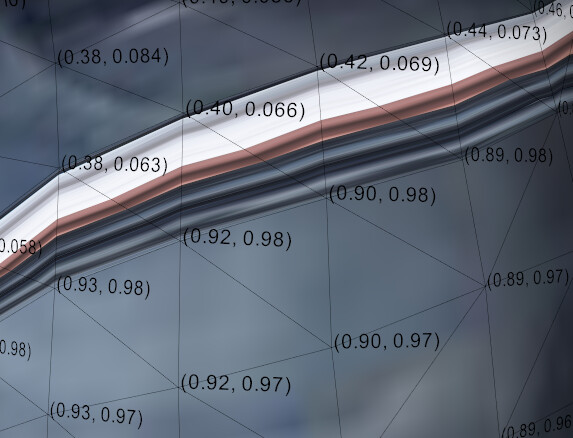
Is there a way to get around this?
(The problem has been discussed [here](https://stackoverflow.com/questions/39137374/vtk-inserts-incorrect-color-between-nodes-when-mapping-texture-to-mesh) too long time ago, but I don’t fully understand the proposed solution).
Thanks
[guy.zip](https://discourse.vtk.org/uploads/short-url/tkVdAOFpoDt47eRISi9tldNPicj.zip) (835.4 KB)
---
### Author:  [@Yohann\_Bearzi](https://discourse.vtk.org/u/Yohann_Bearzi)
#### Post date: [April 16, 2021, 12:16pm UTC](https://discourse.vtk.org/t/unwanted-interpolation-in-vtktexture/5556/2 "2021-04-16T12:16:46Z")
Try turning on `SeamlessU` and / or `SeamlessV` in `vtkPolyDataMapper`. Hopefully it works.
---
### Author:  [@marcomusy](https://discourse.vtk.org/u/marcomusy)
#### Post date: [April 16, 2021, 12:34pm UTC](https://discourse.vtk.org/t/unwanted-interpolation-in-vtktexture/5556/3 "2021-04-16T12:34:03Z")
Thanks Yohann, it looks it does _something_… but not really curing the problem:
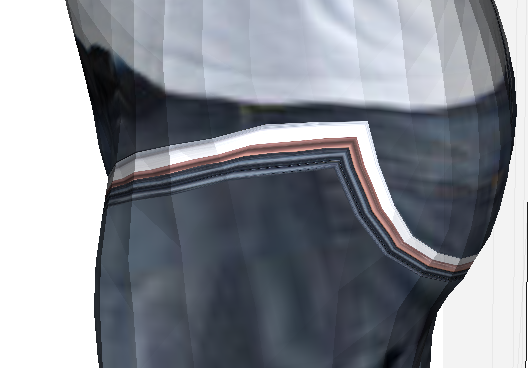
becomes:
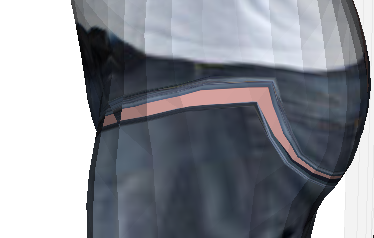
---
### Author:  [@Yohann\_Bearzi](https://discourse.vtk.org/u/Yohann_Bearzi)
#### Post date: [April 16, 2021, 3:00pm UTC](https://discourse.vtk.org/t/unwanted-interpolation-in-vtktexture/5556/4 "2021-04-16T15:00:36Z")
What is happening is that you are jumping from one point to another in your texture, and OpenGL interpolates the texture coordinates between those 2 points. You can tell the shader at the texture edges “make this texture periodic” so it does a texture coordinate interpolation differently with `SeamlessU` and `SeamlessV`, but I’m afraid you won’t be able to do the same kind of things if you do jumps inside your texture like that.
What you could do is duplicate points where this happens and make this interpolation happen between those duplicate points. The jump from (0.38, 0.063) to (0.92, 0.97) must happen at the same point location in your example.
---
### Author:  [@marcomusy](https://discourse.vtk.org/u/marcomusy)
#### Post date: [April 16, 2021, 3:47pm UTC](https://discourse.vtk.org/t/unwanted-interpolation-in-vtktexture/5556/5 "2021-04-16T15:47:24Z")
…I would then need to first identify the seam vertices, what should I use for that?
---
### Author:  [@Yohann\_Bearzi](https://discourse.vtk.org/u/Yohann_Bearzi)
#### Post date: [April 16, 2021, 3:53pm UTC](https://discourse.vtk.org/t/unwanted-interpolation-in-vtktexture/5556/6 "2021-04-16T15:53:46Z")
You could look at discontinuities in the (u,v) coordinates that must be mapped to points. A threshold on these discontinuities might be enough. You can use `vtkGradientFilter` to detect those discontinuities (the derivative should be high on the seam).
---
### Author:  [@marcomusy](https://discourse.vtk.org/u/marcomusy)
#### Post date: [April 16, 2021, 4:51pm UTC](https://discourse.vtk.org/t/unwanted-interpolation-in-vtktexture/5556/7 "2021-04-16T16:51:13Z")
the gradient trick seems to work well (and values are actually in log scale):
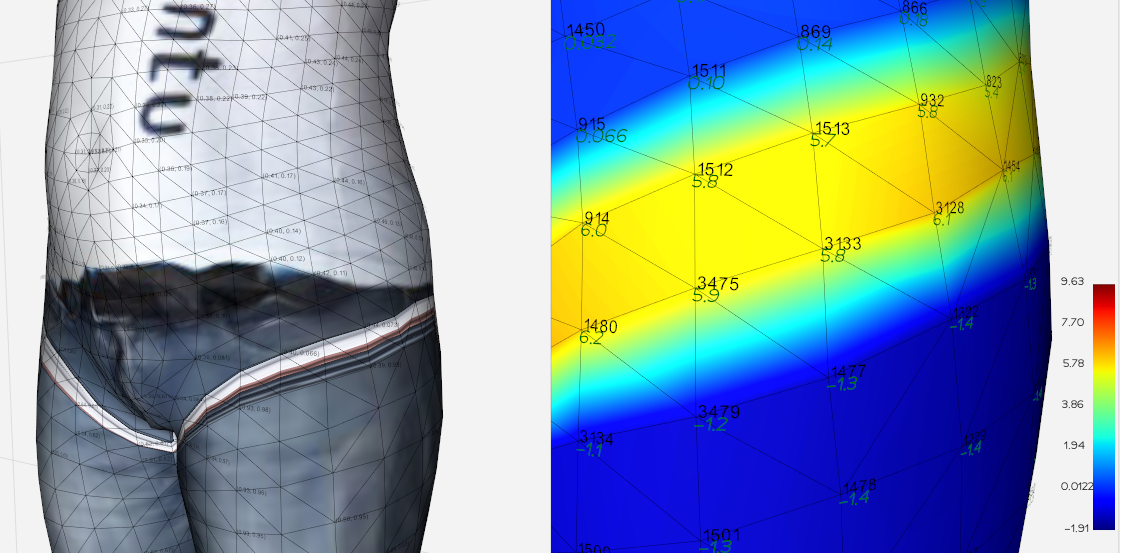
(vertex indices, and log(sum(|grad(u)|+|grad(v)|) in italic green)
now i feel a bit lost on how to duplicate points to let the interpolation happen there… any advice is welcome 🙂
---
### Author:  [@danlipsa](https://discourse.vtk.org/u/danlipsa)
#### Post date: [April 16, 2021, 4:59pm UTC](https://discourse.vtk.org/t/unwanted-interpolation-in-vtktexture/5556/8 "2021-04-16T16:59:29Z")
We had a similar problem for the PLY reader. The issue was that colors were assigned per cells in the PLY file but were set on points when data was read. As Yohann mentioned this resulted in discontinuities for the texture coordinates which causes problems similar to what you are seeing. So one thing you can try is to save you data as PLY and then you can toggle between duplicating points at discontinuities or not using
SetDuplicatePointsForFaceTexture (bool)
I do plan to separate that code as a separate filter
[https://gitlab.kitware.com/vtk/vtk/-/merge\_requests/6079](https://gitlab.kitware.com/vtk/vtk/-/merge_requests/6079)
---
### Author:  [@Yohann\_Bearzi](https://discourse.vtk.org/u/Yohann_Bearzi)
#### Post date: [April 16, 2021, 5:09pm UTC](https://discourse.vtk.org/t/unwanted-interpolation-in-vtktexture/5556/9 "2021-04-16T17:09:06Z")
So you can understand how you want it to work, try to collapse points from the yellow bottom line into the positions of the top layer. You can have consistency on which point goes when by looking at the orientation of your triangles (do a cross product of compute the triangle normal, and see how points turn around this normal).
This will distort the geometry but will remove the seam.
Now, what you want is you want to keep the geometry intact, and actually duplicate points. What you need to do is instead of collapsing, create a new strip of triangles as thick as a line, with new points. You want this strip to replace the yellow strip that you are currently seeing. So basically you need to need to edit triangles from this yellow strip and change the point ids to match the ones of your new strip. Don’t forget to add this triangle strip into your poly data polys and the new points into your `vtkPoints* vtkPolyData::GetPoints()`.
---
### Author:  [@Yohann\_Bearzi](https://discourse.vtk.org/u/Yohann_Bearzi)
#### Post date: [April 16, 2021, 5:10pm UTC](https://discourse.vtk.org/t/unwanted-interpolation-in-vtktexture/5556/10 "2021-04-16T17:10:22Z")
Oh I didn’t see you gave an easier fix 🙂
If it works with saving into a `.ply` @marcomusy you should definitely do that, as it would work out of the box.
---
### Author:  [@marcomusy](https://discourse.vtk.org/u/marcomusy)
#### Post date: [April 19, 2021, 10:36am UTC](https://discourse.vtk.org/t/unwanted-interpolation-in-vtktexture/5556/11 "2021-04-19T10:36:16Z")
collapsing the triangle edges with a threshold already does a pretty decent job… a very unsophisticated test here:
```python
import numpy as np
from vedo import *
txu = 'SMPL_sampleTex_m.jpg'
threshold = 4.0
mesh1 = Mesh('guy.vtk', c='w').texture(txu)
grad = mesh1.gradient("tcoords")
ugrad, vgrad = np.split(grad, 2, axis=1)
ugradm, vgradm = mag(ugrad), mag(vgrad)
gradm = np.log(ugradm*ugradm + vgradm*vgradm)
largegrad_ids = np.arange(len(grad))[gradm>threshold]
# collapse triangles that have large gradient
uvmap = mesh1.getPointArray('tcoords')
points = mesh1.points()
for f in mesh1.faces():
if np.isin(f, largegrad_ids).all():
id1, id2, id3 = f
uv1, uv2, uv3 = uvmap[f]
d12 = mag(uv1-uv2)
d23 = mag(uv2-uv3)
d31 = mag(uv3-uv1)
idm = np.argmin([d12, d23, d31])
if idm == 0: # d12, collapse segment12 to pt3
points[id1] = points[id2] = points[id3]
elif idm == 1:
points[id2] = points[id3] = points[id1]
mesh1.points(points) # move points
mesh2 = mesh1.clone().cmap('jet', gradm).addScalarBar()
show(mesh1, mesh2, N=2, axes=1)
```
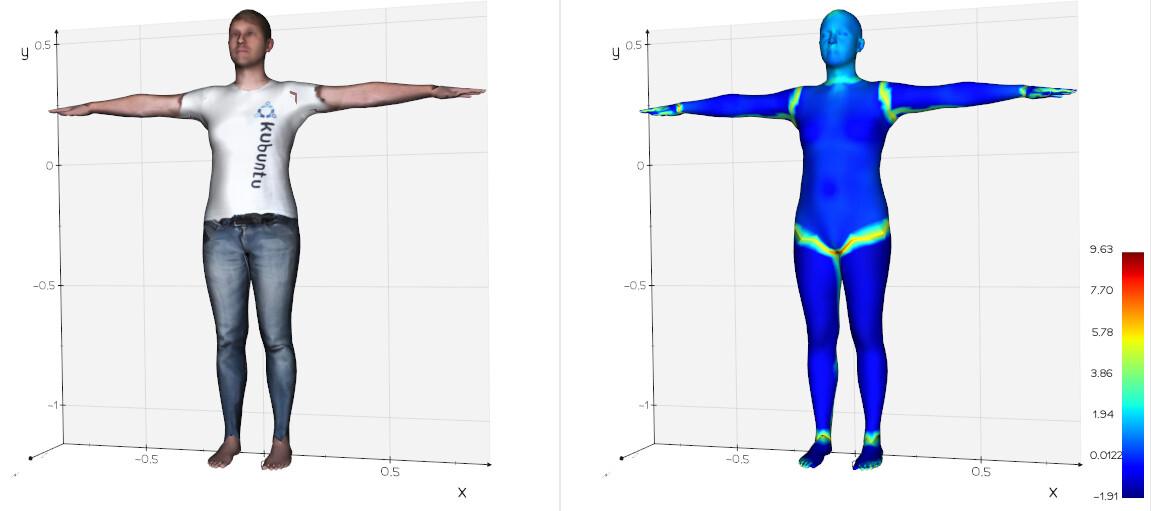
I’ll also give a try to the PLY reader, thanks for the hints!