# Using VTK LinePlot3D in an MFC child window
**URL:** https://discourse.vtk.org/t/using-vtk-lineplot3d-in-an-mfc-child-window/15804
**Category:** Support
**Tags:** code
**Created:** [July 11, 2025, 1:43pm UTC](https://discourse.vtk.org/t/using-vtk-lineplot3d-in-an-mfc-child-window/15804 "2025-07-11T13:43:45Z")
**Posts on this page:** 11
**Page:** 1
### Author:  [@efrederick](https://discourse.vtk.org/u/efrederick)
#### Post date: [July 11, 2025, 1:43pm UTC](https://discourse.vtk.org/t/using-vtk-lineplot3d-in-an-mfc-child-window/15804/1 "2025-07-11T13:43:45Z")
Hello,
I have an extensive MFC (commercial) application and we need to replace the 3D graph. We were hoping to incorporate the LinePlot3D application, but, after many hours of trying to get a mini-application to work, I am hoping someone can assist me here. I have tried both a small MFC application and a code project example. In the MFC app, I used m\_pvtkWnd = new MyVTKWindow(IDD\_DIALOG\_BLANK, GetDlgItem(IDD\_VTKCHART)) to create the window, but that fails at CWnd::Create() within the vtkWindow constructor. We are using VTK 9.4 in MSVS 2022.
I have also attempted to use this example:
> **[CodeProject](https://www.codeproject.com/Tips/795319/VTK-in-MFC)**
>
> For those who code
and that example works, but I cannot get the LinePlot3D application to display in that one either.
Can anyone guide me towards a solution or tell me where I might be making a mistake?
---
### Author:  [@toddy](https://discourse.vtk.org/u/toddy)
#### Post date: [July 14, 2025, 12:57am UTC](https://discourse.vtk.org/t/using-vtk-lineplot3d-in-an-mfc-child-window/15804/2 "2025-07-14T00:57:18Z")
Are you going to post your code?
---
### Author:  [@efrederick](https://discourse.vtk.org/u/efrederick)
#### Post date: [July 14, 2025, 3:36pm UTC](https://discourse.vtk.org/t/using-vtk-lineplot3d-in-an-mfc-child-window/15804/3 "2025-07-14T15:36:54Z")
Sure, below is an excerpt from my custom dialog class. I attempted more than just this small section of code as well, but this is the minimum to reproduce an error. The if statement was used as a sanity check and it loads either the vtkMFCWindow or a CDialog that uses Direct2D to draw the window. The CDialog loads and draws just fine.
Please let me know if you need to see more of the code so you can reproduce and troubleshoot the error.
BOOL CMFCApplication1Dlg::OnInitDialog()
{
CDialog::OnInitDialog();
```
// Add "About..." menu item to system menu.
// IDM_ABOUTBOX must be in the system command range.
ASSERT((IDM_ABOUTBOX & 0xFFF0) == IDM_ABOUTBOX);
ASSERT(IDM_ABOUTBOX < 0xF000);
CMenu* pSysMenu = GetSystemMenu(FALSE);
if (pSysMenu != nullptr)
{
BOOL bNameValid;
CString strAboutMenu;
bNameValid = strAboutMenu.LoadString(IDS_ABOUTBOX);
ASSERT(bNameValid);
if (!strAboutMenu.IsEmpty())
{
pSysMenu->AppendMenu(MF_SEPARATOR);
pSysMenu->AppendMenu(MF_STRING, IDM_ABOUTBOX, strAboutMenu);
}
}
// Set the icon for this dialog. The framework does this automatically
// when the application's main window is not a dialog
SetIcon(m_hIcon, TRUE); // Set big icon
SetIcon(m_hIcon, FALSE); // Set small icon
if (true)
{ // Create the vtkMFCWindow and associate it with an MFC control
pvtkMFCWindow = new vtkMFCWindow(GetDlgItem(IDC_VTKAREA));
}
else
{
CRect rc;
CWnd* pWnd = GetDlgItem(IDC_VTKAREA);
if (pWnd) pWnd->GetWindowRect(rc);
ScreenToClient(rc);
m_d2dChart.Create(rc, this, IDC_VTKAREA);
if (m_d2dChart.GetSafeHwnd() == NULL) {
AfxMessageBox(_T("Graph: Failed to create dialog."));
return FALSE;
}
m_d2dChart.ShowWindow(SW_SHOW);
}
return TRUE; // return TRUE unless you set the focus to a control
```
}
---
### Author:  [@toddy](https://discourse.vtk.org/u/toddy)
#### Post date: [July 15, 2025, 12:16am UTC](https://discourse.vtk.org/t/using-vtk-lineplot3d-in-an-mfc-child-window/15804/4 "2025-07-15T00:16:20Z")
What is the declaration for m\_d2dChart?
Is `IDC_VTKAREA` a CView?
---
### Author:  [@efrederick](https://discourse.vtk.org/u/efrederick)
#### Post date: [July 15, 2025, 12:37pm UTC](https://discourse.vtk.org/t/using-vtk-lineplot3d-in-an-mfc-child-window/15804/5 "2025-07-15T12:37:31Z")
IDC\_VTKAREA is not a CView, but a drawing area. If it helps, attached is a screenshot.
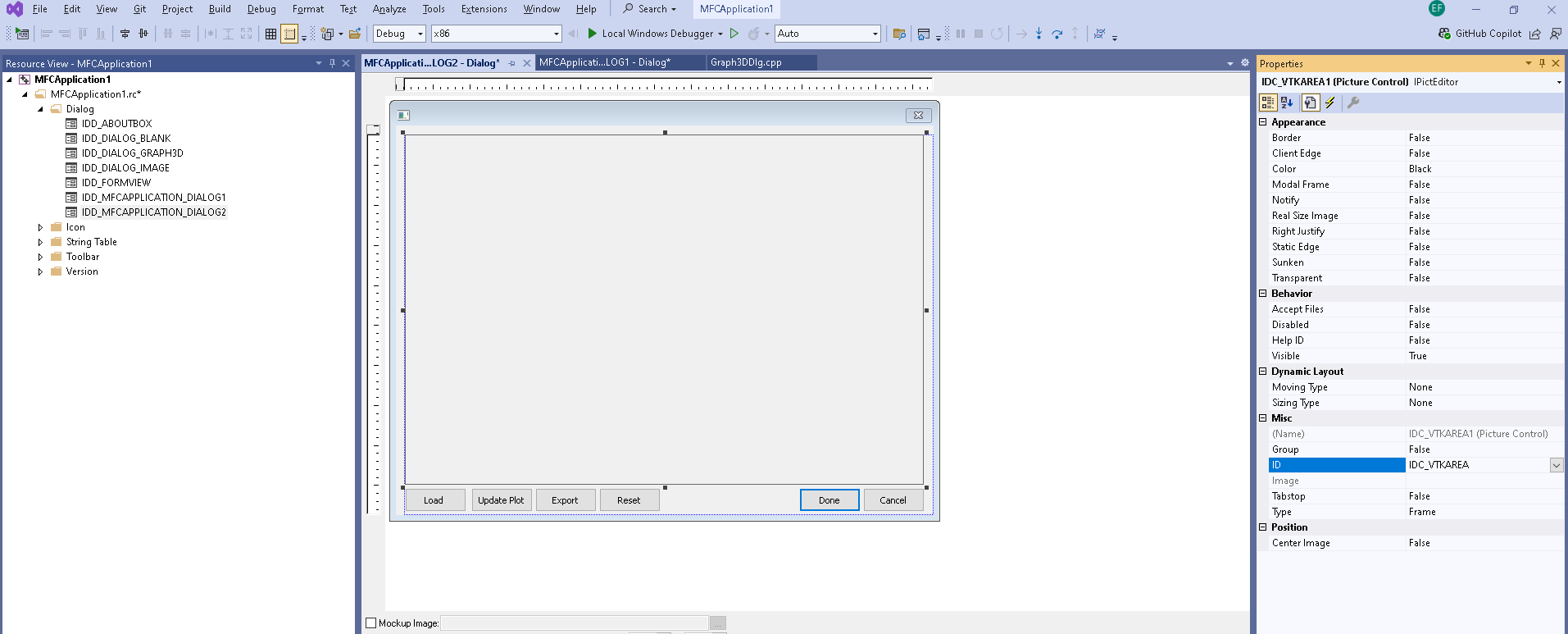
If needed, I can work with a CView, but a drawing area is more generalizable.
---
### Author:  [@toddy](https://discourse.vtk.org/u/toddy)
#### Post date: [July 16, 2025, 11:49am UTC](https://discourse.vtk.org/t/using-vtk-lineplot3d-in-an-mfc-child-window/15804/6 "2025-07-16T11:49:11Z")
Did you try running the CodeProject example with IPictEditor?
---
### Author:  [@efrederick](https://discourse.vtk.org/u/efrederick)
#### Post date: [July 16, 2025, 2:31pm UTC](https://discourse.vtk.org/t/using-vtk-lineplot3d-in-an-mfc-child-window/15804/7 "2025-07-16T14:31:39Z")
The code project example uses a CView to draw the bitmap. From my screenshot above, my test app used the IPictEditor. To me, these are different ways to draw a scene in an MFC window. Which is preferred?
---
### Author:  [@efrederick](https://discourse.vtk.org/u/efrederick)
#### Post date: [July 16, 2025, 3:05pm UTC](https://discourse.vtk.org/t/using-vtk-lineplot3d-in-an-mfc-child-window/15804/8 "2025-07-16T15:05:12Z")
I will add that when I use CView from the Code Project example the line
m\_pvtkMFCWindow = new vtkMFCWindow(this);
does not result in an exception, but this line has an exception:
this-\>Context-\>GetDevice()-\>SetViewportSize(vtkVector2i(size));
vtkContext2D::GetDevicevirtual returned nullptr.
it is in the function vtkContextActor::RenderOverlay(vtkViewport\* viewport).
Do I need to set the device or initialize other members in CTestBMPView::OnInitialUpdate()?
The example from code project just does the following:
m\_pvtkMFCWindow = new vtkMFCWindow(this);
m\_pvtkMFCWindow-\>GetRenderWindow()-\>AddRenderer(m\_pvtkRenderer);
m\_pvtkRenderer-\>SetBackground(0.0, 0.0, 0.0);
if(NULL != GetDocument()-\>m\_pvtkBMPReader)
{
//setup renderer
m\_pvtkImageActor-\>GetMapper()-\>SetInputConnection(GetDocument()-\>m\_pvtkBMPReader-\>GetOutputPort());
m\_pvtkRenderer-\>AddActor(m\_pvtkImageActor);
m\_pvtkRenderer-\>ResetCamera();
}
---
### Author:  [@efrederick](https://discourse.vtk.org/u/efrederick)
#### Post date: [July 16, 2025, 3:25pm UTC](https://discourse.vtk.org/t/using-vtk-lineplot3d-in-an-mfc-child-window/15804/9 "2025-07-16T15:25:14Z")
Hi Todd, I was able to find the solution thanks to several posts made by dwventer. Thank you for your assistance with this problem.
If anyone else needs a bread crumb to the solution, see this:
> [@Using vtkChartXY with vtkMFCWindow](https://discourse.vtk.org/t/using-vtkchartxy-with-vtkmfcwindow/2959):
>
> So I found plenty of examples where I can plot a chart using something like the vtkChartXY and vtkContextView object. Something like “pvtContextViewChart-\>GetScene()-\>AddItem(pvtChart);” is needed. Can something please then tell me how do I add the Chart object to the vtkMFCWindow object?
---
### Author:  [@toddy](https://discourse.vtk.org/u/toddy)
#### Post date: [July 16, 2025, 10:58pm UTC](https://discourse.vtk.org/t/using-vtk-lineplot3d-in-an-mfc-child-window/15804/10 "2025-07-16T22:58:28Z")
I haven’t actually used `vtkMFCWindow` but I have done something similar with an OpenCascade rendering window, so I supposed that `vtkMFCWindow` requires a CView host.
I’m glad you got it solved.
---
### Author:  [@efrederick](https://discourse.vtk.org/u/efrederick)
#### Post date: [July 17, 2025, 4:46pm UTC](https://discourse.vtk.org/t/using-vtk-lineplot3d-in-an-mfc-child-window/15804/11 "2025-07-17T16:46:09Z")
Your suggestions got the gears moving and that was all that was needed…thanks again!