# Visualize vtkStructuredGrid as volume
**URL:** https://discourse.vtk.org/t/visualize-vtkstructuredgrid-as-volume/7004
**Category:** Support
**Created:** [October 28, 2021, 1:03pm UTC](https://discourse.vtk.org/t/visualize-vtkstructuredgrid-as-volume/7004 "2021-10-28T13:03:23Z")
**Posts on this page:** 4
**Page:** 1
### Author:  [@brnk](https://discourse.vtk.org/u/brnk)
#### Post date: [October 28, 2021, 1:03pm UTC](https://discourse.vtk.org/t/visualize-vtkstructuredgrid-as-volume/7004/1 "2021-10-28T13:03:23Z")
I have a `vtkStructuredGrid` whose points are not distributed on a uniform rectangular grid. I want to use the volume rendering capabilities like opacity transfer functions.
To achieve that, I have to convert the `vtkStructuredGrid` instance to a `vtkUnstructuredGrid` (or `vtkImageData`) instance. Is there a way to extract the cells of the `vtkStructuredGrid` to use them in the `vtkUnstructuredGrid`?
Alternatively, is it possible to apply opacity transfer functions when using `vtkStructuredGrid` instances? Since I want to animate the volume, I guess a `vtkStructuredGrid` would be beneficial regarding the performance.
---
### Author:  [@Paulo\_Carvalho](https://discourse.vtk.org/u/Paulo_Carvalho)
#### Post date: [October 29, 2021, 2:36pm UTC](https://discourse.vtk.org/t/visualize-vtkstructuredgrid-as-volume/7004/2 "2021-10-29T14:36:30Z")
Hello,
I can set transparency in my `vtkStructureGrid`s easily:
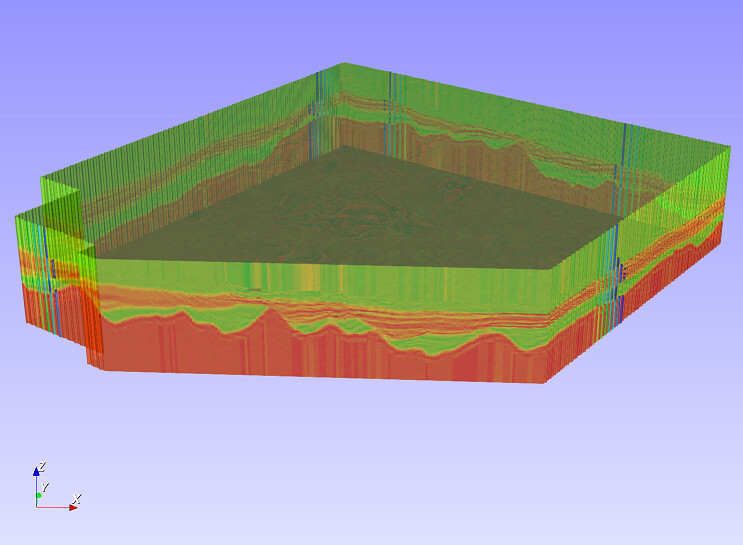
But this is not rendered as an actual volume (`vtkImageData`), that is, only the outside-facing cells are rendered. If this helps, I can post the code.
regards,
paulo
---
### Author:  [@brnk](https://discourse.vtk.org/u/brnk)
#### Post date: [November 3, 2021, 8:54am UTC](https://discourse.vtk.org/t/visualize-vtkstructuredgrid-as-volume/7004/3 "2021-11-03T08:54:32Z")
Hello @Paulo_Carvalho,
unfortunately, I have to render the `vtkStructuredGrid` as an actual volume to look “into” the volume.
---
### Author:  [@Paulo\_Carvalho](https://discourse.vtk.org/u/Paulo_Carvalho)
#### Post date: [November 3, 2021, 2:33pm UTC](https://discourse.vtk.org/t/visualize-vtkstructuredgrid-as-volume/7004/4 "2021-11-03T14:33:36Z")
Ok… given that your original `vtkStructuredGrid` is not regular, you will have to “raster” it into a regularly spaced grid. This is much like rastering a vector drawing into pixels. Searching the internet, I couldn’t find a VTK filter that could do this. Hence, you are left for implementing this operation yourself like I did. Unfortunately my code does this as domain objects in my program ([gammaray/valuestransferer.cpp at master · PauloCarvalhoRJ/gammaray · GitHub](https://github.com/PauloCarvalhoRJ/gammaray/blob/master/domain/auxiliary/valuestransferer.cpp)), not as VTK objects, as VTK is only used for visualization.
The basic steps to do this with VTK objects (untested code based on my code for my domain classes):
1. Create a `vtkImageData` large enough to contain the volume of your original `vtkUnstructuredGrid`:
```cpp
vtkNew image;
image->SetDimensions(nI, nJ, nK);
image->AllocateScalars(VTK_UNSIGNED_CHAR, 1);
double dX = x_extent / nI;
double dY = y_extent / nJ;
double dZ = z_extent / nK;
image->SetSpacing( dX, dY, dZ);
```
In the code above, `*_extent` are the extents of your `vtkUnstructuredGrid` along the main axes (compute the bounding box of your `vtkUnstructuredGrid` with the `GetBounds` method: [https://vtk.org/doc/nightly/html/classvtkDataSet.html#a9e3d8ff1ca5cafdc8433772d09b5a70f](https://vtk.org/doc/nightly/html/classvtkDataSet.html#a9e3d8ff1ca5cafdc8433772d09b5a70f)). `n*` are the resolutions (number of voxels) of your output `vtkImageData`.
1. Scan the output `vtkImageData`, querying the value of the input `vtkUnstructuredGrid` that exists in the x,y,z location of a given `vtkImageData` voxel:
```cpp
for (int k = 0; k < nK; k++)
{
double cellCenterZ = originZ + k * dZ + dZ/2;
for (int j = 0; j < nJ; j++)
{
double cellCenterY = originY + j * dY + dY/2;
for (int i = 0; i < nI; i++)
{
double cellCenterX = originX + i * dX + dX/2;
unsigned char* ptr = (unsigned char*)image->GetScalarPointer(i, j, k);
*ptr = get_value_at( unstructuredGrid,
cellCenterX,
cellCenterY,
cellCenterZ );
}
}
}
```
1. Write a `get_value_at()` function that does the following:
```cpp
vtkCellData *cellData = unstructuredGrid->GetCellData();
vtkDataArray* data = cellData->GetArray( id_returned_by_FindIndex );
return data->GetTuple1( 0 ); //this assumes you have one scalar in each cell.
//Query data->GetNumberOfTuples() to get the number of values per cell in
//multi-valued grids. You may even have no data in a given cell (defensive programming alert!)
```
Of course there will be much more code than posted here, but I hope this helps to get you started and understand the center tasks to perform a data transfer between grids with different geometries and topologies.
cheers,
Paulo