# Volume opacity
**URL:** https://discourse.vtk.org/t/volume-opacity/12123
**Category:** Web
**Created:** [August 9, 2023, 10:29am UTC](https://discourse.vtk.org/t/volume-opacity/12123 "2023-08-09T10:29:37Z")
**Posts on this page:** 4
**Page:** 1
### Author:  [@Xoz](https://discourse.vtk.org/u/Xoz)
#### Post date: [August 9, 2023, 10:29am UTC](https://discourse.vtk.org/t/volume-opacity/12123/1 "2023-08-09T10:29:37Z")
Hi everyone,
I’ve met a problem when trying to change the volume opacity, see these pics:
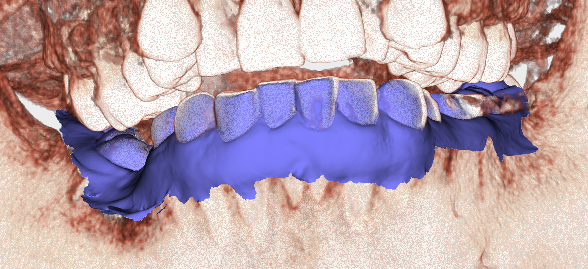
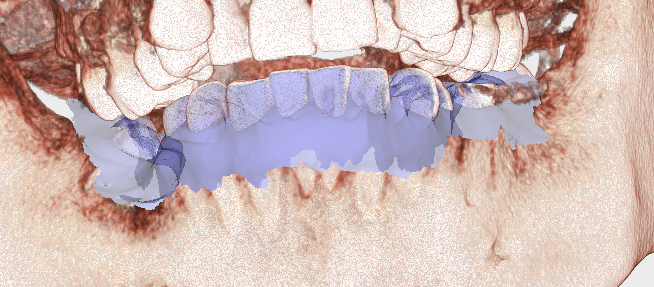
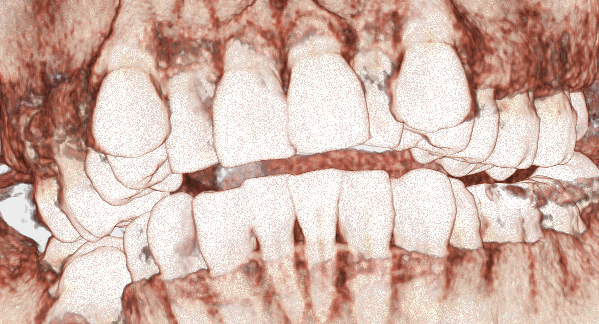
When a volume is placed in a same renderer with a polyData actor and is applied an RGBTransferFunction and a PiecewiseFunction.
If I change the opacity of the actor by calling actor.getProperty().setOpacity(number), part of the overlapping part of the volume becomes invisible, seems like that part did not join the opacity test, looks similar to the situation that the blend is disabled and depth test is enabled.
Is there anyway I can do to change this behavior? The expected result should be that the part of the volume is visible.
Regards
---
### Author:  [@finetjul](https://discourse.vtk.org/u/finetjul)
#### Post date: [August 9, 2023, 11:23am UTC](https://discourse.vtk.org/t/volume-opacity/12123/2 "2023-08-09T11:23:30Z")
What you want to achieve can only be done with a DepthPeeling technique however it has not been implemented yet in VTK.js.
It would be a great feature to add indeed. We would be happy to help you with the implementation of such feature.
---
### Author:  [@Xoz](https://discourse.vtk.org/u/Xoz)
#### Post date: [August 10, 2023, 9:30am UTC](https://discourse.vtk.org/t/volume-opacity/12123/3 "2023-08-10T09:30:53Z")
Hi Julien,
Is it a kind of achievement like this example? [WebGL 2 Example: Order-independent Transparency](https://tsherif.github.io/webgl2examples/oit.html)
I’m still studying on it, my CPR will also need this, if it is finished, I can continue with the implementation.
---
### Author:  [@finetjul](https://discourse.vtk.org/u/finetjul)
#### Post date: [August 10, 2023, 11:57am UTC](https://discourse.vtk.org/t/volume-opacity/12123/4 "2023-08-10T11:57:05Z")
> [WebGL 2 Example: Order-independent Transparency](https://tsherif.github.io/webgl2examples/oit.html)
This won’t do it. It is not fit to support both meshes AND volumes. Only DepthPeeling will work with my understanding.
You can look at the [VTK C++/OpenGL](https://vtk.org/Wiki/VTK/Depth_Peeling) implementation.