### Author:  [@aangelos28](https://discourse.vtk.org/u/aangelos28)
#### Post date: [February 21, 2021, 12:18am UTC](https://discourse.vtk.org/t/vtk-9-0-0-rendering-issue-many-artifacts-with-nouveau-driver/5222/1 "2021-02-21T00:18:42Z")
Hello,
I compiled and ran the TriangleColoredPoints example ([https://vtk.org/Wiki/VTK/Examples/Cxx/PolyData/TriangleColoredPoints](https://vtk.org/Wiki/VTK/Examples/Cxx/PolyData/TriangleColoredPoints)) but no render window was displaying and I was getting the following warning: _WARN| vtkInteractorStyleSwitchBase (0x5626f82e6430): Warning: Link to vtkInteractionStyle for default style selection._
I added the following code to fix this based on internet sources:
#include \
VTK\_MODULE\_INIT(vtkRenderingOpenGL2)
VTK\_MODULE\_INIT(vtkInteractionStyle)
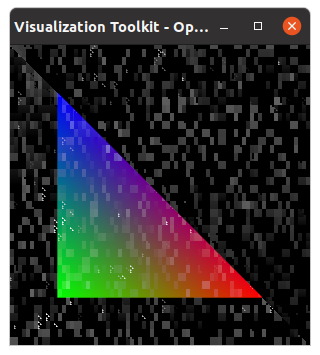
The render window now displays but the output is messed up as you can see in the following image.
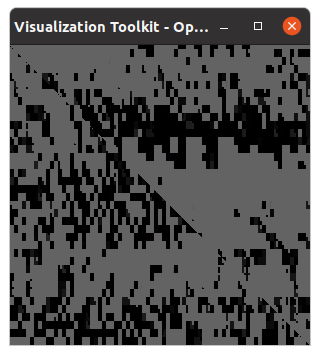
If the camera is rotated a bit, the following output is displayed:
What could be the cause of this? I have the same issue with different polydata as well. I am using VTK 9.0.0 on Ubuntu 20.04.2 LTS. I also tested this with the latest commit from master.
EDIT:
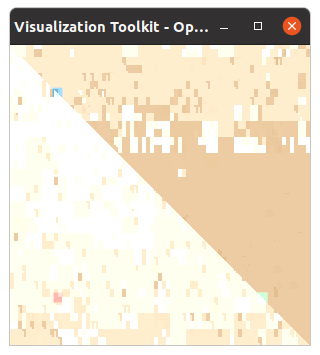
I also tested the newer ColoredPoints example ([https://lorensen.github.io/VTKExamples/site/Cxx/PolyData/ColoredPoints/](https://lorensen.github.io/VTKExamples/site/Cxx/PolyData/ColoredPoints/)) and added the following in my CMakeLists.txt file instead of using the VTK\_MODULE\_INIT macros.
vtk\_module\_autoinit(
TARGETS example
MODULES ${VTK\_LIBRARIES}
)
I got the following output:
This is my OpenGL info:
OpenGL vendor string: nouveau
OpenGL renderer string: NV124
OpenGL core profile version string: 4.3 (Core Profile) Mesa 20.2.6
OpenGL core profile shading language version string: 4.30
GPU: GTX 970
---
### Author:  [@amaclean](https://discourse.vtk.org/u/amaclean)
#### Post date: [February 21, 2021, 4:05am UTC](https://discourse.vtk.org/t/vtk-9-0-0-rendering-issue-many-artifacts-with-nouveau-driver/5222/2 "2021-02-21T04:05:56Z")
Most likely it is your video driver, could you try installing the NVIDIA drivers. e.g. [How to install the NVIDIA drivers on Ubuntu 20.04 Focal Fossa Linux](https://linuxconfig.org/how-to-install-the-nvidia-drivers-on-ubuntu-20-04-focal-fossa-linux)
I use the NVIDIA drivers and have no issues.
The new VTK Examples site is [vtk-examples](https://kitware.github.io/vtk-examples/site/) and the examples corresponding to those no longer maintained ones are: [TriangleColoredPoints](https://kitware.github.io/vtk-examples/site/Cxx/PolyData/TriangleColoredPoints/) and [ColoredPoints](https://kitware.github.io/vtk-examples/site/Cxx/PolyData/ColoredPoints/). These render perfectly well using VTK 9.0 and the NVIDIA drivers in both Windows and Linux. Also the CMakeLists.txt files should need no modifications.
---
### Author:  [@aangelos28](https://discourse.vtk.org/u/aangelos28)
#### Post date: [February 21, 2021, 4:28am UTC](https://discourse.vtk.org/t/vtk-9-0-0-rendering-issue-many-artifacts-with-nouveau-driver/5222/3 "2021-02-21T04:28:19Z")
Hi Andrew,
Thanks for your reply.
I can confirm it works with the latest Nvidia driver. I also tried reinstalling the Nouveau driver and the issue persisted. Is the default Nouveau driver not supported?
When I modified the CMakeLists file I included the below snippet, which is present in the new examples, but not the old ones:
vtk\_module\_autoinit(
TARGETS TriangleColoredPoints
MODULES ${VTK\_LIBRARIES}
)
---
### Author:  [@amaclean](https://discourse.vtk.org/u/amaclean)
#### Post date: [February 21, 2021, 4:38am UTC](https://discourse.vtk.org/t/vtk-9-0-0-rendering-issue-many-artifacts-with-nouveau-driver/5222/4 "2021-02-21T04:38:16Z")
I might be wrong but I suspect that not all the features of the NVidia cards are emulated by Nouveau. You will get far better performance using the NVidia drivers e.g. [NVIDIA/Nouveau vs. NVIDIA Linux Driver](https://www.phoronix.com/scan.php?page=article&item=nvidia-nouveau-2019&num=2)
---
### Author:  [@aangelos28](https://discourse.vtk.org/u/aangelos28)
#### Post date: [February 21, 2021, 4:46am UTC](https://discourse.vtk.org/t/vtk-9-0-0-rendering-issue-many-artifacts-with-nouveau-driver/5222/5 "2021-02-21T04:46:48Z")
Most likely this is true. The strange thing is that ParaView 5.8.0 works just fine with the Nouveau driver, so it is a little odd VTK had an issue. Doesn’t ParaView use the VTK rendering features? Maybe a different (older?) VTK version is currently used by it.
---
### Author:  [@amaclean](https://discourse.vtk.org/u/amaclean)
#### Post date: [February 21, 2021, 4:55am UTC](https://discourse.vtk.org/t/vtk-9-0-0-rendering-issue-many-artifacts-with-nouveau-driver/5222/6 "2021-02-21T04:55:04Z")
> [@aangelos28](#):
>
> ParaView 5.8.0 works just fine with the Nouveau driver
Someone else maybe be able to answer this. However I am sure that you will find ParaView will be much faster using the NVidia drivers.
---
### Author:  [@aangelos28](https://discourse.vtk.org/u/aangelos28)
#### Post date: [February 21, 2021, 4:55am UTC](https://discourse.vtk.org/t/vtk-9-0-0-rendering-issue-many-artifacts-with-nouveau-driver/5222/7 "2021-02-21T04:55:42Z")
I just compiled VTK 8.2.0 and it works with the Nouveau driver. It seems VTK 9.0.0 has an issue with Nouveau (at least for me).
---
### Author:  [@aangelos28](https://discourse.vtk.org/u/aangelos28)
#### Post date: [February 21, 2021, 5:00am UTC](https://discourse.vtk.org/t/vtk-9-0-0-rendering-issue-many-artifacts-with-nouveau-driver/5222/8 "2021-02-21T05:00:08Z")
Anyway, I will use the Nvidia driver. Thanks for the help Andrew!