# VTK 9.0 artifacts after upgrade using vcpkg
**URL:** https://discourse.vtk.org/t/vtk-9-0-artifacts-after-upgrade-using-vcpkg/9828
**Category:** Support
**Tags:** code
**Created:** [November 15, 2022, 1:55pm UTC](https://discourse.vtk.org/t/vtk-9-0-artifacts-after-upgrade-using-vcpkg/9828 "2022-11-15T13:55:20Z")
**Posts on this page:** 6
**Page:** 1
### Author:  [@ErwanD](https://discourse.vtk.org/u/ErwanD)
#### Post date: [November 15, 2022, 1:55pm UTC](https://discourse.vtk.org/t/vtk-9-0-artifacts-after-upgrade-using-vcpkg/9828/1 "2022-11-15T13:55:20Z")
Hi,
I got multiple artifacts on vtk canvas. I didn´t have this issue before I changed vcpkg commit and vtk version.
Here is an overview of my problem :
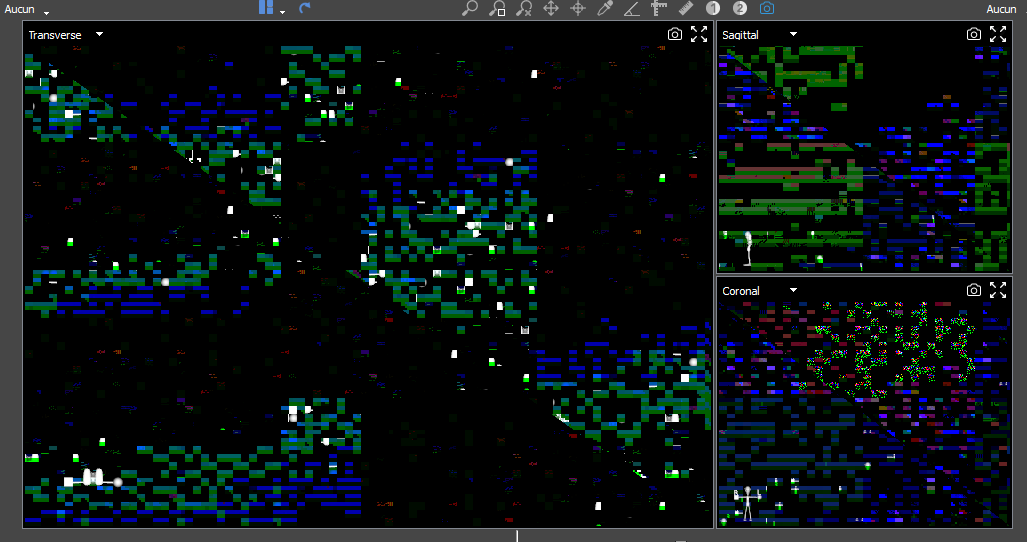
I´m using :
- Vcpkg commit is : 779ce74ef
- VTK version : 9.0.3-pv5.9.1#11
- VS2019
- QT 5.15.5#2
- GPU driver : AMD Adrenaline 22.10.3
- Windows 11 22H2 64b
Are you aware of any similar issue related to this vtk version ? We tested on differents machine and compiled vtk dll works great with other gpus and win10. Btw my gpu is not dying, older vtk versions are working perfectly.
Let me know if you need more details, or test anything you want on my machine.
Thanks for helping
---
### Author:  [@ben.boeckel](https://discourse.vtk.org/u/ben.boeckel)
#### Post date: [November 15, 2022, 2:59pm UTC](https://discourse.vtk.org/t/vtk-9-0-artifacts-after-upgrade-using-vcpkg/9828/2 "2022-11-15T14:59:00Z")
Looks like rendering artifacts. Can you update your GPU driver?
Cc: @mwestphal
---
### Author:  [@ErwanD](https://discourse.vtk.org/u/ErwanD)
#### Post date: [November 15, 2022, 3:00pm UTC](https://discourse.vtk.org/t/vtk-9-0-artifacts-after-upgrade-using-vcpkg/9828/3 "2022-11-15T15:00:02Z")
@ben.boeckel my gpu driver is the lastest version
---
### Author:  [@fab672000](https://discourse.vtk.org/u/fab672000)
#### Post date: [November 30, 2022, 3:16pm UTC](https://discourse.vtk.org/t/vtk-9-0-artifacts-after-upgrade-using-vcpkg/9828/4 "2022-11-30T15:16:35Z")
Can you completely uninstall adrenalin and use either the windows automatically found driver for your AMD card or the windows store [AMD software](https://apps.microsoft.com/store/detail/amd-radeon-software/9NZ1BJQN6BHL?hl=en-us&gl=us) version to see if it is a driver related issue ?
If the problem persists, could be worth giving a try to the latest vtk 9.2 version too.
---
### Author:  [@ErwanD](https://discourse.vtk.org/u/ErwanD)
#### Post date: [December 1, 2022, 2:37pm UTC](https://discourse.vtk.org/t/vtk-9-0-artifacts-after-upgrade-using-vcpkg/9828/5 "2022-12-01T14:37:52Z")
@fab672000 after a clean install I don´t get any issue.
Win11 22h2 amd driver : 30.0.13023.4001 (12/2021)
But we have customers using more recents driver version (31.0.12016.3004 08/2022) or later like I did and facing this issue.
Does Vtk 9.2 is available in latest vcpkg version ?
Do you know if there is any fix in vtk9.2 related to a driver issue with amd drivers ?
Best regards
---
### Author:  [@fab672000](https://discourse.vtk.org/u/fab672000)
#### Post date: [December 3, 2022, 5:15pm UTC](https://discourse.vtk.org/t/vtk-9-0-artifacts-after-upgrade-using-vcpkg/9828/6 "2022-12-03T17:15:51Z")
Glad to read it solved the issue, I don’t use vcpkg and just added to my CI the vtk sources to build with custom options.