# VTK 9 build help

**URL:** https://discourse.vtk.org/t/vtk-9-build-help/7267
**Category:** Support
**Created:** [November 24, 2021, 2:42pm UTC](https://discourse.vtk.org/t/vtk-9-build-help/7267 "2021-11-24T14:42:04Z")
**Posts on this page:** 20
**Page:** 1

<div class="post-metadata">

### Author: ![no2497](https://discourse.vtk.org/user_avatar/discourse.vtk.org/no2497/32/3226_2.png) [@no2497](https://discourse.vtk.org/u/no2497)
#### Post date: [November 24, 2021, 2:42pm UTC](https://discourse.vtk.org/t/vtk-9-build-help/7267/1 "2021-11-24T14:42:04Z")

</div>

Hi  
I’m trying to build vtk 9 with the python wrapper and including some modules I need (in particular the vtkDICOM), the mesa and building the static libraries.  
The aim is to be able to use the vtkGDCMImageReader or the vtkDICOMReader in a project.

Just for information I followed these guides: [GDCM/INSTALL.txt at master · malaterre/GDCM · GitHub](https://github.com/malaterre/GDCM/blob/master/INSTALL.txt) and [https://gitlab.kitware.com/vtk/vtk/-/blob/master/Documentation/dev/build.md](https://gitlab.kitware.com/vtk/vtk/-/blob/master/Documentation/dev/build.md). Moreover, I’m building it on a CentOS (so the cmake3 and the python executables in /opt/).

First thing I tried was to compile the gdcm 3.0.10 library including the vtk 9.0.1 build and from there generating the vtkgdcm lib in order to import the vtkGDCMImageReader in python but without any luck since I couldn’t even finish the configure part with cmake.

Then I tried the reverse: compiling the vtk enabling the gdcm (and passing a build configured only with the shared libs on) with the parameters that follows:

```auto
cmake3 \
  -GNinja \
  -D CMAKE_BUILD_TYPE:STRING=Release \
  -D BUILD_SHARED_LIBS:BOOL=ON \
  -D VTK_ENABLE_REMOTE_MODULES=ON \
  -D VTK_ENABLE_WRAPPING:BOOL=ON \
  -D VTK_MODULE_ENABLE_VTK_Python:STRING=YES \
  -D VTK_MODULE_ENABLE_VTK_vtkDICOM=WANT \
  -D VTK_OPENGL_HAS_OSMESA:BOOL=ON \
  -D VTK_PYTHON_VERSION:STRING=3 \
  -D VTK_RELOCATABLE_INSTALL:BOOL=ON \
  -D VTK_USE_X:BOOL=OFF \
  -D VTK_WRAP_PYTHON:BOOL=ON \
  -D VTK_WHEEL_BUILD:STRING=YES \
  -D OSMESA_INCLUDE_DIR:PATH=/opt/mesa/include \
  -D OSMESA_LIBRARY:FILEPATH=/opt/mesa/lib/libOSMesa.so \
  -D Python3_EXECUTABLE:FILEPATH=/opt/python3/bin/python3.7 \
  -D Python3_INCLUDE_DIR:PATH=/opt/python3/include/python3.7m \
  -D Python3_LIBRARY:PATH=/opt/python3/lib/libpython3.7m.so \
  -D USE_GDCM=ON \
  -D GDCM_DIR=/opt/build/gdcm/gdcm-build \
  ../vtk

```

This step worked and also compiling it with ninja produced the wrapper and the wheel I needed.  
Testing it, however, gives this error:

```auto
Traceback (most recent call last):
  File "test.py", line 7, in <module>
    import vtk
  File "/opt/python3/lib/python3.7/site-packages/vtk.py", line 30, in <module>
    all_m = importlib.import_module('vtkmodules.all')
  File "/opt/python3/lib/python3.7/importlib/ __init__.py", line 127, in import_module
    return _bootstrap._gcd_import(name[level:], package, level)
  File "/opt/python3/lib/python3.7/site-packages/vtkmodules/all.py", line 14, in <module>
    from .vtkDICOM import *
ImportError: libgdcmMSFF.so.3.0: cannot open shared object file: No such file or directory

```

Do you have something to suggest? Thanks

---

<div class="post-metadata">

### Author: ![ben.boeckel](https://discourse.vtk.org/letter_avatar_proxy/v4/letter/b/ea5d25/32.png) [@ben.boeckel](https://discourse.vtk.org/u/ben.boeckel)
#### Post date: [November 24, 2021, 3:06pm UTC](https://discourse.vtk.org/t/vtk-9-build-help/7267/2 "2021-11-24T15:06:53Z")

</div>

@dgobbi

---

<div class="post-metadata">

### Author: ![no2497](https://discourse.vtk.org/user_avatar/discourse.vtk.org/no2497/32/3226_2.png) [@no2497](https://discourse.vtk.org/u/no2497)
#### Post date: [November 24, 2021, 3:24pm UTC](https://discourse.vtk.org/t/vtk-9-build-help/7267/3 "2021-11-24T15:24:31Z")

</div>

PS: I need the vtkGDCMImageReader in particular since it seems that it is the only one to read compressed images. I also tried simpleITK but it is too slow when reading images.

---

<div class="post-metadata">

### Author: ![dgobbi](https://discourse.vtk.org/user_avatar/discourse.vtk.org/dgobbi/32/18_2.png) [@dgobbi](https://discourse.vtk.org/u/dgobbi)
#### Post date: [November 24, 2021, 5:05pm UTC](https://discourse.vtk.org/t/vtk-9-build-help/7267/4 "2021-11-24T17:05:57Z")

</div>

The vtkDICOMReader is able to read compressed images, too, as long as it is built with `USE_GDCM=ON`.

My approach is to build GDCM with `GDCM_USE_VTK=OFF`, i.e. build the GDCM libs but not the vtkGDCMImageReader. Then, for VTK, I enable the vtkDICOM module and set `USE_GDCM=ON`. That allows vtkDICOMReader to use GDCM for decompression.

In short, it is _not_ necessary to build vtkGDCMImageReader. You can just use the GDCM libs with the vtkDICOMReader.

---

<div class="post-metadata">

### Author: ![no2497](https://discourse.vtk.org/user_avatar/discourse.vtk.org/no2497/32/3226_2.png) [@no2497](https://discourse.vtk.org/u/no2497)
#### Post date: [November 24, 2021, 5:45pm UTC](https://discourse.vtk.org/t/vtk-9-build-help/7267/5 "2021-11-24T17:45:30Z")

</div>

Thanks for the quick response.  
Unfortunately that’s not working for me. I tried what you said but it still gives me the same error when trying to import vtk from the wheel I previously created.  
For the gdcm I built them enabling only the shared\_libs bool while I used the same command posted above for the VTK.  
Do you know if there is something that doesn’t work exactly between the two versions?  
Tomorrow I can post the entire process with commands I used if needed

---

<div class="post-metadata">

### Author: ![dgobbi](https://discourse.vtk.org/user_avatar/discourse.vtk.org/dgobbi/32/18_2.png) [@dgobbi](https://discourse.vtk.org/u/dgobbi)
#### Post date: [November 24, 2021, 5:53pm UTC](https://discourse.vtk.org/t/vtk-9-build-help/7267/6 "2021-11-24T17:53:35Z")

</div>

The error is telling you that `libgdcmMSFF.so.3.0` isn’t in your runtime library path.

Have you tried adding the directory that contains the gdcm libraries to your `LD_LIBRARY_PATH`? After installing gdcm, did you remember to run `ldconfig`?

Another option is to build gdcm with static libraries.

---

<div class="post-metadata">

### Author: ![no2497](https://discourse.vtk.org/user_avatar/discourse.vtk.org/no2497/32/3226_2.png) [@no2497](https://discourse.vtk.org/u/no2497)
#### Post date: [December 1, 2021, 1:51pm UTC](https://discourse.vtk.org/t/vtk-9-build-help/7267/7 "2021-12-01T13:51:07Z")

</div>

@dgobbi Sorry to keep you waiting but in the end I solved the issue and now it is working on linux. Now I have a similar issue on windows. To build vtk I followed this guide [https://gitlab.kitware.com/vtk/vtk/blob/master/Documentation/dev/build\_windows\_vs.md](https://gitlab.kitware.com/vtk/vtk/blob/master/Documentation/dev/build_windows_vs.md) and, after the visual studio build and install I created the wheel. After that I installed the wheel but importing it I get this error

```auto
Traceback (most recent call last):
  File "<stdin>", line 1, in <module>
  File "C:\Users\owner\AppData\Roaming\Python\Python37\site-packages\vtk.py", line 31, in <module>
    all_m = importlib.import_module('vtkmodules.all')
  File "C:\Program Files\Python37\lib\importlib\ __init__.py", line 127, in import_module
    return _bootstrap._gcd_import(name[level:], package, level)
  File "C:\Users\owner\AppData\Roaming\Python\Python37\site-packages\vtkmodules\all.py", line 14, in <module>
    from .vtkDICOM import *
ImportError: DLL load failed: The specified module could not be found.

```

This is not related to the gdcm since compiling without it raises the same error. In your opinion what could be wrong?

Edit: I saw that a similar error is thrown if I remove from the Path the dll’s path. If done, the error is risen form the .vtkCommonCore’s import.  
Thanks!!

---

<div class="post-metadata">

### Author: ![dgobbi](https://discourse.vtk.org/user_avatar/discourse.vtk.org/dgobbi/32/18_2.png) [@dgobbi](https://discourse.vtk.org/u/dgobbi)
#### Post date: [December 1, 2021, 2:20pm UTC](https://discourse.vtk.org/t/vtk-9-build-help/7267/8 "2021-12-01T14:20:29Z")

</div>

It’s very similar to the problem you saw on Linux: it’s a problem with the runtime library path.

On Windows, unfortunately, Python does not tell you the name of the DLL that it needs (it says “DLL load failed” but it does not say _which_ DLL … it’s a very unhelpful error message!).

Please make sure that the PATH is set correctly, so that it contains all VTK DLLs, as well as all GDCM DLLs. Also, [note that if you upgrade to Python 3.8, the PATH is handled in a different way.](https://docs.python.org/3/library/os.html#os.add_dll_directory)

> [@no2497](#):
>
> Sorry to keep you waiting but in the end I solved the issue and now it is working on linux. Now I have a similar issue on windows. To build vtk I followed this guide

If you solve a problem, it’s helpful to other people if you say _how_ you solved the problem (since a lot of people read read the answers).

---

<div class="post-metadata">

### Author: ![no2497](https://discourse.vtk.org/user_avatar/discourse.vtk.org/no2497/32/3226_2.png) [@no2497](https://discourse.vtk.org/u/no2497)
#### Post date: [December 1, 2021, 2:29pm UTC](https://discourse.vtk.org/t/vtk-9-build-help/7267/9 "2021-12-01T14:29:22Z")

</div>

God sorry, I’m so stupid, I renamed the gdcm folder so the Path was not valid anymore… I’m sorry if I wasted your time and thanks

---

<div class="post-metadata">

### Author: ![no2497](https://discourse.vtk.org/user_avatar/discourse.vtk.org/no2497/32/3226_2.png) [@no2497](https://discourse.vtk.org/u/no2497)
#### Post date: [December 2, 2021, 10:41am UTC](https://discourse.vtk.org/t/vtk-9-build-help/7267/10 "2021-12-02T10:41:23Z")

</div>

One more thing.  
For the windows build I had to add to the Path also the vtk’s dll folder that was created during the installation process. However the same dlls are already present in the python wheel I managed to produce. How can I use them instead of the installed ones?

---

<div class="post-metadata">

### Author: ![no2497](https://discourse.vtk.org/user_avatar/discourse.vtk.org/no2497/32/3226_2.png) [@no2497](https://discourse.vtk.org/u/no2497)
#### Post date: [December 2, 2021, 10:42am UTC](https://discourse.vtk.org/t/vtk-9-build-help/7267/11 "2021-12-02T10:42:25Z")

</div>

Remember to always add EVERYTHING you need to the Path/LD\_LIBRARY\_PATH before posting!

---

<div class="post-metadata">

### Author: ![no2497](https://discourse.vtk.org/user_avatar/discourse.vtk.org/no2497/32/3226_2.png) [@no2497](https://discourse.vtk.org/u/no2497)
#### Post date: [December 2, 2021, 10:52am UTC](https://discourse.vtk.org/t/vtk-9-build-help/7267/12 "2021-12-02T10:52:57Z")

</div>

Just to add some infomation @dgobbi :

 ![image](https://discourse.vtk.org/uploads/default/original/2X/c/c4ec2c19e18617f2f05a8635f3257482a14ac40d.png)  
this is the content of the wheel produced from the vtk build process, which is pretty much the same as the one produced after installing vtk on the system.  
If I add this directory to the Path everything goes fine but if I don’t do it I get the error

```auto
Traceback (most recent call last):
  File "<stdin>", line 1, in <module>
  File "C:\Users\owner\AppData\Roaming\Python\Python37\site-packages\vtk.py", line 31, in <module>
    all_m = importlib.import_module('vtkmodules.all')
  File "C:\Program Files\Python37\lib\importlib\ __init__.py", line 127, in import_module
    return _bootstrap._gcd_import(name[level:], package, level)
  File "C:\Users\owner\AppData\Roaming\Python\Python37\site-packages\vtkmodules\all.py", line 14, in <module>
    from .vtkCommonCore import *
ImportError: DLL load failed: The specified module could not be found.

```

from the vtkCommonCore, meaning that the gdcm are not involved in this problem.  
I was hoping to avoid adding more things to the Path, considering that these dlls are already present in the wheel.

Edit:  
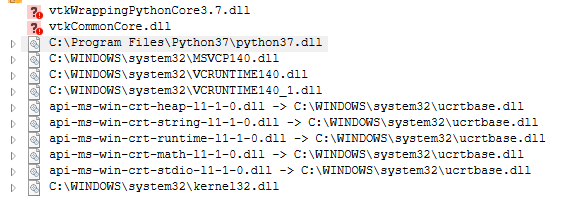
in the following screenshot you can see what dependecies the vtkCommonCore.pyd is searching  
 ![image](https://discourse.vtk.org/uploads/default/original/2X/c/cf2061434af357850e3d47b3d8ba83a32ab0d6ce.png)  
as you can see the vtkWrappingPythonCore and vtkCommonCore are not found but these are indeed inside the wheel in the _Release_ folder. Did I configured something wrong during the cmake process?

---

<div class="post-metadata">

### Author: ![dgobbi](https://discourse.vtk.org/user_avatar/discourse.vtk.org/dgobbi/32/18_2.png) [@dgobbi](https://discourse.vtk.org/u/dgobbi)
#### Post date: [December 2, 2021, 1:07pm UTC](https://discourse.vtk.org/t/vtk-9-build-help/7267/13 "2021-12-02T13:07:45Z")

</div>

In the wheel, the DLLs should be in the same folder as .pyd files (in other words, there should not be a Release folder). My guess is that the Release folder was created by Visual Studio.

@ben.boeckel is Visual Studio supported for wheel builds, or is it necessary to use Ninja?

---

<div class="post-metadata">

### Author: ![no2497](https://discourse.vtk.org/user_avatar/discourse.vtk.org/no2497/32/3226_2.png) [@no2497](https://discourse.vtk.org/u/no2497)
#### Post date: [December 2, 2021, 2:42pm UTC](https://discourse.vtk.org/t/vtk-9-build-help/7267/14 "2021-12-02T14:42:58Z")

</div>

Using ninja actually solves this issue. It creates the dlls in the vtk\_modules folder with the .pyd.

---

<div class="post-metadata">

### Author: ![no2497](https://discourse.vtk.org/user_avatar/discourse.vtk.org/no2497/32/3226_2.png) [@no2497](https://discourse.vtk.org/u/no2497)
#### Post date: [December 3, 2021, 9:23am UTC](https://discourse.vtk.org/t/vtk-9-build-help/7267/15 "2021-12-03T09:23:45Z")

</div>

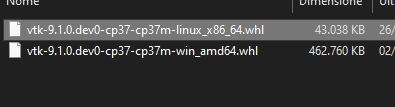
@dgobbi Moreover, do you know why there is so much size difference between the linux wheel and the windows one?  
 ![image](https://discourse.vtk.org/uploads/default/original/2X/3/36f225d55f38f029e352f6e4413b659df0ce9a78.png)  
I see that in the windows one there are also some .pdb and .ilk files that I don’t think they belong there (this ultra-sized wheel was created with ninja while the one with visual studio actually doesn’t have these files). Do you know if there is some parameter to specify to avoid this behaviour?  
Thanks

---

<div class="post-metadata">

### Author: ![dgobbi](https://discourse.vtk.org/user_avatar/discourse.vtk.org/dgobbi/32/18_2.png) [@dgobbi](https://discourse.vtk.org/u/dgobbi)
#### Post date: [December 3, 2021, 4:22pm UTC](https://discourse.vtk.org/t/vtk-9-build-help/7267/16 "2021-12-03T16:22:20Z")

</div>

Use `-D CMAKE_BUILD_TYPE=Release` to specify the configuration.

---

<div class="post-metadata">

### Author: ![ben.boeckel](https://discourse.vtk.org/letter_avatar_proxy/v4/letter/b/ea5d25/32.png) [@ben.boeckel](https://discourse.vtk.org/u/ben.boeckel)
#### Post date: [December 3, 2021, 6:42pm UTC](https://discourse.vtk.org/t/vtk-9-build-help/7267/17 "2021-12-03T18:42:48Z")

</div>

> [@dgobbi](#):
>
> is Visual Studio supported for wheel builds, or is it necessary to use Ninja?

Multi-config generators are generally untested for anything other than local builds (this includes `Ninja Multi-Config`). There’s some logic attempting to work for them, but it’s tricky in general and I don’t think the wheels have gotten any of it applied to them.

---

<div class="post-metadata">

### Author: ![sanidhya26](https://discourse.vtk.org/user_avatar/discourse.vtk.org/sanidhya26/32/3215_2.png) [@sanidhya26](https://discourse.vtk.org/u/sanidhya26)
#### Post date: [May 3, 2023, 1:08am UTC](https://discourse.vtk.org/t/vtk-9-build-help/7267/18 "2023-05-03T01:08:15Z")

</div>

Hi @dgobbi @ben.boeckel ,

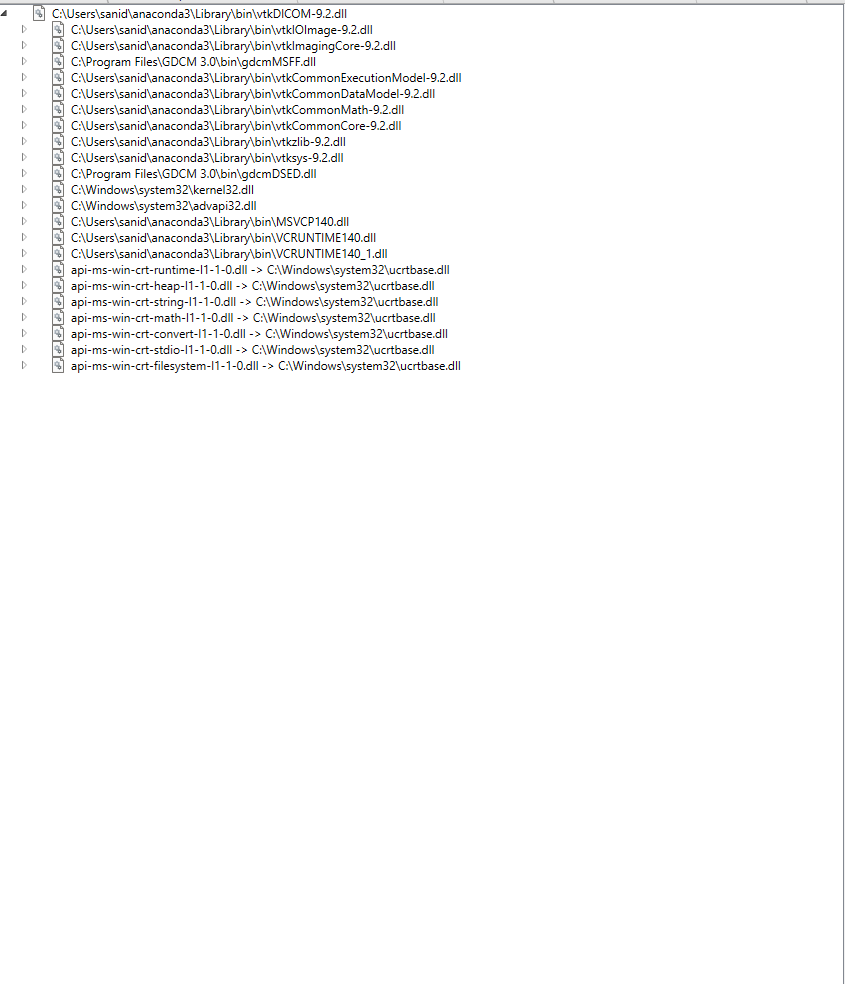
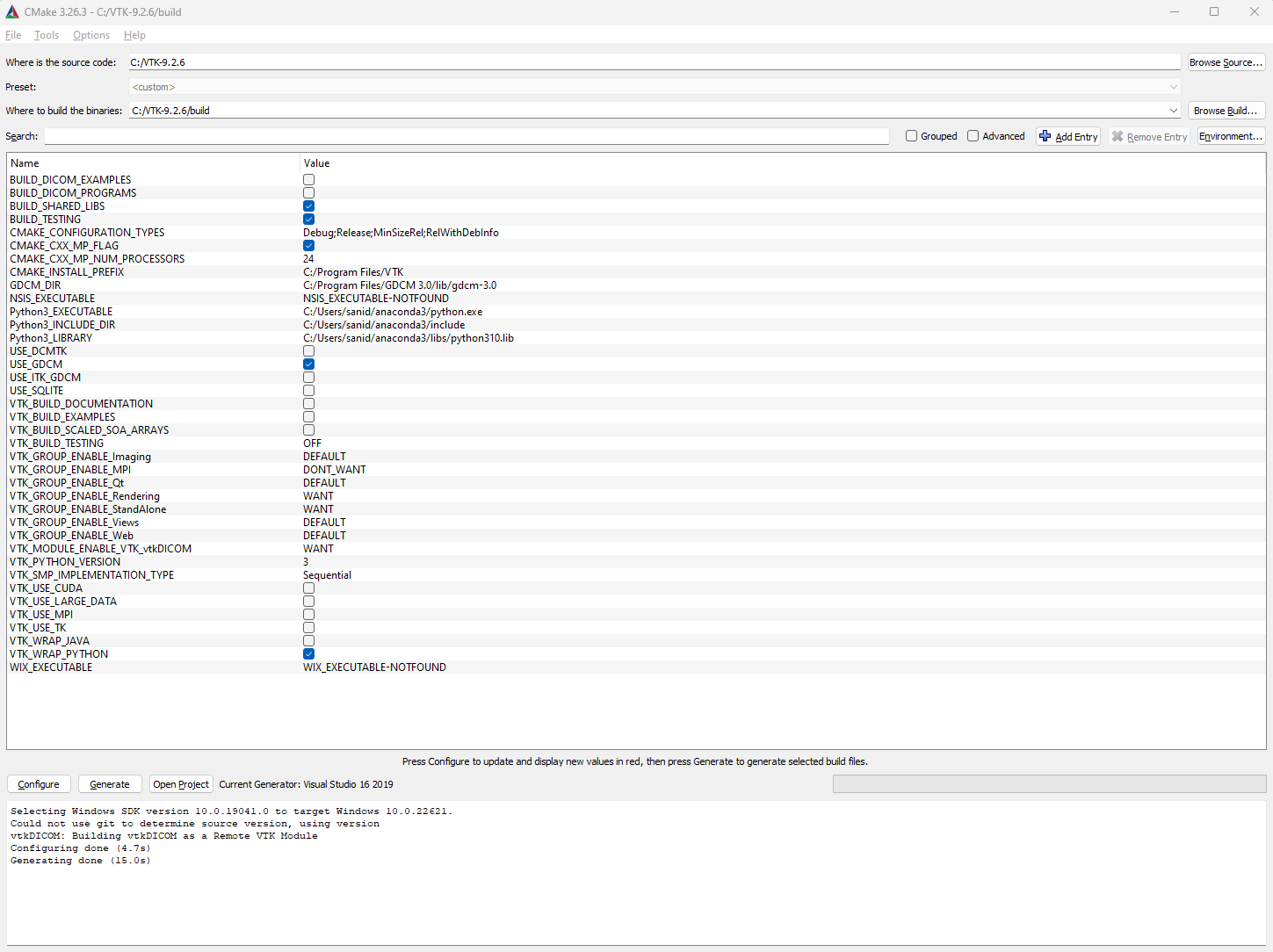
I am facing a similar issue. Trying to build the latest VTK-9.2.6 with vtkDicom, but everytime I am trying to import vtk in python, it gives dll load failed error.

Python version: 3.10.9 anaconda3  
visual studio version: 2019

cmake Screenshot:
 ![cmake_screenshot](https://discourse.vtk.org/uploads/default/original/2X/2/283aa36f194a9e37c3712a02a9bdaa43c52d7fa4.png)

Dependencies tool screenshot:

 ![dependencies_screenshot](https://discourse.vtk.org/uploads/default/original/2X/b/b64e730f334117c2b0915bfab36e5374e74fe63a.png)

Please let me know what am I missing or doing wrong here.

---

<div class="post-metadata">

### Author: ![dgobbi](https://discourse.vtk.org/user_avatar/discourse.vtk.org/dgobbi/32/18_2.png) [@dgobbi](https://discourse.vtk.org/u/dgobbi)
#### Post date: [May 3, 2023, 4:16am UTC](https://discourse.vtk.org/t/vtk-9-build-help/7267/19 "2023-05-03T04:16:46Z")

</div>

My best guess is that Python is refusing to load the gdcm DLLs because they aren’t in Python’s DLL path.

As a test, you can importing vtk like this:

```python
import os

gdcm_path = "C:/Program Files/GDCM 3.0/bin"
with os.add_dll_directory(gdcm_path) as token:
    print("importing CommonCore")
    import vtkmodules.vtkCommonCore
    print("importing RenderingOpenGL2")
    import vtkmodules.vtkRenderingOpenGL2
    print("importing all of VTK")
    import vtk

```

You can also try copying the GDCM DLLs into Anaconda’s `Library/bin` folder.

---

<div class="post-metadata">

### Author: ![sanidhya26](https://discourse.vtk.org/user_avatar/discourse.vtk.org/sanidhya26/32/3215_2.png) [@sanidhya26](https://discourse.vtk.org/u/sanidhya26)
#### Post date: [May 3, 2023, 6:27am UTC](https://discourse.vtk.org/t/vtk-9-build-help/7267/20 "2023-05-03T06:27:03Z")

</div>

Both your suggestions worked like a charm @dgobbi. Thank you so much.

[Next page](https://discourse.vtk.org/t/vtk-9-build-help/7267.md?page=2)