# VTK clipping with Python
**URL:** https://discourse.vtk.org/t/vtk-clipping-with-python/3352
**Category:** Support
**Created:** [May 20, 2020, 1:47pm UTC](https://discourse.vtk.org/t/vtk-clipping-with-python/3352 "2020-05-20T13:47:57Z")
**Posts on this page:** 8
**Page:** 1
### Author:  [@nikolay](https://discourse.vtk.org/u/nikolay)
#### Post date: [May 20, 2020, 1:47pm UTC](https://discourse.vtk.org/t/vtk-clipping-with-python/3352/1 "2020-05-20T13:47:57Z")
Hi all,
I am fairly new to VTK. I am using VTK version 8.1.2, Python 3.7.5 on Windows 10. I am trying to clip a VTK image with Python similar to the screenshot below taken from Slicer:
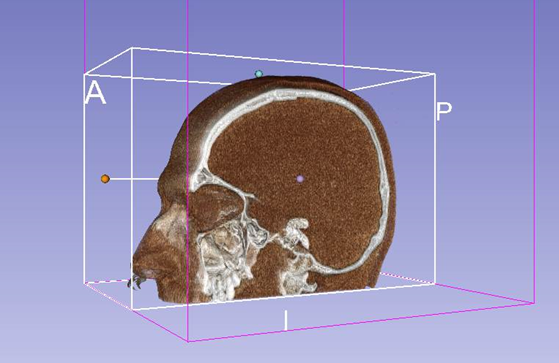
Below is the code that I manage to put together, however I have the feeling that I am missing something conceptual in VTK library because the code is hanging on line 23 (_clipper.Update()_) without any errors.
```python
import vtk
renderer = vtk.vtkRenderer()
render_window = vtk.vtkRenderWindow()
render_window.AddRenderer(renderer)
render_window_interaction = vtk.vtkRenderWindowInteractor()
render_window_interaction.SetRenderWindow(render_window)
reader = vtk.vtkStructuredPointsReader()
reader.SetFileName('.\\sample.vtk')
reader.Update()
plane = vtk.vtkPlane()
plane.SetOrigin(0.25, 0, 0)
plane.SetNormal(-1, -1, 0)
clipper = vtk.vtkClipVolume()
clipper.SetInputConnection(reader.GetOutputPort())
clipper.SetClipFunction(plane)
clipper.GenerateClipScalarsOn()
clipper.GenerateClippedOutputOn()
clipper.SetValue(0.5)
clipper.Update()
volume_mapper = vtk.vtkOpenGLGPUVolumeRayCastMapper()
volume_mapper.SetInputConnection(clipper.GetOutputPort())
volume_mapper.SetBlendModeToComposite()
volume_color = vtk.vtkColorTransferFunction()
volume_color.AddRGBPoint(0, 0.0, 0.0, 0.0)
volume_color.AddRGBPoint(500, 1.0, 0.5, 0.3)
volume_color.AddRGBPoint(1000, 1.0, 0.5, 0.3)
volume_color.AddRGBPoint(1150, 1.0, 1.0, 0.9)
volume_scalar_opacity = vtk.vtkPiecewiseFunction()
volume_scalar_opacity.AddPoint(0, 0.00)
volume_scalar_opacity.AddPoint(500, 0.15)
volume_scalar_opacity.AddPoint(1000, 0.15)
volume_scalar_opacity.AddPoint(1150, 0.85)
volume_gradient_opacity = vtk.vtkPiecewiseFunction()
volume_gradient_opacity.AddPoint(0, 0.0)
volume_gradient_opacity.AddPoint(90, 0.5)
volume_gradient_opacity.AddPoint(100, 1.0)
volume_property = vtk.vtkVolumeProperty()
volume_property.SetColor(volume_color)
volume_property.SetScalarOpacity(volume_scalar_opacity)
volume_property.SetGradientOpacity(volume_gradient_opacity)
volume_property.SetInterpolationTypeToLinear()
volume_property.ShadeOn()
volume_property.SetAmbient(0.4)
volume_property.SetDiffuse(0.6)
volume_property.SetSpecular(0.2)
volume = vtk.vtkVolume()
volume.SetMapper(volume_mapper)
volume.SetProperty(volume_property)
renderer.AddViewProp(volume)
camera = renderer.GetActiveCamera()
center = volume.GetCenter()
camera.SetFocalPoint(center[0], center[1], center[2])
camera.SetPosition(center[0] + 400, center[1], center[2])
camera.SetViewUp(0, 0, -1)
render_window.SetSize(640, 480)
render_window_interaction.Initialize()
render_window.Render()
render_window_interaction.Start()
```
Looking forward for your help!
---
### Author:  [@dgobbi](https://discourse.vtk.org/u/dgobbi)
#### Post date: [May 20, 2020, 1:55pm UTC](https://discourse.vtk.org/t/vtk-clipping-with-python/3352/2 "2020-05-20T13:55:39Z")
Remove vtkClipVolume from your pipeline. For volume rendering, the clipping is done by the mapper:
```
volume_mapper.AddClippingPlane(plane)
```
---
### Author:  [@lassoan](https://discourse.vtk.org/u/lassoan)
#### Post date: [May 20, 2020, 2:04pm UTC](https://discourse.vtk.org/t/vtk-clipping-with-python/3352/3 "2020-05-20T14:04:59Z")
Also note that you can run your code in Slicer’s Python environment and then you don’t need to reimplement any existing features just add what is new or specific to your project. You can use the full Slicer GUI, a plain Python console, or Slicer Jupyter kernel (which also provides interactive 3D and slice viewers inside the notebook).
---
### Author:  [@nikolay](https://discourse.vtk.org/u/nikolay)
#### Post date: [May 20, 2020, 2:12pm UTC](https://discourse.vtk.org/t/vtk-clipping-with-python/3352/4 "2020-05-20T14:12:15Z")
Thank you for your replay! The screenshot from my question is actually from Slicer GUI. I was not aware that Slicer had a Python console because as I said I am fairly new. Now I found it and I will play with it.
---
### Author:  [@khalil\_nacef](https://discourse.vtk.org/u/khalil_nacef)
#### Post date: [March 28, 2021, 10:57pm UTC](https://discourse.vtk.org/t/vtk-clipping-with-python/3352/5 "2021-03-28T22:57:54Z")
nikolay im working on cropping a volume set of dicom data volume with python and i need help plz i don’t
know where to start something like new vtk.js release crroping widget thanks
---
### Author:  [@kookoo9999](https://discourse.vtk.org/u/kookoo9999)
#### Post date: [November 23, 2022, 5:06pm UTC](https://discourse.vtk.org/t/vtk-clipping-with-python/3352/6 "2022-11-23T17:06:23Z")
@dgobbi
Hi, I’m new in VTK .
I’m tryna implement clipping volume in vtk8.2 with QT(c++) on windows10 like this issue.
My code is below
> VTK\_NEW(vtkSmartVolumeMapper, mapper);
> VTK\_NEW(vtkPlane, plane);
> plane-\>SetOrigin(m\_ImageData-\>GetOrigin());
> plane-\>SetNormal(-1, -1, 0);
>
> mapper-\>SetInputData(m\_ImageData);
> mapper-\>AddClippingPlane(plane);
>
> VTK\_NEW(vtkVolumeProperty, volumeProperty);
> volumeProperty-\>SetScalarOpacity(m\_OpacityFunc);
> volumeProperty-\>SetColor(m\_ColorFunc);
> volumeProperty-\>ShadeOn();
> volumeProperty-\>SetInterpolationTypeToLinear();
>
> m\_volume-\>SetMapper(mapper);
> m\_volume-\>SetProperty(volumeProperty);
but it doesn’t work , I can’t find clipping plane on volume.
would you plz know how to sovle this??
Thank you.
---
### Author:  [@dgobbi](https://discourse.vtk.org/u/dgobbi)
#### Post date: [November 23, 2022, 5:30pm UTC](https://discourse.vtk.org/t/vtk-clipping-with-python/3352/7 "2022-11-23T17:30:20Z")
This line is the mistake, because it places the plane at the corner of the volume:
> [@](#):
>
> plane-\>SetOrigin(m\_ImageData-\>GetOrigin());
If you want to see the plane, then place it at the center of the volume.
```c++
plane->SetOrigin(m_ImageData->GetCenter());
```
---
### Author:  [@kookoo9999](https://discourse.vtk.org/u/kookoo9999)
#### Post date: [November 24, 2022, 1:02am UTC](https://discourse.vtk.org/t/vtk-clipping-with-python/3352/8 "2022-11-24T01:02:34Z")
Thank you for reply and it is very useful!!
I checked clipped volume.
If you know implement circle which is ROI of volume , Can you know that??
I wanna control regieon which is plane position(or origin) by mouse interaction like the picture in this issue.
Thank you.