# vtk: code work only correctly in debug with breakpoint
**URL:** https://discourse.vtk.org/t/vtk-code-work-only-correctly-in-debug-with-breakpoint/8380
**Category:** Support
**Created:** [April 26, 2022, 12:01pm UTC](https://discourse.vtk.org/t/vtk-code-work-only-correctly-in-debug-with-breakpoint/8380 "2022-04-26T12:01:06Z")
**Posts on this page:** 7
**Page:** 1
### Author:  [@zhang-qiang-github](https://discourse.vtk.org/u/zhang-qiang-github)
#### Post date: [April 26, 2022, 12:01pm UTC](https://discourse.vtk.org/t/vtk-code-work-only-correctly-in-debug-with-breakpoint/8380/1 "2022-04-26T12:01:06Z")
I have a code:
1. do not work correctly in release
2. do not work correctly in debug without breakpoint
3. work correctly in debug with a breakpoint
The code is:
```auto
import vtkmodules.all as vtk
render = vtk.vtkRenderer()
renWin = vtk.vtkRenderWindow()
renWin.AddRenderer(render)
iren = vtk.vtkRenderWindowInteractor()
iren.SetRenderWindow(renWin)
iren.SetInteractorStyle(vtk.vtkInteractorStyleTrackballCamera())
cubeAnnotation = vtk.vtkAnnotatedCubeActor()
actors = vtk.vtkPropCollection()
cubeAnnotation.GetActors(actors)
cubeActor = list(actors)[0]
colors = vtk.vtkNamedColors()
face_colors = vtk.vtkUnsignedCharArray()
face_colors.SetNumberOfComponents(3)
face_x_plus = colors.GetColor3ub('Red')
face_x_minus = colors.GetColor3ub('Green')
face_y_plus = colors.GetColor3ub('Blue')
face_y_minus = colors.GetColor3ub('Yellow')
face_z_plus = colors.GetColor3ub('Cyan')
face_z_minus = colors.GetColor3ub('Magenta')
face_colors.InsertNextTypedTuple(face_x_minus)
face_colors.InsertNextTypedTuple(face_x_plus)
face_colors.InsertNextTypedTuple(face_y_plus)
face_colors.InsertNextTypedTuple(face_y_minus)
face_colors.InsertNextTypedTuple(face_z_plus)
face_colors.InsertNextTypedTuple(face_z_minus)
cubeActor.GetMapper().GetInput().GetCellData().SetScalars(face_colors)
cubeActor.GetMapper().Update()
cubeActor.Modified()
render.AddActor(cubeActor)
render.ResetCamera()
renWin.Render()
iren.Initialize()
iren.Start()
```
The breakpoint should be added at `cubeActor.GetMapper().GetInput().GetCellData().SetScalars(face_colors)`, and the cube will be visualizated as:
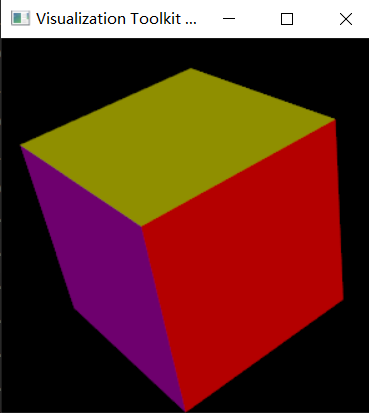
Otherwise, it do show only gray color.
The environment has been tested:
```auto
win10 & ubuntu18
vtk 9.1.0
pycharm
```
It really make me confuzed. Any suggestion is appreciated~~~
---
### Author:  [@ben.boeckel](https://discourse.vtk.org/u/ben.boeckel)
#### Post date: [May 15, 2022, 5:23pm UTC](https://discourse.vtk.org/t/vtk-code-work-only-correctly-in-debug-with-breakpoint/8380/2 "2022-05-15T17:23:06Z")
Could you describe how it doesn’t work?
---
### Author:  [@zhang-qiang-github](https://discourse.vtk.org/u/zhang-qiang-github)
#### Post date: [May 20, 2022, 11:53am UTC](https://discourse.vtk.org/t/vtk-code-work-only-correctly-in-debug-with-breakpoint/8380/3 "2022-05-20T11:53:47Z")
@ben.boeckel Thank you for your reply.
The meaning of `doesn't work` is that:
1. If I directly run the code in release, the shown result is:
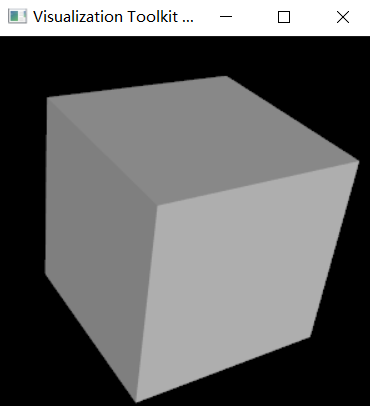
1. If I add a break point at `cubeActor.GetMapper().GetInput().GetCellData().SetScalars(face_colors)`, and run the code in debug, the result is:
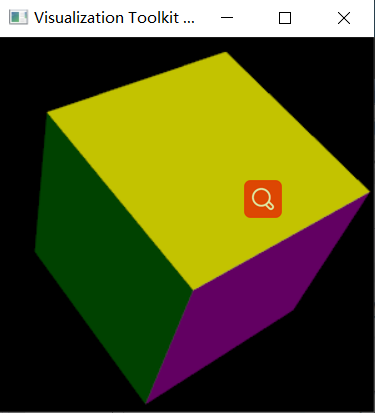
It really make me very confuzed why the result is different for debug&release.
---
### Author:  [@ben.boeckel](https://discourse.vtk.org/u/ben.boeckel)
#### Post date: [May 20, 2022, 6:49pm UTC](https://discourse.vtk.org/t/vtk-code-work-only-correctly-in-debug-with-breakpoint/8380/4 "2022-05-20T18:49:58Z")
Well, that’s certainly interesting. @mwestphal Any ideas?
---
### Author:  [@will.schroeder](https://discourse.vtk.org/u/will.schroeder)
#### Post date: [May 20, 2022, 7:02pm UTC](https://discourse.vtk.org/t/vtk-code-work-only-correctly-in-debug-with-breakpoint/8380/5 "2022-05-20T19:02:04Z")
It seems to me that the statement issued in the debugger:
`cubeActor.GetMapper().GetInput().GetCellData().SetScalars(face_colors)`
Is adding cell scalars to the input of the mapper, and then when the next render occurs the face colors of the cube change i.e., the code being run release vs debug is different so the results are different, so why is this a surprise ???
---
### Author:  [@zhang-qiang-github](https://discourse.vtk.org/u/zhang-qiang-github)
#### Post date: [May 21, 2022, 2:26pm UTC](https://discourse.vtk.org/t/vtk-code-work-only-correctly-in-debug-with-breakpoint/8380/6 "2022-05-21T14:26:50Z")
@will.schroeder Thank you for your kindly reply. But I still have two questions:
1. Why the code being run release vs debug is different? Could you please give me more details?
2. How to fix it so that I can get the same result in release with that in debug?
---
### Author:  [@danlipsa](https://discourse.vtk.org/u/danlipsa)
#### Post date: [May 21, 2022, 2:43pm UTC](https://discourse.vtk.org/t/vtk-code-work-only-correctly-in-debug-with-breakpoint/8380/7 "2022-05-21T14:43:37Z")
The code in debug mode (even more so when run inside the debugger) is different then code in release mode, so bugs the code will behave differently.
I would run your code through valgrind. Possible reasons include variables pointing to the wrong place (uninitialized, or pointing to memory that was deallocated) or buffer overruns.