# VTK color 3D image display error
**URL:** https://discourse.vtk.org/t/vtk-color-3d-image-display-error/6434
**Category:** Support
**Created:** [August 20, 2021, 10:59am UTC](https://discourse.vtk.org/t/vtk-color-3d-image-display-error/6434 "2021-08-20T10:59:54Z")
**Posts on this page:** 10
**Page:** 1
### Author:  [@Luis\_Carlos\_Carneiro](https://discourse.vtk.org/u/Luis_Carlos_Carneiro)
#### Post date: [August 20, 2021, 10:59am UTC](https://discourse.vtk.org/t/vtk-color-3d-image-display-error/6434/1 "2021-08-20T10:59:54Z")
Dear All,
I have a 3D, MHD color image display error with VTK with interactor. The image has 2.8GBytes (raw).
The problem is in Linux. My computer has 20GBytes of RAM and is i7 (Intel GPU).
VTK 9.0.3
2021-08-20 11:52:29.308 ( 5.371s) [FC3F3740] vtkVolumeTexture.cxx:739 ERR| vtkVolumeTexture (0x4c10b70): Capabilities check via proxy texture 3D allocation failed!
How I can display such big image? Despite to be color file it displays in gray level.
Thanks,
Luís Gonçalves
---
### Author:  [@Luis\_Carlos\_Carneiro](https://discourse.vtk.org/u/Luis_Carlos_Carneiro)
#### Post date: [August 20, 2021, 7:04pm UTC](https://discourse.vtk.org/t/vtk-color-3d-image-display-error/6434/2 "2021-08-20T19:04:39Z")
> glxinfo | egrep -i ‘device|memory’
> Device: Mesa Intel(R) UHD Graphics 630 (CFL GT2) (0x3e9b)
> Video memory: 3072MB
> Unified memory: yes
> GL\_AMD\_performance\_monitor, GL\_AMD\_pinned\_memory,
> GL\_AMD\_pinned\_memory, GL\_AMD\_query\_buffer\_object,
How I increase the memory limit available to Intel GPU?
---
### Author:  [@Luis\_Carlos\_Carneiro](https://discourse.vtk.org/u/Luis_Carlos_Carneiro)
#### Post date: [August 20, 2021, 8:19pm UTC](https://discourse.vtk.org/t/vtk-color-3d-image-display-error/6434/3 "2021-08-20T20:19:40Z")
Intel Memory of GPU is dynamically increased.
I have two GPUs in my portable. The Intel GPU and a Nvidia GTX 1650 with 4GBytes.
If the display in Intel GPU it gives the error reported. With GTX 1650 it displays Ok.
---
### Author:  [@Paulo\_Carvalho](https://discourse.vtk.org/u/Paulo_Carvalho)
#### Post date: [August 21, 2021, 9:36pm UTC](https://discourse.vtk.org/t/vtk-color-3d-image-display-error/6434/4 "2021-08-21T21:36:45Z")
I think you answered your own question. It seems you’re trying to load a texture too large for the graphics card’s memory. This means that you either have to add memory modules to it or buy another one with more memory.
I’m curious: why do you need such large texture? To display an image that large you have to resort to some large data management technique such as level-of-detail or multiresolution volume. You never actually need (or are able to) to load all your data in full resolution. I mean, if you’re looking at the entire cube from afar, you only need a low resolution version of it. If you zoom in, then you only need the small portions of the image that happen to intersect the viewing frustrum. That’s how we display 300GB-1TB seismic surveys cubes in petroleum industry without the need for a high-end graphics card.
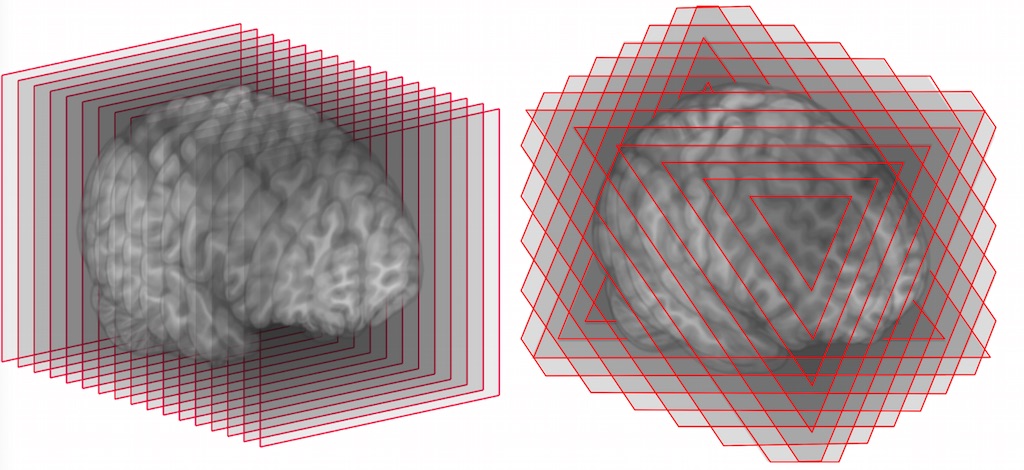
A simpler techinque for displaying large volumes is by using orthoslices or camera-facing slices. This way you reduce the problem to a number of 2D textures, reducing memory demand dramacticaly:
---
### Author:  [@Luis\_Carlos\_Carneiro](https://discourse.vtk.org/u/Luis_Carlos_Carneiro)
#### Post date: [August 21, 2021, 9:51pm UTC](https://discourse.vtk.org/t/vtk-color-3d-image-display-error/6434/5 "2021-08-21T21:51:03Z")
Thanks for the answer.
The display GPU is an Intel from the CPU. I think that if the GPU needs more memory, it dynamically uses from CPU memory (RAM shared between CPU and GPU). I suppose…
I suspect that the problem is related with Intel GPU (with CPU RAM) has not enough performance to deal to such large image. (perhaps some timeout).
The Nvidia GPU deals with it without problems. It has GDDR5 4GBytes that is much faster. It can process pixels much faster than the Intel.
---
### Author:  [@Paulo\_Carvalho](https://discourse.vtk.org/u/Paulo_Carvalho)
#### Post date: [August 21, 2021, 10:09pm UTC](https://discourse.vtk.org/t/vtk-color-3d-image-display-error/6434/6 "2021-08-21T22:09:59Z")
It doesn’t work exactly like that. Of course you can have graphics data in CPU memory. However, to display them, the data is transfered to GPU memory, not the way around (the graphics card requesting data). This means that the CPU memory is not available for the graphics card to use on demand, otherwise it would be a mess, not counting the lag resulting from constantly transferring data between both memories. The NVidia card works because it has enough memory for your texture. The other card has about 3GB, which is likely not enough for a 2.8GB texture. Remember that the graphics card has other stuff taking up its memory: shaders, vertex buffer, z-buffer, stencil buffer, back buffer, etc.
---
### Author:  [@Luis\_Carlos\_Carneiro](https://discourse.vtk.org/u/Luis_Carlos_Carneiro)
#### Post date: [August 21, 2021, 10:22pm UTC](https://discourse.vtk.org/t/vtk-color-3d-image-display-error/6434/7 "2021-08-21T22:22:15Z")
Are you certain about that?
> **[Frequently Asked Questions for Intel® Graphics Memory on Windows® 10](https://www.intel.com/content/www/us/en/support/articles/000020962/graphics.html)**
>
> Answers to frequently asked questions about Intel® graphics memory on systems using Windows® 10.
My Intel GPU:
Intel® UHD Graphics 630
---
### Author:  [@Paulo\_Carvalho](https://discourse.vtk.org/u/Paulo_Carvalho)
#### Post date: [August 22, 2021, 12:24pm UTC](https://discourse.vtk.org/t/vtk-color-3d-image-display-error/6434/8 "2021-08-22T12:24:26Z")
Look, this is not a dispute of who’s wrong and who’s right like in those forums discussing politics, right? We’re not discussing video memory from the OS standpoint, but texture rendering. I’m giving you an explanation of why you’re getting a texture allocation error. You’re trying to load a 2.8GB texture into a 3GB graphics card, and that’s marginally not possible. You can use your 20GB main memory to load the texture data from a file, but, yet, it must be transfered to the graphics card’s memory to be rendered, unless you use software rendering (disable hardware acceleration). In conclusion: I don’t see any fault in VTK here, just limited hardware combined with a naïve way to handle a large data set.
take care.
---
### Author:  [@Luis\_Carlos\_Carneiro](https://discourse.vtk.org/u/Luis_Carlos_Carneiro)
#### Post date: [August 22, 2021, 12:29pm UTC](https://discourse.vtk.org/t/vtk-color-3d-image-display-error/6434/9 "2021-08-22T12:29:03Z")
All sites in internet says that Intel GPU uses the RAM of the CPU and it is dynamically allocated. Seems that the 3GBytes can be expanded dynamically.
---
### Author:  [@Luis\_Carlos\_Carneiro](https://discourse.vtk.org/u/Luis_Carlos_Carneiro)
#### Post date: [September 13, 2021, 12:10pm UTC](https://discourse.vtk.org/t/vtk-color-3d-image-display-error/6434/10 "2021-09-13T12:10:22Z")
I continue to receive this error even with smaller images 1.1Gbytes raw images in Linux.
2021-08-20 11:52:29.308 ( 5.371s) [FC3F3740] vtkVolumeTexture.cxx:739 ERR| vtkVolumeTexture (0x4c10b70): Capabilities check via proxy texture 3D allocation failed!