# VTK error: no override found for ‘vtkImageSliceMapper'
**URL:** https://discourse.vtk.org/t/vtk-error-no-override-found-for-vtkimageslicemapper/4313
**Category:** Support
**Created:** [September 28, 2020, 2:45pm UTC](https://discourse.vtk.org/t/vtk-error-no-override-found-for-vtkimageslicemapper/4313 "2020-09-28T14:45:13Z")
**Posts on this page:** 18
**Page:** 1
### Author:  [@Luis\_Carlos\_Carneiro](https://discourse.vtk.org/u/Luis_Carlos_Carneiro)
#### Post date: [September 28, 2020, 2:45pm UTC](https://discourse.vtk.org/t/vtk-error-no-override-found-for-vtkimageslicemapper/4313/1 "2020-09-28T14:45:13Z")
Dear all,
I am running an example in VTK and it is giving the following error:
vtkImageSliceMapper.cxx:36 WARN| Error: no override found for ‘vtkImageSliceMapper’.
1st I compiled in Windows the VTK
2nd I included the directory of the include files
3rd I copied all the dll to the program directory. Also include in compilation all the .lib.
The example is
[https://vtk.org/Wiki/VTK/Examples/Cxx/IO/MetaImageReader](https://vtk.org/Wiki/VTK/Examples/Cxx/IO/MetaImageReader)
The error is in this figure:
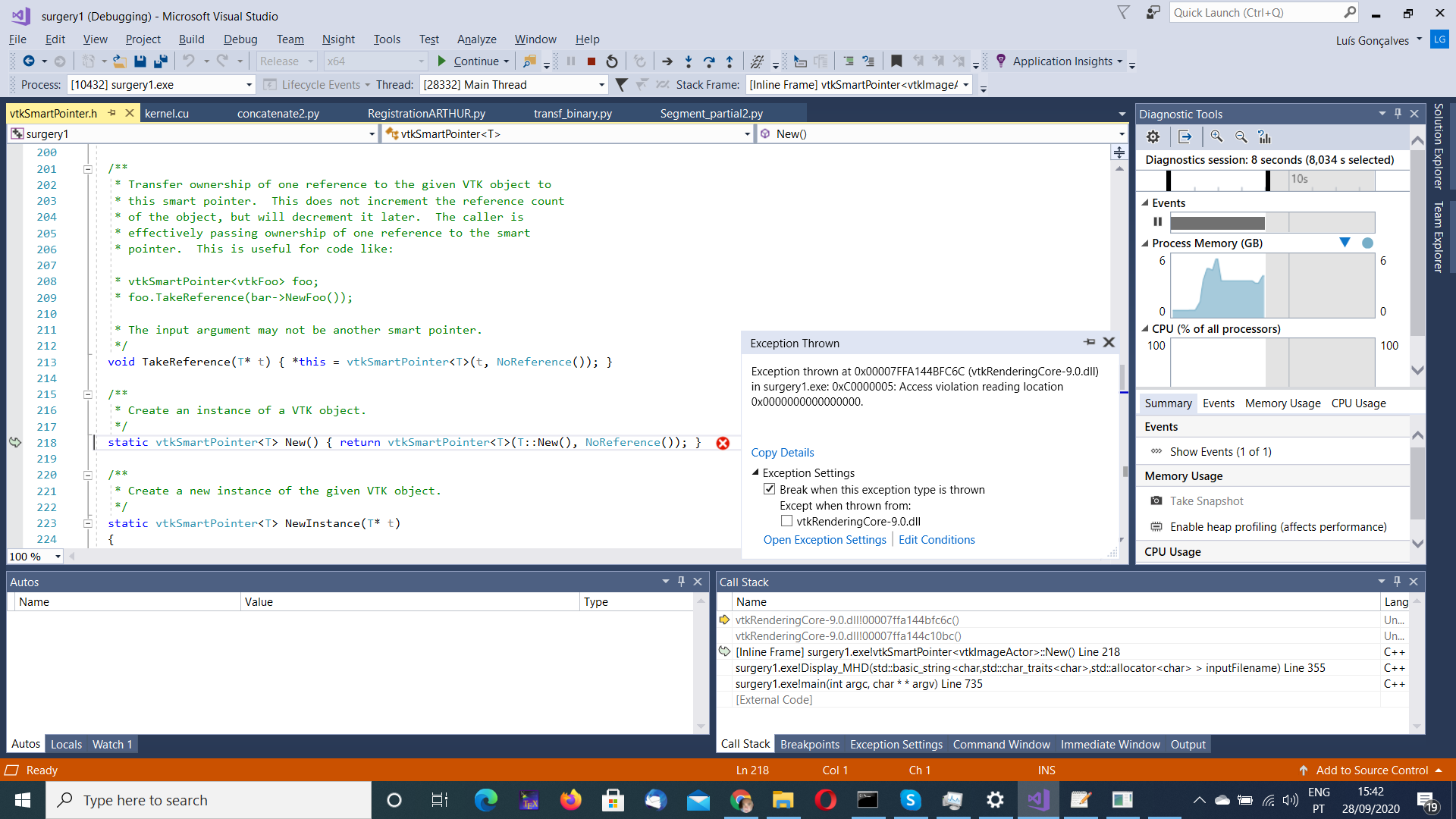
Seems giving error in a “new” but I have plenty of memory (20GBytes total)
Can anyone give an advise?
Thanks,
Luis Gonçalves
---
### Author:  [@Luis\_Carlos\_Carneiro](https://discourse.vtk.org/u/Luis_Carlos_Carneiro)
#### Post date: [September 28, 2020, 10:04pm UTC](https://discourse.vtk.org/t/vtk-error-no-override-found-for-vtkimageslicemapper/4313/2 "2020-09-28T22:04:28Z")
Same happens in VTK 8.2.
Intel Graphics UHD 630
In Python a similar example works.
---
### Author:  [@dgobbi](https://discourse.vtk.org/u/dgobbi)
#### Post date: [September 29, 2020, 1:44pm UTC](https://discourse.vtk.org/t/vtk-error-no-override-found-for-vtkimageslicemapper/4313/3 "2020-09-29T13:44:54Z")
This error means that vtkOpenGLImageSliceMapper is missing. If you link the vtkRenderingOpenGL2 library into your app, the error should go away. The vtkOpenGLImageSliceMapper class is the “implementation” of the vtkImageSliceMapper class, i.e. when you call vtkImageSliceMapper::New(), a vtkOpenGLImageSliceMapper is actually created.
---
### Author:  [@Luis\_Carlos\_Carneiro](https://discourse.vtk.org/u/Luis_Carlos_Carneiro)
#### Post date: [September 29, 2020, 7:40pm UTC](https://discourse.vtk.org/t/vtk-error-no-override-found-for-vtkimageslicemapper/4313/4 "2020-09-29T19:40:36Z")
No, it is not the problem.
In line:
actor-\>GetMapper()-\>SetInputConnection(reader-\>GetOutput());
gives:
no instance of overloaded function “vtkImageMapper3D::SetInputConnection” matches the argument list.
Thanks for any help,
Luis Gonçalves
---
### Author:  [@dgobbi](https://discourse.vtk.org/u/dgobbi)
#### Post date: [September 29, 2020, 8:36pm UTC](https://discourse.vtk.org/t/vtk-error-no-override-found-for-vtkimageslicemapper/4313/5 "2020-09-29T20:36:36Z")
This new error that you are reporting is completely different from the first error you reported. Fortunately, it has an easy fix. Use `GetOutputPort()` instead of `GetOutput()`:
```auto
actor->GetMapper()->SetInputConnection(reader->GetOutputPort());
```
The pattern is always one of these:
```auto
a->SetInputData(b->GetOutput());
a->SetInputConnection(b->GetOutputPort());
```
The first one just passes the data object from ‘a’ to ‘b’.
The second one creates a pipeline connection between ‘a’ and ‘b’.
---
### Author:  [@Luis\_Carlos\_Carneiro](https://discourse.vtk.org/u/Luis_Carlos_Carneiro)
#### Post date: [September 29, 2020, 8:56pm UTC](https://discourse.vtk.org/t/vtk-error-no-override-found-for-vtkimageslicemapper/4313/6 "2020-09-29T20:56:54Z")
Ok, I made some changes and I made an error. Now I corrected and returned the former error. The former error is a runtime error.
Visual 2017
The library(vtkRenderingOpenGL2 and all others of VTK) is in Properties-\>Linker-\>Input-\>Additional Dependencies
\*.dll(s) copied to x64\Release
Properties-\>VC++ Directories-\>Library Directories = C:\Program Files (x86)\VTK\lib
Properties-\>VC++ Directories-\>Include Directories = C:\Program Files (x86)\VTK\include\vtk-9.0
Properties-\>Linker-\>General-\>Additional Library Directories-\>C:\Program Files (x86)\VTK\lib
---
### Author:  [@dgobbi](https://discourse.vtk.org/u/dgobbi)
#### Post date: [September 29, 2020, 9:13pm UTC](https://discourse.vtk.org/t/vtk-error-no-override-found-for-vtkimageslicemapper/4313/7 "2020-09-29T21:13:21Z")
Aha, you aren’t using cmake. With cmake, the VTK overrides are handled automatically. But since you are doing everything in Visual Studio, you will have to add some extra steps to make it work.
Unfortunately, I forget the details, but if you search for “VTK AUTOINIT” something might come up.
---
### Author:  [@Luis\_Carlos\_Carneiro](https://discourse.vtk.org/u/Luis_Carlos_Carneiro)
#### Post date: [September 29, 2020, 9:16pm UTC](https://discourse.vtk.org/t/vtk-error-no-override-found-for-vtkimageslicemapper/4313/8 "2020-09-29T21:16:11Z")
I generated the Visual Projects of VTK 9.0.1 with cmake-gui.
---
### Author:  [@dgobbi](https://discourse.vtk.org/u/dgobbi)
#### Post date: [September 29, 2020, 9:17pm UTC](https://discourse.vtk.org/t/vtk-error-no-override-found-for-vtkimageslicemapper/4313/9 "2020-09-29T21:17:04Z")
But did you add the extra library with cmake, or did you add it in the Visual Studio GUI?
---
### Author:  [@Luis\_Carlos\_Carneiro](https://discourse.vtk.org/u/Luis_Carlos_Carneiro)
#### Post date: [September 29, 2020, 9:22pm UTC](https://discourse.vtk.org/t/vtk-error-no-override-found-for-vtkimageslicemapper/4313/10 "2020-09-29T21:22:58Z")
First, I generated the projects (Visual 2017, x64, Release) with cmake-gui. Then I loaded the “INSTALL” project in Visual. And build ALL-BUILD. And then build INSTALL.
vtkRenderingOpenGL2 is there that way.
---
### Author:  [@dgobbi](https://discourse.vtk.org/u/dgobbi)
#### Post date: [September 29, 2020, 9:25pm UTC](https://discourse.vtk.org/t/vtk-error-no-override-found-for-vtkimageslicemapper/4313/11 "2020-09-29T21:25:05Z")
So you added the library with the `target_link_libraries()` command?
What I mean is, you’ll have to show me what you did in your CMakeLists.txt in order for me to know whether it was done correctly.
---
### Author:  [@Luis\_Carlos\_Carneiro](https://discourse.vtk.org/u/Luis_Carlos_Carneiro)
#### Post date: [September 29, 2020, 9:30pm UTC](https://discourse.vtk.org/t/vtk-error-no-override-found-for-vtkimageslicemapper/4313/12 "2020-09-29T21:30:18Z")
The CMakeLists.txt is the one that came with VTK package.
---
### Author:  [@dgobbi](https://discourse.vtk.org/u/dgobbi)
#### Post date: [September 29, 2020, 9:33pm UTC](https://discourse.vtk.org/t/vtk-error-no-override-found-for-vtkimageslicemapper/4313/13 "2020-09-29T21:33:50Z")
Right. But you didn’t make a CMakeLists.txt for your own application.
---
### Author:  [@Luis\_Carlos\_Carneiro](https://discourse.vtk.org/u/Luis_Carlos_Carneiro)
#### Post date: [September 29, 2020, 9:35pm UTC](https://discourse.vtk.org/t/vtk-error-no-override-found-for-vtkimageslicemapper/4313/14 "2020-09-29T21:35:16Z")
I simply configurate the Project Properties in Visual like I have in a post above.
The project is a CUDA project but I also isolated this code in an other project and gave the same error.
Windows SDK Version 10.0.17763.0
---
### Author:  [@dgobbi](https://discourse.vtk.org/u/dgobbi)
#### Post date: [September 29, 2020, 10:01pm UTC](https://discourse.vtk.org/t/vtk-error-no-override-found-for-vtkimageslicemapper/4313/15 "2020-09-29T22:01:15Z")
See [https://vtk.org/Wiki/VTK/VTK\_6\_Migration/Factories\_now\_require\_defines](https://vtk.org/Wiki/VTK/VTK_6_Migration/Factories_now_require_defines) (the factory overrides are still done similarly in VTK 9).
The factory overrides are mostly automated if you configure your project with a CMakeLists.txt, as I’ve mentioned before in this thread. If you do the configuration within visual studio, you have to do extra steps. Again, I’m just repeating what I’ve said before.
---
### Author:  [@Luis\_Carlos\_Carneiro](https://discourse.vtk.org/u/Luis_Carlos_Carneiro)
#### Post date: [September 29, 2020, 11:29pm UTC](https://discourse.vtk.org/t/vtk-error-no-override-found-for-vtkimageslicemapper/4313/16 "2020-09-29T23:29:10Z")
I am following:
[https://vtk.org/pipermail/vtkusers/2017-October/100123.html](https://vtk.org/pipermail/vtkusers/2017-October/100123.html)
trying to run WhatModulesVTK.py but requires Python 2.
I put 4 modules and stopped giving error and opens a dark Window. No picture. No error. It went out with Exit Code 0.
#include \
VTK\_MODULE\_INIT(vtkInteractionStyle);
VTK\_MODULE\_INIT(vtkRenderingOpenGL2);
VTK\_MODULE\_INIT(vtkRenderingVolumeOpenGL2);
VTK\_MODULE\_INIT(vtkRenderingFreeType);
Is better way to find out the remaining modules?
After of above:
WhatModulesVTK.py gave:
find\_package(VTK COMPONENTS
IOImage
InteractionStyle
RenderingCore
)
I added:
VTK\_MODULE\_INIT(vtkIOImage);
VTK\_MODULE\_INIT(vtkRenderingCore);
But gave linking error despite the libraries are there for linking.
---
### Author:  [@Luis\_Carlos\_Carneiro](https://discourse.vtk.org/u/Luis_Carlos_Carneiro)
#### Post date: [September 30, 2020, 1:11am UTC](https://discourse.vtk.org/t/vtk-error-no-override-found-for-vtkimageslicemapper/4313/17 "2020-09-30T01:11:07Z")
It is working. The not working was a mhd color image (MET\_UCHAR\_ARRAY). The one that worked is MET\_SHORT mha.
---
### Author:  [@PONPAT](https://discourse.vtk.org/u/PONPAT)
#### Post date: [February 25, 2024, 9:11am UTC](https://discourse.vtk.org/t/vtk-error-no-override-found-for-vtkimageslicemapper/4313/18 "2024-02-25T09:11:17Z")
Hello,
I also got the same error: Error: no override found for ‘vtkRayCastImageDisplayHelper’. Although I have added this library to the project configuration:C:\Program Files\VTK\lib\vtkRenderingVolumeOpenGL2-9.3.lib.
Thanks for any help.
PonPat