# VTK Examples
**URL:** https://discourse.vtk.org/t/vtk-examples/16094
**Category:** Announcements
**Created:** [October 15, 2025, 6:07am UTC](https://discourse.vtk.org/t/vtk-examples/16094 "2025-10-15T06:07:12Z")
**Posts on this page:** 5
**Page:** 1
### Author:  [@amaclean](https://discourse.vtk.org/u/amaclean)
#### Post date: [October 15, 2025, 6:07am UTC](https://discourse.vtk.org/t/vtk-examples/16094/1 "2025-10-15T06:07:13Z")
There has been a rewrite/upgrade of the CameraOrientationWidget example.
There is a new [C++](https://examples.vtk.org/site/Cxx/Widgets/CameraOrientationWidget/) version and a new [PythonicAPI](https://examples.vtk.org/site/PythonicAPI/Widgets/CameraOrientationWidget/) version. WASM now works with the C++ version.
These two new versions take into account all the recent changes to the [vtkCameraOrientationWidget](https://vtk.org/doc/nightly/html/classvtkCameraOrientationWidget.html), namely, axes labels and colors along with the positioning of the widget can now be easily changed.
The code demonstrates how to to automatically change axes labels and colors depending upon the object being viewed. You can also reposition the widget, the option `-r` repositions the widget to the upper right corner.
The code for setting up labels, colors and making the widget has been moved into functions to make it easier to implement in your own code. Note that, where colors are used, we pass the original vtkNamedColors object from main() to these functions. This is to ensure that if you define your own colors then these can be easily passed into these functions.
Look at the history section at the end of the description to see the relevant MRs corresponding to when these improvements were introduced.
Thanks to Jaswant Panchumarti and Shelly Belsky for making this a really useful widget.
Enjoy
---
### Author:  [@cory.quammen](https://discourse.vtk.org/u/cory.quammen)
#### Post date: [October 15, 2025, 5:08pm UTC](https://discourse.vtk.org/t/vtk-examples/16094/2 "2025-10-15T17:08:39Z")
That’s awesome, thank you, Andrew!
---
### Author:  [@bistek](https://discourse.vtk.org/u/bistek)
#### Post date: [October 20, 2025, 4:07pm UTC](https://discourse.vtk.org/t/vtk-examples/16094/3 "2025-10-20T16:07:16Z")
Hello, how does it work the `-r` option in Python?
I noticed where you say “You can also reposition the widget, the option `-r` repositions the widget to the upper right corner.”, and this could provide a workaround for a problem we have with PySide and PyVista in our PZero application, with the widget being huge and in the middle of the view.
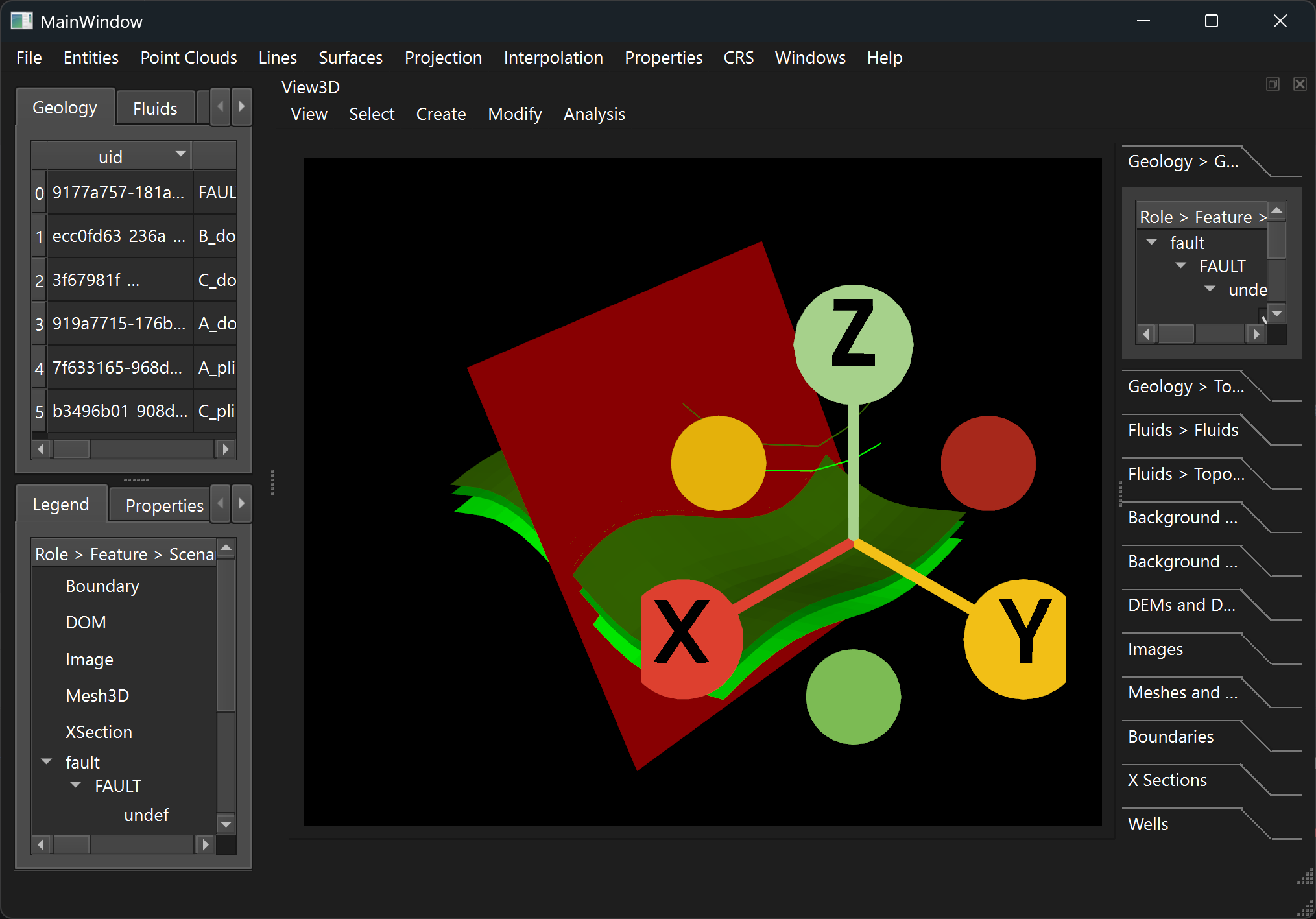
>
>
> The orientation widget in VTK views has one unexpected behavior and another prob…lem (explained below but to be solved).
>
> Expected to be solved: the widget is active in map and cross-section views, that are rotated if the widget axes are clicked. To solve this the widget interaction must be deactivated in these views.
>
> Unexpected: when a 3D view is opened, the widget appears huge, and is resized after the view is resized. For some reason to be investigated, the widget size is OK in map and cross-section views.
>
>
> !\[Image\](https://github.com/user-attachments/assets/5f0ea764-2463-4073-b5d1-afad18856df9)
>
>
>
> !\[Image\](https://github.com/user-attachments/assets/1f0674fa-e956-4281-a6b7-11b9544fb40c)
---
### Author:  [@amaclean](https://discourse.vtk.org/u/amaclean)
#### Post date: [October 21, 2025, 6:04am UTC](https://discourse.vtk.org/t/vtk-examples/16094/4 "2025-10-21T06:04:24Z")
You may have to wait for the next release of VTK,
However have a look at vtkCameraOrientationRepresentation for what can be done.
Also doing a reset camera before the render may help:
```Python
ren.ResetCamera() ren_win.Render() iren.Initialize() iren.Start()
```
Finally, remember that the interactor must be set prior to enabling the Camera Orientation Widget.
---
### Author:  [@bistek](https://discourse.vtk.org/u/bistek)
#### Post date: [October 30, 2025, 12:47pm UTC](https://discourse.vtk.org/t/vtk-examples/16094/5 "2025-10-30T12:47:35Z")
Hi, I’ve done some testing but found no solution.
Actually, some of the methods you cite are not exposed, since I’m using the [Plotter of PyVista](https://docs.pyvista.org/api/plotting/_autosummary/pyvista.plotter#pyvista.Plotter) in Qt, with [pyvistaqt](https://qtdocs.pyvista.org/).
Maybe @banesullivan could provide some suggestion?
Thanks!