# VTK Extrude Polygon Points and Holes Issue
**URL:** https://discourse.vtk.org/t/vtk-extrude-polygon-points-and-holes-issue/8642
**Category:** Development
**Tags:** python
**Created:** [June 2, 2022, 8:24am UTC](https://discourse.vtk.org/t/vtk-extrude-polygon-points-and-holes-issue/8642 "2022-06-02T08:24:10Z")
**Posts on this page:** 11
**Page:** 1
### Author:  [@USMANHEART](https://discourse.vtk.org/u/USMANHEART)
#### Post date: [June 2, 2022, 8:24am UTC](https://discourse.vtk.org/t/vtk-extrude-polygon-points-and-holes-issue/8642/1 "2022-06-02T08:24:10Z")
I am using VTK for creating my meshes. I am new to it and I am facing 2 issues.
1. I can’t find proper documentation to add holes into polygon mesh
2. Polygon curves have issue
My Code sample is:
```auto
def extrude_polygon(vertices, holes, extrude):
cell = vtkIdList()
points = [[point[0], point[1]] for point in vertices]
# points = remove_recursion(points)
# Create points
poly_points = vtkPoints()
poly_points.SetDataTypeToDouble()
[(poly_points.InsertNextPoint(pt[0], pt[1], 0), cell.InsertNextId(i)) for i, pt in enumerate(points)]
# Create a PolyData object and add points
pd = vtkPolyData()
pd.Allocate(1, 1)
pd.SetPoints(poly_points)
# pd.InsertNextCell(VTK_POLYGON, cell)
pd.InsertNextCell(vtkConstants.VTK_POLYGON, cell)
prod = vtkTrivialProducer()
prod.SetOutput(pd)
extr = vtkLinearExtrusionFilter()
extr.SetInputConnection(prod.GetOutputPort())
extr.SetVector(0, 0, extrude)
pn = vtkPolyDataNormals()
pn.SetInputConnection(extr.GetOutputPort())
pn.AutoOrientNormalsOn()
return pn
```
Current Output:
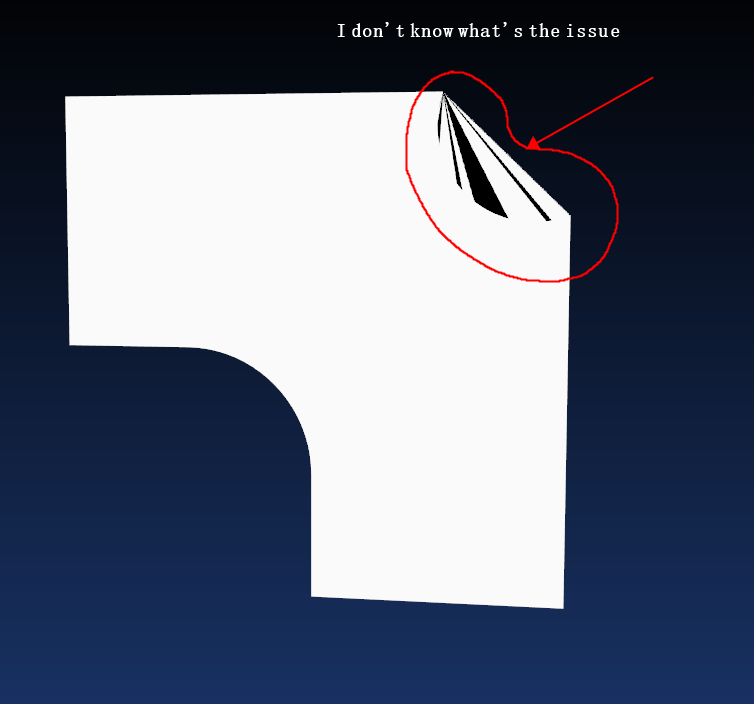
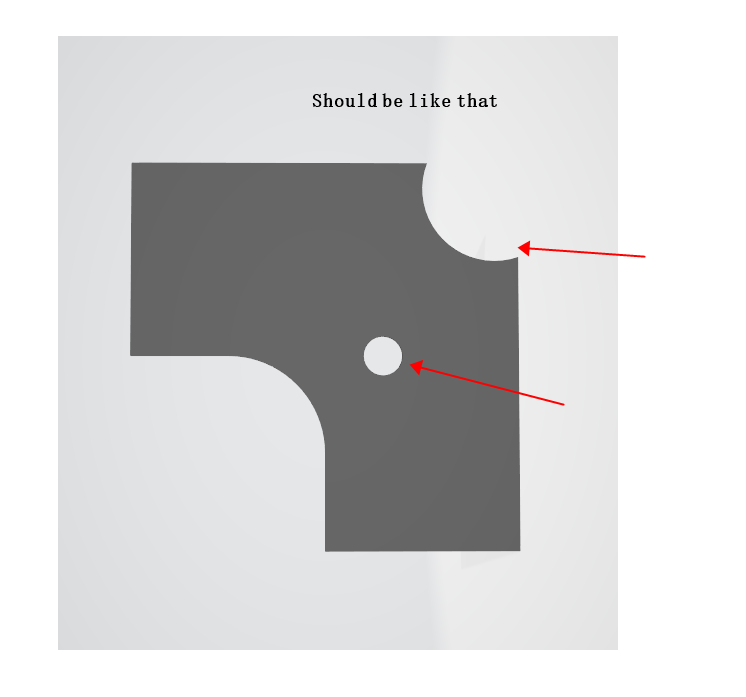
Expected Output:
---
### Author:  [@mau\_igna\_06](https://discourse.vtk.org/u/mau_igna_06)
#### Post date: [June 2, 2022, 7:28pm UTC](https://discourse.vtk.org/t/vtk-extrude-polygon-points-and-holes-issue/8642/2 "2022-06-02T19:28:10Z")
Hi
1. Maybe you can try vtkCutter
2. Maybe the problem is that your polygon is not convex
Hope it helps
---
### Author:  [@will.schroeder](https://discourse.vtk.org/u/will.schroeder)
#### Post date: [June 2, 2022, 7:52pm UTC](https://discourse.vtk.org/t/vtk-extrude-polygon-points-and-holes-issue/8642/3 "2022-06-02T19:52:32Z")
Two quick comments which may or may not be relevant:
- Rendering non-convex polygons will most likely produce bad results (this is because most rendering libraries often use simple methods to tessellate n-sided polygons which do not take into account concave situations). Render the polygon in wireframe and see if the outline looks correct. If you need to render non-convex polygons, you’re going to have to triangulate them.
- VTK has no direct support for complex polygons (including those with holes). David Gobbi created a very nice class called vtkContourTriangulator which can triangulate loops with inner loops.
---
### Author:  [@marcomusy](https://discourse.vtk.org/u/marcomusy)
#### Post date: [June 2, 2022, 8:51pm UTC](https://discourse.vtk.org/t/vtk-extrude-polygon-points-and-holes-issue/8642/4 "2022-06-02T20:51:50Z")
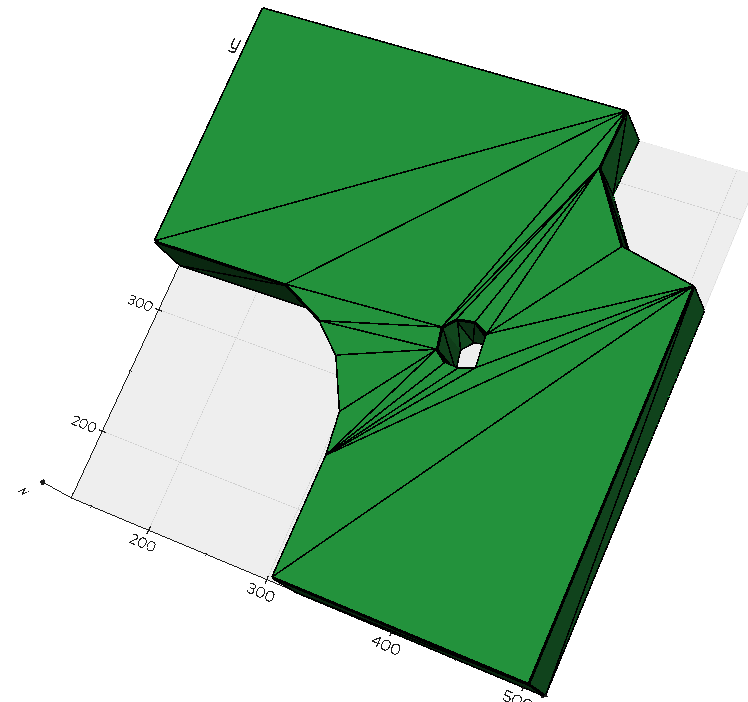
the `vtkContourTriangulator` works like a charm:
```python
from vedo import Line, merge, show
outpts = [
(515.5, 146.0),
(516.1, 429.8),
(460.0, 440.8),
(423.3, 489.6),
(425.2, 534.2),
(131.6, 532.3),
(132.2, 337.7),
(242.7, 339.5),
(278.7, 323.0),
(300.7, 304.1),
(320.2, 268.1),
(323.9, 236.4),
(323.9, 146.0),
]
inpts = [
(395.9, 352.9),
(384.9, 358.4),
(371.5, 356.0),
(364.1, 347.4),
(367.2, 331.6),
(376.4, 324.8),
(386.7, 324.2),
(398.3, 328.5),
]
l1 = Line(outpts, lw=3, closed=True)
l2 = Line(inpts, lw=3, closed=True)
m = merge(l1, l2).triangulate().lw(0)
sm = m.extrude(50).flat().lighting("default")
show(l1, l2, sm, axes=1)
```
---
### Author:  [@USMANHEART](https://discourse.vtk.org/u/USMANHEART)
#### Post date: [June 3, 2022, 9:15am UTC](https://discourse.vtk.org/t/vtk-extrude-polygon-points-and-holes-issue/8642/5 "2022-06-03T09:15:25Z")
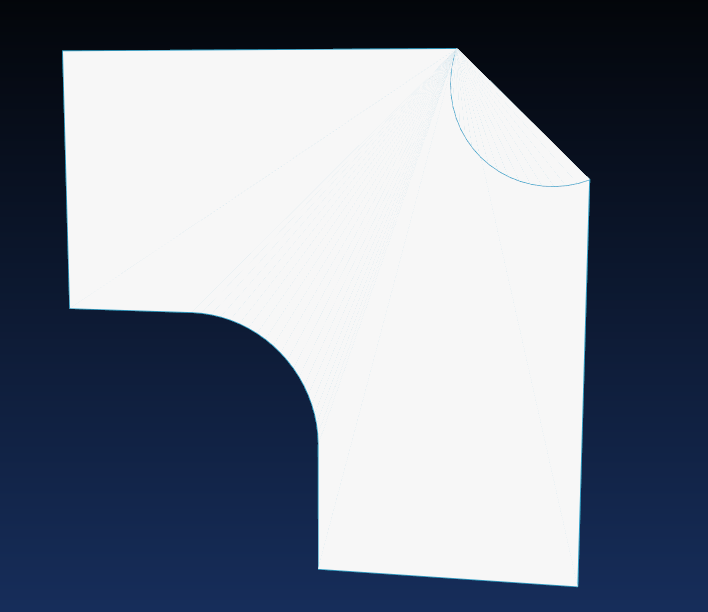
I have checked Wireframe and Exported as an GLTF, it is fine.
This is Wireframe
This is GLTF

But there is no UVs in GLTF/OBJ model.
Could you please guide me if I am missing anything?
---
### Author:  [@mau\_igna\_06](https://discourse.vtk.org/u/mau_igna_06)
#### Post date: [June 3, 2022, 10:09am UTC](https://discourse.vtk.org/t/vtk-extrude-polygon-points-and-holes-issue/8642/6 "2022-06-03T10:09:40Z")
It would be great uf someine could port Marco’s code to vtk
---
### Author:  [@USMANHEART](https://discourse.vtk.org/u/USMANHEART)
#### Post date: [June 3, 2022, 11:27am UTC](https://discourse.vtk.org/t/vtk-extrude-polygon-points-and-holes-issue/8642/7 "2022-06-03T11:27:34Z")
Sir my main aim is to export these shapes as OBJ, GLB, GLTF etc.
When I export GLTF/OBJ, the shape is fine. There’s no issue with appearance.
The only problem now is there is no UV inside polygon mesh. So my model in other programs doesn’t have textures because there is no UVs
It seems like I’m missing something.
I’m completely new to it, if you have any idea regarding this, it would be really appericiated.
Thanks
---
### Author:  [@USMANHEART](https://discourse.vtk.org/u/USMANHEART)
#### Post date: [June 3, 2022, 4:17pm UTC](https://discourse.vtk.org/t/vtk-extrude-polygon-points-and-holes-issue/8642/8 "2022-06-03T16:17:39Z")
Can you share demo of how can I use this to assign texture and export as a 3D model (GLB, OBJ etc)?
---
### Author:  [@marcomusy](https://discourse.vtk.org/u/marcomusy)
#### Post date: [June 3, 2022, 6:09pm UTC](https://discourse.vtk.org/t/vtk-extrude-polygon-points-and-holes-issue/8642/9 "2022-06-03T18:09:23Z")
```python
from vedo import Line, Mesh, merge
# ...
l1 = Line(outpts, closed=True)
l2 = Line(inpts, closed=True)
m = merge(l1, l2).triangulate().lw(0)
sm = m.extrude(50).flat().lighting("default")
sm.texture("https://upload.wikimedia.org/wikipedia/commons/thumb/3/3a/Cat03.jpg/1200px-Cat03.jpg")
sm.write("test.obj").print()
sm.show(axes=1).close()
# read back and show again:
Mesh("test.obj").texture("Cat03.jpg", tcoords="TCoords").show().close()
```
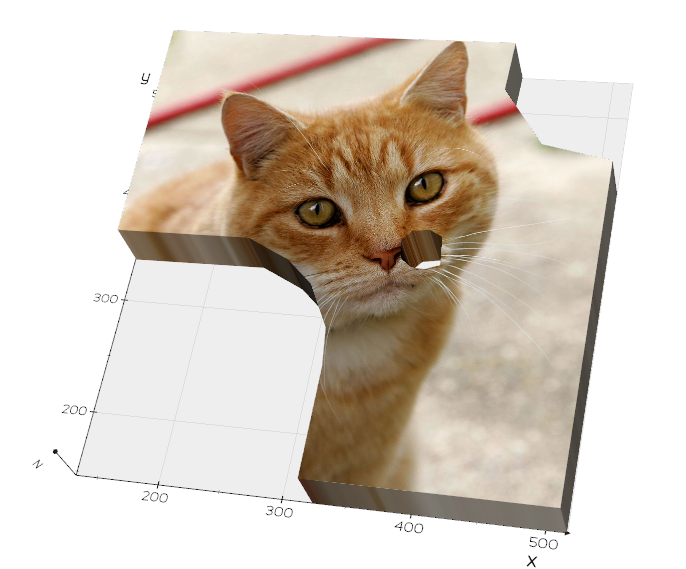
you need to:
`pip install -U git+https://github.com/marcomusy/vedo.git`
@mau_igna_06
that is very easy, just use `vtkAppendPolyData` and then `vtkContourTriangulator` like in the line:
`merge(l1, l2).triangulate()`
---
### Author:  [@mau\_igna\_06](https://discourse.vtk.org/u/mau_igna_06)
#### Post date: [June 4, 2022, 9:22am UTC](https://discourse.vtk.org/t/vtk-extrude-polygon-points-and-holes-issue/8642/10 "2022-06-04T09:22:19Z")
Thank you Marco
You habe done a really great work simplifying vtk for newcommers
Mauro
---
### Author:  [@USMANHEART](https://discourse.vtk.org/u/USMANHEART)
#### Post date: [June 4, 2022, 7:19pm UTC](https://discourse.vtk.org/t/vtk-extrude-polygon-points-and-holes-issue/8642/11 "2022-06-04T19:19:53Z")
Thank you so much. As you said, This works like a Charm. Great recommendation