# vtk for Python: nii.gz image in 3D reconstruction but no options to set colors
**URL:** https://discourse.vtk.org/t/vtk-for-python-nii-gz-image-in-3d-reconstruction-but-no-options-to-set-colors/4451
**Category:** Support
**Created:** [October 20, 2020, 5:30am UTC](https://discourse.vtk.org/t/vtk-for-python-nii-gz-image-in-3d-reconstruction-but-no-options-to-set-colors/4451 "2020-10-20T05:30:28Z")
**Posts on this page:** 5
**Page:** 1
### Author:  [@lihanhu](https://discourse.vtk.org/u/lihanhu)
#### Post date: [October 20, 2020, 5:30am UTC](https://discourse.vtk.org/t/vtk-for-python-nii-gz-image-in-3d-reconstruction-but-no-options-to-set-colors/4451/1 "2020-10-20T05:30:28Z")
I did a cell segmentation program, and the results of the segmentation were marked. But in 3D reconstruction, I don’t know how to mark the result I marked with different colors and color the target object. ☹
---
### Author:  [@lihanhu](https://discourse.vtk.org/u/lihanhu)
#### Post date: [October 20, 2020, 5:31am UTC](https://discourse.vtk.org/t/vtk-for-python-nii-gz-image-in-3d-reconstruction-but-no-options-to-set-colors/4451/2 "2020-10-20T05:31:33Z")
here is my code for 3D reconstruction and ‘path’ is my image folder.
aRenderer = vtk.vtkRenderer()
renWin = vtk.vtkRenderWindow()
renWin.AddRenderer(aRenderer)
iren = vtk.vtkRenderWindowInteractor()
iren.SetRenderWindow(renWin)
v16 = vtk.vtkNIFTIImageReader()
v16.SetDataByteOrderToLittleEndian()
v16.SetFileName(path)
mc = vtk.vtkMarchingCubes()
mc.SetInputConnection(v16.GetOutputPort())
mc.SetValue(0,2)
skinMapper = vtk.vtkPolyDataMapper();
skinMapper.SetInputConnection(mc.GetOutputPort())
skinMapper.ScalarVisibilityOff()
skin = vtk.vtkActor()
skin.SetMapper(skinMapper)
aRenderer.AddActor(skin)
iren.Initialize()
iren.Start()
---
### Author:  [@lihanhu](https://discourse.vtk.org/u/lihanhu)
#### Post date: [October 20, 2020, 5:41am UTC](https://discourse.vtk.org/t/vtk-for-python-nii-gz-image-in-3d-reconstruction-but-no-options-to-set-colors/4451/3 "2020-10-20T05:41:31Z")
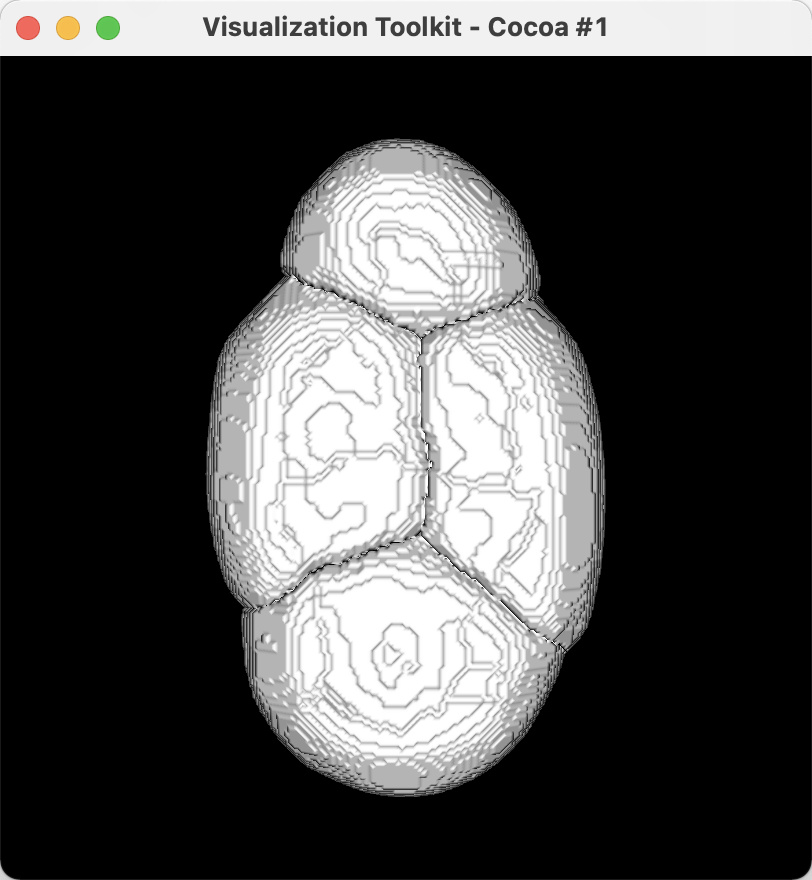
here is my image of a seg cell…
---
### Author:  [@lassoan](https://discourse.vtk.org/u/lassoan)
#### Post date: [October 20, 2020, 1:33pm UTC](https://discourse.vtk.org/t/vtk-for-python-nii-gz-image-in-3d-reconstruction-but-no-options-to-set-colors/4451/4 "2020-10-20T13:33:15Z")
The example that you have found is for visualizing isosurface of a grayscale volume. To display a labelmap volume in 3D, you need to use discrete marching cubes (or flying edges, for faster operation), set multiple values (`SetValue`), enable `ScalarVisibility`, set an appropriate color lookup table, and apply surface smoothing. See complete example here: [https://lorensen.github.io/VTKExamples/site/Cxx/Medical/GenerateModelsFromLabels/](https://lorensen.github.io/VTKExamples/site/Cxx/Medical/GenerateModelsFromLabels/)
---
### Author:  [@lihanhu](https://discourse.vtk.org/u/lihanhu)
#### Post date: [October 21, 2020, 8:31am UTC](https://discourse.vtk.org/t/vtk-for-python-nii-gz-image-in-3d-reconstruction-but-no-options-to-set-colors/4451/5 "2020-10-21T08:31:53Z")
Thanks for your reply!!!
However, I don’t know how to display the image using Python. The classes in the example just tell users how to write the image into ‘.vtp’ files.
v16 = vtk.vtkNIFTIImageReader()
v16.SetDataByteOrderToLittleEndian()
v16.SetFileName(path)
mc = vtk.vtkDiscreteMarchingCubes()
mc.SetInputConnection(v16.GetOutputPort())
mc.SetValue(0,1)
smoother = vtk.vtkWindowedSincPolyDataFilter()
scalarsOff = vtk.vtkMaskFields()
selector = vtk.vtkThreshold()
geometry = vtk.vtkGeometryFilter()
smoother.SetInputConnection(mc.GetOutputPort())
smoother.SetNumberOfIterations(15)
smoother.BoundarySmoothingOff()
smoother.SetFeatureAngle(120)
smoother.Update()
selector.SetInputConnection(smoother.GetOutputPort())
selector.SetInputArrayToProcess(0,0,0,vtk.vtkDataObject.FIELD\_ASSOCIATION\_CELLS,
vtk.vtkDataSetAttributes.SCALARS)
scalarsOff.SetInputConnection(selector.GetOutputPort())
scalarsOff.CopyAttributeOff(vtk.vtkMaskFields.POINT\_DATA, vtk.vtkDataSetAttributes.SCALARS)
scalarsOff.CopyAttributeOff(vtk.vtkMaskFields.CELL\_DATA, vtk.vtkDataSetAttributes.SCALARS)
geometry.SetInputConnection(scalarsOff.GetOutputPort())
I’m using Python to solve the above problem but it doesn’t work…