# \[vtk.js\] trackball/default interaction style with pan/zoom on other mouse buttons
**URL:** https://discourse.vtk.org/t/vtk-js-trackball-default-interaction-style-with-pan-zoom-on-other-mouse-buttons/4059
**Category:** Web
**Created:** [August 24, 2020, 4:53pm UTC](https://discourse.vtk.org/t/vtk-js-trackball-default-interaction-style-with-pan-zoom-on-other-mouse-buttons/4059 "2020-08-24T16:53:52Z")
**Posts on this page:** 20
**Page:** 1
### Author:  [@banesullivan](https://discourse.vtk.org/u/banesullivan)
#### Post date: [August 24, 2020, 4:53pm UTC](https://discourse.vtk.org/t/vtk-js-trackball-default-interaction-style-with-pan-zoom-on-other-mouse-buttons/4059/1 "2020-08-24T16:53:52Z")
Is there an easy way to enable pan with right-click on the default trackball interactor style? Currently, if I want to add pan with the right mouse button and zoom with the middle mouse button (the typical defaults for VTK applications), I define a new `vtkInteractorStyleManipulator` and set up those events plus all the defaults that the trackball interactor style handles.
For example:
```auto
import vtkInteractorStyleManipulator from 'vtk.js/Sources/Interaction/Style/InteractorStyleManipulator';
import vtkMouseCameraTrackballRotateManipulator from 'vtk.js/Sources/Interaction/Manipulators/MouseCameraTrackballRotateManipulator';
import vtkMouseCameraTrackballPanManipulator from 'vtk.js/Sources/Interaction/Manipulators/MouseCameraTrackballPanManipulator';
import vtkMouseCameraTrackballZoomManipulator from 'vtk.js/Sources/Interaction/Manipulators/MouseCameraTrackballZoomManipulator';
...
function vtkDefaultCameraInteractor () {
const interactorStyle = vtkInteractorStyleManipulator.newInstance();
const rotateManipulator = vtkMouseCameraTrackballRotateManipulator.newInstance();
rotateManipulator.setButton(1); // Left Button
interactorStyle.addMouseManipulator(rotateManipulator);
const zoomManipulatorMiddleButton = vtkMouseCameraTrackballZoomManipulator.newInstance();
zoomManipulatorMiddleButton.setButton(2); // Middle Button
interactorStyle.addMouseManipulator(zoomManipulatorMiddleButton);
const zoomManipulatorScroll = vtkMouseCameraTrackballZoomManipulator.newInstance();
zoomManipulatorScroll.setDragEnabled(false);
zoomManipulatorScroll.setScrollEnabled(true);
interactorStyle.addMouseManipulator(zoomManipulatorScroll);
const zoomManipulatorLeft = vtkMouseCameraTrackballZoomManipulator.newInstance();
zoomManipulatorLeft.setButton(1); // Left Button
zoomManipulatorLeft.setControl(true);
interactorStyle.addMouseManipulator(zoomManipulatorLeft);
const panManipulatorRightMouse = vtkMouseCameraTrackballPanManipulator.newInstance();
panManipulatorRightMouse.setButton(3); // Right button
interactorStyle.addMouseManipulator(panManipulatorRightMouse);
const panManipulatorLeftMouse = vtkMouseCameraTrackballPanManipulator.newInstance();
panManipulatorLeftMouse.setButton(1); // Left button
panManipulatorLeftMouse.setShift(true);
interactorStyle.addMouseManipulator(panManipulatorLeftMouse);
return interactorStyle;
}
```
* * *
is there an easier way to do this where I can quickly enable those additional manipulators on the default trackball interactor style?
---
### Author:  [@banesullivan](https://discourse.vtk.org/u/banesullivan)
#### Post date: [August 24, 2020, 5:08pm UTC](https://discourse.vtk.org/t/vtk-js-trackball-default-interaction-style-with-pan-zoom-on-other-mouse-buttons/4059/2 "2020-08-24T17:08:24Z")
[`itk-vtk-viewer`](https://github.com/Kitware/itk-vtk-viewer) has an interesting approach where they use a list of objects defining these options [here](https://github.com/Kitware/itk-vtk-viewer/blob/da2507d4f62524122187c7577dcb824f2c69205d/src/vtk/proxyManagerConfiguration.js#L11-L20), but I cannot traceback where that is used to set up the camera… any tips?
---
### Author:  [@Sebastien\_Jourdain](https://discourse.vtk.org/u/Sebastien_Jourdain)
#### Post date: [August 24, 2020, 5:13pm UTC](https://discourse.vtk.org/t/vtk-js-trackball-default-interaction-style-with-pan-zoom-on-other-mouse-buttons/4059/3 "2020-08-24T17:13:22Z")
This is using the [Manipulators](https://kitware.github.io/vtk-js/examples/InteractorStyleManipulator.html) which is bundled in the [View Proxy](https://github.com/Kitware/vtk-js/blob/master/Sources/Proxy/Core/ViewProxy/index.js#L87-L98).
---
### Author:  [@banesullivan](https://discourse.vtk.org/u/banesullivan)
#### Post date: [August 24, 2020, 5:33pm UTC](https://discourse.vtk.org/t/vtk-js-trackball-default-interaction-style-with-pan-zoom-on-other-mouse-buttons/4059/4 "2020-08-24T17:33:54Z")
Ah, thanks for pointer. Since I am not using a View Proxy in my app, I can use the `vtkInteractorStyleManipulator` with the helpers in `InteractionPresets` to do this a bit easier:
```auto
import vtkInteractorStyleManipulator from 'vtk.js/Sources/Interaction/Style/InteractorStyleManipulator';
import InteractionPresets from 'vtk.js/Sources/Interaction/Style/InteractorStyleManipulator/Presets';
...
const interactorStyle = vtkInteractorStyleManipulator.newInstance();
fullScreenRenderer.getInteractor().setInteractorStyle(interactorStyle);
InteractionPresets.applyPreset('3D', interactorStyle);
```
But since I want the right button to pan, I have to modifyy this to use other definitions than the presets in `InteractionPresets`:
```auto
import vtkInteractorStyleManipulator from 'vtk.js/Sources/Interaction/Style/InteractorStyleManipulator';
import InteractionPresets from 'vtk.js/Sources/Interaction/Style/InteractorStyleManipulator/Presets';
...
const interactorStyleDefinitions = [
{ type: 'pan', options: { button: 3 } }, // Pan on Right button drag
{ type: 'pan', options: { button: 1, shift: true } }, // Pan on Shift + Left button drag
{ type: 'zoom', options: { button: 1, control: true } }, // Zoom on Ctrl + Left button drag
{ type: 'zoom', options: { dragEnabled: false, scrollEnabled: true } }, // Zoom on scroll
{ type: 'rotate', options: { button: 1 } } // Rotate on Left button drag
];
const interactorStyle = vtkInteractorStyleManipulator.newInstance();
fullScreenRenderer.getInteractor().setInteractorStyle(interactorStyle);
InteractionPresets.applyDefinitions(interactorStyleDefinitions, interactorStyle);
```
(figured I share in case someone else is trying to figure out how to more easily customize the interactor style)
---
### Author:  [@lonewolf](https://discourse.vtk.org/u/lonewolf)
#### Post date: [September 2, 2020, 1:44pm UTC](https://discourse.vtk.org/t/vtk-js-trackball-default-interaction-style-with-pan-zoom-on-other-mouse-buttons/4059/5 "2020-09-02T13:44:01Z")
Hi Bane and Sebastian, very useful discussion!
I have already changed some mouse and key combinations successfully. However I want to have more complex interaction. In c++ I am able to really control and create my interactors, but in vtk js it’s been a challange.
I am trying to do something similar to what Bane has, while mixing up with this example: [https://kitware.github.io/vtk-js/examples/InteractorStyleMPRSlice.html](https://kitware.github.io/vtk-js/examples/InteractorStyleMPRSlice.html)
I am trying to add the part
`interactorStyle.onModified(updateUI);`
but nothing is happening. Am I missing some options in the interactorStyleDefinitions ? or in the interactorStyle? I would like to be able to “parse” the mouse clicks as I do in c++.
Thanks!
---
### Author:  [@Sebastien\_Jourdain](https://discourse.vtk.org/u/Sebastien_Jourdain)
#### Post date: [September 2, 2020, 2:28pm UTC](https://discourse.vtk.org/t/vtk-js-trackball-default-interaction-style-with-pan-zoom-on-other-mouse-buttons/4059/6 "2020-09-02T14:28:14Z")
You can make your own style if need be that way you could track mouseDown/Up/Move and so on.
For the modified, I would not expect the Style to be modified and therefore your callback should not be called. Could you attach the `onModified` on the camera? Or maybe there is another even type that is more inlined with what you want to listen to?
Could you explain when you want your callback to be triggered?
---
### Author:  [@lonewolf](https://discourse.vtk.org/u/lonewolf)
#### Post date: [September 2, 2020, 2:35pm UTC](https://discourse.vtk.org/t/vtk-js-trackball-default-interaction-style-with-pan-zoom-on-other-mouse-buttons/4059/7 "2020-09-02T14:35:32Z")
Hi Sebastien, thank you for your quick reply.
I am having a 2D rendering of slices with several actors. By using this, the window/level mouse interaction stops working on the CT - I assume it is because of the internal picker.
So I want to catch the mouse / keyboards interactions and set my own functions to control the scene and update the UI like in the example from MPRSlice
So from that example I see that the UI is updated with mouse interaction. I assume it comes from the
`onModified`.
My original interactor was:
```
const iStyle = vtkInteractorStyleImage.newInstance();
iStyle.setInteractionMode('IMAGE_SLICING');
renderWindow.getInteractor().setInteractorStyle(iStyle);
```
---
### Author:  [@Sebastien\_Jourdain](https://discourse.vtk.org/u/Sebastien_Jourdain)
#### Post date: [September 2, 2020, 4:34pm UTC](https://discourse.vtk.org/t/vtk-js-trackball-default-interaction-style-with-pan-zoom-on-other-mouse-buttons/4059/8 "2020-09-02T16:34:57Z")
You can create your own style which will give you everything that you want to catch and then, you can forward those calls to a `vtkInteractorStyleImage` if you extend it when you want to.
Basically, you want to create your own style.
---
### Author:  [@lonewolf](https://discourse.vtk.org/u/lonewolf)
#### Post date: [September 3, 2020, 7:37am UTC](https://discourse.vtk.org/t/vtk-js-trackball-default-interaction-style-with-pan-zoom-on-other-mouse-buttons/4059/9 "2020-09-03T07:37:15Z")
yes, that would be ideal. But I dont know how to do it in JS. And I havent found an example doing so.
Do you have any resource around explaining how to do it?
Would be much appreciated!
Best regards
---
### Author:  [@Sebastien\_Jourdain](https://discourse.vtk.org/u/Sebastien_Jourdain)
#### Post date: [September 3, 2020, 3:15pm UTC](https://discourse.vtk.org/t/vtk-js-trackball-default-interaction-style-with-pan-zoom-on-other-mouse-buttons/4059/10 "2020-09-03T15:15:16Z")
What you want to look at is probably the [Manipulator style](https://github.com/Kitware/vtk-js/blob/master/Sources/Interaction/Style/InteractorStyleManipulator/index.js) as it only forwarding those events to various instances of manipulators. And creating a style is just about exposing methods for the event that you want to handle and reacting to those by changing camera or doing something else.
The list of events you can monitor are available [here](https://github.com/Kitware/vtk-js/blob/master/Sources/Rendering/Core/RenderWindowInteractor/index.js#L27-L62).
So you just need to create methods with names like `handle${EventName}` in your style class.
---
### Author:  [@banesullivan](https://discourse.vtk.org/u/banesullivan)
#### Post date: [September 23, 2020, 8:37pm UTC](https://discourse.vtk.org/t/vtk-js-trackball-default-interaction-style-with-pan-zoom-on-other-mouse-buttons/4059/11 "2020-09-23T20:37:48Z")
Update to my original solution: I am finding that the camera rotate option is changing the focal point of the camera. For instance, with the interaction style I shared above, it does this:
(note the change in focal point after a “rotate”)
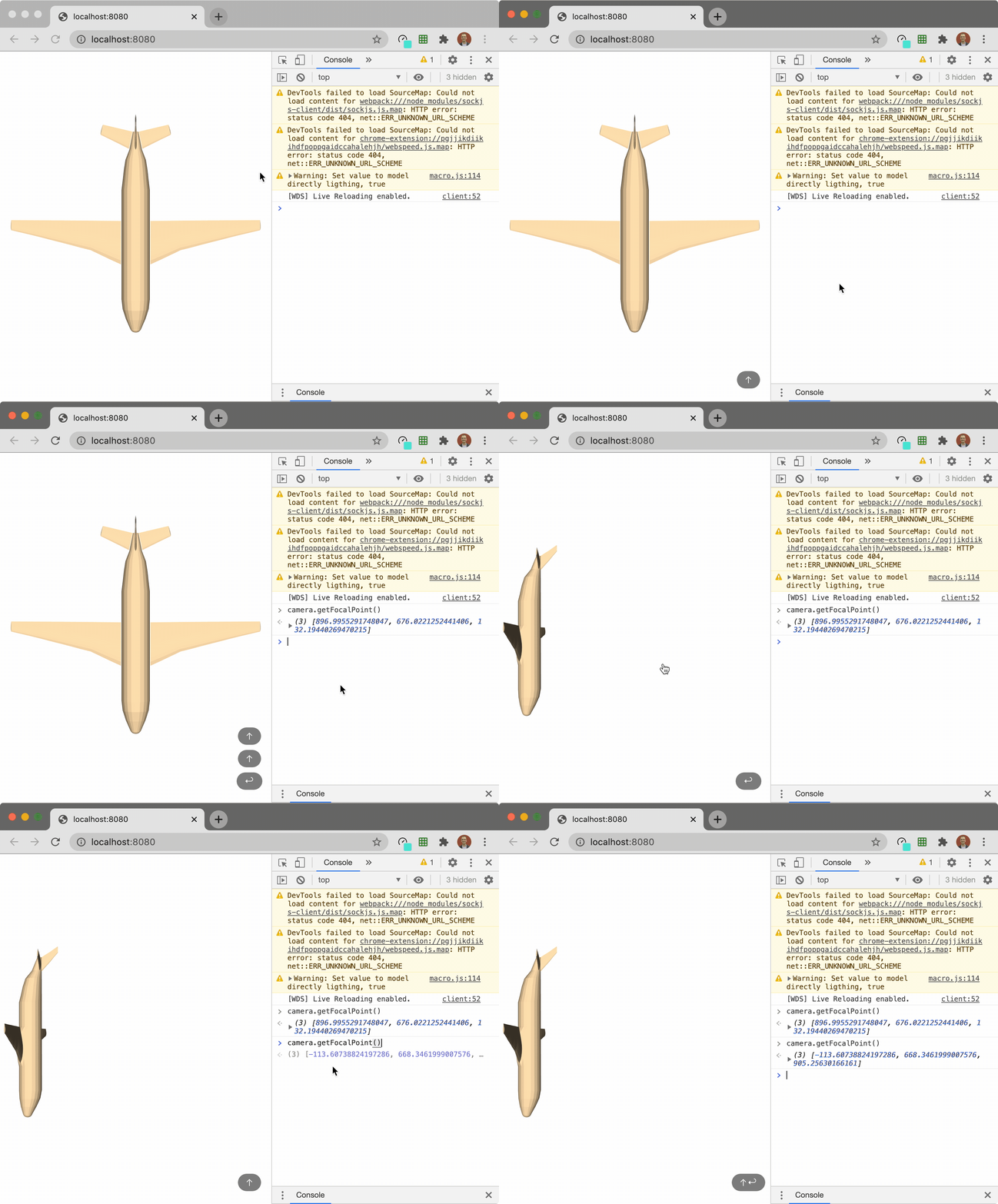
With the default camera interaction, this does not happen:
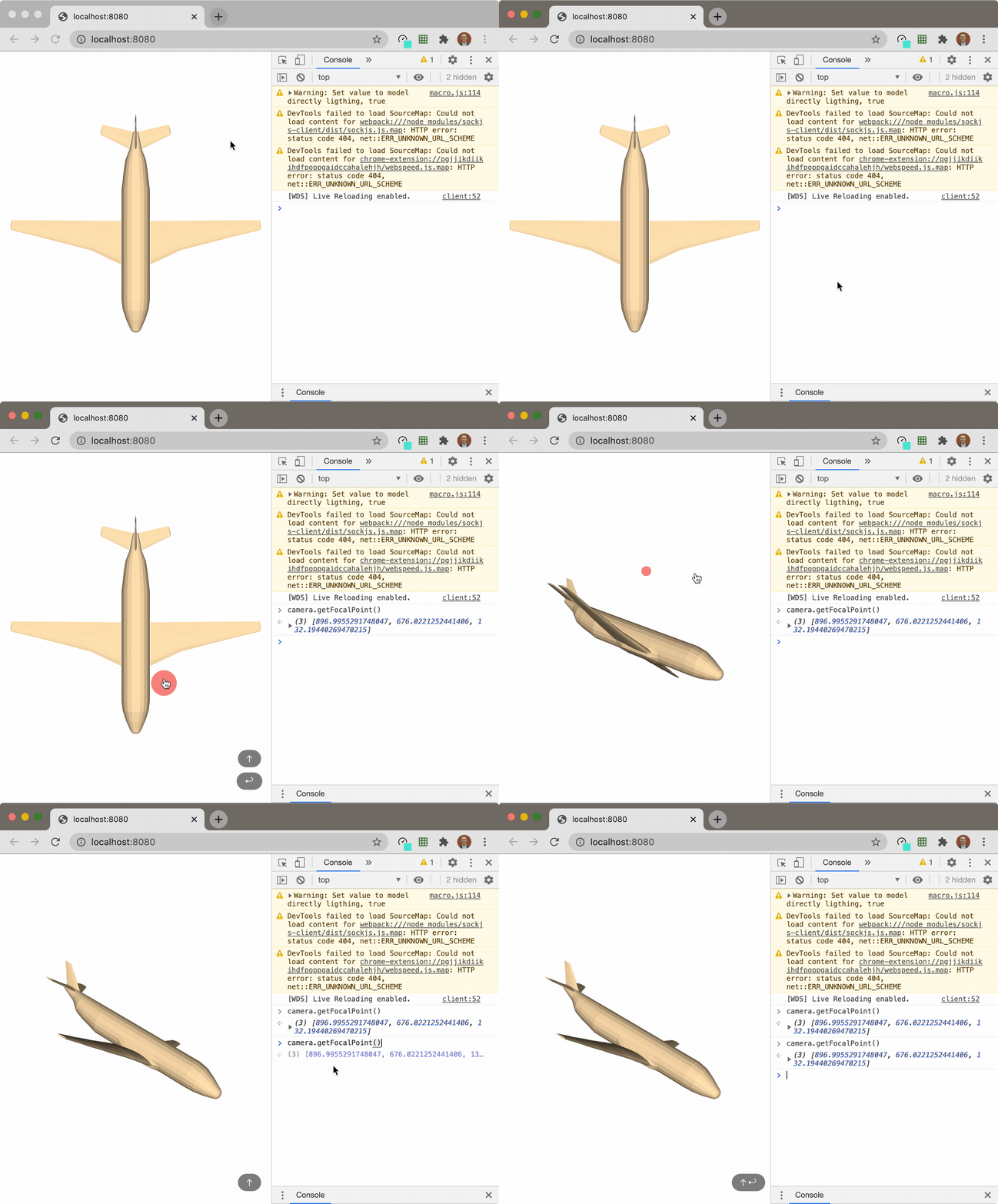
is a “rotate” not actually what I want?
* * *
Note that if the mesh is centered around the origin that this isn’t all that noticeable… hence why it took me a while to realize this. Any tips, @Sebastien_Jourdain?
---
### Author:  [@banesullivan](https://discourse.vtk.org/u/banesullivan)
#### Post date: [September 23, 2020, 8:47pm UTC](https://discourse.vtk.org/t/vtk-js-trackball-default-interaction-style-with-pan-zoom-on-other-mouse-buttons/4059/12 "2020-09-23T20:47:44Z")
Hm. I just noticed that the `vtkInteractorStyleManipulator` class has a `centerOfRotation` property (the default interactor style does not have this) that is always set to the origin. Setting this to the center of the data in the scene resolves the issue, but is there a way to do that automatically on perhaps the `renderer.resetCamera()` call?
---
### Author:  [@banesullivan](https://discourse.vtk.org/u/banesullivan)
#### Post date: [September 23, 2020, 9:21pm UTC](https://discourse.vtk.org/t/vtk-js-trackball-default-interaction-style-with-pan-zoom-on-other-mouse-buttons/4059/13 "2020-09-23T21:21:59Z")
My solution: create a wrapper around `resetCamera` that is returned when creating the interaction style:
```auto
import vtkInteractorStyleManipulator from 'vtk.js/Sources/Interaction/Style/InteractorStyleManipulator';
import InteractionPresets from 'vtk.js/Sources/Interaction/Style/InteractorStyleManipulator/Presets';
function getCenterOfScene (renderer) {
const bounds = renderer.computeVisiblePropBounds();
const center = [0, 0, 0];
center[0] = (bounds[0] + bounds[1]) / 2.0;
center[1] = (bounds[2] + bounds[3]) / 2.0;
center[2] = (bounds[4] + bounds[5]) / 2.0;
return center;
}
function useVtkInteractorStyle (fullScreenRenderer) {
const interactorStyleDefinitions = [
{ type: 'pan', options: { button: 2 } }, // Pan on middle button drag
{ type: 'pan', options: { button: 1, shift: true } }, // Pan on Shift + Left button drag
{ type: 'zoom', options: { button: 3 } }, // Zoom on right button drag
{ type: 'zoom', options: { button: 1, control: true } }, // Zoom on Ctrl + Left button drag
{ type: 'zoom', options: { dragEnabled: false, scrollEnabled: true } }, // Zoom on scroll
{ type: 'rotate', options: { button: 1 } } // Rotate on Left button drag
];
const interactorStyle = vtkInteractorStyleManipulator.newInstance();
fullScreenRenderer.getInteractor().setInteractorStyle(interactorStyle);
InteractionPresets.applyDefinitions(interactorStyleDefinitions, interactorStyle);
function resetCamera () {
const center = getCenterOfScene(fullScreenRenderer.getRenderer());
interactorStyle.setCenterOfRotation(center);
return fullScreenRenderer.getRenderer().resetCamera();
}
return [interactorStyle, resetCamera];
}
export default { useVtkInteractorStyle, getCenterOfScene };
```
then in use:
```auto
import interactor from './interactor.js';
const fullScreenRenderer = vtkFullScreenRenderWindow.newInstance(
{ background: [1, 1, 1] }
);
const renderer = fullScreenRenderer.getRenderer();
const renderWindow = fullScreenRenderer.getRenderWindow();
const [style, resetCamera] = interactor.useVtkInteractorStyle(fullScreenRenderer);
...
resetCamera();
```
---
### Author:  [@Sebastien\_Jourdain](https://discourse.vtk.org/u/Sebastien_Jourdain)
#### Post date: [September 24, 2020, 2:55pm UTC](https://discourse.vtk.org/t/vtk-js-trackball-default-interaction-style-with-pan-zoom-on-other-mouse-buttons/4059/14 "2020-09-24T14:55:01Z")
I usually do a resetCamera() and then use the camera focal point as new center of rotation. But otherwise same logic.
---
### Author:  [@FezVrasta](https://discourse.vtk.org/u/FezVrasta)
#### Post date: [December 8, 2020, 1:10pm UTC](https://discourse.vtk.org/t/vtk-js-trackball-default-interaction-style-with-pan-zoom-on-other-mouse-buttons/4059/15 "2020-12-08T13:10:36Z")
When I try to add a `range` configuration to `interactorStyleDefinitions` nothing happens.
```auto
const interactorStyleDefinitions = [
{
type: 'range',
options: { button: 1 },
},
];
```
All the other configurations work correctly, do you have any idea? I’m rendering a MPR DICOM image.
---
### Author:  [@Sebastien\_Jourdain](https://discourse.vtk.org/u/Sebastien_Jourdain)
#### Post date: [December 8, 2020, 4:59pm UTC](https://discourse.vtk.org/t/vtk-js-trackball-default-interaction-style-with-pan-zoom-on-other-mouse-buttons/4059/16 "2020-12-08T16:59:03Z")
You need to attach some callback (I think) to the Range manipulator.
---
### Author:  [@FezVrasta](https://discourse.vtk.org/u/FezVrasta)
#### Post date: [December 8, 2020, 5:08pm UTC](https://discourse.vtk.org/t/vtk-js-trackball-default-interaction-style-with-pan-zoom-on-other-mouse-buttons/4059/17 "2020-12-08T17:08:35Z")
Thanks for the answer! Do you have some example or doc to link to? I’m kind of lost ☹
---
### Author:  [@Sebastien\_Jourdain](https://discourse.vtk.org/u/Sebastien_Jourdain)
#### Post date: [December 8, 2020, 5:18pm UTC](https://discourse.vtk.org/t/vtk-js-trackball-default-interaction-style-with-pan-zoom-on-other-mouse-buttons/4059/18 "2020-12-08T17:18:04Z")
> **[vtk.js](https://kitware.github.io/vtk-js/examples/MouseRangeManipulator.html)**
>
> MouseRangeManipulatorLive example Sourceimport 'vtk.js/Sources/favicon';import vtkFullScreenRenderWindow from 'vtk.js/Sources/Rendering/Misc/FullScreenRenderWindow';import vtkRTAnalyticSource from 'v
---
### Author:  [@FezVrasta](https://discourse.vtk.org/u/FezVrasta)
#### Post date: [December 8, 2020, 5:24pm UTC](https://discourse.vtk.org/t/vtk-js-trackball-default-interaction-style-with-pan-zoom-on-other-mouse-buttons/4059/19 "2020-12-08T17:24:11Z")
I don’t see any callback there?

---
### Author:  [@Sebastien\_Jourdain](https://discourse.vtk.org/u/Sebastien_Jourdain)
#### Post date: [December 8, 2020, 8:41pm UTC](https://discourse.vtk.org/t/vtk-js-trackball-default-interaction-style-with-pan-zoom-on-other-mouse-buttons/4059/20 "2020-12-08T20:41:00Z")
```auto
rangeManipulator.setVerticalListener(wMin, wMax, 1, wGet, wSet);
rangeManipulator.setHorizontalListener(lMin, lMax, 1, lGet, lSet);
rangeManipulator.setScrollListener(kMin, kMax, 1, kGet, kSet);
```