# VTK.js + trame: No textures in local rendering =\> minimal example for python ?

**URL:** https://discourse.vtk.org/t/vtk-js-trame-no-textures-in-local-rendering-minimal-example-for-python/15104
**Category:** Web
**Tags:** python, vtkjs
**Created:** [January 2, 2025, 7:40pm UTC](https://discourse.vtk.org/t/vtk-js-trame-no-textures-in-local-rendering-minimal-example-for-python/15104 "2025-01-02T19:40:28Z")
**Posts on this page:** 7
**Page:** 1

<div class="post-metadata">

### Author: ![Henryk](https://discourse.vtk.org/user_avatar/discourse.vtk.org/henryk/32/10296_2.png) [@Henryk](https://discourse.vtk.org/u/Henryk)
#### Post date: [January 2, 2025, 7:40pm UTC](https://discourse.vtk.org/t/vtk-js-trame-no-textures-in-local-rendering-minimal-example-for-python/15104/1 "2025-01-02T19:40:28Z")

</div>

Hey everyone,

I’m a new and unexperienced user of VTK + Trame for displaying mechnical parts in a browser and  
I’m impressed what can be done with just a few lines of code.  
So far, I got a working python-code to render my parts coming from a calculation-script,  
what is my major topic.  
I’m thinking of using Trame + VTK to present/share these results with other  
team-members; it would be very handy for them just to open their brower to get a  
first impression of these parts.  
Local rendering would be pretty useful, because some team-members may be far away.

So far, I got everthing working what I wanted to achieve, except one thing:  
textures in local-rendering mode.  
I’m likely facing the same trouble that is already described here:

> <https://github.com/holoviz/panel/issues/4761>
>
> \#### Is your feature request related to a problem? Please describe.
> Currently v…tk.js is used in panel projects (e.g. \[VTK\](https://panel.holoviz.org/reference/panes/VTK.html) and \[VTKInteractive\](https://panel.holoviz.org/gallery/demos/VTKInteractive.html)). vtk.js is currently not actively maintained, which leads to the problem that some vtk features are not supported (e.g. \[Texture missing in pyvista plotter in Panel\](https://discourse.holoviz.org/t/texture-missing-in-pyvista-plotter-in-panel/2750) and \[Interaction with pyvista widgets\](https://discourse.holoviz.org/t/interaction-with-pyvista-widgets/2328)). To remedy this, PyVista deprecated the use of vtk.js and made \[trame\](https://kitware.github.io/trame/docs/index.html) the standard. PyVista supports jupyter rendering with trame via the show method, which allows it to be rendered to the panel via ipywidget.
> 
> \<details\>
> \<summary\>Code\</summary\>
> 
> Using \[Physically Based Rendering example\](https://docs.pyvista.org/version/stable/examples/02-plot/pbr.html).
> 
> \`\`\`python
> import panel as pn
> import pyvista as pv
> from IPython.display import IFrame
> from pyvista import examples
> 
> 
> def handler(viewer, src, \*\*kwargs):
> return IFrame(src, "75%", "500px")
> 
> 
> \# Load the statue mesh
> mesh = examples.download\_nefertiti()
> mesh.rotate\_x(-90.0, inplace=True) # rotate to orient with the skybox
> 
> \# Download skybox
> cubemap = examples.download\_sky\_box\_cube\_map()
> 
> p = pv.Plotter(notebook=True)
> p.add\_actor(cubemap.to\_skybox())
> p.set\_environment\_texture(cubemap) # For reflecting the environment off the mesh
> p.add\_mesh(mesh, color="linen", pbr=True, metallic=0.8, roughness=0.1, diffuse=1)
> 
> \# Define a nice camera perspective
> cpos = \[(-313.40, 66.09, 1000.61), (0.0, 0.0, 0.0), (0.018, 0.99, -0.06)\]
> 
> iframe = p.show(
> jupyter\_backend="trame",
> jupyter\_kwargs=dict(handler=handler),
> return\_viewer=True,
> cpos=cpos,
> )
> 
> pn.extension()
> pn.panel(iframe, width=2000).show()
> \`\`\`
> \</details\>
> 
> \[Screencast from 2023-05-03 16-09-10.webm\](https://user-images.githubusercontent.com/7513610/235856497-3821624b-1435-4a57-84f7-6053c7f8643b.webm)
> 
> 
> \#### Describe the solution you'd like
> Please document this example and encourage people to use trame.
> 
> \#### Describe alternatives you've considered
> None
> 
> \#### Additional context
> See the detail of discussion \[here\](https://discourse.holoviz.org/t/trame-support-in-panel-to-fully-support-vtk/5275).

Short description: The skybox and other textures work fine in remote-rendering-mode, but  
vanish when switching to local-rendering mode.

I added the textures a little different, but I guess it is the same problem:  
…  
jpg\_img\_reader = vtk.vtkJPEGReader()  
jpg\_img\_reader.SetFileName(‘Feldanker\_1.jpg’)  
#jpg\_img\_reader.SetFileName(“[http://localhost:8800/html/Feldanker\_1.jpg](http://localhost:8800/html/Feldanker_1.jpg)”) # Failed!

```
Box_texture = vtk.vtkTexture()
Box_texture.SetInputConnection(jpg_img_reader.GetOutputPort())
Box_texture.Modified()

Box_source = vtk.vtkCubeSource()
Box_Mapper = vtk.vtkPolyDataMapper()
Box_Mapper.SetInputConnection(Box_source.GetOutputPort())

Box_Actor = vtk.vtkActor()
Box_Actor.SetMapper(Box_Mapper)
Box_Actor.SetTexture(Box_texture)
Box_Actor.GetProperty().SetDiffuse(0.1)
Box_Actor.GetProperty().SetAmbient(1.0)
plotter.add_actor(Box_Actor)

Skybox = vtk.vtkSkybox()
Skybox.SetTexture(sky_map)
Skybox.SetFloorRight(0, 0, 1)
Skybox.SetProjection(vtk.vtkSkybox.Cube)
plotter.add_actor(Skybox)
....

```

A similar question to the vanishing textues was asked here a short time ago:

> [@Simple skybox and cube texture](https://discourse.vtk.org/t/simple-skybox-and-cube-texture/14772/1):
>
> I’m relatively new to vtk.js but I’m trying to implement a simple skybox. That wasn’t working so I created a cube, which works when applying a texture created from a canvas. However, I’m trying to apply images but only two sides of the cube render an image. The skybox doesn’t seem to render at all with images or a simple canvas. I’m somewhat lost down the rabbit hole missing something simple and would appreciate some direction. I created a code pen that should be a 6-sided textured cube in a…

, but it is unclear to me how it was solved.  
Going throught the skybox-C+±Examples mentioned there did not help me, some classes  
are missing in the python-VTK-package, e.g. there seems to be no vtkHttpDataSetReader.

I understand, that vtk and vtk.js is not 100% the same, but is there a minimal example  
for python similar to

> <https://github.com/holoviz/panel/issues/4761>
>
> \#### Is your feature request related to a problem? Please describe.
> Currently v…tk.js is used in panel projects (e.g. \[VTK\](https://panel.holoviz.org/reference/panes/VTK.html) and \[VTKInteractive\](https://panel.holoviz.org/gallery/demos/VTKInteractive.html)). vtk.js is currently not actively maintained, which leads to the problem that some vtk features are not supported (e.g. \[Texture missing in pyvista plotter in Panel\](https://discourse.holoviz.org/t/texture-missing-in-pyvista-plotter-in-panel/2750) and \[Interaction with pyvista widgets\](https://discourse.holoviz.org/t/interaction-with-pyvista-widgets/2328)). To remedy this, PyVista deprecated the use of vtk.js and made \[trame\](https://kitware.github.io/trame/docs/index.html) the standard. PyVista supports jupyter rendering with trame via the show method, which allows it to be rendered to the panel via ipywidget.
> 
> \<details\>
> \<summary\>Code\</summary\>
> 
> Using \[Physically Based Rendering example\](https://docs.pyvista.org/version/stable/examples/02-plot/pbr.html).
> 
> \`\`\`python
> import panel as pn
> import pyvista as pv
> from IPython.display import IFrame
> from pyvista import examples
> 
> 
> def handler(viewer, src, \*\*kwargs):
> return IFrame(src, "75%", "500px")
> 
> 
> \# Load the statue mesh
> mesh = examples.download\_nefertiti()
> mesh.rotate\_x(-90.0, inplace=True) # rotate to orient with the skybox
> 
> \# Download skybox
> cubemap = examples.download\_sky\_box\_cube\_map()
> 
> p = pv.Plotter(notebook=True)
> p.add\_actor(cubemap.to\_skybox())
> p.set\_environment\_texture(cubemap) # For reflecting the environment off the mesh
> p.add\_mesh(mesh, color="linen", pbr=True, metallic=0.8, roughness=0.1, diffuse=1)
> 
> \# Define a nice camera perspective
> cpos = \[(-313.40, 66.09, 1000.61), (0.0, 0.0, 0.0), (0.018, 0.99, -0.06)\]
> 
> iframe = p.show(
> jupyter\_backend="trame",
> jupyter\_kwargs=dict(handler=handler),
> return\_viewer=True,
> cpos=cpos,
> )
> 
> pn.extension()
> pn.panel(iframe, width=2000).show()
> \`\`\`
> \</details\>
> 
> \[Screencast from 2023-05-03 16-09-10.webm\](https://user-images.githubusercontent.com/7513610/235856497-3821624b-1435-4a57-84f7-6053c7f8643b.webm)
> 
> 
> \#### Describe the solution you'd like
> Please document this example and encourage people to use trame.
> 
> \#### Describe alternatives you've considered
> None
> 
> \#### Additional context
> See the detail of discussion \[here\](https://discourse.holoviz.org/t/trame-support-in-panel-to-fully-support-vtk/5275).

to solve the issue with missing textures in the skybox and/or planes in local rendering mode?

---

<div class="post-metadata">

### Author: ![Sebastien\_Jourdain](https://discourse.vtk.org/user_avatar/discourse.vtk.org/sebastien_jourdain/32/100_2.png) [@Sebastien\_Jourdain](https://discourse.vtk.org/u/Sebastien_Jourdain)
#### Post date: [January 6, 2025, 4:43am UTC](https://discourse.vtk.org/t/vtk-js-trame-no-textures-in-local-rendering-minimal-example-for-python/15104/2 "2025-01-06T04:43:30Z")

</div>

Welcome to the community!

Since you are using VTK, you might be ok by using **trame-vtklocal** with just 2 lines change.

Basically replace `trame.widgets.vtk.VtkLocalView` by `trame.widgets.vtklocal.LocalView`.

You will need **vtk 9.4+** and **trame-vtklocal**

```auto
pip install "vtk>=9.4.1" trame-vtklocal

```

You can find a usage [example here](https://github.com/Kitware/trame-vtklocal/blob/master/examples/vtk/cone.py#L85-L91).

---

<div class="post-metadata">

### Author: ![Henryk](https://discourse.vtk.org/user_avatar/discourse.vtk.org/henryk/32/10296_2.png) [@Henryk](https://discourse.vtk.org/u/Henryk)
#### Post date: [January 6, 2025, 11:42am UTC](https://discourse.vtk.org/t/vtk-js-trame-no-textures-in-local-rendering-minimal-example-for-python/15104/3 "2025-01-06T11:42:35Z")

</div>

Hey Sebastien,

thank you very much, your example helped me to get the textures to work!  
I successfully got cubemaps and HDR to work for the skybox.

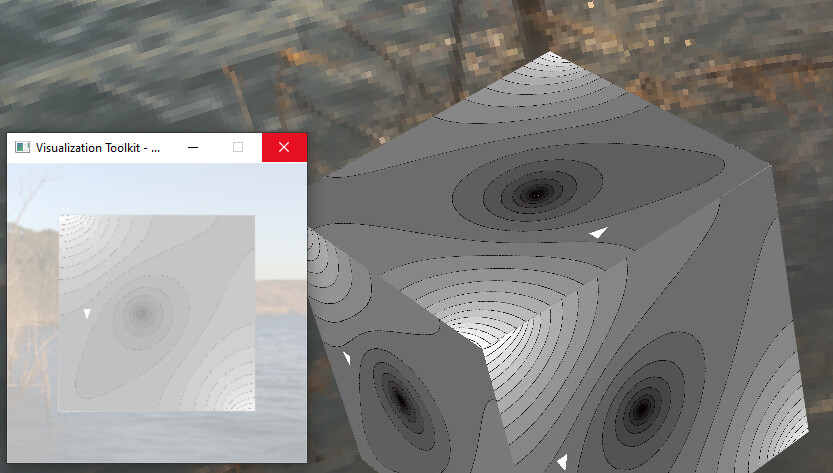
Just one more thing: I guess, the addtional window should be synchronized with the browser-window(?) This doesn’t work for me, the second window always freezes, also with the original example-code.
 ![image](https://discourse.vtk.org/uploads/default/original/2X/1/18edc1592210251b223d37249726f2130f832b3b.jpeg)

---

<div class="post-metadata">

### Author: ![Sebastien\_Jourdain](https://discourse.vtk.org/user_avatar/discourse.vtk.org/sebastien_jourdain/32/100_2.png) [@Sebastien\_Jourdain](https://discourse.vtk.org/u/Sebastien_Jourdain)
#### Post date: [January 6, 2025, 5:11pm UTC](https://discourse.vtk.org/t/vtk-js-trame-no-textures-in-local-rendering-minimal-example-for-python/15104/4 "2025-01-06T17:11:24Z")

</div>

You should set your render window to be offscreen, that will prevent that window to even pop-up.

---

<div class="post-metadata">

### Author: ![Henryk](https://discourse.vtk.org/user_avatar/discourse.vtk.org/henryk/32/10296_2.png) [@Henryk](https://discourse.vtk.org/u/Henryk)
#### Post date: [January 8, 2025, 12:32pm UTC](https://discourse.vtk.org/t/vtk-js-trame-no-textures-in-local-rendering-minimal-example-for-python/15104/5 "2025-01-08T12:32:47Z")

</div>

Dear VTK-team,  
dear Sebastien,

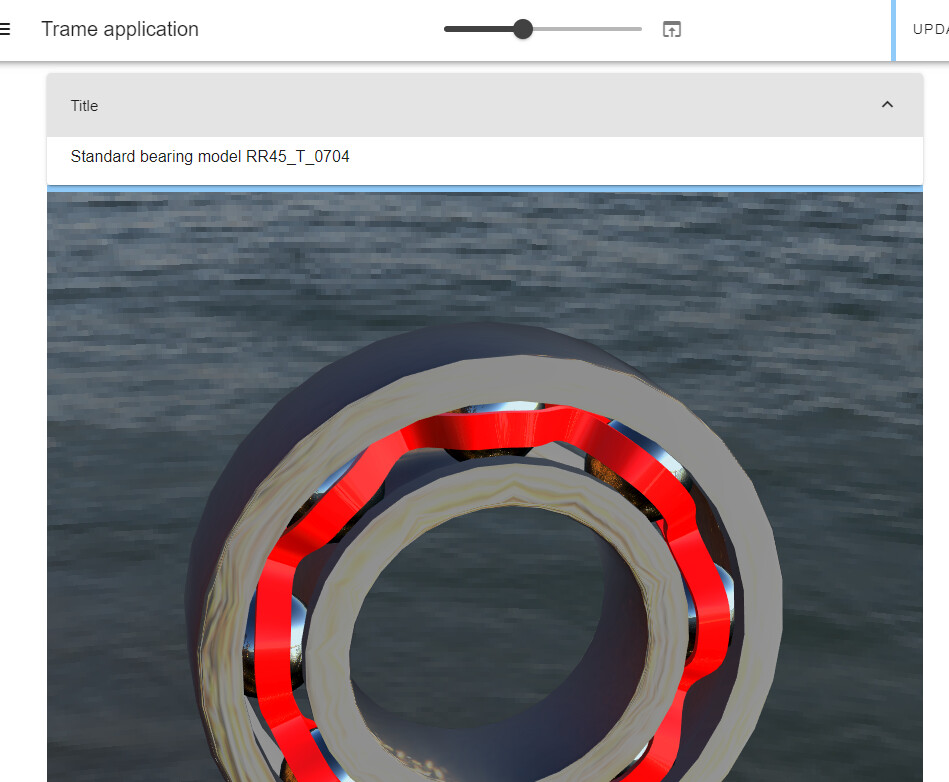
from older discussion on stack-overflow I got the impression, that local-rendering comes with some limitation, is this any longer true? I’m really happy, that also PBR is availible in local-rendering-mode.

I just want to to say thank you for your help and this great piece of software!
 ![image](https://discourse.vtk.org/uploads/default/original/2X/0/0114fc838579338e7b292a4b940ae097852a33c1.jpeg)

---

<div class="post-metadata">

### Author: ![Sebastien\_Jourdain](https://discourse.vtk.org/user_avatar/discourse.vtk.org/sebastien_jourdain/32/100_2.png) [@Sebastien\_Jourdain](https://discourse.vtk.org/u/Sebastien_Jourdain)
#### Post date: [January 9, 2025, 5:54pm UTC](https://discourse.vtk.org/t/vtk-js-trame-no-textures-in-local-rendering-minimal-example-for-python/15104/6 "2025-01-09T17:54:04Z")

</div>

Any limitation for local rendering when using VTK/WASM should totally disappear by end of 2025 (🤞). And as you’ve notice we are already pretty far along, but we can still expect some hiccup here and there.

Since VTK is working on moving to WebGPU, it will address a lot of the rendering limitation we currently have in the browser too. Also we are working to add more testing especially targeting our serialization infrastructure for our WASM usage. When those complete, we should reach full parity. And like I said, a lot of that is expected to happen in 2025.

---

<div class="post-metadata">

### Author: ![PaulHax](https://discourse.vtk.org/user_avatar/discourse.vtk.org/paulhax/32/2748_2.png) [@PaulHax](https://discourse.vtk.org/u/PaulHax)
#### Post date: [July 23, 2025, 1:59pm UTC](https://discourse.vtk.org/t/vtk-js-trame-no-textures-in-local-rendering-minimal-example-for-python/15104/7 "2025-07-23T13:59:58Z")

</div>

Just for posterity, I think there is a issue with `trame-vtk` vtkLocalView sync of texture to the client/browser.

This change to vtk.js’s Sources/Rendering/Misc/SynchronizableRenderWindow/ObjectManager/index.js seems to fix it:

> <https://github.com/PaulHax/vtk-js/commit/c24a0f0a20897a5a8644bc2b064cfd8f5fccfe4c#diff-484f911eda50ace8fde6a0444858a5fce6d70589402140a843c4ba4cf8da53adR330-R351>

The change does have the issue of triggering a perf warning though `GL_INVALID_OPERATION: glTexStorage2D: Texture is immutable.`

Here is a test trame app that triggers the issue. It updates the texture every second:

> <https://gist.github.com/PaulHax/92d81f16c8bb96b1f93b0d0a853ee342>
