# VTK module import error

**URL:** https://discourse.vtk.org/t/vtk-module-import-error/10274
**Category:** Support
**Tags:** python, code
**Created:** [December 20, 2022, 1:20pm UTC](https://discourse.vtk.org/t/vtk-module-import-error/10274 "2022-12-20T13:20:06Z")
**Posts on this page:** 10
**Page:** 1

<div class="post-metadata">

### Author: ![Deepa](https://discourse.vtk.org/user_avatar/discourse.vtk.org/deepa/32/1680_2.png) [@Deepa](https://discourse.vtk.org/u/Deepa)
#### Post date: [December 20, 2022, 1:20pm UTC](https://discourse.vtk.org/t/vtk-module-import-error/10274/1 "2022-12-20T13:20:06Z")

</div>

Hi All,

I am trying to run the following example ([K3D-jupyter/volume\_renderer.ipynb at 3fef1ea419a84a51c8aed56cb285b9fcf0a18c9a · K3D-tools/K3D-jupyter · GitHub](https://github.com/K3D-tools/K3D-jupyter/blob/3fef1ea419a84a51c8aed56cb285b9fcf0a18c9a/examples/volume_renderer.ipynb)) in jupyter notebook.

```
import k3d
import math
import numpy as np
import nibabel as nib
from k3d.helpers import download
import ipywidgets as widgets
import vtk
from vtkmodules.util import numpy_support
basic_color_maps = [(attr, getattr(k3d.basic_color_maps, attr)) for attr in dir(k3d.basic_color_maps) if
                    not attr.startswith('__')]
paraview_color_maps = [(attr, getattr(k3d.paraview_color_maps, attr)) for attr in dir(k3d.paraview_color_maps) if
                       not attr.startswith('__')]
matplotlib_color_maps = [(attr, getattr(k3d.matplotlib_color_maps, attr)) for attr in dir(k3d.matplotlib_color_maps)
                         if not attr.startswith('__')]
colormaps = basic_color_maps + paraview_color_maps + matplotlib_color_maps

filename = download('https://vedo.embl.es/examples/data/embryo.slc')
reader = vtk.vtkSLCReader()
reader.SetFileName(filename)
reader.Update()
vti = reader.GetOutput()

bounds = vti.GetBounds()
x, y, z = vti.GetDimensions()
img = numpy_support.vtk_to_numpy(vti.GetPointData().GetArray(0)).reshape(-1, y, x)

tf_editor = k3d.transfer_function_editor()
volume = k3d.volume(img.astype(np.float16))

@widgets.interact(x=widgets.Dropdown(options=colormaps, description='ColorMap:'))
def g(x):
    tf_editor.color_map = np.array(x, dtype=np.float32)

plot = k3d.plot()
plot += volume
tf_editor.display()
plot.display()

a = widgets.jslink((tf_editor, 'color_map'), (volume, 'color_map'))
a = widgets.jslink((tf_editor, 'opacity_function'), (volume, 'opacity_function'))

```

and I get the following error

```auto

ImportError Traceback (most recent call last)
~\anaconda3\lib\site-packages\vtkmodules\vtkIOImage.py in <module>
      4 # use relative import for installed modules
----> 5 from .vtkIOImagePython import *
      6 except ImportError:

ImportError: DLL load failed: The specified module could not be found.

During handling of the above exception, another exception occurred:

ModuleNotFoundError Traceback (most recent call last)
<ipython-input-5-b5758b6de607> in <module>
      5 from k3d.helpers import download
      6 import ipywidgets as widgets
----> 7 import vtk
      8 from vtkmodules.util import numpy_support
      9 basic_color_maps = [(attr, getattr(k3d.basic_color_maps, attr)) for attr in dir(k3d.basic_color_maps) if

~\anaconda3\lib\site-packages\vtk.py in <module>
     30 all_spec = importlib.util.find_spec('vtkmodules.all')
     31 all_m = importlib.util.module_from_spec(all_spec)
---> 32 all_spec.loader.exec_module(all_m)
     33 
     34 # import vtkmodules

~\anaconda3\lib\site-packages\vtkmodules\all.py in <module>
     54 from .vtkFiltersTopology import *
     55 from .vtkFiltersVerdict import *
---> 56 from .vtkIOImage import *
     57 from .vtkImagingHybrid import *
     58 from .vtkInfovisLayout import *

~\anaconda3\lib\site-packages\vtkmodules\vtkIOImage.py in <module>
      7 # during build and testing, the modules will be elsewhere,
      8 # e.g. in lib directory or Release/Debug config directories
----> 9 from vtkIOImagePython import *

ModuleNotFoundError: No module named 'vtkIOImagePython'

```

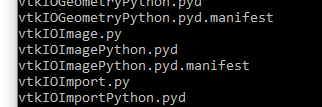
I checked the files available in vtkmodules folder in the anaconda environment
![image](https://discourse.vtk.org/uploads/default/original/2X/1/19fa9f36bfb52e69b4ecec63c90a80f8c25ed258.png)

and I could only find the `vtkIOImagePython.pyd` file and not `vtkIOImagePython.py`.

I’m using Windows.

I am not sure how to solve this error. Suggestions will be really helpful.

I also checked this post [VTK Module Import Error | Anaconda Windows 10 - ✉️ Mailing List Archive (read-only) - MNE Forum](https://mne.discourse.group/t/vtk-module-import-error-anaconda-windows-10/1723). But it’s not clear to me how the module import error can be fixed.  
Thanks a lot for your time and kind attention.

---

<div class="post-metadata">

### Author: ![Deepa](https://discourse.vtk.org/user_avatar/discourse.vtk.org/deepa/32/1680_2.png) [@Deepa](https://discourse.vtk.org/u/Deepa)
#### Post date: [December 21, 2022, 10:59am UTC](https://discourse.vtk.org/t/vtk-module-import-error/10274/2 "2022-12-21T10:59:09Z")

</div>

Any suggestions?

---

<div class="post-metadata">

### Author: ![Aron\_Helser](https://discourse.vtk.org/user_avatar/discourse.vtk.org/aron_helser/32/14_2.png) [@Aron\_Helser](https://discourse.vtk.org/u/Aron_Helser)
#### Post date: [December 21, 2022, 2:20pm UTC](https://discourse.vtk.org/t/vtk-module-import-error/10274/3 "2022-12-21T14:20:20Z")

</div>

This:

```auto
ImportError: DLL load failed: The specified module could not be found.

```

indicates that it’s unable to find a .dll file that is being used by a python module it is importing. You likely need to add the directory containing the VTK .dlls. Unfortunately I don’t know how you might add directories to the path in anaconda/jupyter environment.

---

<div class="post-metadata">

### Author: ![Deepa](https://discourse.vtk.org/user_avatar/discourse.vtk.org/deepa/32/1680_2.png) [@Deepa](https://discourse.vtk.org/u/Deepa)
#### Post date: [December 21, 2022, 2:26pm UTC](https://discourse.vtk.org/t/vtk-module-import-error/10274/4 "2022-12-21T14:26:58Z")

</div>

Thank you, I will give it a try.

> [@Aron\_Helser](#):
>
> You likely need to add the directory containing the VTK .dlls

Could you please let me know where I can find the VTK .dlls ?

---

<div class="post-metadata">

### Author: ![banesullivan](https://discourse.vtk.org/user_avatar/discourse.vtk.org/banesullivan/32/7143_2.png) [@banesullivan](https://discourse.vtk.org/u/banesullivan)
#### Post date: [December 21, 2022, 4:05pm UTC](https://discourse.vtk.org/t/vtk-module-import-error/10274/5 "2022-12-21T16:05:39Z")

</div>

How did you install VTK? With `pip` or `conda` or something else?

---

<div class="post-metadata">

### Author: ![Deepa](https://discourse.vtk.org/user_avatar/discourse.vtk.org/deepa/32/1680_2.png) [@Deepa](https://discourse.vtk.org/u/Deepa)
#### Post date: [December 21, 2022, 4:06pm UTC](https://discourse.vtk.org/t/vtk-module-import-error/10274/6 "2022-12-21T16:06:48Z")

</div>

Thanks for the response. I installed via pip

---

<div class="post-metadata">

### Author: ![banesullivan](https://discourse.vtk.org/user_avatar/discourse.vtk.org/banesullivan/32/7143_2.png) [@banesullivan](https://discourse.vtk.org/u/banesullivan)
#### Post date: [December 21, 2022, 4:07pm UTC](https://discourse.vtk.org/t/vtk-module-import-error/10274/7 "2022-12-21T16:07:50Z")

</div>

What’s your version of python and which version of VTK was installed?

```auto
python --version
pip show vtk

```

---

<div class="post-metadata">

### Author: ![Deepa](https://discourse.vtk.org/user_avatar/discourse.vtk.org/deepa/32/1680_2.png) [@Deepa](https://discourse.vtk.org/u/Deepa)
#### Post date: [December 21, 2022, 4:20pm UTC](https://discourse.vtk.org/t/vtk-module-import-error/10274/8 "2022-12-21T16:20:58Z")

</div>

Python 3.7.9

```auto
Name: vtk
Version: -PKG-VERSION
Summary: VTK is an open-source toolkit for 3D computer graphics, image processing, and visualization
Home-page: 
Author: 
Author-email: 
License: 
Location: c:\users\xxx\anaconda3\lib\site-packages
Requires: 
Required-by: mayavi, vedo

```

---

<div class="post-metadata">

### Author: ![Deepa](https://discourse.vtk.org/user_avatar/discourse.vtk.org/deepa/32/1680_2.png) [@Deepa](https://discourse.vtk.org/u/Deepa)
#### Post date: [December 21, 2022, 5:05pm UTC](https://discourse.vtk.org/t/vtk-module-import-error/10274/9 "2022-12-21T17:05:16Z")

</div>

I’m now using

Python 3.9.15

`Name: vtk Version: 9.2.2 Summary: VTK is an open-source toolkit for 3D computer graphics, image processing, and visualization Home-page: [https://vtk.org](https://vtk.org/) Author: VTK developers Author-email: License: BSD Location: c:\users\xxx\anaconda3\envs\differential_networks\lib\site-packages Requires: matplotlib, wslink Required-by: vedo`.

I don’t get the module import error now. But I see the following error

* * *

```auto
AttributeError Traceback (most recent call last)
Input In [1], in <cell line: 25>()
     23 bounds = vti.GetBounds()
     24 x, y, z = vti.GetDimensions()
---> 25 img = numpy_support.vtk_to_numpy(vti.GetPointData().GetArray(0)).reshape(-1, y, x)
     27 tf_editor = k3d.transfer_function_editor()
     28 volume = k3d.volume(img.astype(np.float16))

File ~\anaconda3\envs\differential_networks\lib\site-packages\vtkmodules\util\numpy_support.py:215, in vtk_to_numpy(vtk_array)
    200 def vtk_to_numpy(vtk_array):
    201 """Converts a VTK data array to a numpy array.
    202 
    203 Given a subclass of vtkDataArray, this function returns an
   (...)
    213 
    214 """
--> 215 typ = vtk_array.GetDataType()
    216 assert typ in get_vtk_to_numpy_typemap().keys(), \
    217 "Unsupported array type %s"%typ
    218 assert typ != vtkConstants.VTK_BIT, 'Bit arrays are not supported.'

AttributeError: 'NoneType' object has no attribute 'GetDataType'

```

---

<div class="post-metadata">

### Author: ![ben.boeckel](https://discourse.vtk.org/letter_avatar_proxy/v4/letter/b/ea5d25/32.png) [@ben.boeckel](https://discourse.vtk.org/u/ben.boeckel)
#### Post date: [January 21, 2023, 2:52am UTC](https://discourse.vtk.org/t/vtk-module-import-error/10274/10 "2023-01-21T02:52:20Z")

</div>

> [@Deepa](#):
>
> Python 3.7.9

3.7 is before `os.add_dll_directory` which was added in 3.8 to help with this problem on Windows.
