# VTK (pyqt): from world coordinate to display coordinate
**URL:** https://discourse.vtk.org/t/vtk-pyqt-from-world-coordinate-to-display-coordinate/2626
**Category:** Support
**Created:** [February 16, 2020, 2:05am UTC](https://discourse.vtk.org/t/vtk-pyqt-from-world-coordinate-to-display-coordinate/2626 "2020-02-16T02:05:07Z")
**Posts on this page:** 15
**Page:** 1
### Author:  [@zhang-qiang-github](https://discourse.vtk.org/u/zhang-qiang-github)
#### Post date: [February 16, 2020, 2:05am UTC](https://discourse.vtk.org/t/vtk-pyqt-from-world-coordinate-to-display-coordinate/2626/1 "2020-02-16T02:05:07Z")
I am using VTK for my project. Now, I need to convert the point from world coordinate to display coordinate, and the result is wrong. The following pyqt code is used to reproduce the problem I meet.
```auto
from PyQt5.QtWidgets import *
from PyQt5.QtGui import *
from PyQt5.QtCore import *
import sys, os
import numpy as np
import vtk, qimage2ndarray
class vtkLabel(QLabel):
def __init__ (self):
super(vtkLabel, self). __init__ ()
cone = vtk.vtkConeSource()
mapper = vtk.vtkPolyDataMapper()
mapper.SetInputConnection(cone.GetOutputPort())
actor = vtk.vtkActor()
actor.SetMapper(mapper)
ren = vtk.vtkRenderer()
ren.AddActor(actor)
renWin = vtk.vtkRenderWindow()
renWin.AddRenderer(ren)
renWin.SetOffScreenRendering(1)
imageFilter = vtk.vtkWindowToImageFilter()
imageFilter.SetInput(renWin)
self.ren = ren
self.renWin = renWin
self.imageFilter = imageFilter
def mousePressEvent(self, QMouseEvent):
super().mousePressEvent(QMouseEvent)
pos = QMouseEvent.pos()
x = pos.x()
y = pos.y()
self.lastPos = [x, y]
def mouseReleaseEvent(self, QMouseEvent):
super().mouseReleaseEvent(QMouseEvent)
self.lastPos = None
def mouseMoveEvent(self, QMouseEvent):
super().mouseMoveEvent(QMouseEvent)
pos = QMouseEvent.pos()
x = pos.x()
y = pos.y()
if self.lastPos != None:
if QMouseEvent.buttons() == Qt.RightButton:
dy = self.lastPos[1] - y
center = self.ren.GetCenter()
dyf = dy/center[1]
import math
val = math.pow(1.1, dyf)
self.ren.GetActiveCamera().Dolly(val)
if QMouseEvent.buttons() == Qt.LeftButton:
dx = x - self.lastPos[0]
dy = self.lastPos[1] - y
size = self.renWin.GetSize()
delta_elevation = -20.0 / size[1]
delta_azimuth = -20.0 / size[0]
rxf = dx * delta_azimuth
ryf = dy * delta_elevation
camera = self.ren.GetActiveCamera()
camera.Azimuth(rxf)
camera.Elevation(ryf)
camera.OrthogonalizeViewUp()
self.ren.ResetCameraClippingRange()
self.ren.UpdateLightsGeometryToFollowCamera()
self.ren.Render()
self.calculationForDisplay()
def resizeEvent(self, QMouseEvent):
super().resizeEvent(QMouseEvent)
self.renWin.SetSize(self.width(), self.height())
self.calculationForDisplay()
def calculationForDisplay(self):
self.renWin.Render()
self.imageFilter.Modified()
self.imageFilter.Update()
displayImg = self.imageFilter.GetOutput()
dims = displayImg.GetDimensions()
from vtk.util.numpy_support import vtk_to_numpy
numImg = vtk_to_numpy(displayImg.GetPointData().GetScalars())
numImg = numImg.reshape(dims[1], dims[0], 3)
numImg = numImg.transpose(0, 1, 2)
numImg = np.flipud(numImg)
displayQImg = qimage2ndarray.array2qimage(numImg)
pixmap = QPixmap.fromImage(displayQImg)
self.pixmap = pixmap
self.update()
def paintEvent(self, QPaintEvent):
super(vtkLabel, self).paintEvent(QPaintEvent)
painter = QPainter(self)
width = self.width()
height = self.height()
painter.drawPixmap(QPoint(0, 0), self.pixmap, QRect(0, 0, width, height))
coordinate = vtk.vtkCoordinate()
coordinate.SetCoordinateSystemToWorld()
point = [-0.411, 0.203, 0.894]
coordinate.SetValue(point[0], point[1], point[2])
displayCoor = coordinate.GetComputedDisplayValue(self.ren)
x = displayCoor[0]
y = displayCoor[1]
y = self.height() - y
painter.setPen(QPen(QColor(255, 0, 0), 5))
painter.drawPoint(x, y)
class MainWindow(QMainWindow):
def __init__ (self, parent=None):
super(MainWindow, self). __init__ (parent)
self.resize(500,500)
self.imageLabel = vtkLabel()
self.setCentralWidget(self.imageLabel)
app = QApplication(sys.argv)
window = MainWindow()
window.show()
app.exec_()
```
In the above code, the world point is hard coded as [-0.411, 0.203, 0.894] in the paintEvent function, and show it as a red point. Then, I zoom in/out the object by mouse press and move (right button), and rotate the object by mouse press and move (left button). It can be seen that the shown red point doesn’t change along with the object.
---
### Author:  [@Paulo\_Carvalho](https://discourse.vtk.org/u/Paulo_Carvalho)
#### Post date: [February 17, 2020, 12:09pm UTC](https://discourse.vtk.org/t/vtk-pyqt-from-world-coordinate-to-display-coordinate/2626/2 "2020-02-17T12:09:53Z")
The paint event will not necessarily be called when VTK updates its scene, since it takes place in an OpenGL viewport (that is, in the graphics card) without Qt noticing it. Try adding a `print("")` to the `paintEvent()` function to tell whether it is being called repeatedly.
---
### Author:  [@zhang-qiang-github](https://discourse.vtk.org/u/zhang-qiang-github)
#### Post date: [February 17, 2020, 12:37pm UTC](https://discourse.vtk.org/t/vtk-pyqt-from-world-coordinate-to-display-coordinate/2626/3 "2020-02-17T12:37:44Z")
Firstly, I show the cone and point by QLabel rather than VTK. Thus, I need to update the results in paint event.
More important, the thing makes me confuzed is that the displayed point would not rotate or zoom in/out along with the object, which is calculated from a fixed world point. I am doubt that the point convertion between world system and display system is wrong. Could you please help me to check the point convertion code?
> ```
> coordinate = vtk.vtkCoordinate()
> coordinate.SetCoordinateSystemToWorld()
> point = [-0.411, 0.203, 0.894]
> coordinate.SetValue(point[0], point[1], point[2])
> displayCoor = coordinate.GetComputedDisplayValue(self.ren)
>
> ```
---
### Author:  [@Paulo\_Carvalho](https://discourse.vtk.org/u/Paulo_Carvalho)
#### Post date: [February 17, 2020, 1:26pm UTC](https://discourse.vtk.org/t/vtk-pyqt-from-world-coordinate-to-display-coordinate/2626/4 "2020-02-17T13:26:37Z")
> [@Paulo\_Carvalho](#):
>
> The paint event will not necessarily be called when VTK updates its scene, since it takes place in an OpenGL viewport (that is, in the graphics card) without Qt noticing it. Try adding a `print("")` to the `paintEvent()` function to tell whether it is being called repeatedly.
Please, put a `print("Repainted!")` in the `paintEvent()` function and try again. Post the results here when you interact with the cone.
---
### Author:  [@zhang-qiang-github](https://discourse.vtk.org/u/zhang-qiang-github)
#### Post date: [February 17, 2020, 1:40pm UTC](https://discourse.vtk.org/t/vtk-pyqt-from-world-coordinate-to-display-coordinate/2626/5 "2020-02-17T13:40:54Z")
I have added print(‘repainted!’) in the paintEvent(), and it actually print the expected information when I iteract with the cone. However, the red point still not change along with the cone.
> from PyQt5.QtWidgets import \*
> from PyQt5.QtGui import \*
> from PyQt5.QtCore import \*
> import sys, os
> import numpy as np
> import vtk, qimage2ndarray
>
> class vtkLabel(QLabel):
> def **init** (self):
> super(vtkLabel, self). **init** ()
> self.k = 0
> cone = vtk.vtkConeSource()
> mapper = vtk.vtkPolyDataMapper()
> mapper.SetInputConnection(cone.GetOutputPort())
> actor = vtk.vtkActor()
> actor.SetMapper(mapper)
>
> ```
> ren = vtk.vtkRenderer()
> ren.AddActor(actor)
> renWin = vtk.vtkRenderWindow()
> renWin.AddRenderer(ren)
> renWin.SetOffScreenRendering(1)
> imageFilter = vtk.vtkWindowToImageFilter()
> imageFilter.SetInput(renWin)
>
> self.ren = ren
> self.renWin = renWin
> self.imageFilter = imageFilter
>
> def mousePressEvent(self, QMouseEvent):
> super().mousePressEvent(QMouseEvent)
> pos = QMouseEvent.pos()
> x = pos.x()
> y = pos.y()
> self.lastPos = [x, y]
>
> def mouseReleaseEvent(self, QMouseEvent):
> super().mouseReleaseEvent(QMouseEvent)
> self.lastPos = None
>
> def mouseMoveEvent(self, QMouseEvent):
> super().mouseMoveEvent(QMouseEvent)
> pos = QMouseEvent.pos()
> x = pos.x()
> y = pos.y()
> if self.lastPos != None:
> if QMouseEvent.buttons() == Qt.RightButton:
> dy = self.lastPos[1] - y
> center = self.ren.GetCenter()
> dyf = dy/center[1]
> import math
> val = math.pow(1.1, dyf)
> self.ren.GetActiveCamera().Dolly(val)
>
> if QMouseEvent.buttons() == Qt.LeftButton:
> dx = x - self.lastPos[0]
> dy = self.lastPos[1] - y
> size = self.renWin.GetSize()
>
> delta_elevation = -20.0 / size[1]
> delta_azimuth = -20.0 / size[0]
> rxf = dx * delta_azimuth
> ryf = dy * delta_elevation
>
> camera = self.ren.GetActiveCamera()
> camera.Azimuth(rxf)
> camera.Elevation(ryf)
> camera.OrthogonalizeViewUp()
>
> self.ren.ResetCameraClippingRange()
> self.ren.UpdateLightsGeometryToFollowCamera()
> self.ren.Render()
> self.calculationForDisplay()
>
> def resizeEvent(self, QMouseEvent):
> super().resizeEvent(QMouseEvent)
> self.renWin.SetSize(self.width(), self.height())
> self.calculationForDisplay()
>
> def calculationForDisplay(self):
> self.renWin.Render()
> self.imageFilter.Modified()
> self.imageFilter.Update()
> displayImg = self.imageFilter.GetOutput()
>
> dims = displayImg.GetDimensions()
> from vtk.util.numpy_support import vtk_to_numpy
> numImg = vtk_to_numpy(displayImg.GetPointData().GetScalars())
> numImg = numImg.reshape(dims[1], dims[0], 3)
> numImg = numImg.transpose(0, 1, 2)
> numImg = np.flipud(numImg)
>
> displayQImg = qimage2ndarray.array2qimage(numImg)
> pixmap = QPixmap.fromImage(displayQImg)
> self.pixmap = pixmap
> self.update()
>
> def paintEvent(self, QPaintEvent):
> super(vtkLabel, self).paintEvent(QPaintEvent)
> print('repainter: ', self.k)
> self.k += 1
> painter = QPainter(self)
> width = self.width()
> height = self.height()
> painter.drawPixmap(QPoint(0, 0), self.pixmap, QRect(0, 0, width, height))
>
> coordinate = vtk.vtkCoordinate()
> coordinate.SetCoordinateSystemToWorld()
> point = [-0.411, 0.203, 0.894]
> coordinate.SetValue(point[0], point[1], point[2])
> displayCoor = coordinate.GetComputedDisplayValue(self.ren)
> x = displayCoor[0]
> y = displayCoor[1]
> y = self.height() - y
> painter.setPen(QPen(QColor(255, 0, 0), 5))
> painter.drawPoint(x, y)
>
> ```
>
> class MainWindow(QMainWindow):
> def **init** (self, parent=None):
> super(MainWindow, self). **init** (parent)
> self.resize(500,500)
> self.imageLabel = vtkLabel()
> self.setCentralWidget(self.imageLabel)
>
> app = QApplication(sys.argv)
> window = MainWindow()
> window.show()
> app.exec\_()
Actually, the QLabel.update is called in the calculationForDisplay, which will be called in the mouseMoveEvent. Thus, the paintEvent would be called when I interact with the cone.
---
### Author:  [@Paulo\_Carvalho](https://discourse.vtk.org/u/Paulo_Carvalho)
#### Post date: [February 17, 2020, 2:21pm UTC](https://discourse.vtk.org/t/vtk-pyqt-from-world-coordinate-to-display-coordinate/2626/6 "2020-02-17T14:21:11Z")
Please, replace this:
```auto
x = displayCoor[0]
y = displayCoor[1]
```
with this:
```auto
x = random.randint ( 0 , 500 )
y = random.randint ( 0 , 500 )
```
in your `paintEvent()` method. Report the results when you drag the mouse to interact with the cone.
---
### Author:  [@zhang-qiang-github](https://discourse.vtk.org/u/zhang-qiang-github)
#### Post date: [February 18, 2020, 1:03am UTC](https://discourse.vtk.org/t/vtk-pyqt-from-world-coordinate-to-display-coordinate/2626/7 "2020-02-18T01:03:40Z")
Yes, I have modified my code as the suggestion. The red point would randomly change when I rotate the cone.
---
### Author:  [@Paulo\_Carvalho](https://discourse.vtk.org/u/Paulo_Carvalho)
#### Post date: [February 18, 2020, 4:50pm UTC](https://discourse.vtk.org/t/vtk-pyqt-from-world-coordinate-to-display-coordinate/2626/8 "2020-02-18T16:50:02Z")
**Would** or **IS**? It is important to make sure the `paintEvent()` method is being called as you drag the mouse. I’d try updating the coordinates in another event, say `mouseMoveEvent()`.
---
### Author:  [@zhang-qiang-github](https://discourse.vtk.org/u/zhang-qiang-github)
#### Post date: [February 19, 2020, 1:01am UTC](https://discourse.vtk.org/t/vtk-pyqt-from-world-coordinate-to-display-coordinate/2626/9 "2020-02-19T01:01:31Z")
The paintEvent() is called when I rotate the cone. The coordinate is also updated in the mouseMoveEvent(). In the mouseMoveEvent(), I call the calculationForDisplay() function, and in this function, the update() is called thus the paintEvent() is called.
---
### Author:  [@Paulo\_Carvalho](https://discourse.vtk.org/u/Paulo_Carvalho)
#### Post date: [February 19, 2020, 11:28am UTC](https://discourse.vtk.org/t/vtk-pyqt-from-world-coordinate-to-display-coordinate/2626/10 "2020-02-19T11:28:49Z")
Try translating the cone with the middle mouse button or SHFT + left mouse button.
---
### Author:  [@zhang-qiang-github](https://discourse.vtk.org/u/zhang-qiang-github)
#### Post date: [February 21, 2020, 2:14am UTC](https://discourse.vtk.org/t/vtk-pyqt-from-world-coordinate-to-display-coordinate/2626/11 "2020-02-21T02:14:33Z")
Sorry, but I do not implement the translation function.
Are you doubt that the display coordinate is not updated when I interact with the cone?
However, when I roatate the cone, the displayed red point also move. The problem is that the movement of red point do not along with the cone.
Could you please run the code? It may show the problem more clearly.
---
### Author:  [@Paulo\_Carvalho](https://discourse.vtk.org/u/Paulo_Carvalho)
#### Post date: [February 22, 2020, 10:19am UTC](https://discourse.vtk.org/t/vtk-pyqt-from-world-coordinate-to-display-coordinate/2626/12 "2020-02-22T10:19:23Z")
Hello, Zhang,
You hard coded the world coordinate of the test point. So, its screen coordinate won’t necessarily coincide with the cone’s. To achieve the coherent effect you desire, you have to make the point’s world coordinate equal one of the cone’s points (e.g. its center). But other parts of the cone will appear to move with respect to the point due to parallax. That’s inevitable because the cone is a 3D object.
cheers,
Paulo
---
### Author:  [@zhang-qiang-github](https://discourse.vtk.org/u/zhang-qiang-github)
#### Post date: [February 22, 2020, 11:55am UTC](https://discourse.vtk.org/t/vtk-pyqt-from-world-coordinate-to-display-coordinate/2626/13 "2020-02-22T11:55:41Z")
Thank you for you suggestion. You mean that the point I provide is not a point of cone, thus, it will not move along the cone. Yes, it may be the reason.
In order to avoid this possible problem, I obtain the world point by converting a displayed point:
```auto
picker = vtk.vtkPropPicker()
picker.Pick(250, 250, 0, self.ren)
if picker.GetActor():
coordinate = vtk.vtkCoordinate()
coordinate.SetCoordinateSystemToDisplay()
coordinate.SetValue(250, 250, 0)
position = coordinate.GetComputedWorldValue(self.ren)
self.position = position
print('the point is one of the cone point')
else:
raise RuntimeError('the point is not one of the cone point')
```
I convert the displayed point (250, 250) to world point, and it print that “the point is one of the cone point”. Thus, the self.position is definitely one point of cone. Am I right?
However, when I rotate the cone, the point still not fall on the cone:
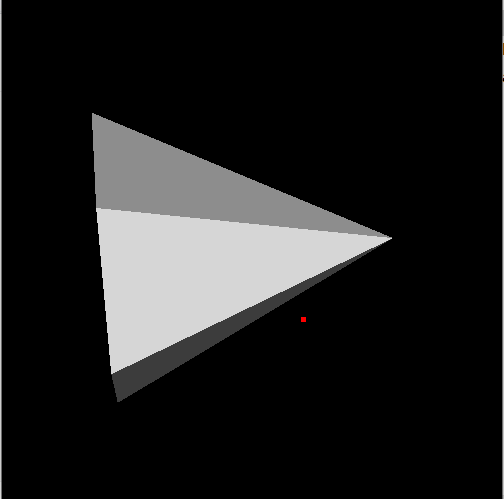
The whole code is:
```auto
from PyQt5.QtWidgets import *
from PyQt5.QtGui import *
from PyQt5.QtCore import *
import sys, os
import numpy as np
import vtk, qimage2ndarray
class vtkLabel(QLabel):
def __init__ (self):
super(vtkLabel, self). __init__ ()
cone = vtk.vtkConeSource()
mapper = vtk.vtkPolyDataMapper()
mapper.SetInputConnection(cone.GetOutputPort())
actor = vtk.vtkActor()
actor.SetMapper(mapper)
ren = vtk.vtkRenderer()
ren.AddActor(actor)
renWin = vtk.vtkRenderWindow()
renWin.AddRenderer(ren)
renWin.SetOffScreenRendering(1)
imageFilter = vtk.vtkWindowToImageFilter()
imageFilter.SetInput(renWin)
self.ren = ren
self.renWin = renWin
self.imageFilter = imageFilter
def mousePressEvent(self, QMouseEvent):
super().mousePressEvent(QMouseEvent)
pos = QMouseEvent.pos()
x = pos.x()
y = pos.y()
self.lastPos = [x, y]
def mouseReleaseEvent(self, QMouseEvent):
super().mouseReleaseEvent(QMouseEvent)
self.lastPos = None
def mouseMoveEvent(self, QMouseEvent):
super().mouseMoveEvent(QMouseEvent)
pos = QMouseEvent.pos()
x = pos.x()
y = pos.y()
if self.lastPos != None:
if QMouseEvent.buttons() == Qt.RightButton:
dy = self.lastPos[1] - y
center = self.ren.GetCenter()
dyf = dy/center[1]
import math
val = math.pow(1.1, dyf)
self.ren.GetActiveCamera().Dolly(val)
if QMouseEvent.buttons() == Qt.LeftButton:
dx = x - self.lastPos[0]
dy = self.lastPos[1] - y
size = self.renWin.GetSize()
delta_elevation = -20.0 / size[1]
delta_azimuth = -20.0 / size[0]
rxf = dx * delta_azimuth
ryf = dy * delta_elevation
camera = self.ren.GetActiveCamera()
camera.Azimuth(rxf)
camera.Elevation(ryf)
camera.OrthogonalizeViewUp()
self.ren.ResetCameraClippingRange()
self.ren.UpdateLightsGeometryToFollowCamera()
self.ren.Render()
self.calculationForDisplay()
def resizeEvent(self, QMouseEvent):
super().resizeEvent(QMouseEvent)
self.renWin.SetSize(self.width(), self.height())
self.calculationForDisplay()
picker = vtk.vtkPropPicker()
picker.Pick(250, 250, 0, self.ren)
if picker.GetActor():
coordinate = vtk.vtkCoordinate()
coordinate.SetCoordinateSystemToDisplay()
coordinate.SetValue(250, 250, 0)
position = coordinate.GetComputedWorldValue(self.ren)
self.position = position
print('the point is one of the cone point')
else:
raise RuntimeError('the point is not one of the cone point')
def calculationForDisplay(self):
self.renWin.Render()
self.imageFilter.Modified()
self.imageFilter.Update()
displayImg = self.imageFilter.GetOutput()
dims = displayImg.GetDimensions()
from vtk.util.numpy_support import vtk_to_numpy
numImg = vtk_to_numpy(displayImg.GetPointData().GetScalars())
numImg = numImg.reshape(dims[1], dims[0], 3)
numImg = numImg.transpose(0, 1, 2)
numImg = np.flipud(numImg)
displayQImg = qimage2ndarray.array2qimage(numImg)
pixmap = QPixmap.fromImage(displayQImg)
self.pixmap = pixmap
self.update()
def paintEvent(self, QPaintEvent):
super(vtkLabel, self).paintEvent(QPaintEvent)
painter = QPainter(self)
width = self.width()
height = self.height()
painter.drawPixmap(QPoint(0, 0), self.pixmap, QRect(0, 0, width, height))
coordinate = vtk.vtkCoordinate()
coordinate.SetCoordinateSystemToWorld()
point = self.position
coordinate.SetValue(point[0], point[1], point[2])
displayCoor = coordinate.GetComputedDisplayValue(self.ren)
x = displayCoor[0]
y = displayCoor[1]
y = self.height() - y
painter.setPen(QPen(QColor(255, 0, 0), 5))
painter.drawPoint(x, y)
class MainWindow(QMainWindow):
def __init__ (self, parent=None):
super(MainWindow, self). __init__ (parent)
self.resize(500,500)
self.imageLabel = vtkLabel()
self.setCentralWidget(self.imageLabel)
app = QApplication(sys.argv)
window = MainWindow()
window.show()
app.exec_()
```
I am so confuzed.
---
### Author:  [@Paulo\_Carvalho](https://discourse.vtk.org/u/Paulo_Carvalho)
#### Post date: [February 22, 2020, 9:36pm UTC](https://discourse.vtk.org/t/vtk-pyqt-from-world-coordinate-to-display-coordinate/2626/14 "2020-02-22T21:36:34Z")
And when you drag (translate) the cone with the mouse?
---
### Author:  [@zhang-qiang-github](https://discourse.vtk.org/u/zhang-qiang-github)
#### Post date: [February 23, 2020, 3:07am UTC](https://discourse.vtk.org/t/vtk-pyqt-from-world-coordinate-to-display-coordinate/2626/15 "2020-02-23T03:07:22Z")
Yes, if I drag the cone, we can see that the point is seperated from cone.
When I drag the cone, the displayed cone and displayed point will simultaneously be updated.
Could you please run the code?