# VTK & Qt: rendering issues when drawing thick lines
**URL:** https://discourse.vtk.org/t/vtk-qt-rendering-issues-when-drawing-thick-lines/13903
**Category:** Development
**Tags:** bug
**Created:** [May 17, 2024, 1:57pm UTC](https://discourse.vtk.org/t/vtk-qt-rendering-issues-when-drawing-thick-lines/13903 "2024-05-17T13:57:41Z")
**Posts on this page:** 20
**Page:** 1
### Author:  [@dkutak](https://discourse.vtk.org/u/dkutak)
#### Post date: [May 17, 2024, 1:57pm UTC](https://discourse.vtk.org/t/vtk-qt-rendering-issues-when-drawing-thick-lines/13903/1 "2024-05-17T13:57:41Z")
Hello,
We are using **Qt 5.15.7** and **VTK 9.2.2**. After the update from **VTK 8.2.0** , we started to encounter strange line-rendering issues that did not occur before. These issues apply to **all lines that are rendered with thickness \> 1**. What happens is that the lines have a strange thickness (larger than the expected one) that is changing depending on the point of view. Also, the lines are showing artifacts when looking along them.
**Examples:**
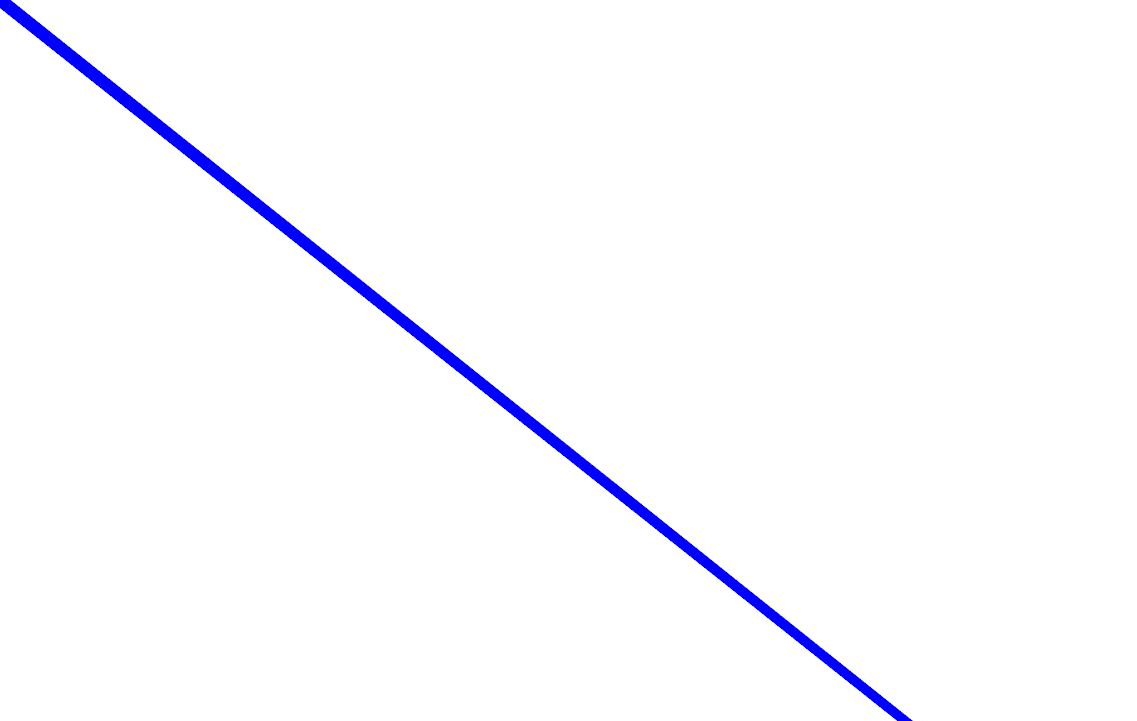
Blue line with a thickness of 2.0

The same line after rotating the camera (while preserving the same distance to the line):
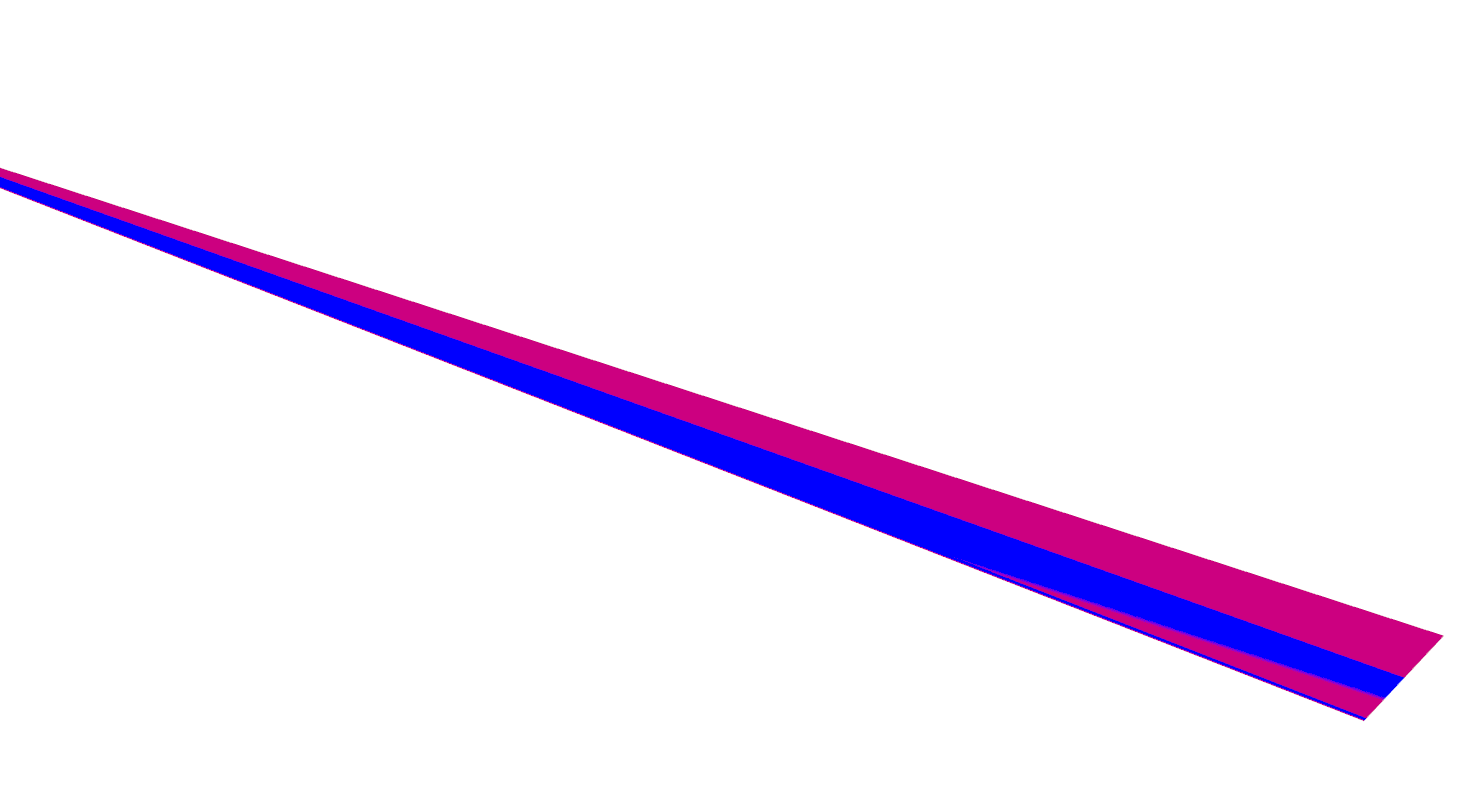
Two lines rendered: a blue line with 2.0 thickness and pink line with 4.0 thickness. Here you can also notice that the line width seems to somehow take line’s distance to the camera into account.
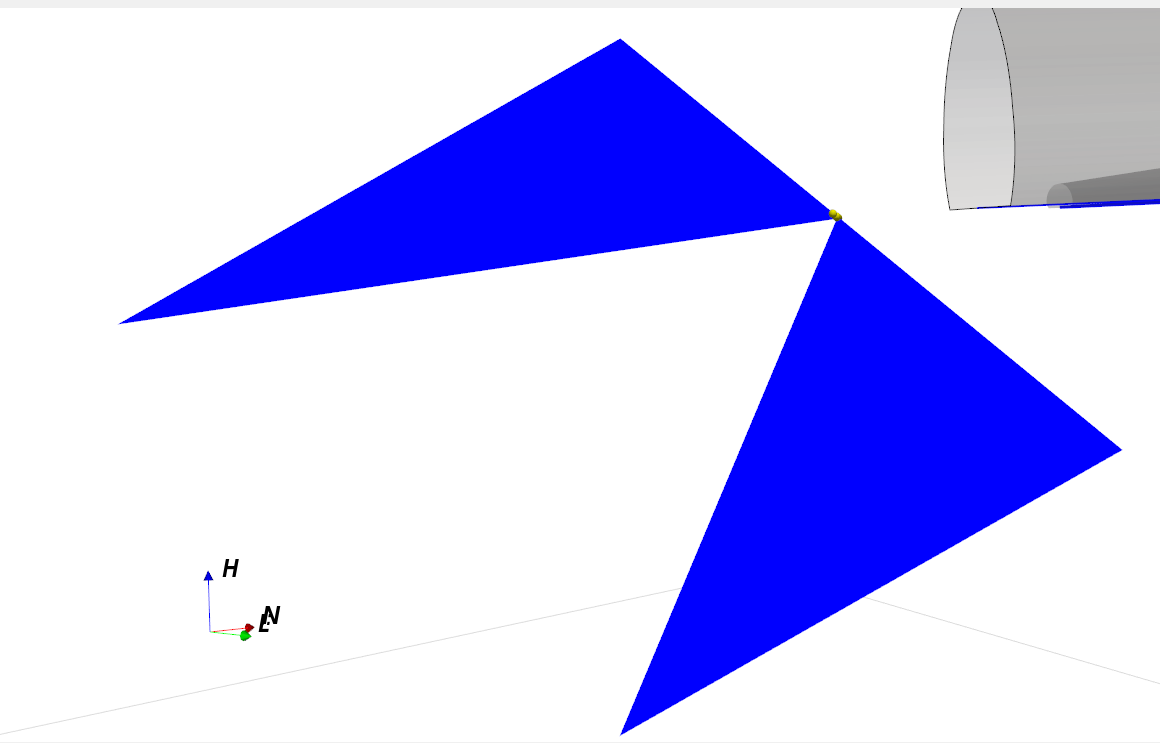
If you are looking along the line (i.e., position the camera on the line and look in the same direction), you may see following artifacts:
**Remarks:** These issues influence all lines that are rendered in our Qt application. It was verified on different hardware/resolutions/graphics cards. However, our C# application (using the same VTK codebase but without Qt) seems to work well. Similarly, we have other applications that use the combination of the same-versioned Qt & VTK as we do and their line-rendering works nicely.
Thus, there might be some issue in our VTK-related codebase that might have popped up after the update to VTK 9.2.2, yet we fail to identify the root cause.
We would be grateful for any ideas guiding us in the right direction.
---
### Author:  [@mwestphal](https://discourse.vtk.org/u/mwestphal)
#### Post date: [May 17, 2024, 1:58pm UTC](https://discourse.vtk.org/t/vtk-qt-rendering-issues-when-drawing-thick-lines/13903/2 "2024-05-17T13:58:47Z")
FYI @Charles_Gueunet
@dkutak : the simplest way forward is to bisect to find the offending commit.
---
### Author:  [@dkutak](https://discourse.vtk.org/u/dkutak)
#### Post date: [May 17, 2024, 2:19pm UTC](https://discourse.vtk.org/t/vtk-qt-rendering-issues-when-drawing-thick-lines/13903/3 "2024-05-17T14:19:06Z")
Thanks for the quick reply and yep, we tried that and this lead us to point of VTK update to 9.2.2. Since this git history approach did not help us much (i.e., we did not find a specific code change that seems to cause this), we also tried to downgrade our current codebase back to VTK 8.2.0 (there were barely any changes required apart from the VTK itself), and the lines started to work again.
Thus, it really feels like that the code does something that was well-accepted in 8.2.0 (although it might be potentially incorrect code [aka undefined behavior] but 8.2.0 may “deal with it”) but it stops working in 9.2.2. But that is just a guess to be honest.
We tried many different solutions how to tackle the issue, including running the application through RenderDoc and checking the API, but our theories were so far wrong and did not lead to solution.
One observation is that the lines with thickness \> 1 are apparently rendered using some VTK solution (i.e., not via driver – please correct me if I am wrong), so the cause might be related to this. We also tried to render lines as tubes (using the _RenderLinesAsTubes_ call) but the behavior was the same.
---
### Author:  [@mwestphal](https://discourse.vtk.org/u/mwestphal)
#### Post date: [May 17, 2024, 2:23pm UTC](https://discourse.vtk.org/t/vtk-qt-rendering-issues-when-drawing-thick-lines/13903/4 "2024-05-17T14:23:03Z")
> [@dkutak](#):
>
> point of VTK update to 9.2.2
I mean bisect VTK
---
### Author:  [@dkutak](https://discourse.vtk.org/u/dkutak)
#### Post date: [May 17, 2024, 2:28pm UTC](https://discourse.vtk.org/t/vtk-qt-rendering-issues-when-drawing-thick-lines/13903/5 "2024-05-17T14:28:31Z")
Ah, thanks and sorry for the misunderstanding. Yes, that might be the way to go now. We were now jumping between combinations of VTK 9.2.2 & VTK 8.2.0 + Qt 5.12.6 & Qt 5.15.7 (suspecting that Qt might have had some influence) and given the outcomes, we will probably have to bisect the VTK more properly.
---
### Author:  [@sankhesh](https://discourse.vtk.org/u/sankhesh)
#### Post date: [May 20, 2024, 2:10pm UTC](https://discourse.vtk.org/t/vtk-qt-rendering-issues-when-drawing-thick-lines/13903/6 "2024-05-20T14:10:05Z")
@dkutak What OS and graphics drivers are you running this on?
---
### Author:  [@dkutak](https://discourse.vtk.org/u/dkutak)
#### Post date: [May 21, 2024, 6:18am UTC](https://discourse.vtk.org/t/vtk-qt-rendering-issues-when-drawing-thick-lines/13903/7 "2024-05-21T06:18:05Z")
@sankhesh I am running Windows 10 with Intel Iris Xe Graphics (driver v. 31.0.101.4887).
The problem occurred also on another Windows 10 computer with AMD Ryzen 7 PRO 5850U with Radeon Graphics (driver v. 27.20.14501.45003).
We were able to reproduce it also on Windows 11 with AMD Ryzen GPUs.
---
### Author:  [@Michael\_Jackson](https://discourse.vtk.org/u/Michael_Jackson)
#### Post date: [May 22, 2024, 2:50pm UTC](https://discourse.vtk.org/t/vtk-qt-rendering-issues-when-drawing-thick-lines/13903/8 "2024-05-22T14:50:39Z")
[https://gitlab.kitware.com/paraview/paraview/-/issues/22594](https://gitlab.kitware.com/paraview/paraview/-/issues/22594)
[https://discourse.paraview.org/t/cell-values-partly-disappear-when-editing-width-on-mac/11666](https://discourse.paraview.org/t/cell-values-partly-disappear-when-editing-width-on-mac/11666)
[https://gitlab.kitware.com/paraview/paraview/-/issues/21832](https://gitlab.kitware.com/paraview/paraview/-/issues/21832)
For us, using Vtk 9.2.6 + Qt 6.5.3 and 6.6.3, the Windows and Linux machines do not show this behavior. MacOS on INTEL does _not_ show the behavior. MacOS on ARM64 **does** show the behavior.
You might try a slightly newer version of Vtk (9.2.6) and maybe the Windows/Linux fixes you need are in there.
---
### Author:  [@sankhesh](https://discourse.vtk.org/u/sankhesh)
#### Post date: [May 22, 2024, 3:00pm UTC](https://discourse.vtk.org/t/vtk-qt-rendering-issues-when-drawing-thick-lines/13903/9 "2024-05-22T15:00:34Z")
@dkutak Do you see similar behavior when it is just a vtk window? i.e. without Qt?
---
### Author:  [@Michael\_Jackson](https://discourse.vtk.org/u/Michael_Jackson)
#### Post date: [May 22, 2024, 3:04pm UTC](https://discourse.vtk.org/t/vtk-qt-rendering-issues-when-drawing-thick-lines/13903/10 "2024-05-22T15:04:41Z")
I have not been able to test that scenario.
---
### Author:  [@dkutak](https://discourse.vtk.org/u/dkutak)
#### Post date: [May 22, 2024, 3:10pm UTC](https://discourse.vtk.org/t/vtk-qt-rendering-issues-when-drawing-thick-lines/13903/11 "2024-05-22T15:10:40Z")
In our case, our C# application (not using Qt widget) seems to behave well (despite generally using the same VTK codebase).
After further exploration, it seems that the issue is related to transition from `QVTKWidget` to `QVTKOpenGLNativeWidget`. I have been able to reproduce the problem using VTK 9.0.0.rc1 when we used `QVTKOpenGLNativeWidget` but changing our viewer to derive from `QVTKWidget` instead helped. Thus, there appears to be some relation to the changes related to Qt widgets, windows or so.
---
### Author:  [@dkutak](https://discourse.vtk.org/u/dkutak)
#### Post date: [May 22, 2024, 3:16pm UTC](https://discourse.vtk.org/t/vtk-qt-rendering-issues-when-drawing-thick-lines/13903/12 "2024-05-22T15:16:37Z")
Thank you for the information and links. I will take a closer look at it.
I initially tried also VTK 9.3 and it did not seem to help.
---
### Author:  [@sankhesh](https://discourse.vtk.org/u/sankhesh)
#### Post date: [May 22, 2024, 3:35pm UTC](https://discourse.vtk.org/t/vtk-qt-rendering-issues-when-drawing-thick-lines/13903/13 "2024-05-22T15:35:51Z")
Are you setting up the Qt surface format as described here: [VTK: QVTKOpenGLNativeWidget Class Reference](https://vtk.org/doc/nightly/html/classQVTKOpenGLNativeWidget.html#details) ?
---
### Author:  [@dkutak](https://discourse.vtk.org/u/dkutak)
#### Post date: [May 23, 2024, 6:49am UTC](https://discourse.vtk.org/t/vtk-qt-rendering-issues-when-drawing-thick-lines/13903/14 "2024-05-23T06:49:25Z")
Yes, we are doing exactly the same (I also suspected something may have gone wrong here but it seems ok).
---
### Author:  [@dkutak](https://discourse.vtk.org/u/dkutak)
#### Post date: [June 7, 2024, 12:14pm UTC](https://discourse.vtk.org/t/vtk-qt-rendering-issues-when-drawing-thick-lines/13903/15 "2024-06-07T12:14:08Z")
Hello all,
We further examined the issue (the root cause is still unknown since the behavior seems to be triggered by the move from `QVTKWidget` to `QVTKOpenGLNativeWidget`) and managed to create a **minimalistic example reproducing our problem**. This example consists of a simple VTK (9.2.2) widget rendered within a Qt (5.15.7) application/window. The VTK scene contains a line and a cube (the cube is just for reference and does not seem to influence the line rendering behavior).
We made this example available for download:
- [Source code](https://ambgrp-my.sharepoint.com/:u:/g/personal/dkutak_amberg_cz/EY-CNAd6XtJJlvGEQYLoOhcBMu1VGDSSL5Ueyh1LD5tiYA?e=MFdSlM): contains two folders – VS 2022 solution and necessary Qt/VTK libraries. It should be possible to build the code [prepared for x64 & Release] by extracting the archive and building the solution.
- [Build](https://ambgrp-my.sharepoint.com/:u:/g/personal/dkutak_amberg_cz/EaQADG7PTqRFl0SOP4Fmm0sBU08SZlsNiTdgdcW-ms8wBQ?e=m1ke7Q): Windows x64 release build of the demo application (shown on images below). To execute, run `QtVtkLineTest.exe` file.
We are also posting the most important source codes here:
> **main.cpp**
>
> ```auto
> #include "QtVtkLineTest.h"
> #include
>
> int main(int argc, char *argv[])
> {
> QSurfaceFormat::setDefaultFormat(QVTKOpenGLNativeWidget::defaultFormat());
> QApplication::setAttribute(Qt::AA_EnableHighDpiScaling);
> QApplication a(argc, argv);
> QtVtkLineTest w;
> w.show();
> return a.exec();
> }
>
> ```
> **QtVtkLineTest.h**
>
> ```auto
> #pragma once
>
> #include
>
> #include
> #include "ui_QtVtkLineTest.h"
>
> class QtVtkLineTest : public QMainWindow
> {
> Q_OBJECT
>
> public:
> QtVtkLineTest(QWidget *parent = nullptr);
> ~QtVtkLineTest();
>
> private:
> void add_line(vtkRenderer* renderer);
> void add_cube(vtkRenderer* renderer);
>
> Ui::QtVtkLineTestClass ui;
> QVTKOpenGLNativeWidget* vtkWidget;
> };
>
> ```
> **QtVtkLineTest.cpp**
>
> ```auto
> #include "QtVtkLineTest.h"
>
> #include
> #include
> #include
> #include
> #include
> #include
> #include
> #include
> #include
> #include
> #include
> #include
> #include
> #include
> #include
> #include
>
> QtVtkLineTest::QtVtkLineTest(QWidget *parent)
> : QMainWindow(parent)
> {
> ui.setupUi(this);
> setStyleSheet("background-color: #fffee0;");
> setWindowFlags(Qt::Dialog | Qt::MSWindowsFixedSizeDialogHint);
>
> QString versionInfo;
> versionInfo.append("VTK version: ");
> versionInfo.append(vtkVersion::GetVTKVersion());
> versionInfo.append(" | Qt version: ");
> versionInfo.append(QT_VERSION_STR);
>
> ui.versionInfo->setText(versionInfo);
>
> // Window & widget init
> vtkNew renderWindow;
> vtkNew renderer;
> renderer->SetBackground(0.9, 0.9, 0.9);
> renderWindow->AddRenderer(renderer);
>
> vtkWidget = new QVTKOpenGLNativeWidget(this);
> vtkWidget->setRenderWindow(renderWindow);
> ui.vtkWidgetLayout->addWidget(vtkWidget);
>
> // Objects creation
> add_line(renderer);
> add_cube(renderer);
> }
>
> QtVtkLineTest::~QtVtkLineTest()
> { }
>
> void QtVtkLineTest::add_line(vtkRenderer* renderer)
> {
> vtkNew line;
> line->SetPoint1(0, 0, 0);
> line->SetPoint2(100, 200, 400);
>
> vtkNew colors;
>
> vtkNew mapper;
> mapper->SetInputConnection(line->GetOutputPort());
>
> vtkNew actor;
> actor->SetMapper(mapper);
> actor->GetProperty()->SetLineWidth(2);
> actor->GetProperty()->SetPointSize(2);
> actor->GetProperty()->SetColor(colors->GetColor3d("Crimson").GetData());
>
> renderer->AddActor(actor);
> }
>
> void QtVtkLineTest::add_cube(vtkRenderer* renderer)
> {
> vtkNew cube;
> cube->SetXLength(12);
> cube->SetYLength(18);
> cube->SetZLength(32);
> cube->SetCenter(0, 64, 0);
> cube->Update();
>
> vtkNew colors;
>
> vtkNew cubeMapper;
> cubeMapper->SetInputData(cube->GetOutput());
>
> vtkNew cubeActor;
> cubeActor->SetMapper(cubeMapper);
> cubeActor->GetProperty()->SetColor(colors->GetColor3d("Banana").GetData());
>
> renderer->AddActor(cubeActor);
> }
>
> #include "QtVtkLineTest.moc"
>
> ```
In our case (tested on multiple Windows devices), the two-pixel line shows strange behavior when previewed from different perspectives and distances – you can see some examples of the rendering artifacts on the image below.
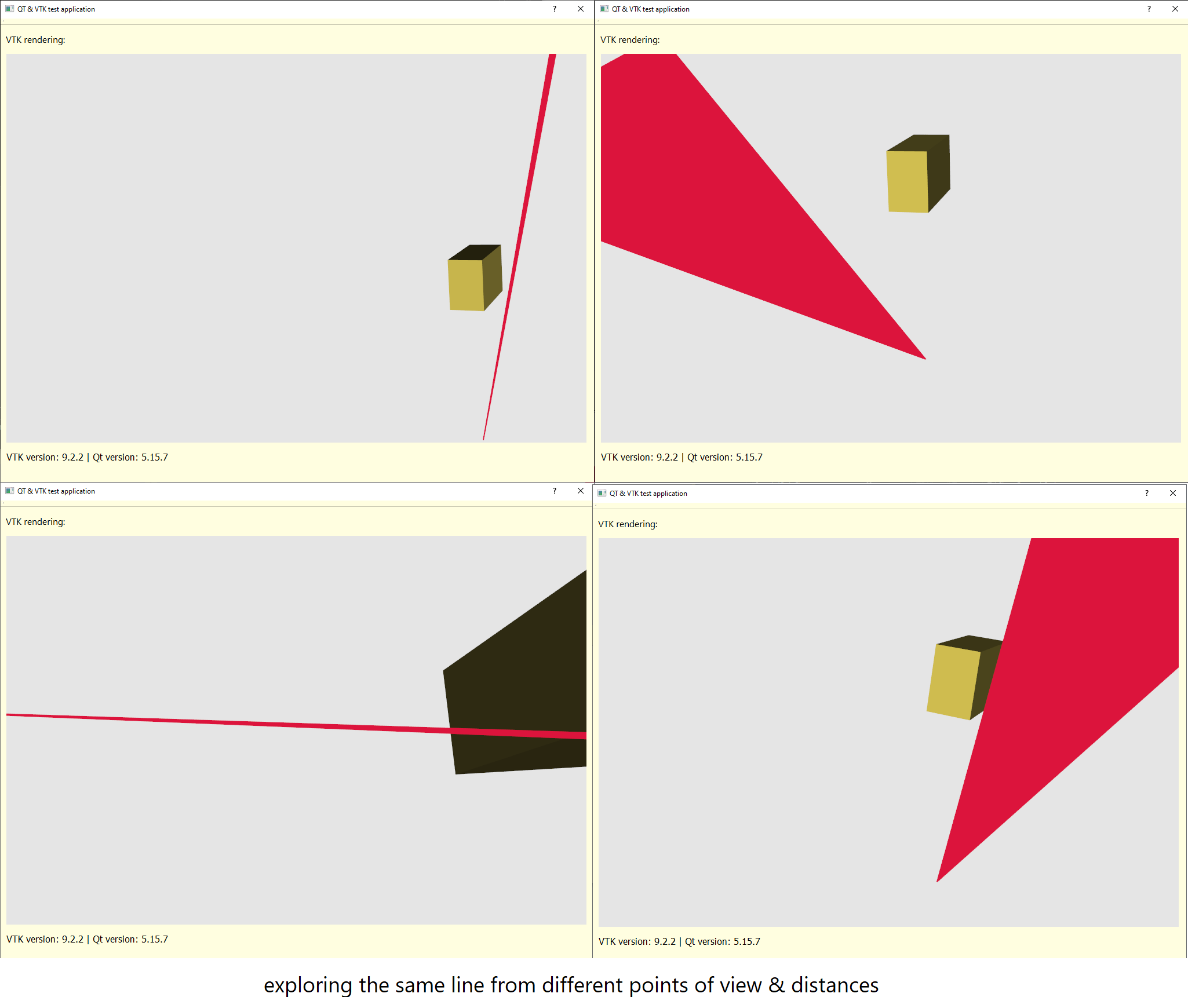
Everything seems to work well with one-pixel lines. Thus, we assume there might be some conflict between Qt and VTK’s geometry shader-based wide line rendering.
We would be very glad for any ideas how to tackle this problem. Newer VTK versions did not seem to help.
---
### Author:  [@Michael\_Jackson](https://discourse.vtk.org/u/Michael_Jackson)
#### Post date: [June 13, 2024, 7:16pm UTC](https://discourse.vtk.org/t/vtk-qt-rendering-issues-when-drawing-thick-lines/13903/16 "2024-06-13T19:16:39Z")
Are you seeing this on Windows and/or Linux? we only saw it on MacOS.
---
### Author:  [@dkutak](https://discourse.vtk.org/u/dkutak)
#### Post date: [June 14, 2024, 6:33am UTC](https://discourse.vtk.org/t/vtk-qt-rendering-issues-when-drawing-thick-lines/13903/17 "2024-06-14T06:33:08Z")
Yes, we can reproduce the minimal example above on various Windows devices.
---
### Author:  [@dkutak](https://discourse.vtk.org/u/dkutak)
#### Post date: [September 4, 2024, 12:26pm UTC](https://discourse.vtk.org/t/vtk-qt-rendering-issues-when-drawing-thick-lines/13903/18 "2024-09-04T12:26:28Z")
Hello,
since this issue still lives in our backlog and I noticed that the links to example source code and build expired, I reuploaded these examples in case someone encounters similar issue or feels like sharing any other idea.
[Build](https://attspinternalstorage.blob.core.windows.net/temp/QtVtkLineTest_build.zip)
[Source code](https://attspinternalstorage.blob.core.windows.net/temp/QtVtkLineTest_source.zip)
Thanks for any suggestions! 🙂
---
### Author:  [@sankhesh](https://discourse.vtk.org/u/sankhesh)
#### Post date: [September 4, 2024, 12:51pm UTC](https://discourse.vtk.org/t/vtk-qt-rendering-issues-when-drawing-thick-lines/13903/19 "2024-09-04T12:51:25Z")
@dkutak, Thanks for re-uploading. I’ll try it on my Windows machine. By the way, have you tried rendering a thick line with ParaView on your Windows setup? I’ve had no issues with ParaView (which uses the same `QVTKOpenGLNativeWidget` with Qt5.15 and VTK 9.3) for rendering on Windows.
---
### Author:  [@dkutak](https://discourse.vtk.org/u/dkutak)
#### Post date: [September 5, 2024, 5:56am UTC](https://discourse.vtk.org/t/vtk-qt-rendering-issues-when-drawing-thick-lines/13903/20 "2024-09-05T05:56:59Z")
Thank you. I tried ParaView 5.13.0 and while it seems mostly ok at first sight, I started to notice similar behavior as we have when zooming in onto the lines (and looking at the line from a right angle of view).