# VTK raycasting aliasing lines
**URL:** https://discourse.vtk.org/t/vtk-raycasting-aliasing-lines/5321
**Category:** Support
**Created:** [March 4, 2021, 9:27pm UTC](https://discourse.vtk.org/t/vtk-raycasting-aliasing-lines/5321 "2021-03-04T21:27:43Z")
**Posts on this page:** 3
**Page:** 1
### Author:  [@desheng](https://discourse.vtk.org/u/desheng)
#### Post date: [March 4, 2021, 9:27pm UTC](https://discourse.vtk.org/t/vtk-raycasting-aliasing-lines/5321/1 "2021-03-04T21:27:43Z")
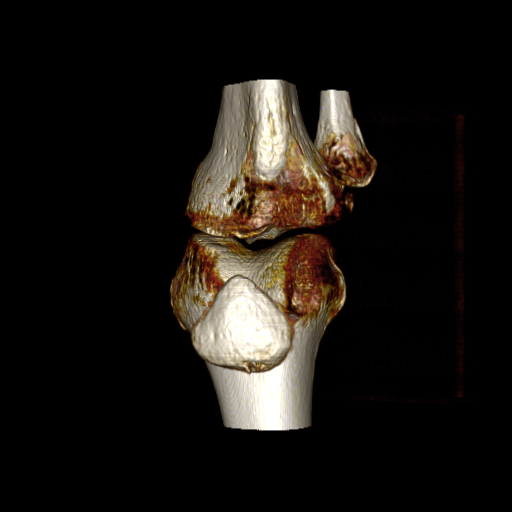
Tried to generate raycasting for a knee CT, but the resulting image shows some aliasing lines, as shown in the image. Anyone can help me out? Thanks!
---
### Author:  [@lassoan](https://discourse.vtk.org/u/lassoan)
#### Post date: [March 4, 2021, 11:07pm UTC](https://discourse.vtk.org/t/vtk-raycasting-aliasing-lines/5321/2 "2021-03-04T23:07:22Z")
This already looks very nice, but if you think it is necessary then you can [enable jittering](https://vtk.org/doc/nightly/html/classvtkGPUVolumeRayCastMapper.html#a9f58bdf2f81625edfbcb1fa7e9c26bd6) or set smaller SampleDistance and/or ImageSampleDistance manually.
---
### Author:  [@desheng](https://discourse.vtk.org/u/desheng)
#### Post date: [March 5, 2021, 2:35pm UTC](https://discourse.vtk.org/t/vtk-raycasting-aliasing-lines/5321/3 "2021-03-05T14:35:42Z")
Really appreciate your help!!!
After apply .SetUseJittering the image get much better.