# VTK Trame Image Quality
**URL:** https://discourse.vtk.org/t/vtk-trame-image-quality/8394
**Category:** Web
**Tags:** python
**Created:** [April 28, 2022, 7:51am UTC](https://discourse.vtk.org/t/vtk-trame-image-quality/8394 "2022-04-28T07:51:47Z")
**Posts on this page:** 16
**Page:** 1
### Author:  [@simplyvish](https://discourse.vtk.org/u/simplyvish)
#### Post date: [April 28, 2022, 7:51am UTC](https://discourse.vtk.org/t/vtk-trame-image-quality/8394/1 "2022-04-28T07:51:47Z")
Hi,
I’m work on a PoC application using VTK Trame. Currently there are two thing on which I’m a bit stuck. I’m following the python [examples](https://kitware.github.io/vtk-examples/site/Python/) from the VTK. I have installed vtk and trame in my local python environment and even then I’m getting error for some of the imports present in the online python examples like
> ImportError: cannot import name ‘vtkImageGaussianSmooths’ from ‘vtkmodules.vtkImagingGeneral’
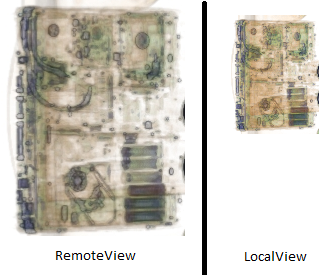
Also, I tried LocalView and RemoteView in the trame. However, the color of the image is not same in both cases. Do I need to made any other setting apart from view creation while switching between these views.
---
### Author:  [@Sebastien\_Jourdain](https://discourse.vtk.org/u/Sebastien_Jourdain)
#### Post date: [April 28, 2022, 3:03pm UTC](https://discourse.vtk.org/t/vtk-trame-image-quality/8394/2 "2022-04-28T15:03:35Z")
Which Python example are you trying to convert/run with trame? Which version of vtk did you pip install?
Regarding the color, it usually happen with ParaView because of the light kit but in VTK/C++ it is usually very close if not identical.
---
### Author:  [@simplyvish](https://discourse.vtk.org/u/simplyvish)
#### Post date: [April 28, 2022, 4:21pm UTC](https://discourse.vtk.org/t/vtk-trame-image-quality/8394/3 "2022-04-28T16:21:12Z")
I’m trying [this](https://kitware.github.io/vtk-examples/site/Python/Visualization/FrogBrain/) example of smoothing using Gaussian. The vtk version is 9.1.0 and trame version is 1.18.4. Attached below the image from local and remote rendering for reference. Also, I have applied zooming from code which is not getting applied in case of LocalView. The only change in code of both the images is RemoteView and LocalView.
---
### Author:  [@Sebastien\_Jourdain](https://discourse.vtk.org/u/Sebastien_Jourdain)
#### Post date: [April 28, 2022, 5:56pm UTC](https://discourse.vtk.org/t/vtk-trame-image-quality/8394/4 "2022-04-28T17:56:20Z")
That example seems to do geometry rendering while the picture you are sharing are doing volume rendering. Can you share a python script that illustrate the issue so we can test it locally?
It is possible that the camera don’t get properly pushed initially for the local view but it will be easier to see your code to be sure.
---
### Author:  [@simplyvish](https://discourse.vtk.org/u/simplyvish)
#### Post date: [April 28, 2022, 6:20pm UTC](https://discourse.vtk.org/t/vtk-trame-image-quality/8394/5 "2022-04-28T18:20:16Z")
I’m getting error in the import statement only. For color do any other setting need to be done apart from View creation. Also, in case of RemoteView the image quality is not so good while any operation like rotate/zoom is performed over it. I tried tuning desiredUpdateRate but it slows down the operations with increase in quality. Below is the code for reference.
```auto
from trame.layouts import SinglePage
from trame.html import vtk, vuetify
# noinspection PyUnresolvedReferences
import vtkmodules.vtkInteractionStyle
# noinspection PyUnresolvedReferences
import vtkmodules.vtkRenderingVolumeOpenGL2
import vtkmodules.vtkRenderingOpenGL2 # noqa
from vtkmodules.vtkImagingGeneral import vtkImageGaussianSmooths # Import giving error
from vtkmodules.vtkIOXML import vtkXMLImageDataReader
from vtkmodules.vtkCommonColor import vtkNamedColors
from vtkmodules.vtkRenderingVolume import vtkFixedPointVolumeRayCastMapper
from vtkmodules.vtkCommonDataModel import vtkPiecewiseFunction
from vtkmodules.vtkRenderingCore import (
vtkColorTransferFunction,
vtkRenderer,
vtkRenderWindow,
vtkRenderWindowInteractor,
vtkVolume,
vtkVolumeProperty
)
renderer = vtkRenderer()
renderWindow = vtkRenderWindow()
renderWindow.AddRenderer(renderer)
renderWindow.SetWindowName('VTI Reader')
renderWindowInteractor = vtkRenderWindowInteractor()
renderWindowInteractor.SetRenderWindow(renderWindow)
renderWindowInteractor.GetInteractorStyle().SetCurrentStyleToTrackballCamera()
renderWindowInteractor.SetDesiredUpdateRate(15)
renderWindowInteractor.Initialize()
colors = vtkNamedColors()
vtiReader = vtkXMLImageDataReader()
vtiReader.SetFileName("Sample.vti")
vtiReader.Update()
vtiMapper = vtkFixedPointVolumeRayCastMapper()
vtiMapper.SetInputConnection(vtiReader.GetOutputPort())
vtiColor = vtkColorTransferFunction()
vtiColor.AddHSVPoint(0.0, 1.0, 0.0, 1.0)
vtiColor.AddHSVPoint(1300.0, 1, 0, 1)
vtiColor.AddHSVPoint(1301.0, 0.0889, 0.95, 0.966)
vtiColor.AddHSVPoint(1700.0, 0.0889, 0.95, 0.955)
vtiColor.AddHSVPoint(1900.0, 0.0889, 0.95, 0.913)
vtiColor.AddHSVPoint(2080.0, 0.0889, 0.95, 0.903)
vtiOpacity = vtkPiecewiseFunction()
vtiOpacity.AddPoint(0, 0.0)
vtiOpacity.AddPoint(1300.0, 0.0)
vtiOpacity.AddPoint(1301.0, 0.012)
vtiOpacity.AddPoint(1700, 0.017)
vtiOpacity.AddPoint(1800.0, 0.020)
vtiOpacity.AddPoint(2000.0, 0.035)
vtiOpacity.AddPoint(1900.0, 0.038)
vtiOpacity.AddPoint(2080.0, 0.045)
vtiGradientOpacity = vtkPiecewiseFunction()
vtiGradientOpacity.AddPoint(0, 0.0)
vtiGradientOpacity.AddPoint(90, 0.5)
vtiGradientOpacity.AddPoint(100, 1.0)
volumeProperty = vtkVolumeProperty()
volumeProperty.SetColor(vtiColor)
volumeProperty.SetScalarOpacity(vtiOpacity)
volumeProperty.SetGradientOpacity(vtiGradientOpacity)
volumeProperty.SetInterpolationTypeToLinear()
volumeProperty.ShadeOn()
vtiVolume = vtkVolume()
vtiVolume.SetMapper(vtiMapper)
vtiVolume.SetProperty(volumeProperty)
renderer.AddViewProp(vtiVolume)
renderer.ResetCamera()
renderer.SetBackground(colors.GetColor3d('White'))
renderer.GetActiveCamera().Zoom(2)
renderer.ResetCameraClippingRange()
renderWindow.Render()
VTK_VIEW_SETTINGS = {
"interactive_ratio": 1,
"interactive_quality": 100,
}
# Colors seems to be faded in RemoteView-----------------
# html_view = vtk.VtkLocalView(renderWindow, ref="view", interactive_ratio=(1,))
html_view = vtk.VtkRemoteView(renderWindow, ref="view", interactive_ratio=(1,))
html_view.update()
layout = SinglePage("Volume Viewer", on_ready=html_view.update)
layout.content.children += [
vuetify.VContainer(
fluid=True,
classes="pa-0 fill-height",
children=[html_view],
)
]
if __name__ == " __main__":
layout.start()
```
---
### Author:  [@Sebastien\_Jourdain](https://discourse.vtk.org/u/Sebastien_Jourdain)
#### Post date: [April 29, 2022, 10:43pm UTC](https://discourse.vtk.org/t/vtk-trame-image-quality/8394/6 "2022-04-29T22:43:37Z")
The rendering won’t be matching for sure as the GL implementation is somewhat different between C++ and JS but I’m not sure why the camera zoom is not properly reported with the VtkLocalView, that should not be happening.
---
### Author:  [@simplyvish](https://discourse.vtk.org/u/simplyvish)
#### Post date: [May 2, 2022, 4:12am UTC](https://discourse.vtk.org/t/vtk-trame-image-quality/8394/7 "2022-05-02T04:12:06Z")
For color difference in LocalView and RemoteView I was also thinking of same. Thanks for confirming. Apart from zoom parameter not working, there’s one parameter for setting interactive quality while creating Local or Remote view. I tried changing it but unable to see any impact on the screen. Is there any other setting that need to be done.
---
### Author:  [@Sebastien\_Jourdain](https://discourse.vtk.org/u/Sebastien_Jourdain)
#### Post date: [May 2, 2022, 11:49pm UTC](https://discourse.vtk.org/t/vtk-trame-image-quality/8394/8 "2022-05-02T23:49:14Z")
I don’t think of any settings you can tweak right now but the `interactive_quality` is to adjust the compression level when you are dragging your mouse for rotating or panning. Usually it is good to keep that value around 80 or below to ensure a low latency response.
---
### Author:  [@simplyvish](https://discourse.vtk.org/u/simplyvish)
#### Post date: [May 3, 2022, 6:26am UTC](https://discourse.vtk.org/t/vtk-trame-image-quality/8394/9 "2022-05-03T06:26:07Z")
The interactive\_quality parameter value doesn’t seems to make any impact. Its default value is 60. As you mention about latency, I want to highlight this point as well. This now the desiredUpdateRate function is working for adjusting the image quality as well as the response time. But if I keep it at its default value i.e. 15 then I see only blurry images while rotating. If I try to decrease it up to 5 a significance quality improvement is observed. Still lower than VTK.JS based rendering and much lower than VTK C++ based desktop application.
As everything is handled by Trame itself. I’m unable to identify why this trade off between response time and image quality is there. Is CPU related or graphics related or any other limiting factor. On same machine desktop application is running smoothly.
As far as I understood Trame uses VTK Python for server application and VtkWebVue for client UI. So, on what part should I focus to increase the image quality and a good response time as well. Currently I’m observing a response time from 1 to 4 seconds depending on the size of vti file. Max size I checked is 1.4GB while min is 350MB.
I also tried RDP/VNC of the desktop application and there I’m getting good response time. In my knowledge these application usually perform image compression/decompression. Can we implement something similar in Trame.
---
### Author:  [@Sebastien\_Jourdain](https://discourse.vtk.org/u/Sebastien_Jourdain)
#### Post date: [May 3, 2022, 2:29pm UTC](https://discourse.vtk.org/t/vtk-trame-image-quality/8394/10 "2022-05-03T14:29:56Z")
I think you must be doing something really wrong in your settings for trame or VTK. Normally the defaults are fairly good and should provide a reasonable results. Unless your server is not using the GPU, you should get similar perf as desktop VTK with a capped fps around 30 fps.
**interactive\_quality** has a huge impact for latency but that will only affect the network part of the rendering stream not the server side rendering.
**desiredUpdateRate** is a different beast as it affect LOD to enable more interactive volume rendering. That is a plain VTK/C++ setting, not a trame one… Also if you are targeting something lower that 30 fps here, you should do the same for [trame](https://github.com/Kitware/VTK/blob/master/Web/Python/vtkmodules/web/protocols.py#L308), otherwise the server will try to render 30 fps and will fail while overloading itself.
Trame should perform similarly and even better than RDP/VNC when properly configured.
---
### Author:  [@simplyvish](https://discourse.vtk.org/u/simplyvish)
#### Post date: [May 4, 2022, 4:44am UTC](https://discourse.vtk.org/t/vtk-trame-image-quality/8394/11 "2022-05-04T04:44:22Z")
Hi @Sebastien_Jourdain, thanks for quick response. I haven’t done any specific settings. Code is already shared above for you reference. However, one thing that come to my mind is that for POC, I’m running it with trame’s inbuilt server. Will deploying it on dedicated server make any impact. I’m guessing that it should. Need to try it out though. Any references to get started in that direction ?
---
### Author:  [@Sebastien\_Jourdain](https://discourse.vtk.org/u/Sebastien_Jourdain)
#### Post date: [May 4, 2022, 2:36pm UTC](https://discourse.vtk.org/t/vtk-trame-image-quality/8394/12 "2022-05-04T14:36:11Z")
Running on a dedicated server will only be different if the GPU on that server is better than the one on your machine.
For multi-user deployment the cookie cutter provide a starting point for bundling an app within a docker image. You will have to edit the Docker file to point to a GPU image and make sure you run it properly.
You can read [that thread](https://github.com/Kitware/trame/discussions/50) as a starting point.
---
### Author:  [@simplyvish](https://discourse.vtk.org/u/simplyvish)
#### Post date: [May 5, 2022, 5:36am UTC](https://discourse.vtk.org/t/vtk-trame-image-quality/8394/13 "2022-05-05T05:36:16Z")
I’m new to docker as well. So, will be checking on that part. On the deployment side I was planning on same machine on which the application is currently running. Did you get any chance to check the code if I have missed some setting or did something wrong.
---
### Author:  [@Sebastien\_Jourdain](https://discourse.vtk.org/u/Sebastien_Jourdain)
#### Post date: [May 5, 2022, 2:34pm UTC](https://discourse.vtk.org/t/vtk-trame-image-quality/8394/14 "2022-05-05T14:34:19Z")
I glanced through the code and I didn’t see anything obvious except the part I was mentioning earlier.
To really go to the bottom of it, I will have to run your code with the proper dataset and I don’t necessarily have the time right now. But if you need dedicated help, you can reach out to [Kitware for support hours](https://www.kitware.com/contact/).
---
### Author:  [@simplyvish](https://discourse.vtk.org/u/simplyvish)
#### Post date: [May 6, 2022, 5:23am UTC](https://discourse.vtk.org/t/vtk-trame-image-quality/8394/15 "2022-05-06T05:23:14Z")
I’m currently doing it for self POC. Will explore more about the frame rate setting as you highlighted.
---
### Author:  [@simplyvish](https://discourse.vtk.org/u/simplyvish)
#### Post date: [June 1, 2022, 6:02am UTC](https://discourse.vtk.org/t/vtk-trame-image-quality/8394/16 "2022-06-01T06:02:22Z")
Hi,
Just to update the image quality issue got resolved by using `vtkGPUVolumeRayCastMapper()` instead of `vtkFixedPointVolumeRayCastMapper`. However, I think that the code will not be executable on machine without dedicated graphic card.