# VTK with OCCT support
**URL:** https://discourse.vtk.org/t/vtk-with-occt-support/15925
**Category:** Support
**Tags:** python, code
**Created:** [August 6, 2025, 3:13pm UTC](https://discourse.vtk.org/t/vtk-with-occt-support/15925 "2025-08-06T15:13:09Z")
**Posts on this page:** 12
**Page:** 1
### Author:  [@TheWizRd](https://discourse.vtk.org/u/TheWizRd)
#### Post date: [August 6, 2025, 3:13pm UTC](https://discourse.vtk.org/t/vtk-with-occt-support/15925/1 "2025-08-06T15:13:09Z")
For a few days I have been trying to build VTK-9.5.0 with OCCT support. I mainly followed steps from a previous discussion about this topic ([Building VTK with OpenCascade support](https://discourse.vtk.org/t/building-vtk-with-opencascade-support/13605)). I managed to create install files of both OCCT and VTK from their source files and added VTK after configuring the VTK modules in python. However, I still cannot import vtkIOOCCT. How can I fix that? I mostly got errors related to dll files (though I have copied all dlls of OCCT to my VTKs bin directory.)
---
### Author:  [@dgobbi](https://discourse.vtk.org/u/dgobbi)
#### Post date: [August 6, 2025, 3:53pm UTC](https://discourse.vtk.org/t/vtk-with-occt-support/15925/2 "2025-08-06T15:53:59Z")
The most likely cause is that there are still some DLLs that need to be copied. VTK automatically calls [os.add\_dll\_directory](https://docs.python.org/3/library/os.html#os.add_dll_directory)(path) for the VTK bin directory, but any DLLs elsewhere, even if they’re in the PATH, will fail to load. I recommend the use of a [dependency walker](https://github.com/lucasg/Dependencies) to locate all DLLs that the vtkIOOCCT DLL needs.
What were the errors that you saw?
---
### Author:  [@TheWizRd](https://discourse.vtk.org/u/TheWizRd)
#### Post date: [August 6, 2025, 3:59pm UTC](https://discourse.vtk.org/t/vtk-with-occt-support/15925/3 "2025-08-06T15:59:43Z")
Thank you so much for the fast reply. I have already used a dependency checker. It seemed fine but I upon trying to debug it in Python some dlls seemed corrupted whereas some worked just fine. Could you write down the steps you followed if you were able to configure VTK with OCCT support.
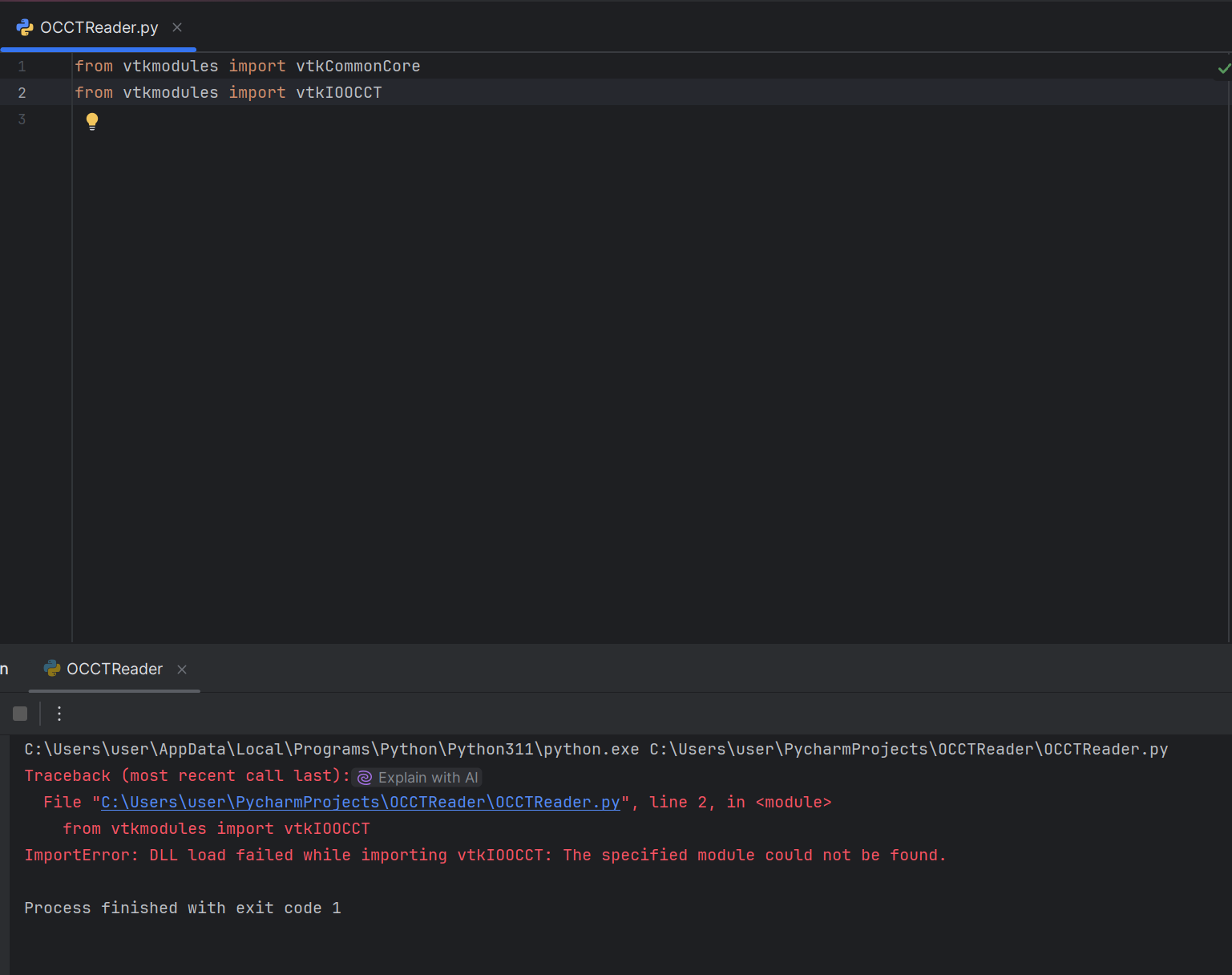
PS: This was the error I got for the majority of the time from vtkmodules import vtkIOOCCT
ImportError: DLL load failed while importing vtkIOOCCT: The specified module could not be found.
---
### Author:  [@dgobbi](https://discourse.vtk.org/u/dgobbi)
#### Post date: [August 6, 2025, 4:13pm UTC](https://discourse.vtk.org/t/vtk-with-occt-support/15925/4 "2025-08-06T16:13:51Z")
I’ve only built VTK with OCCT once, and that was a couple years ago on Linux, so I don’t have any notes to share. I’m just a jack-of-all-trades, not an OCCT specialist.
If you’re using a dependency checker, then you’re already on the right track. Also, while you’re trying to get this to work, make sure to build everything in “Release” mode and only switch to “Debug” mode when Release is working fine.
Yes, that “DLL load failed while importing …” is what I thought the error would be. Unfortunately it isn’t a helpful error, it could mean a missing DLL, or an incompatible DLL, but it gives no hints about what the actual problem is.
---
### Author:  [@TheWizRd](https://discourse.vtk.org/u/TheWizRd)
#### Post date: [August 6, 2025, 4:18pm UTC](https://discourse.vtk.org/t/vtk-with-occt-support/15925/5 "2025-08-06T16:18:35Z")
I used Release mode for all builds as you’ve noted. Do you remember the version that you used for OCCT?
---
### Author:  [@dgobbi](https://discourse.vtk.org/u/dgobbi)
#### Post date: [August 6, 2025, 4:32pm UTC](https://discourse.vtk.org/t/vtk-with-occt-support/15925/6 "2025-08-06T16:32:51Z")
It was OCCT 7.6.3.
OCCT is part of the Paraview superbuild, which might have some useful config details:
[https://gitlab.kitware.com/paraview/paraview-superbuild/-/blob/master/projects/occt.cmake](https://gitlab.kitware.com/paraview/paraview-superbuild/-/blob/master/projects/occt.cmake)
---
### Author:  [@dgobbi](https://discourse.vtk.org/u/dgobbi)
#### Post date: [August 6, 2025, 4:46pm UTC](https://discourse.vtk.org/t/vtk-with-occt-support/15925/7 "2025-08-06T16:46:06Z")
And Paraview currently uses OCCT 7.7.2:
[https://gitlab.kitware.com/paraview/paraview-superbuild/-/blob/master/versions.cmake](https://gitlab.kitware.com/paraview/paraview-superbuild/-/blob/master/versions.cmake#L385)
---
### Author:  [@TheWizRd](https://discourse.vtk.org/u/TheWizRd)
#### Post date: [August 6, 2025, 4:50pm UTC](https://discourse.vtk.org/t/vtk-with-occt-support/15925/8 "2025-08-06T16:50:17Z")
I could not understand that document. I used cmake-gui for the build files and VS17-2022 edition for installation files. Could you provide me insight on how to read Paraview superbuild. I also used the latest 3rdparty zip folder provided in github and also OCCT’s official webpage. Also in my last attempt I used OCCT-7.7.2
---
### Author:  [@dgobbi](https://discourse.vtk.org/u/dgobbi)
#### Post date: [August 6, 2025, 5:07pm UTC](https://discourse.vtk.org/t/vtk-with-occt-support/15925/9 "2025-08-06T17:07:53Z")
Just focus on this part, which indicates how Paraview sets the OCCT cmake options:
```auto
# Do not build Draw or Visualization modules as they require tcl/tk.
-DBUILD_MODULE_Draw:BOOL=FALSE
-DBUILD_MODULE_Visualization:BOOL=FALSE
# Do not build docs or examples:
-DBUILD_DOC_Overview:BOOL=OFF
-DBUILD_SAMPLES_QT:BOOL=OFF
# Fix targets to know their installed directory
-DCMAKE_INSTALL_NAME_DIR:PATH=/lib
# Install only what is needed to the superbuild's install dir
-DINSTALL_DIR:PATH=
# Install dlls to the bin dir - but non-release builds need help, below.
-DINSTALL_DIR_BIN:PATH=bin
-DINSTALL_SAMPLES:BOOL=OFF
-DINSTALL_TCL:BOOL=OFF
-DINSTALL_TEST_CASES:BOOL=OFF
-DINSTALL_TK:BOOL=OFF
```
Ignore any freetype options, because they’re linux-specific.
---
### Author:  [@TheWizRd](https://discourse.vtk.org/u/TheWizRd)
#### Post date: [August 6, 2025, 5:31pm UTC](https://discourse.vtk.org/t/vtk-with-occt-support/15925/10 "2025-08-06T17:31:12Z")
Thanks, I’ll try.
---
### Author:  [@ben.boeckel](https://discourse.vtk.org/u/ben.boeckel)
#### Post date: [August 7, 2025, 12:16am UTC](https://discourse.vtk.org/t/vtk-with-occt-support/15925/11 "2025-08-07T00:16:16Z")
Can you please provide the actual error message(s) you’re seeing? Also relevant: what Python version are you using? Newer versions (3.10+ IIRC) have more useful error messages for this codepath.
Instead of copying DLLs around, if you’re using it just through Python, the `VTK_DLL_PATHS` variable can be set to a `;`-separated list of paths to add to the search path _for Python module DLL dependencies_. It will not be sufficient if you use the C++ API directly.
---
### Author:  [@TheWizRd](https://discourse.vtk.org/u/TheWizRd)
#### Post date: [August 7, 2025, 6:30am UTC](https://discourse.vtk.org/t/vtk-with-occt-support/15925/12 "2025-08-07T06:30:16Z")
Hi, Ben
I am using Python 3.11 and I have attached the error message I get. I can import other modules with no problem, except vtkIOOCCT. I have rebuilt everything from scratch in the light of Davids advice, however I now have realized that I have not copied any of the OCCT .dlls this time into the bin directory of VTK. Below is the what I see upon checking dependencies of vtkIOOCCT.dll.
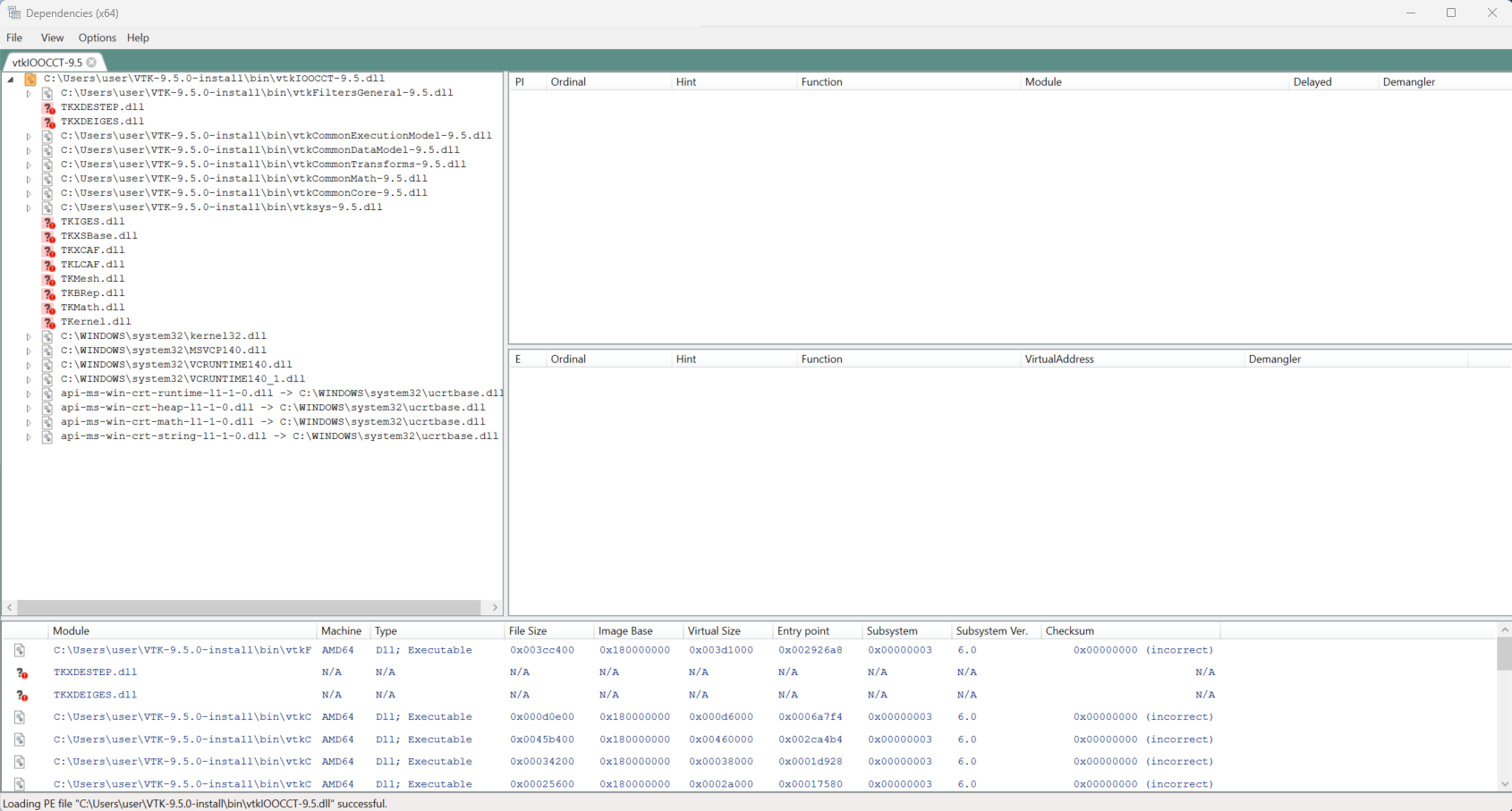
PS: I copied all dlls of OCCT-install to the bin of VTK and it worked!!
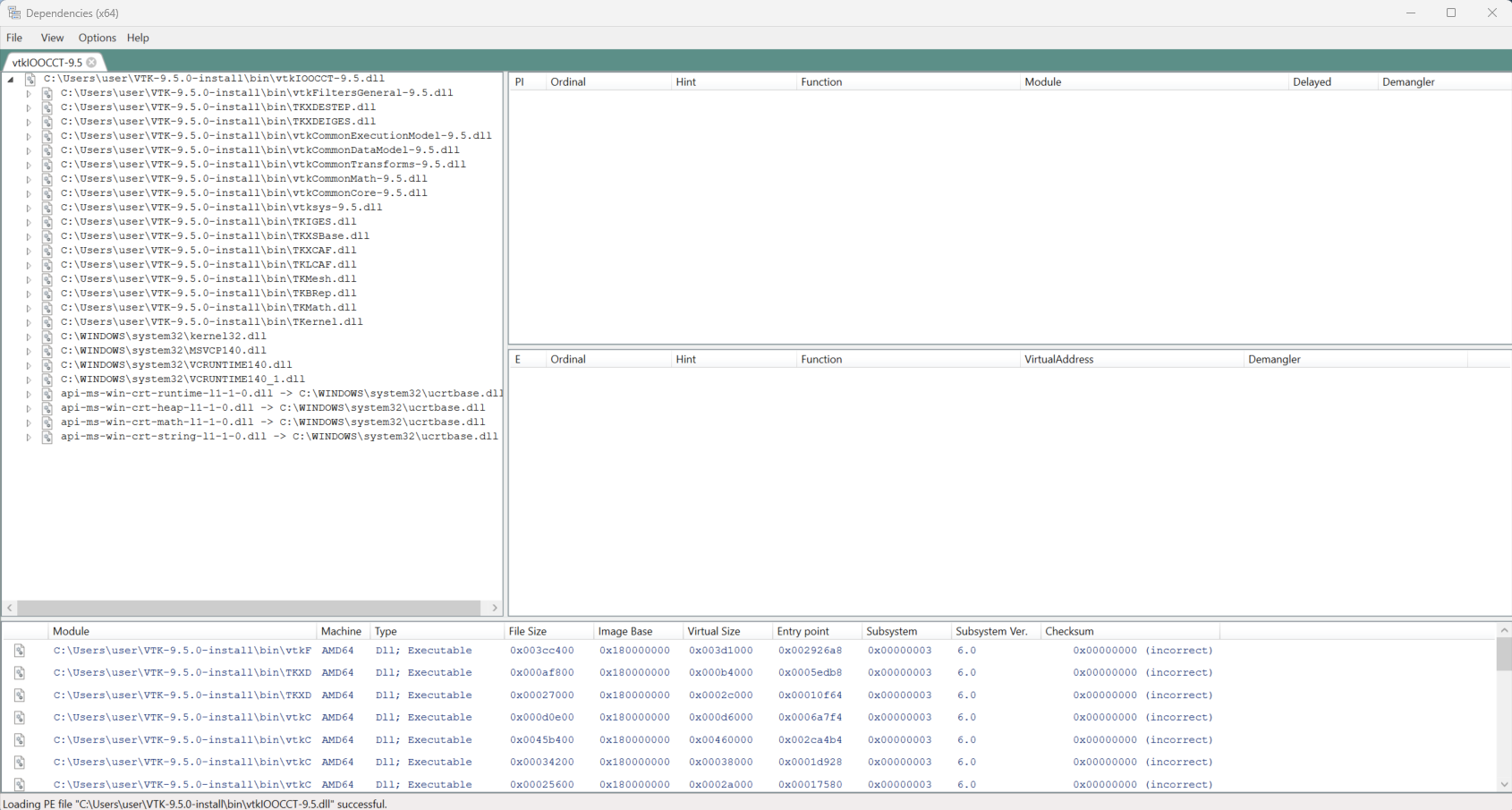
Here is the dependencies now, and I can successfully import vtkOCCTReader. Thanks yall for your suppor this has been very helpful!!!