# VTK9 behavior of vtkRenderWindowInteractor
**URL:** https://discourse.vtk.org/t/vtk9-behavior-of-vtkrenderwindowinteractor/5587
**Category:** Support
**Created:** [April 19, 2021, 11:26pm UTC](https://discourse.vtk.org/t/vtk9-behavior-of-vtkrenderwindowinteractor/5587 "2021-04-19T23:26:32Z")
**Posts on this page:** 12
**Page:** 1
### Author:  [@marcomusy](https://discourse.vtk.org/u/marcomusy)
#### Post date: [April 19, 2021, 11:26pm UTC](https://discourse.vtk.org/t/vtk9-behavior-of-vtkrenderwindowinteractor/5587/1 "2021-04-19T23:26:32Z")
With vtk\<9 I could interact with 2 independent rendering windows, eg.:
```python
import vtk
cone = vtk.vtkConeSource()
cone.Update()
coneMapper = vtk.vtkPolyDataMapper()
coneMapper.SetInputData(cone.GetOutput())
coneActor = vtk.vtkActor()
coneActor.SetMapper(coneMapper)
cube = vtk.vtkCubeSource()
cube.Update()
cubeMapper = vtk.vtkPolyDataMapper()
cubeMapper.SetInputData(cube.GetOutput())
cubeActor = vtk.vtkActor()
cubeActor.SetMapper(cubeMapper)
##########################
ren1 = vtk.vtkRenderer()
ren1.AddActor(coneActor)
ren1.SetBackground(1,0.7,1)
renWin1 = vtk.vtkRenderWindow()
renWin1.AddRenderer(ren1)
iren1 = vtk.vtkRenderWindowInteractor()
iren1.SetRenderWindow(renWin1)
renWin1.Render()
renWin1.SetWindowName("window1")
# iren1.Start()
##########################
ren2 = vtk.vtkRenderer()
ren2.AddActor(cubeActor)
ren2.SetBackground(1,1,0.7)
renWin2 = vtk.vtkRenderWindow()
renWin2.SetPosition(400,0)
renWin2.AddRenderer(ren2)
iren2 = vtk.vtkRenderWindowInteractor()
iren2.SetRenderWindow(renWin2)
renWin2.Render()
renWin2.SetWindowName("window2")
iren2.Start()
#iren1.Start()
```
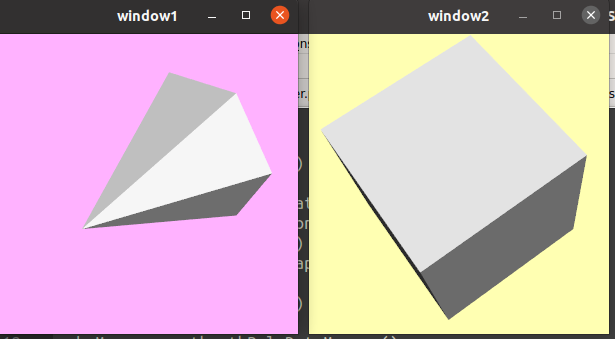
I could rotate both cone and cube.
Now this is no more the case (window1, the one with with the cone, is unresponsive)… why this difference?
is it a bug now, or was it a bug before? (kind of a useful bug though)
---
### Author:  [@amaclean](https://discourse.vtk.org/u/amaclean)
#### Post date: [April 21, 2021, 12:41am UTC](https://discourse.vtk.org/t/vtk9-behavior-of-vtkrenderwindowinteractor/5587/2 "2021-04-21T00:41:48Z")
It is not a bug. You are running two completely separate pipelines and rendering into separate windows with separate interactors.
You need one render window and interactor and then share the camera between the viewports.
For example here is a quick example based on [Model](https://kitware.github.io/vtk-examples/site/Python/Rendering/Model/)
```python
#!/usr/bin/env python
# -*- coding: utf-8 -*-
import vtk
def main():
colors = vtk.vtkNamedColors()
# Set the colors.
colors.SetColor('CubeColor', [250, 128, 114, 255])
colors.SetColor('BkgColor', [230, 230, 230, 255])
# Create the rendering window and two renderers.
ren_1 = vtk.vtkRenderer()
ren_2 = vtk.vtkRenderer()
ren_win = vtk.vtkRenderWindow()
ren_win.AddRenderer(ren_1)
ren_win.AddRenderer(ren_2)
ren_win.SetWindowName('Model')
iren = vtk.vtkRenderWindowInteractor()
iren.SetRenderWindow(ren_win)
# Create an actor and give it cone geometry.
cone = vtk.vtkConeSource()
cone.SetResolution(8)
cone_mapper = vtk.vtkPolyDataMapper()
cone_mapper.SetInputConnection(cone.GetOutputPort())
cone_actor = vtk.vtkActor()
cone_actor.SetMapper(cone_mapper)
cone_actor.GetProperty().SetColor(colors.GetColor3d('Peacock'))
# Create an actor and give it cube geometry.
cube = vtk.vtkCubeSource()
cube_mapper = vtk.vtkPolyDataMapper()
cube_mapper.SetInputConnection(cube.GetOutputPort())
cube_actor = vtk.vtkActor()
cube_actor.SetMapper(cube_mapper)
cube_actor.GetProperty().SetColor(colors.GetColor3d('CubeColor'))
# Assign our actors to both renderers.
ren_1.AddActor(cone_actor)
ren_2.AddActor(cube_actor)
camera = ren_1.GetActiveCamera()
ren_2.SetActiveCamera(camera)
ren_1.ResetCamera()
# set the size of our window
ren_win.SetSize(600, 300)
ren_win.SetPosition(0, 50)
# Set the viewports and backgrounds of the renderers.
ren_1.SetViewport(0, 0, 0.5, 1)
ren_1.SetBackground(colors.GetColor3d('BkgColor'))
ren_2.SetViewport(0.5, 0, 1, 1)
ren_2.SetBackground(colors.GetColor3d('Linen'))
# Draw the resulting scene.
ren_win.Render()
iren.Start()
if __name__ == ' __main__':
main()
```
---
### Author:  [@marcomusy](https://discourse.vtk.org/u/marcomusy)
#### Post date: [April 21, 2021, 1:01am UTC](https://discourse.vtk.org/t/vtk9-behavior-of-vtkrenderwindowinteractor/5587/3 "2021-04-21T01:01:24Z")
Yes, they are two completely different pipelines, that is why I am surprised that in vtk8.1.2 the `iren2` starts `iren1` too, so I can in practice interact with both windows (not renderers) at the same time. This doesn’t happen in vtk9 (which actually looks more logical…).
So question is: can one interact with 2 separate windows at the same time?
---
### Author:  [@Joachim\_P](https://discourse.vtk.org/u/Joachim_P)
#### Post date: [April 21, 2021, 3:41am UTC](https://discourse.vtk.org/t/vtk9-behavior-of-vtkrenderwindowinteractor/5587/4 "2021-04-21T03:41:14Z")
Haven’t try but you might want to try something like that:
```
iren1.Initialize()
iren2.Initialize()
while True:
iren1.ProcessEvents()
iren2.ProcessEvents()
```
In this case, both windows should have the chance to process the interaction-render loop.
---
### Author:  [@marcomusy](https://discourse.vtk.org/u/marcomusy)
#### Post date: [April 21, 2021, 9:58am UTC](https://discourse.vtk.org/t/vtk9-behavior-of-vtkrenderwindowinteractor/5587/5 "2021-04-21T09:58:11Z")
sounds interesting… but no… if I add the above lines, without any `iren.Start()`, both windows are frozen in vtk9.
---
### Author:  [@Joachim\_P](https://discourse.vtk.org/u/Joachim_P)
#### Post date: [April 21, 2021, 10:33am UTC](https://discourse.vtk.org/t/vtk9-behavior-of-vtkrenderwindowinteractor/5587/6 "2021-04-21T10:33:33Z")
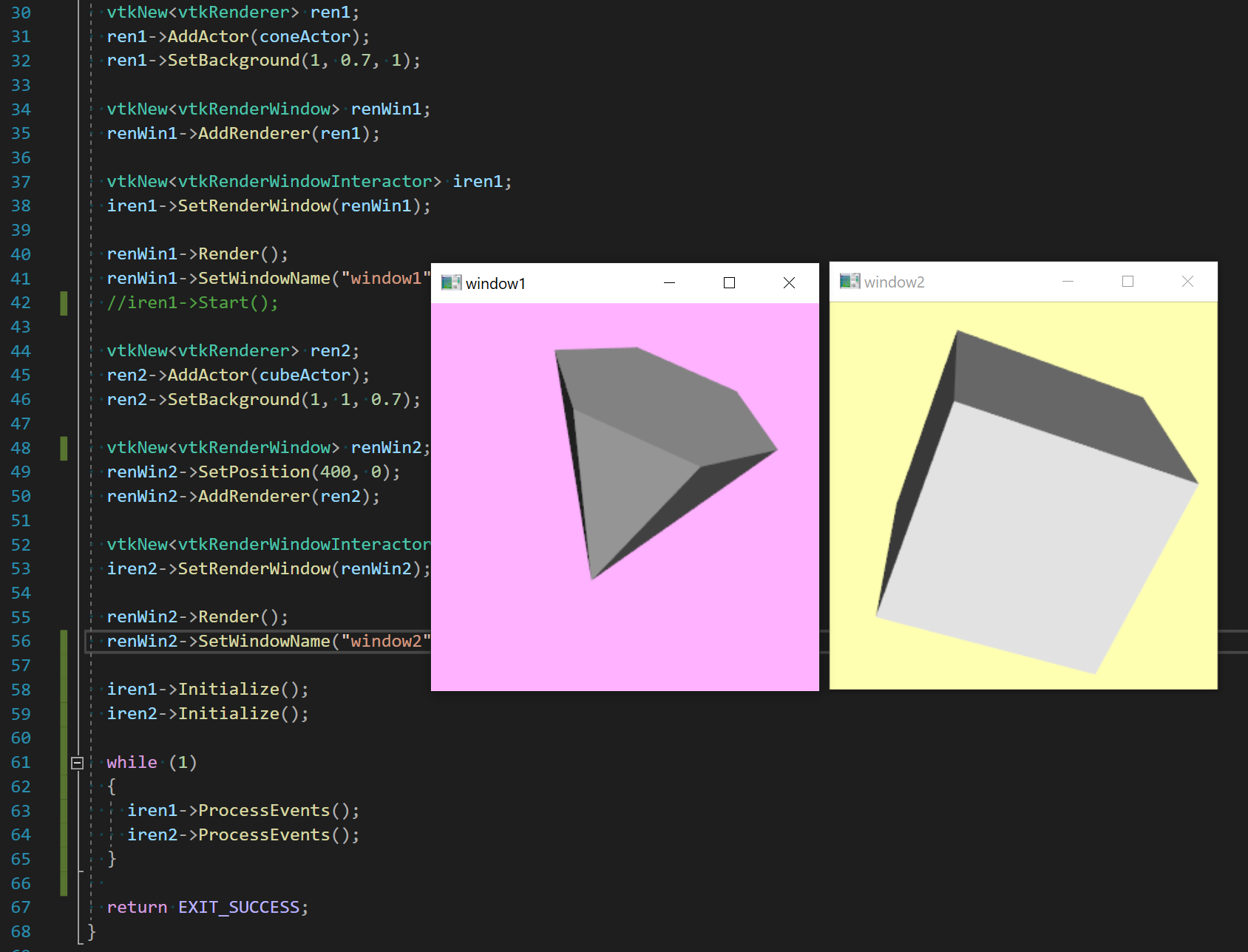
Really? I tried it and it works great here.
---
### Author:  [@marcomusy](https://discourse.vtk.org/u/marcomusy)
#### Post date: [April 21, 2021, 10:46am UTC](https://discourse.vtk.org/t/vtk9-behavior-of-vtkrenderwindowinteractor/5587/7 "2021-04-21T10:46:06Z")
uhm, unless i’m doing something silly it doesn’t work in my python 3.8.5:
```python
import vtk
cone = vtk.vtkConeSource()
cone.Update()
coneMapper = vtk.vtkPolyDataMapper()
coneMapper.SetInputData(cone.GetOutput())
coneActor = vtk.vtkActor()
coneActor.SetMapper(coneMapper)
cube = vtk.vtkCubeSource()
cube.Update()
cubeMapper = vtk.vtkPolyDataMapper()
cubeMapper.SetInputData(cube.GetOutput())
cubeActor = vtk.vtkActor()
cubeActor.SetMapper(cubeMapper)
##########################
ren1 = vtk.vtkRenderer()
ren1.AddActor(coneActor)
ren1.SetBackground(1,0.7,1)
renWin1 = vtk.vtkRenderWindow()
renWin1.AddRenderer(ren1)
iren1 = vtk.vtkRenderWindowInteractor()
iren1.SetRenderWindow(renWin1)
renWin1.Render()
renWin1.SetWindowName("window1")
##########################
ren2 = vtk.vtkRenderer()
ren2.AddActor(cubeActor)
ren2.SetBackground(1,1,0.7)
renWin2 = vtk.vtkRenderWindow()
renWin2.SetPosition(400,0)
renWin2.AddRenderer(ren2)
iren2 = vtk.vtkRenderWindowInteractor()
iren2.SetRenderWindow(renWin2)
renWin2.Render()
renWin2.SetWindowName("window2")
iren1.Initialize()
iren2.Initialize()
while True:
iren1.ProcessEvents()
iren2.ProcessEvents()
```
both windows are unresponsive.
---
### Author:  [@Joachim\_P](https://discourse.vtk.org/u/Joachim_P)
#### Post date: [April 21, 2021, 10:55am UTC](https://discourse.vtk.org/t/vtk9-behavior-of-vtkrenderwindowinteractor/5587/8 "2021-04-21T10:55:06Z")
I tried with a recent master and under Windows. I will check on Linux and let you know.
---
### Author:  [@Joachim\_P](https://discourse.vtk.org/u/Joachim_P)
#### Post date: [April 21, 2021, 11:38am UTC](https://discourse.vtk.org/t/vtk9-behavior-of-vtkrenderwindowinteractor/5587/9 "2021-04-21T11:38:01Z")
OK so calliing `Start()` on one instance of a renderwindowinteractor should actually perform the interaction-render loop on all windows of the threads. And yes, on Windows, it works great if I just call `iren2->Start()`.
Then, it appears that on Linux, the bug has been fixed 9 months ago on master: [https://gitlab.kitware.com/vtk/vtk/-/merge\_requests/7095](https://gitlab.kitware.com/vtk/vtk/-/merge_requests/7095)
Please try with a recent VTK build.
---
### Author:  [@amaclean](https://discourse.vtk.org/u/amaclean)
#### Post date: [April 26, 2021, 2:54am UTC](https://discourse.vtk.org/t/vtk9-behavior-of-vtkrenderwindowinteractor/5587/10 "2021-04-26T02:54:35Z")
I have updated [MultipleViewports](https://kitware.github.io/vtk-examples/site/Python/Visualization/MultipleViewports/) and produced a corresponding Python example. Please take a look.
---
### Author:  [@Joachim\_P](https://discourse.vtk.org/u/Joachim_P)
#### Post date: [April 26, 2021, 3:36am UTC](https://discourse.vtk.org/t/vtk9-behavior-of-vtkrenderwindowinteractor/5587/11 "2021-04-26T03:36:12Z")
@amaclean This example is a bit different than what was discussed here as it involves only a single render window and a single interactor. Here we have two of them and a single renderer for each.
---
### Author:  [@amaclean](https://discourse.vtk.org/u/amaclean)
#### Post date: [April 26, 2021, 8:39am UTC](https://discourse.vtk.org/t/vtk9-behavior-of-vtkrenderwindowinteractor/5587/12 "2021-04-26T08:39:18Z")
My apologies, here is the correct link: [MultipleRenderWindows](https://kitware.github.io/vtk-examples/site/Cxx/Visualization/MultipleRenderWindows/). Please note that only the test image can be displayed. You need to run the program to see four windows. There is also a Python version.