# vtkActor do not rotate as I want
**URL:** https://discourse.vtk.org/t/vtkactor-do-not-rotate-as-i-want/9849
**Category:** Support
**Created:** [November 17, 2022, 8:34am UTC](https://discourse.vtk.org/t/vtkactor-do-not-rotate-as-i-want/9849 "2022-11-17T08:34:20Z")
**Posts on this page:** 2
**Page:** 1
### Author:  [@zhang-qiang-github](https://discourse.vtk.org/u/zhang-qiang-github)
#### Post date: [November 17, 2022, 8:34am UTC](https://discourse.vtk.org/t/vtkactor-do-not-rotate-as-i-want/9849/1 "2022-11-17T08:34:20Z")
The code to reproduce my problem is:
```auto
import vtkmodules.all as vtk
cylinder = vtk.vtkCylinderSource()
cylinder.SetCenter(0, 10, 0)
cylinder.SetRadius(5)
cylinder.SetHeight(10)
cylinder.SetResolution(100)
cylinder.Update()
cylinderMapper = vtk.vtkPolyDataMapper()
cylinderMapper.SetInputData(cylinder.GetOutput())
cylinderActor = vtk.vtkActor()
cylinderActor.SetMapper(cylinderMapper)
cylinderActor.GetProperty().SetOpacity(0.3)
cylinderActor.SetOrigin(0, 10, 0)
cylinderActor.RotateX(90)
#######################################################
cylinderActor.RotateY(90) # line makes me confuzed
#######################################################
def Line(p0, p1, c):
line = vtk.vtkLineSource()
line.SetPoint1(p0[0], p0[1], p0[2])
line.SetPoint2(p1[0], p1[1], p1[2])
line.Update()
mapper = vtk.vtkPolyDataMapper()
mapper.SetInputData(line.GetOutput())
actor = vtk.vtkActor()
actor.SetMapper(mapper)
actor.GetProperty().SetColor(c[0], c[1], c[2])
return actor
x = Line(p0=[0, 0, 0], p1=[20, 0, 0], c=[1, 0, 0])
y = Line(p0=[0, 0, 0], p1=[0, 20, 0], c=[0, 1, 0])
z = Line(p0=[0, 0, 0], p1=[0, 0, 20], c=[0, 0, 1])
renderer = vtk.vtkRenderer()
renderer.AddActor(cylinderActor)
renderer.AddActor(x)
renderer.AddActor(y)
renderer.AddActor(z)
renWin = vtk.vtkRenderWindow()
renWin.AddRenderer(renderer)
iren = vtk.vtkRenderWindowInteractor()
iren.SetRenderWindow(renWin)
iren.SetInteractorStyle(vtk.vtkInteractorStyleTrackballCamera())
iren.Initialize()
iren.Start()
```
The final shown figure is:
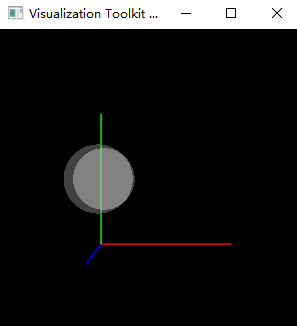
where red line indicates x axis, green line indicates y axis, and blue line indicates z axis.
I find the `cylinderActor.RotateY(90)` do not make any change for the final result.
If `cylinderActor.RotateY(90)` is added, I expect the final shown figure is:
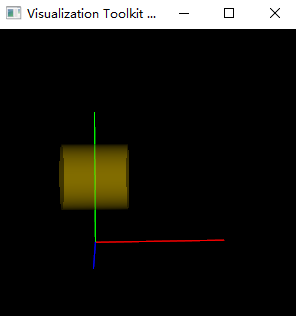
Why `cylinderActor.RotateY(90)` don’t rotate the cylinder along the y axis?
---
### Author:  [@dgobbi](https://discourse.vtk.org/u/dgobbi)
#### Post date: [November 17, 2022, 8:15pm UTC](https://discourse.vtk.org/t/vtkactor-do-not-rotate-as-i-want/9849/2 "2022-11-17T20:15:30Z")
Consider VTK’s code for `vtkProp3D::RotateY()`:
```nohighlight
//------------------------------------------------------------------------------
// Rotate the Prop3D in degrees about the Y axis using the right hand
// rule. The axis is the Prop3D's Y axis, which can change as other rotations
// are performed. To rotate about the world Y axis use RotateWXYZ (angle, 0,
// 1, 0). This rotation is applied before all others in the current
// transformation matrix.
void vtkProp3D::RotateY(double angle)
{
this->IsIdentity = 0;
this->Transform->PreMultiply();
this->Transform->RotateY(angle);
this->Modified();
}
```
The “`PreMultipy()`” is the important thing: it causes a rotation around the actor’s _original_ Y axis, not the _world_ Y axis.
To rotate around _world_ Y axis, it is necessary to use `RotateWXYZ()`, because it uses "`PostMultiply()`. ~~However, this will not rotate around the actor’s Origin. Instead, it will rotate around the world origin. In general, I would not recommend using this method on`vtkActor`.~~
```nohighlight
//------------------------------------------------------------------------------
// Rotate the Prop3D in degrees about an arbitrary axis specified by the
// last three arguments. The axis is specified in world coordinates. To
// rotate an about its model axes, use RotateX, RotateY, RotateZ.
void vtkProp3D::RotateWXYZ(double degree, double x, double y, double z)
{
this->IsIdentity = 0;
this->Transform->PostMultiply();
this->Transform->RotateWXYZ(degree, x, y, z);
this->Transform->PreMultiply();
this->Modified();
}
```
So here is my advice for doing rotations: use `RotateX()` and `RotateY()` and `RotateZ()`, but remember that these rotations are applied in the _reverse ordering_ from what you expect.