# vtkAxesActor bounding box appears to be affected by it's world position
**URL:** https://discourse.vtk.org/t/vtkaxesactor-bounding-box-appears-to-be-affected-by-its-world-position/16290
**Category:** Support
**Tags:** python
**Created:** [February 13, 2026, 1:15am UTC](https://discourse.vtk.org/t/vtkaxesactor-bounding-box-appears-to-be-affected-by-its-world-position/16290 "2026-02-13T01:15:11Z")
**Posts on this page:** 5
**Page:** 1
### Author:  [@Dan\_The\_Man](https://discourse.vtk.org/u/Dan_The_Man)
#### Post date: [February 13, 2026, 1:15am UTC](https://discourse.vtk.org/t/vtkaxesactor-bounding-box-appears-to-be-affected-by-its-world-position/16290/1 "2026-02-13T01:15:11Z")
First noticed and described in [this comment](https://discourse.vtk.org/t/vtkaxesactor-fails-to-render-at-some-angles/4864/3) I have asked AI to provide a test script that can replicate the behavior I’m seeing in my larger application. Here’s the prompt I gave claude.ai for completeness:
> I’m looking for a standalone python VTK script that has the following setup. There is one VTK assembly which contains a 1-unit sized cube (vtkActor) as well as a vtkAxesActor located at that cube’s origin. The assembly is moved to the world position (100, 100, 100) and the camera has it’s focal point on that location. I want the vtkAxesActor to be hidden initially, but when the user presses ‘a’ it reduces opacity of the cube and makes the vtkAxesActor visible. Pressing ‘a’ reverses the process, turning the axes visibility off and the cube back to normal opacity. I want to print the following information in screen coordinates: the renderer/camera GetClippingRange(), the bounding box for the vtk assembly, the bounding box for the cube actor, and the bounding box for the vtkAxesActor.
The script runs and provides what I need
[test.py](https://discourse.vtk.org/uploads/short-url/6lFdjh2FzIy0MT750I37Y66U4wW.py) (5.1 KB)
Here’s what it looks like before and after turning on the axes with the ‘a’ key:
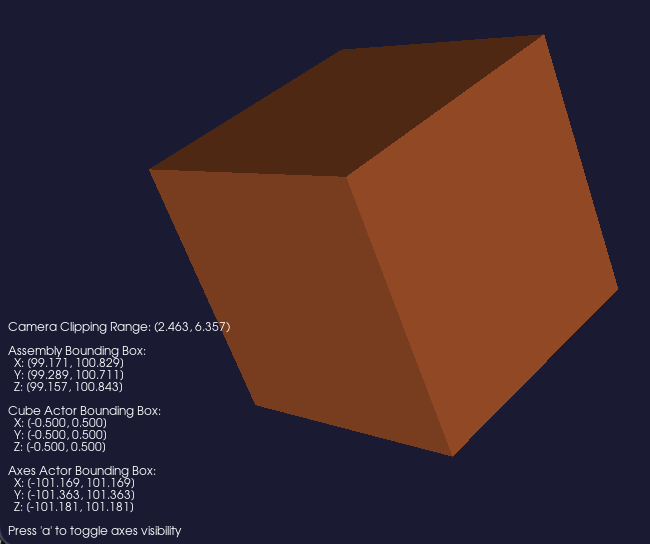
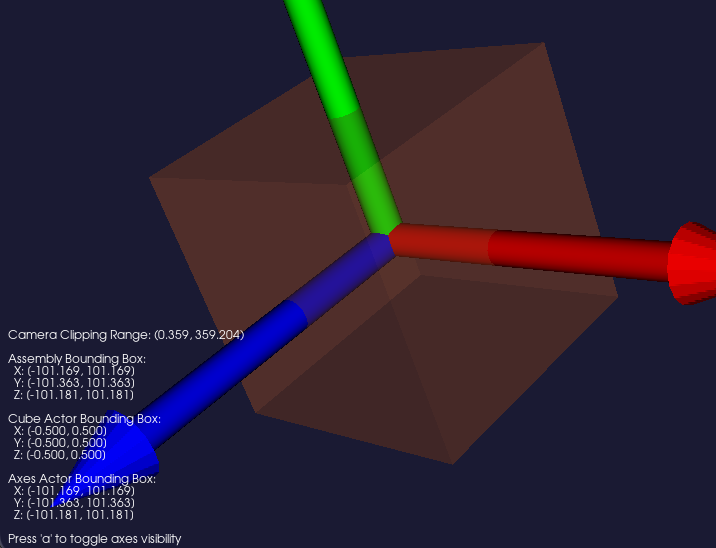
Notice the value of “Axes Actor Bounding Box” and how it affects the “Assembly Bounding Box” and “Camera Clipping Range” when it’s visible - the clipping range changes from (2.464, 6.357) to (0.359, 359.204) . I assume this is because of the determination of the top-level bounding box when `self.renderer.ResetCameraClippingRange()` is run on line 115.
In this simple scene there’s no issue, but in my full application my actors have axes at their center like this and they are large distances away from the world origin - 1e8+ meters as I’m visualizing the simulation of spacecraft orbiting earth and the moon. I have to be extra careful with my clipping ranges given single point precision in the depth buffer and this extra bounding box size is pulling the near clipping plane so far away my objects aren’t viewable.
My questions are:
1. Is the bounding box of a `vtkAxesActor` being affected by it’s world position a bug or intended behavior?
2. Is there a recommended workaround?
Appreciate any help you can provide! FYI @nchampag for additional awareness
---
### Author:  [@Paulo\_Carvalho](https://discourse.vtk.org/u/Paulo_Carvalho)
#### Post date: [February 18, 2026, 11:03pm UTC](https://discourse.vtk.org/t/vtkaxesactor-bounding-box-appears-to-be-affected-by-its-world-position/16290/2 "2026-02-18T23:03:15Z")
Hello,
Short answer: make sure you’re using double-precision floating point data if your data vary by orders of magnitudes greater than 1e6 or 1e7. E.g.: by using `vtkDoubleArray` , `vtkPoints::SetDataType(VTK_DOUBLE)`, etc.
Long answer: get to know PSC (power scaled coordinates), which is an advanced technique to visualize astronomical models, which usually comprise objects with radically different scales (e.g.: spacecraft → Earth → Sun → Milky Way → Local Group and so on. Further reading: [Conceptualizing astronomical scale: Virtual simulations on handheld tablet computers reverse misconceptions - ScienceDirect](https://www.sciencedirect.com/science/article/abs/pii/S0360131513002534) .
best,
PC
---
### Author:  [@Dan\_The\_Man](https://discourse.vtk.org/u/Dan_The_Man)
#### Post date: [February 18, 2026, 11:31pm UTC](https://discourse.vtk.org/t/vtkaxesactor-bounding-box-appears-to-be-affected-by-its-world-position/16290/3 "2026-02-18T23:31:40Z")
Hi Paulo - Appreciate the guidance on double precision and I’m well aware of the limitation of the single precision depth buffer. I already have a rendering scheme with multiple layers that addresses this core issue. However that approach is completely broken by the behavior of the `vtkAxesActor` bounding box as illustrated in the example script provided.
What I’m trying to understand is if it is expected behavior for the `vtkAxesActor` bounding box to be affected by it’s world position. All other actor’s bounding boxes appear to be localized to the physical geometry of the actor regardless of the object’s world position as I would expect, but the `vtkAxesActor` bounding box does not behave the same way. If this is intended behavior I’m likely going to need to roll my own 3D axes in my application - just trying to understand what path to take.
Thanks!
---
### Author:  [@user27182](https://discourse.vtk.org/u/user27182)
#### Post date: [February 20, 2026, 2:56pm UTC](https://discourse.vtk.org/t/vtkaxesactor-bounding-box-appears-to-be-affected-by-its-world-position/16290/4 "2026-02-20T14:56:22Z")
The bounds for `vtkAxesActor` are hard-coded around the origin so that they are symmetric:
>
This makes sense for its intended use case. From the docs:
> [vtkAxesActor](https://vtk.org/doc/nightly/html/classvtkAxesActor.html) is primarily intended for use with [vtkOrientationMarkerWidget](https://vtk.org/doc/nightly/html/classvtkOrientationMarkerWidget.html)
And so using the axes as a normal `Actor` is a bit broken. As you noted, the bounds don’t work properly for this use case, but also IIRC using normal `Prop3D` methods like `Scale` and `Orientation` also don’t work (but `UserMatrix` does).
For C++ users I think overriding `GetBounds` to compute them normally is likely sufficient. For Python users this won’t work though.
There are Python-only workarounds for this in downstream libraries for exactly this reason, e.g. see PyVista’s `AxesAssembly` [pyvista.AxesAssembly — PyVista 0.47.0 documentation](https://docs.pyvista.org/api/plotting/_autosummary/pyvista.axesassembly). It’s very much not as lightweight as `vtkAxesActor`, but for your use case it may be sufficient.
---
### Author:  [@Dan\_The\_Man](https://discourse.vtk.org/u/Dan_The_Man)
#### Post date: [February 20, 2026, 4:59pm UTC](https://discourse.vtk.org/t/vtkaxesactor-bounding-box-appears-to-be-affected-by-its-world-position/16290/5 "2026-02-20T16:59:35Z")
Thanks so much this is a perfect explanation and I now know what I need to do!