# vtkCurvatures yields unreasonably large values along borders
**URL:** https://discourse.vtk.org/t/vtkcurvatures-yields-unreasonably-large-values-along-borders/2527
**Category:** Support
**Created:** [February 1, 2020, 1:41am UTC](https://discourse.vtk.org/t/vtkcurvatures-yields-unreasonably-large-values-along-borders/2527 "2020-02-01T01:41:49Z")
**Posts on this page:** 16
**Page:** 1
### Author:  [@normanius](https://discourse.vtk.org/u/normanius)
#### Post date: [February 1, 2020, 1:41am UTC](https://discourse.vtk.org/t/vtkcurvatures-yields-unreasonably-large-values-along-borders/2527/1 "2020-02-01T01:41:49Z")
Hi
Does anyone know why [`vtkCurvatures`](https://vtk.org/doc/nightly/html/classvtkCurvatures.html#details) yields unreasonably high values close to the object’s border? See screenshot below. I expect the (Gaussian) curvature for my shapes to be in the range [-0.5,1]. However, I observe values along the border that are several orders of magnitude larger/smaller.
Does anyone have experience how to deal with this?
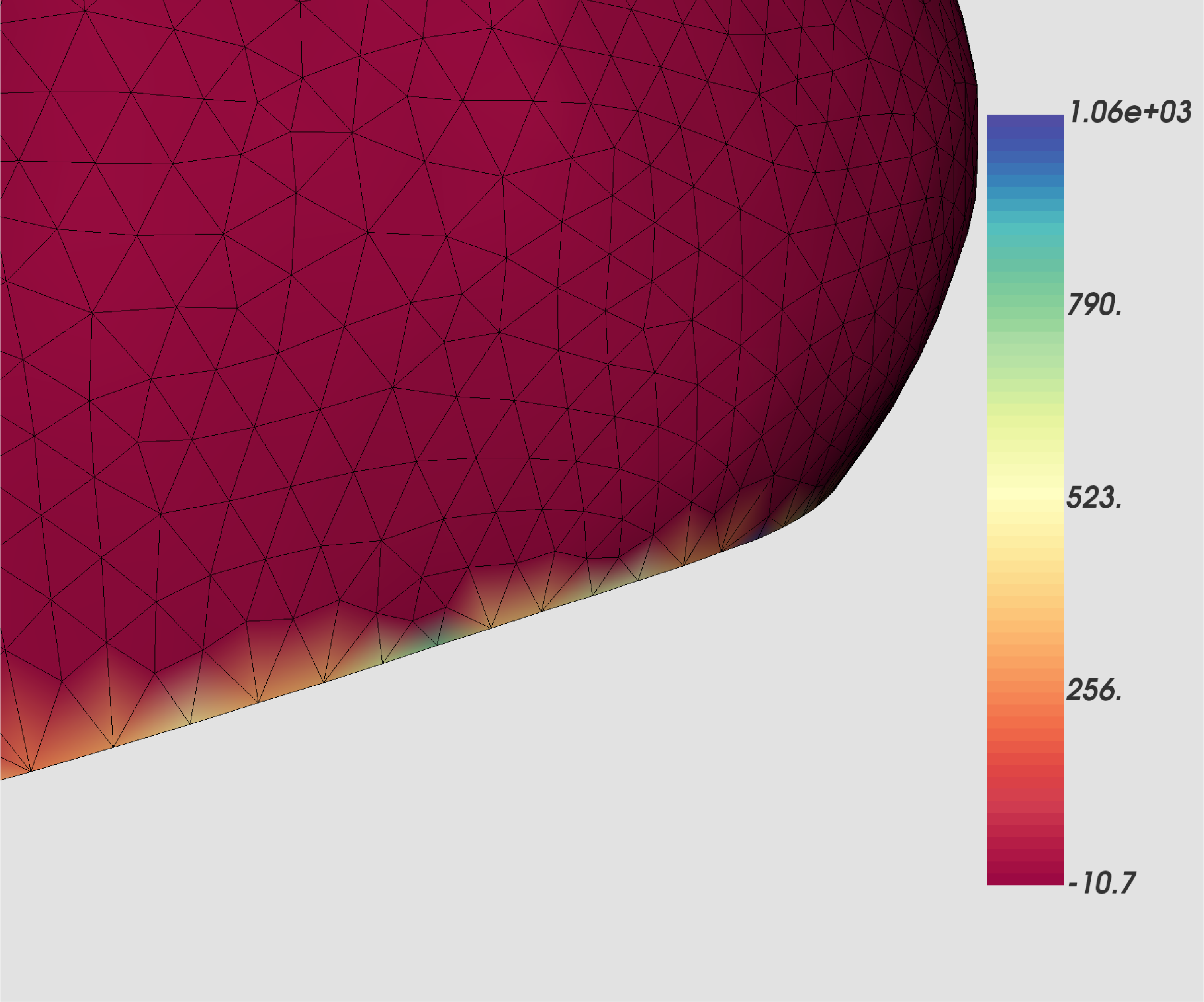
Here is how to reproduce the problem:
```
curvature = vtk.vtkCurvatures()
curvature.SetInputConnection(source.GetOutputPort())
curvature.SetCurvatureTypeToGaussian()
curvature.Update()
```
I also attached a sample geometry:
[curvature.vtp](https://discourse.vtk.org/uploads/short-url/vO3fekAMSOBS33E6uk7MhSv8aAj.vtp) (237.4 KB)
---
### Author:  [@Paulo\_Carvalho](https://discourse.vtk.org/u/Paulo_Carvalho)
#### Post date: [February 1, 2020, 5:33pm UTC](https://discourse.vtk.org/t/vtkcurvatures-yields-unreasonably-large-values-along-borders/2527/2 "2020-02-01T17:33:19Z")
It is possible that your mesh have some tiny faces, degenerate faces or duplicate vertexes. Can you try [`vtkCleanPolyData`](https://vtk.org/doc/nightly/html/classvtkCleanPolyData.html) to rule out that possibility?
---
### Author:  [@normanius](https://discourse.vtk.org/u/normanius)
#### Post date: [February 1, 2020, 6:42pm UTC](https://discourse.vtk.org/t/vtkcurvatures-yields-unreasonably-large-values-along-borders/2527/3 "2020-02-01T18:42:09Z")
I verified this. My surface is clean. This seems not to be the problem.
---
### Author:  [@amaclean](https://discourse.vtk.org/u/amaclean)
#### Post date: [February 1, 2020, 10:19pm UTC](https://discourse.vtk.org/t/vtkcurvatures-yields-unreasonably-large-values-along-borders/2527/4 "2020-02-01T22:19:16Z")
You may like to look at [CurvatureBandsWithGlyphs](https://lorensen.github.io/VTKExamples/site/Cxx/Visualization/CurvatureBandsWithGlyphs/). In this example, the random hills surface will generate large irregular values for curvatures along the edges, so the surface is clipped. Curvatures along edges will most likely yield erroneous values so clipping would be appropriate after generating the curvatures.
---
### Author:  [@lassoan](https://discourse.vtk.org/u/lassoan)
#### Post date: [February 1, 2020, 11:19pm UTC](https://discourse.vtk.org/t/vtkcurvatures-yields-unreasonably-large-values-along-borders/2527/5 "2020-02-01T23:19:09Z")
Check out definition of [discrete Gaussian curvature](http://www.cs.jhu.edu/~misha/Fall09/4-surfaces.pdf). For me, it seems that the formula that vtkCurvatures uses in Gaussian mode is correct for internal vertices but incorrect for edge vertices.
A simple solution is what is suggested above: ignore curvature of edge vertices.
A nicer solution would be compute curvature of edge vertices by averaging curvature of nearby internal vertices.
---
### Author:  [@amaclean](https://discourse.vtk.org/u/amaclean)
#### Post date: [February 2, 2020, 1:10am UTC](https://discourse.vtk.org/t/vtkcurvatures-yields-unreasonably-large-values-along-borders/2527/6 "2020-02-02T01:10:39Z")
@lassoan you are correct in that the formula is correct for internal vertices. Way back in 2002 I think that we did consider points on an edge but even averaging yielded strange values so nothing more was done. The formula is correct for closed orientable surfaces. For edges and holes, clipping would be the best approach after calculating the curvatures.
---
### Author:  [@lassoan](https://discourse.vtk.org/u/lassoan)
#### Post date: [February 2, 2020, 1:45am UTC](https://discourse.vtk.org/t/vtkcurvatures-yields-unreasonably-large-values-along-borders/2527/7 "2020-02-02T01:45:23Z")
> [@amaclean](#):
>
> we did consider points on an edge but even averaging yielded strange values so nothing more was done
Copying value from closest non-boundary neighbor (or weighted average of non-boundary neighbors) should work, but even just setting boundary voxels curvature to 0 would be better than setting incorrect values.
---
### Author:  [@normanius](https://discourse.vtk.org/u/normanius)
#### Post date: [February 2, 2020, 3:32pm UTC](https://discourse.vtk.org/t/vtkcurvatures-yields-unreasonably-large-values-along-borders/2527/8 "2020-02-02T15:32:50Z")
Thanks you Andras and Andrew for your useful answers.
@lassoan That was a good read. In particular, I liked the geometric interpretation of Mean and Gaussian curvature. Based on those slides, I conclude that the problem is present only for Gaussian curvature, but not for Mean curvature, right? What I don’t get is why the curvature peaks are so large (100-1000 than usually), and why Gaussian curvature is computed at all if it is not defined along the surface boundary.
@amaclean Regarding clipping: I mentioned that I expect the values to be in a certain range for the sample geometry I provided, but I’m not entirely sure how this generalizes to other objects. With clipping, one has to make a somewhat arbitrary choice of the clipping thresholds. I don’t feel very comfortable with it. I considered to apply outlier detection (for example based on [robust z-scores](https://stats.stackexchange.com/questions/123895)), which would we feasible for the type of surfaces I deal with: smooth “organic” structures, with a half-sphere as basic shape from which nature deviated gradually.
---
### Author:  [@normanius](https://discourse.vtk.org/u/normanius)
#### Post date: [February 2, 2020, 3:40pm UTC](https://discourse.vtk.org/t/vtkcurvatures-yields-unreasonably-large-values-along-borders/2527/9 "2020-02-02T15:40:47Z")
What I finally did: Since Gaussian curvature is not defined along the surface boundary, I decided to remove those values using a weighted averaging, just as Andras suggested. For my purpose, this is better than setting the curvature to 0.
```python
def computeGaussCurvatureAndFixUpBoundary(source):
# Curvature as vtkPolyData.
source = source.GetOutput() # source: vtkPolyData
curvatureData, arrayName = computeCurvature(source)
# Curvature as python list.
curvature = extractData(curvatureData, arrayName)
# Ids of the boundary points.
pIds = extractEdgeIds(source)
pIdsSet = set(pIds)
# Iterate the edge points and compute the curvature as the weighted
# average of the neighbors.
countInvalid = 0
for pId in pIds:
pIdsNeighbors = pointNeighborhood(source=source, pId=pId)
# Keep only interior points.
pIdsNeighbors -= pIdsSet
# Compute distances and extract curvature values.
curvs = [curvature[pIdN] for pIdN in pIdsNeighbors]
dists = [computeDistance(source, pIdN, pId) for pIdN in pIdsNeighbors]
curvs = np.array(curvs)
dists = np.array(dists)
curvs = curvs[dists>0]
dists = dists[dists>0]
if len(curvs)>0:
weights = 1/np.array(dists)
weights /= weights.sum()
newCurv = np.dot(curvs, weights)
else:
# Corner case.
countInvalid += 1
newCurv = 0
# Set new curvature value.
curvature[pId] = newCurv
return curvature
```
Here, some details about the utilities I used in the above code.
```python
def computeCurvature(source):
curvatureFilter = vtk.vtkCurvatures()
curvatureFilter.SetInputData(source)
curvatureFilter.SetCurvatureTypeToGaussian()
arrayName = "Gauss_Curvature"
curvatureFilter.Update()
return curvatureFilter.GetOutput(), arrayName
def extractEdgeIds(source):
"""
See here: https://discourse.vtk.org/t/2530/3
"""
...
def extractData(source, arrayName):
array = source.GetPointData().GetArray(arrayName)
n = source.GetNumberOfPoints()
data = []
for i in range(n):
data.append(array.GetValue(i))
return data
def pointNeighborhood(source, pId):
"""
Extract the topological neighbors for point pId. In two steps:
1) source.GetPointCells(pId, cellIds)
2) source.GetCellPoints(cId, pointIds) for all cId in cellIds
"""
...
def computeDistance(source, pIdA, pIdB):
pA = np.array(source.GetPoint(pIdA))
pB = np.array(source.GetPoint(pIdB))
return np.linalg.norm(pA-pB)
```
---
### Author:  [@amaclean](https://discourse.vtk.org/u/amaclean)
#### Post date: [August 23, 2021, 7:10am UTC](https://discourse.vtk.org/t/vtkcurvatures-yields-unreasonably-large-values-along-borders/2527/10 "2021-08-23T07:10:36Z")
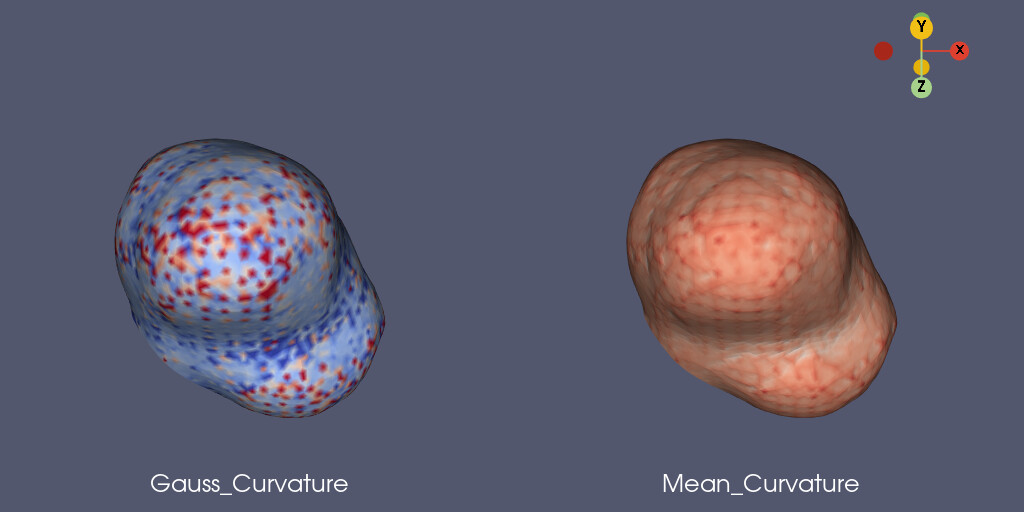
@normanius Based on the comments here, I have created a class that generates the Gaussian and Mean curvatures, adjusting curvature for edge variations.
Please see: [CurvaturesAdjustEdges](https://kitware.github.io/vtk-examples/site/Python/PolyData/CurvaturesAdjustEdges/) for Python and [CurvaturesAdjustEdges](https://kitware.github.io/vtk-examples/site/Cxx/PolyData/CurvaturesAdjustEdges/) for C++.
If you run the Python example with your data as follows:
```auto
reader = vtk.vtkXMLPolyDataReader()
reader.SetFileName('./curvature.vtp')
reader.Update()
source = reader.GetOutput()
cc = ComputeCurvatures(source)
cc.set_gauss_curvature_bounds(-0.5, 1.0)
cc.gauss_bounds_on()
cc.update()
# Uncomment the following lines if you want to write out the polydata.
writer = vtk.vtkXMLPolyDataWriter()
writer.SetFileName('Source.vtp')
writer.SetInputData(source)
writer.SetDataModeToAscii()
writer.Write()
```
I get this result:
---
### Author:  [@Paulo\_Carvalho](https://discourse.vtk.org/u/Paulo_Carvalho)
#### Post date: [August 24, 2021, 12:05pm UTC](https://discourse.vtk.org/t/vtkcurvatures-yields-unreasonably-large-values-along-borders/2527/11 "2021-08-24T12:05:40Z")
What are the color scales of both figures?
---
### Author:  [@amaclean](https://discourse.vtk.org/u/amaclean)
#### Post date: [August 26, 2021, 7:37am UTC](https://discourse.vtk.org/t/vtkcurvatures-yields-unreasonably-large-values-along-borders/2527/12 "2021-08-26T07:37:30Z")
Here are the bands with ranges and frequencies. I have just split the data into 10 bins so you can see the distribution.
```nohighlight
Gaussian Curvature:
cc = ComputeCurvatures(source)
cc.set_gauss_curvature_bounds(-0.5, 1.0)
cc.gauss_bounds_on()
Bands & frequencies:
0 [-0.500, -0.425, -0.350]: 290
1 [-0.350, -0.275, -0.200]: 208
2 [-0.200, -0.125, -0.050]: 358
3 [-0.050, 0.025, 0.100]: 684
4 [0.100, 0.175, 0.250]: 829
5 [0.250, 0.325, 0.400]: 769
6 [0.400, 0.475, 0.550]: 610
7 [0.550, 0.625, 0.700]: 501
8 [0.700, 0.775, 0.850]: 372
9 [0.850, 0.925, 1.000]: 247
Mean Curvature:
No bounds set for the mean curvature so all the adjusted curvatures are used.
Bands & frequencies:
0 [-6.868, -6.375, -5.881]: 1
1 [-5.881, -5.388, -4.895]: 2
2 [-4.895, -4.402, -3.909]: 1
3 [-3.909, -3.416, -2.923]: 3
4 [-2.923, -2.429, -1.936]: 11
5 [-1.936, -1.443, -0.950]: 44
6 [-0.950, -0.457, 0.036]: 1141
7 [0.036, 0.530, 1.023]: 3699
8 [1.023, 1.516, 2.009]: 436
9 [2.009, 2.502, 2.995]: 19
```
---
### Author:  [@Paulo\_Carvalho](https://discourse.vtk.org/u/Paulo_Carvalho)
#### Post date: [August 26, 2021, 2:41pm UTC](https://discourse.vtk.org/t/vtkcurvatures-yields-unreasonably-large-values-along-borders/2527/13 "2021-08-26T14:41:17Z")
Let me rephrase the question: can you post the same figure with color scale bars?
---
### Author:  [@lassoan](https://discourse.vtk.org/u/lassoan)
#### Post date: [August 26, 2021, 4:14pm UTC](https://discourse.vtk.org/t/vtkcurvatures-yields-unreasonably-large-values-along-borders/2527/14 "2021-08-26T16:14:54Z")
> [@amaclean](#):
>
> Based on the comments here, I have created a class that generates the Gaussian and Mean curvatures, adjusting curvature for edge variations.
This is great! Could you add this cleanup to vtkCurvatures filter? It could be enabled/disabled with a flag for performance and backward compatibility reasons.
---
### Author:  [@amaclean](https://discourse.vtk.org/u/amaclean)
#### Post date: [August 27, 2021, 1:09am UTC](https://discourse.vtk.org/t/vtkcurvatures-yields-unreasonably-large-values-along-borders/2527/15 "2021-08-27T01:09:48Z")
That is a good idea (it will make my life simpler)! I’ll add it to vtkCurvatures.
---
### Author:  [@amaclean](https://discourse.vtk.org/u/amaclean)
#### Post date: [August 27, 2021, 1:21am UTC](https://discourse.vtk.org/t/vtkcurvatures-yields-unreasonably-large-values-along-borders/2527/16 "2021-08-27T01:21:44Z")
Done, I have also updated [CurvaturesAdjustEdges](https://kitware.github.io/vtk-examples/site/Python/PolyData/CurvaturesAdjustEdges) and
[CurvaturesDemo](https://kitware.github.io/vtk-examples/site/Python/PolyData/CurvaturesDemo)
