# vtkGPUVolumeRayCastMapper-\>SetImageSampleDistance, parameter set 0.5, result image is not right
**URL:** https://discourse.vtk.org/t/vtkgpuvolumeraycastmapper-setimagesampledistance-parameter-set-0-5-result-image-is-not-right/3870
**Category:** Web
**Created:** [July 29, 2020, 10:01am UTC](https://discourse.vtk.org/t/vtkgpuvolumeraycastmapper-setimagesampledistance-parameter-set-0-5-result-image-is-not-right/3870 "2020-07-29T10:01:59Z")
**Posts on this page:** 4
**Page:** 1
### Author:  [@med-search](https://discourse.vtk.org/u/med-search)
#### Post date: [July 29, 2020, 10:01am UTC](https://discourse.vtk.org/t/vtkgpuvolumeraycastmapper-setimagesampledistance-parameter-set-0-5-result-image-is-not-right/3870/1 "2020-07-29T10:01:59Z")
Hi, all:
In my project, I use vtkGPUVolumeRayCastMapper to do Volume Rendering in VTK version 9.0.
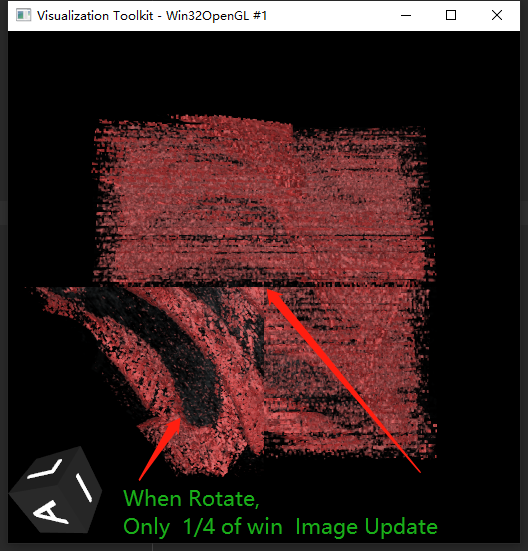
when I use vtkGPUVolumeRayCastMapper-\>SetImageSampleDistance, and set parameter is 0.5. then i rotate the volume. It is strange that only 1/4 of the window update result image.
is it a bug of VTK 9.0? does anybody know how to fix it?
---
### Author:  [@Aaron\_Nowack](https://discourse.vtk.org/u/Aaron_Nowack)
#### Post date: [July 30, 2020, 3:44am UTC](https://discourse.vtk.org/t/vtkgpuvolumeraycastmapper-setimagesampledistance-parameter-set-0-5-result-image-is-not-right/3870/2 "2020-07-30T03:44:23Z")
I also see this behavior, but using Python and the vtk 8.2.0 branch.
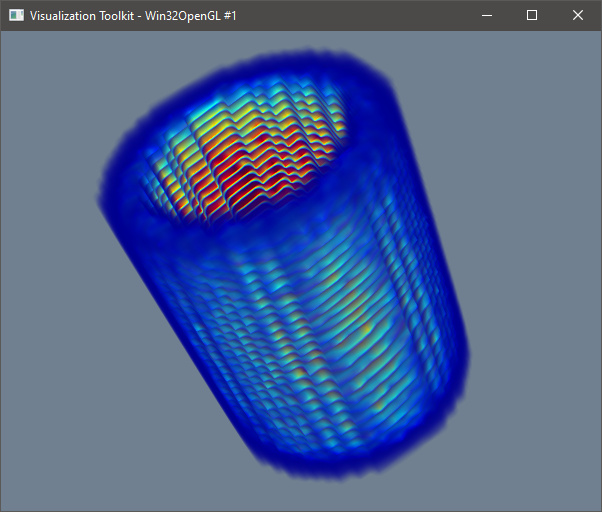
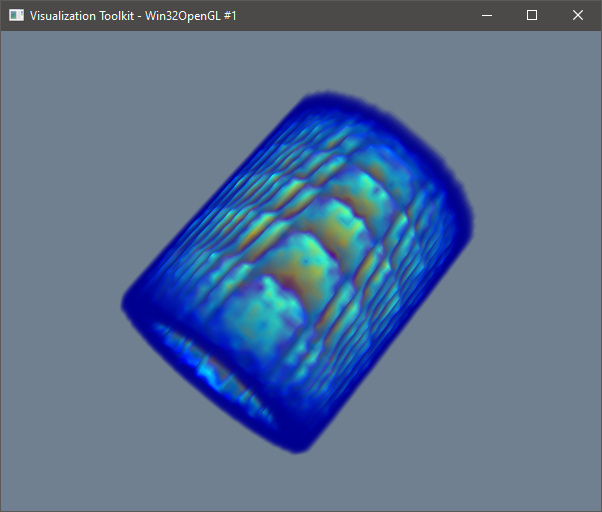
For me, I’m trying to understand how to correctly set the sample distance when using vtkGPUVolumeRayCastMapper to avoid these contour artifacts when rendering a small volumetric dataset. These ringing artifacts should not be displayed as shown below. I only get the artifacts when using vtkGPUVolumeRayCastMapper, when using vtkFixedPointVolumeRayCastMapper the artifacts are no longer present.
---
### Author:  [@med-search](https://discourse.vtk.org/u/med-search)
#### Post date: [July 30, 2020, 6:27am UTC](https://discourse.vtk.org/t/vtkgpuvolumeraycastmapper-setimagesampledistance-parameter-set-0-5-result-image-is-not-right/3870/3 "2020-07-30T06:27:10Z")
Tks your reply. It is useful.
---
### Author:  [@Xiaoling\_Xu](https://discourse.vtk.org/u/Xiaoling_Xu)
#### Post date: [January 3, 2024, 7:37am UTC](https://discourse.vtk.org/t/vtkgpuvolumeraycastmapper-setimagesampledistance-parameter-set-0-5-result-image-is-not-right/3870/4 "2024-01-03T07:37:37Z")
I guess that you want to change sample distance. You should set “SetSampleDistance”, not “SetImageSampleDistance”