# vtkImageData rendering disappears when viewed from z-axis.

**URL:** https://discourse.vtk.org/t/vtkimagedata-rendering-disappears-when-viewed-from-z-axis/4480
**Category:** Development
**Created:** [October 24, 2020, 3:38am UTC](https://discourse.vtk.org/t/vtkimagedata-rendering-disappears-when-viewed-from-z-axis/4480 "2020-10-24T03:38:40Z")
**Posts on this page:** 7
**Page:** 1

<div class="post-metadata">

### Author: ![Velchivz](https://discourse.vtk.org/user_avatar/discourse.vtk.org/velchivz/32/1750_2.png) [@Velchivz](https://discourse.vtk.org/u/Velchivz)
#### Post date: [October 24, 2020, 3:38am UTC](https://discourse.vtk.org/t/vtkimagedata-rendering-disappears-when-viewed-from-z-axis/4480/1 "2020-10-24T03:38:40Z")

</div>

When I have an image placed exactly in the XY plane, and I view it from the z-axis. It disappears if there is nothing else in the scene. If I add some other actor, then it does render it. What I’ve noticed is that if I zoom out a lot, it becomes visible again. Is it clipping the image? Thanks in advanced.

Example of it not working:

![image](https://discourse.vtk.org/uploads/default/original/2X/e/eb7dd585507ee7e497cda673bfdeb045348fab17.jpeg)

![image](https://discourse.vtk.org/uploads/default/original/2X/e/e30b7b0a751c6add20745780823b661968c48113.png)

![image](https://discourse.vtk.org/uploads/default/original/2X/1/1e57f39c36224fb3df14e2587c2537bf1a4a192e.png)

![image](https://discourse.vtk.org/uploads/default/original/2X/f/ff41c7e6c013ab7d5b5fe2bb5c6f328a5b1ed28d.png)

---

<div class="post-metadata">

### Author: ![dgobbi](https://discourse.vtk.org/user_avatar/discourse.vtk.org/dgobbi/32/18_2.png) [@dgobbi](https://discourse.vtk.org/u/dgobbi)
#### Post date: [October 24, 2020, 2:20pm UTC](https://discourse.vtk.org/t/vtkimagedata-rendering-disappears-when-viewed-from-z-axis/4480/2 "2020-10-24T14:20:57Z")

</div>

It might be the near and far clipping planes. How did you set up the camera? Please post your code if you can.

---

<div class="post-metadata">

### Author: ![Velchivz](https://discourse.vtk.org/user_avatar/discourse.vtk.org/velchivz/32/1750_2.png) [@Velchivz](https://discourse.vtk.org/u/Velchivz)
#### Post date: [October 24, 2020, 4:31pm UTC](https://discourse.vtk.org/t/vtkimagedata-rendering-disappears-when-viewed-from-z-axis/4480/3 "2020-10-24T16:31:50Z")

</div>

Hello Mr. Gobbi! Here you go:

```
mRenderWindow = vtkSmartPointer<vtkGenericOpenGLRenderWindow>::New();
mRenderer = vtkSmartPointer<vtkRenderer>::New();
mInteractor = vtkSmartPointer<QVTKInteractor>::New();
mInteractorStyle = vtkSmartPointer<vtkInteractorStyleTrackballCamera>::New();

mRenderWindow->AddRenderer(mRenderer);
mRenderWindow->SetInteractor(mInteractor);
// mWidget is a QVTKOpenGLWidget
mWidget->SetRenderWindow(mRenderWindow);
mInteractor->SetInteractorStyle(mInteractorStyle);
mInteractor->Initialize();

mMapper = vtkSmartPointer<vtkImageSliceMapper>::New();
mActor = vtkSmartPointer<vtkImageActor>::New();
mTransform = vtkSmartPointer<vtkTransform>::New();

// mImageData is vtkImageData with dimensions 143, 205, 165
mMapper->SetInputData(mImageData);
mActor->SetMapper(mMapper);
mActor->SetUserTransform(mTransform);
mActor->ForceOpaqueOn();

mRenderer->AddViewProp(mActor);

// This is how I change the slice being rendered.
mMapper->SetSliceNumber(index);

```

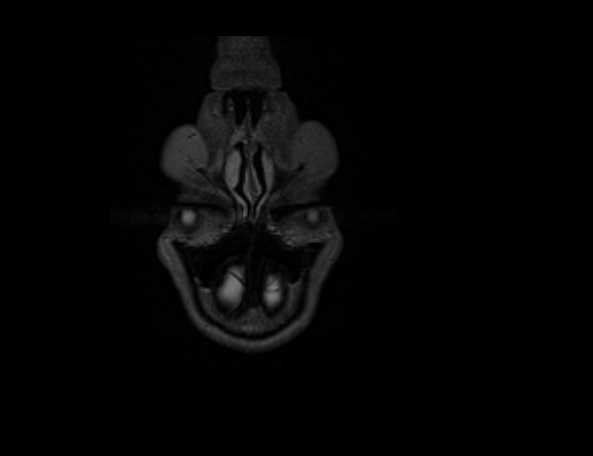
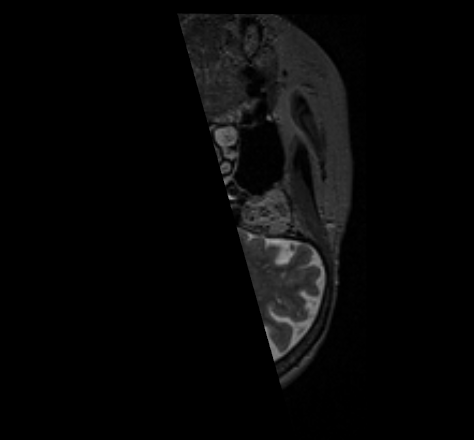
What I’ve noticed is that it doesn’t do it for the first slice:

Slice 0 (front view):  
 ![image](https://discourse.vtk.org/uploads/default/original/2X/8/8baa9f7fd6bcaa218939bb909588c98c9c3eee77.png)

Slice 31 (at an angle, front view is completely gone):  
 ![image](https://discourse.vtk.org/uploads/default/original/2X/1/1624afd2902c2c7a4f000e15f85ee3a868499853.png)

---

<div class="post-metadata">

### Author: ![dgobbi](https://discourse.vtk.org/user_avatar/discourse.vtk.org/dgobbi/32/18_2.png) [@dgobbi](https://discourse.vtk.org/u/dgobbi)
#### Post date: [October 25, 2020, 4:27am UTC](https://discourse.vtk.org/t/vtkimagedata-rendering-disappears-when-viewed-from-z-axis/4480/4 "2020-10-25T04:27:55Z")

</div>

Yes, I’m sure now that it’s a near/far clipping plane issue.

If you do not set up the camera yourself, then VTK will automatically set up the camera based on the actor bounds during the first render. For vtkImageActor, the bounds are set from the DisplayExtent of the actor. Since the DisplayExtent is a single slice, this causes the near and far clipping planes to be very tightly positioned in front of and behind the slice.

There are certain interactions that cause the interactor to reset the clipping planes (I can’t recall which), but it’s very easy for at least part of the vtkImageActor to move beyond the clipping planes. There are two work-arounds for this:

1. Set up the camera yourself before the first render, and set the clipping range to be large enough to contain the whole image from any angle.

2. Use vtkOutlineFilter to create a frame around the image data (use the image data as the input to vtkOutlineFilter, and for the outline actor, use the same UserTransform as for the image actor). This extra actor will cause VTK to initialize the near/far clipping to better values. You can make it transparent if you don’t actually want it to be visible.

---

<div class="post-metadata">

### Author: ![Velchivz](https://discourse.vtk.org/user_avatar/discourse.vtk.org/velchivz/32/1750_2.png) [@Velchivz](https://discourse.vtk.org/u/Velchivz)
#### Post date: [October 25, 2020, 6:32pm UTC](https://discourse.vtk.org/t/vtkimagedata-rendering-disappears-when-viewed-from-z-axis/4480/5 "2020-10-25T18:32:30Z")

</div>

Thanks for the suggestion. I tried doing the second one, but once I make the frame invisible, the clipping problem returns 😔

In terms of the first suggestion, would I have to compute the clipping plane based on the position of the camera with respect to the visuals? I sometimes also render other objects along the image (and in some scenarios, multiple images). Would one require to also compute the clipping range when the user zooms in and out?

---

<div class="post-metadata">

### Author: ![dgobbi](https://discourse.vtk.org/user_avatar/discourse.vtk.org/dgobbi/32/18_2.png) [@dgobbi](https://discourse.vtk.org/u/dgobbi)
#### Post date: [October 25, 2020, 7:52pm UTC](https://discourse.vtk.org/t/vtkimagedata-rendering-disappears-when-viewed-from-z-axis/4480/6 "2020-10-25T19:52:30Z")

</div>

> [@Velchivz](#):
>
> Thanks for the suggestion. I tried doing the second one, but once I make the frame invisible, the clipping problem returns

Try an opacity of 0.005. Regarding the camera, you can look through the VTK examples e.g. [https://lorensen.github.io/VTKExamples/site/Cxx/VisualizationAlgorithms/CarotidFlow/](https://lorensen.github.io/VTKExamples/site/Cxx/VisualizationAlgorithms/CarotidFlow/)

---

<div class="post-metadata">

### Author: ![Velchivz](https://discourse.vtk.org/user_avatar/discourse.vtk.org/velchivz/32/1750_2.png) [@Velchivz](https://discourse.vtk.org/u/Velchivz)
#### Post date: [October 27, 2020, 12:00am UTC](https://discourse.vtk.org/t/vtkimagedata-rendering-disappears-when-viewed-from-z-axis/4480/7 "2020-10-27T00:00:54Z")

</div>

Okay, thank you. I will try these and see what works best. At least I know what the issue is.
