# vtkImageReslice do not include the center point
**URL:** https://discourse.vtk.org/t/vtkimagereslice-do-not-include-the-center-point/4969
**Category:** Support
**Created:** [January 8, 2021, 2:27pm UTC](https://discourse.vtk.org/t/vtkimagereslice-do-not-include-the-center-point/4969 "2021-01-08T14:27:22Z")
**Posts on this page:** 2
**Page:** 1
### Author:  [@zhang-qiang-github](https://discourse.vtk.org/u/zhang-qiang-github)
#### Post date: [January 8, 2021, 2:27pm UTC](https://discourse.vtk.org/t/vtkimagereslice-do-not-include-the-center-point/4969/1 "2021-01-08T14:27:22Z")
I am using vtkImageReslice to reslice a volume image. The vtkImageReslice need the direction and center point as the input. However, I find the center point do not located in the output of vtkImageReslice.
```auto
from vtk.util.numpy_support import vtk_to_numpy, numpy_to_vtk
import vtk
import numpy as np
def numpyToVTK(data):
flat_data_array = data.transpose(2,1,0).flatten()
vtk_data_array = numpy_to_vtk(flat_data_array)
vtk_data = numpy_to_vtk(num_array=vtk_data_array, deep=True, array_type=vtk.VTK_FLOAT)
img = vtk.vtkImageData()
img.GetPointData().SetScalars(vtk_data)
img.SetDimensions(data.shape)
return img
img = np.zeros(shape=[512,512,120])
img[0:300,0:100,:] = 255
vtkImg = numpyToVTK(img)
reslice = vtk.vtkImageReslice()
reslice.SetInputData(vtkImg)
reslice.SetAutoCropOutput(True)
reslice.SetOutputDimensionality(2)
reslice.SetInterpolationModeToCubic()
reslice.SetSlabNumberOfSlices(1)
reslice.SetOutputSpacing(1.0,1.0,1.0)
center = [150, 50, 100]
axialElement = [
1, 0, 0, center[0],
0, 1, 0, center[1],
0, 0, 1, center[2],
0, 0, 0, 1
]
resliceAxes = vtk.vtkMatrix4x4()
resliceAxes.DeepCopy(axialElement)
reslice.SetResliceAxes(resliceAxes)
reslice.Update()
reslicedImg = reslice.GetOutput()
```
Then, I show the `reslicedImg` and the `center` as following:
```auto
imageActor = vtk.vtkImageActor()
windowLevel = vtk.vtkImageMapToWindowLevelColors()
imageActor.GetMapper().SetInputConnection(windowLevel.GetOutputPort())
windowLevel.SetInputData(reslicedImg)
windowLevel.Update()
sphere = vtk.vtkSphereSource()
sphere.SetCenter(center[0], center[1], center[2])
# sphere.SetCenter(center[0], center[1], -100)
sphere.SetRadius(50)
sphere.Update()
sphereMapper = vtk.vtkPolyDataMapper()
sphereMapper.SetInputData(sphere.GetOutput())
sphereActor = vtk.vtkActor()
sphereActor.SetMapper(sphereMapper)
ren = vtk.vtkRenderer()
ren.AddActor(imageActor)
ren.AddActor(sphereActor)
ren.SetBackground(0.1, 0.2, 0.4)
renWin = vtk.vtkRenderWindow()
renWin.AddRenderer(ren)
renWin.SetSize(400, 400)
iren = vtk.vtkRenderWindowInteractor()
iren.SetRenderWindow(renWin)
renWin.Render()
iren.Start()
```
and the result is:
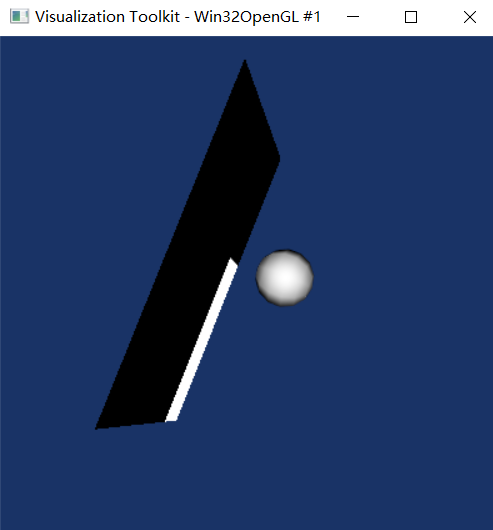
The position of the showed sphere is the center point that is used by `vtkImageReslice`. We can see that the sphere and the image plane is seperated. However, in my understanding, the sphere should located at the output of `vtkImageReslice`.
Is there anything wrong with my code?
---
### Author:  [@zhang-qiang-github](https://discourse.vtk.org/u/zhang-qiang-github)
#### Post date: [January 10, 2021, 1:29am UTC](https://discourse.vtk.org/t/vtkimagereslice-do-not-include-the-center-point/4969/2 "2021-01-10T01:29:38Z")
Finally, I know what’s the problem with my code.
Let’s say the original image is `volumeImg`, and the resliced image is `reslicedImg`. The coordinate system of `volumeImg` and `reslicedImg` is different.
The point of `center` is represented with the `volumeImg` coordinate system, while it has been shown in the `reslicedImg` coordinate system.
Thus, I need to covert the `center` from the `volumeImg` coordinate system to `reslicedImg` coordinate system and display it. The completed code should be:
```auto
from vtk.util.numpy_support import vtk_to_numpy, numpy_to_vtk
import vtk
import numpy as np
def numpyToVTK(data):
flat_data_array = data.transpose(2,1,0).flatten()
vtk_data_array = numpy_to_vtk(flat_data_array)
vtk_data = numpy_to_vtk(num_array=vtk_data_array, deep=True, array_type=vtk.VTK_FLOAT)
img = vtk.vtkImageData()
img.GetPointData().SetScalars(vtk_data)
img.SetDimensions(data.shape)
return img
img = np.zeros(shape=[512,512,120])
img[0:300,0:100,:] = 255
vtkImg = numpyToVTK(img)
reslice = vtk.vtkImageReslice()
reslice.SetInputData(vtkImg)
reslice.SetAutoCropOutput(True)
reslice.SetOutputDimensionality(2)
reslice.SetInterpolationModeToCubic()
reslice.SetSlabNumberOfSlices(1)
reslice.SetOutputSpacing(1.0,1.0,1.0)
center = [256, 256, 60]
axialElement = [
1, 0, 0, center[0],
0, 1, 0, center[1],
0, 0, 1, center[2],
0, 0, 0, 1
]
resliceAxes = vtk.vtkMatrix4x4()
resliceAxes.DeepCopy(axialElement)
reslice.SetResliceAxes(resliceAxes)
reslice.Update()
reslicedImg = reslice.GetOutput()
imageActor = vtk.vtkImageActor()
windowLevel = vtk.vtkImageMapToWindowLevelColors()
imageActor.GetMapper().SetInputConnection(windowLevel.GetOutputPort())
windowLevel.SetInputData(reslicedImg)
windowLevel.Update()
invertAxes = vtk.vtkMatrix4x4()
vtk.vtkMatrix4x4.Invert(reslice.GetResliceAxes(), invertAxes)
coor = invertAxes.MultiplyPoint([center[0], center[1], center[2], 1])
# coor = reslice.GetResliceAxes().MultiplyPoint([center[0], center[1], center[2], 1])
sphere = vtk.vtkSphereSource()
sphere.SetCenter(coor[0], coor[1], coor[2])
# sphere.SetCenter(center[0], center[1], -100)
sphere.SetRadius(50)
sphere.Update()
sphereMapper = vtk.vtkPolyDataMapper()
sphereMapper.SetInputData(sphere.GetOutput())
sphereActor = vtk.vtkActor()
sphereActor.SetMapper(sphereMapper)
ren = vtk.vtkRenderer()
ren.AddActor(imageActor)
ren.AddActor(sphereActor)
ren.SetBackground(0.1, 0.2, 0.4)
renWin = vtk.vtkRenderWindow()
renWin.AddRenderer(ren)
renWin.SetSize(400, 400)
iren = vtk.vtkRenderWindowInteractor()
iren.SetRenderWindow(renWin)
renWin.Render()
iren.Start()
```
And the result is:
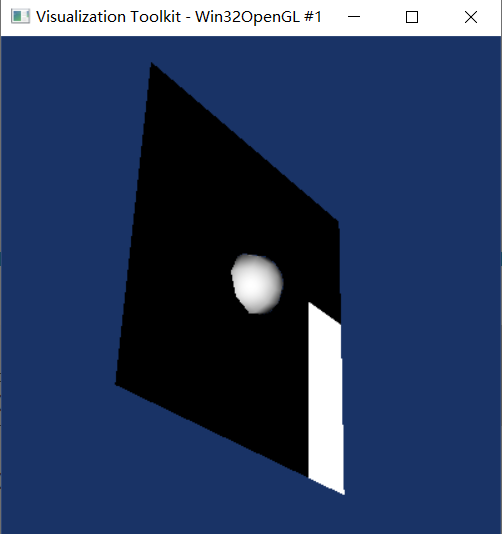
We can see that the converted `center` is located on the resliced image plane.