# vtkImageResliceMapper has weird interpolation artefacts
**URL:** https://discourse.vtk.org/t/vtkimagereslicemapper-has-weird-interpolation-artefacts/11363
**Category:** Web
**Created:** [May 3, 2023, 10:54am UTC](https://discourse.vtk.org/t/vtkimagereslicemapper-has-weird-interpolation-artefacts/11363 "2023-05-03T10:54:53Z")
**Posts on this page:** 9
**Page:** 1
### Author:  [@Tim\_De\_Bauw](https://discourse.vtk.org/u/Tim_De_Bauw)
#### Post date: [May 3, 2023, 10:54am UTC](https://discourse.vtk.org/t/vtkimagereslicemapper-has-weird-interpolation-artefacts/11363/1 "2023-05-03T10:54:53Z")
I am trying to add colors to a volume. It works for me using the vtkImageMapper, but the vtkImageResliceMapper gives weird interpolation artefacts (see images).
code for the initialisation of the actor/mapper:
```auto
this.mapper = vtkImageResliceMapper.newInstance();
this.slicePlane = vtkPlane.newInstance();
this.slicePlane.setNormal(0, 0, 1);
this.mapper.setSlicePlane(this.slicePlane);
this.actor = vtkImageSlice.newInstance();
this.actor.setMapper(this.mapper as any);
```
Code for the colors:
```auto
const cfun = vtkColorTransferFunction.newInstance();
const ofun = vtkPiecewiseFunction.newInstance();
cfun.addRGBPoint(0, 0.0,0.0,0.0);
ofun.addPoint(0, 0.0);
cfun.addRGBPoint(1,1.0,1.0,1.0);
ofun.addPoint(0, 0.0);
this.actor.getProperty().setRGBTransferFunction(0, cfun);
this.actor.getProperty().setPiecewiseFunction(0, ofun);
this.actor.getProperty().setInterpolationTypeToNearest();
```
How can I ensure that there is no interpolation between the labels?
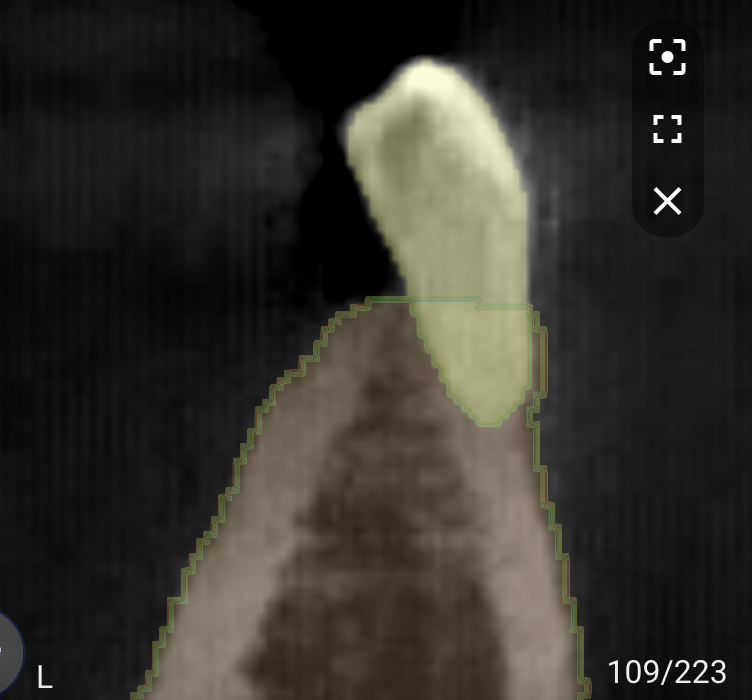
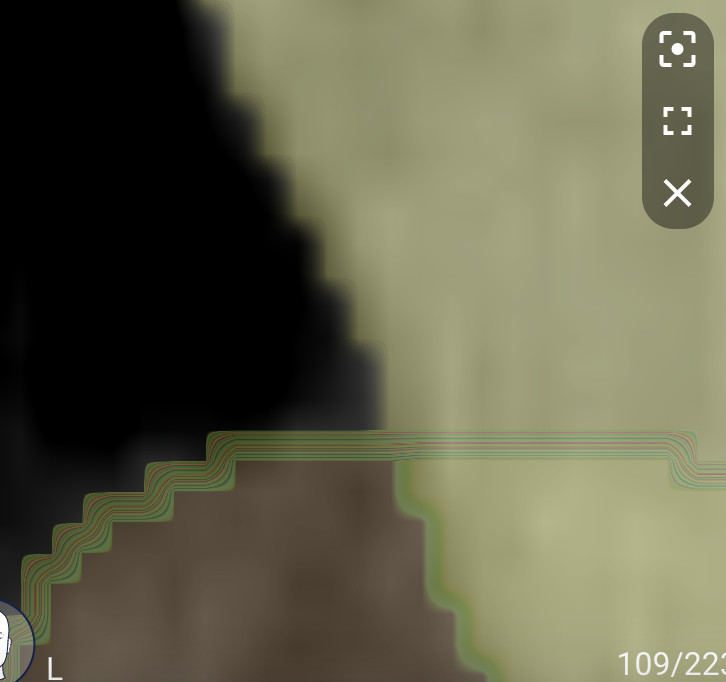

---
### Author:  [@sankhesh](https://discourse.vtk.org/u/sankhesh)
#### Post date: [May 3, 2023, 2:44pm UTC](https://discourse.vtk.org/t/vtkimagereslicemapper-has-weird-interpolation-artefacts/11363/2 "2023-05-03T14:44:13Z")
Could you please share what was the expected result and how it is different with the reslice mapper?
---
### Author:  [@Tim\_De\_Bauw](https://discourse.vtk.org/u/Tim_De_Bauw)
#### Post date: [May 3, 2023, 2:53pm UTC](https://discourse.vtk.org/t/vtkimagereslicemapper-has-weird-interpolation-artefacts/11363/3 "2023-05-03T14:53:17Z")
Hi Sankhesh,
This is the expected result:

The difference is that the border is a hard edge, and that the colored lines are not present
---
### Author:  [@dgobbi](https://discourse.vtk.org/u/dgobbi)
#### Post date: [May 5, 2023, 11:53am UTC](https://discourse.vtk.org/t/vtkimagereslicemapper-has-weird-interpolation-artefacts/11363/4 "2023-05-05T11:53:09Z")
The CTF code looks strange, since “0” is added to the opacity function twice.
```
cfun.addRGBPoint(0, 0.0,0.0,0.0);
ofun.addPoint(0, 0.0);
cfun.addRGBPoint(1,1.0,1.0,1.0);
ofun.addPoint(0, 0.0);
```
Is this the CTF that is is applied to the labels? And is there just one label (binary image) or multiple labels? When using a binary image, it can be useful to vary only the opacity, while keeping the color constant:
```
cfun.addRGBPoint(0, 0.0,1.0,0.0);
ofun.addPoint(0, 0.0);
cfun.addRGBPoint(1, 0.0,1.0,0.0);
ofun.addPoint(1, 1.0);
```
In any case, I agree that in your example it looks like `setInterpolationTypeToNearest()` is ignored by the mapper.
---
### Author:  [@Tim\_De\_Bauw](https://discourse.vtk.org/u/Tim_De_Bauw)
#### Post date: [May 5, 2023, 1:25pm UTC](https://discourse.vtk.org/t/vtkimagereslicemapper-has-weird-interpolation-artefacts/11363/5 "2023-05-05T13:25:58Z")
Hi,
The code looked strange because I edited out some things wrong 🙂 We are trying to show multiple labels. In the picture below you can see the result of you function (I made all the labels green, and gave some an opacity of 0, and some 0.5):
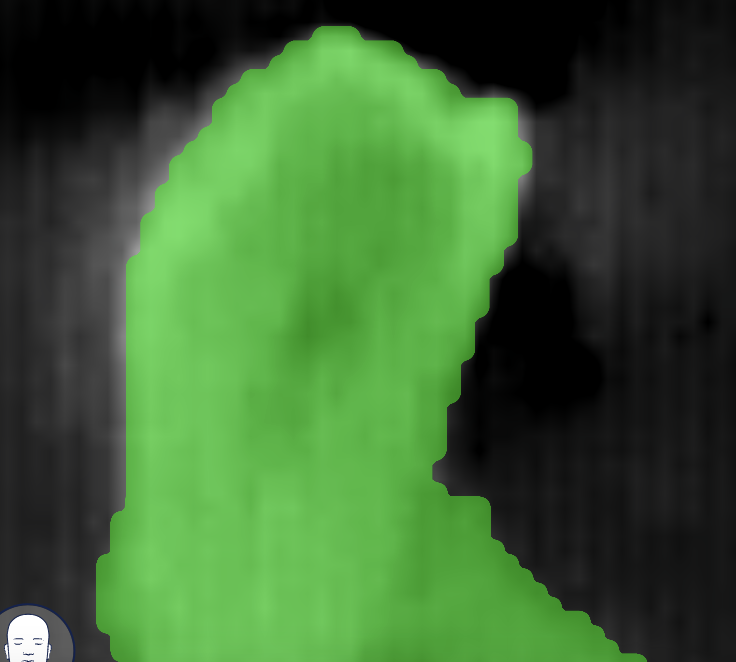

you can see that the edges of the labels get rounded off, and when zooming in you can see that some type of interpolation is happening between the opaque and translucent parts. Do you have an idea what causes this?
---
### Author:  [@dgobbi](https://discourse.vtk.org/u/dgobbi)
#### Post date: [May 5, 2023, 1:54pm UTC](https://discourse.vtk.org/t/vtkimagereslicemapper-has-weird-interpolation-artefacts/11363/6 "2023-05-05T13:54:26Z")
> [@Tim\_De\_Bauw](#):
>
> The code looked strange because I edited out some things wrong
Can you re-edit the code to fix the mistakes? That would help to clear up some of my confusion.
> [@Tim\_De\_Bauw](#):
>
> Do you have an idea what causes this?
> [@dgobbi](#):
>
> it looks like `setInterpolationTypeToNearest()` is ignored by the mapper.
---
### Author:  [@Tim\_De\_Bauw](https://discourse.vtk.org/u/Tim_De_Bauw)
#### Post date: [May 5, 2023, 2:08pm UTC](https://discourse.vtk.org/t/vtkimagereslicemapper-has-weird-interpolation-artefacts/11363/7 "2023-05-05T14:08:49Z")
```auto
Object.keys(colormap).forEach((label) => {
const l = Number(label);
cfun.addRGBPoint(l, 0.0,1.0,0.0);
if (l < 10) {
ofun.addPoint(0, 0.0);
} else {
ofun.addPoint(1, 1.0);
}
```
=\> I generated the picture with the green labels like this.
We have a working version using vtkImageMapper, and I can confirm that we get the results of the first pictures that I sent when I change the interpolation method to ‘LINEAR’. I believe the vtkImageResliceMapper indeed ignores the interpolation settings. Do you know if we can patch it, or if there is an alternative way to get the same results as the vtkImageResliceMapper?
---
### Author:  [@Tim\_De\_Bauw](https://discourse.vtk.org/u/Tim_De_Bauw)
#### Post date: [May 5, 2023, 2:39pm UTC](https://discourse.vtk.org/t/vtkimagereslicemapper-has-weird-interpolation-artefacts/11363/8 "2023-05-05T14:39:19Z")
Hi, I think I found the problem. In ‘vtk.js/Sources/Rendering/OpenGL/ImageResliceMapper/index.js’, the import of of InterpolationType is done like
```auto
import InterpolationType from 'vtk.js/Sources/Rendering/Core/ImageProperty/Constants';
```
while it should be done like
```auto
import { InterpolationType } from 'vtk.js/Sources/Rendering/Core/ImageProperty/Constants';
```
I patched it in my version and it seems to work as expected!
---
### Author:  [@sankhesh](https://discourse.vtk.org/u/sankhesh)
#### Post date: [May 5, 2023, 2:49pm UTC](https://discourse.vtk.org/t/vtkimagereslicemapper-has-weird-interpolation-artefacts/11363/9 "2023-05-05T14:49:35Z")
Excellent @Tim_De_Bauw. Would you be able to submit a PR with your change?