# vtkImclicitModeler in conjunction with vtkPiecewiseFunction --\> vtkOpenGLVolumeOpacityTable Error on Apple M1 Chip

**URL:** https://discourse.vtk.org/t/vtkimclicitmodeler-in-conjunction-with-vtkpiecewisefunction-vtkopenglvolumeopacitytable-error-on-apple-m1-chip/9892
**Category:** Support
**Tags:** code
**Created:** [November 20, 2022, 1:23pm UTC](https://discourse.vtk.org/t/vtkimclicitmodeler-in-conjunction-with-vtkpiecewisefunction-vtkopenglvolumeopacitytable-error-on-apple-m1-chip/9892 "2022-11-20T13:23:43Z")
**Posts on this page:** 4
**Page:** 1

<div class="post-metadata">

### Author: ![aschrempf](https://discourse.vtk.org/letter_avatar_proxy/v4/letter/a/e19adc/32.png) [@aschrempf](https://discourse.vtk.org/u/aschrempf)
#### Post date: [November 20, 2022, 1:23pm UTC](https://discourse.vtk.org/t/vtkimclicitmodeler-in-conjunction-with-vtkpiecewisefunction-vtkopenglvolumeopacitytable-error-on-apple-m1-chip/9892/1 "2022-11-20T13:23:43Z")

</div>

_First of all thanks to VTK team for the great library!_

**BACKGROUND**  
Our research group is developing surgical simulators, where with one of these we use a simple vtk-pipeline to generate “x-ray-like” images from STL-files. Currently I am working hard to provide a native software for Apple M1-chips. All things are working like a charm, BUT the pipeline for generating x-ray images fails.

**PROBLEM**  
Compiling an an Intel-Based MacBook-Pro everything works as expected.  
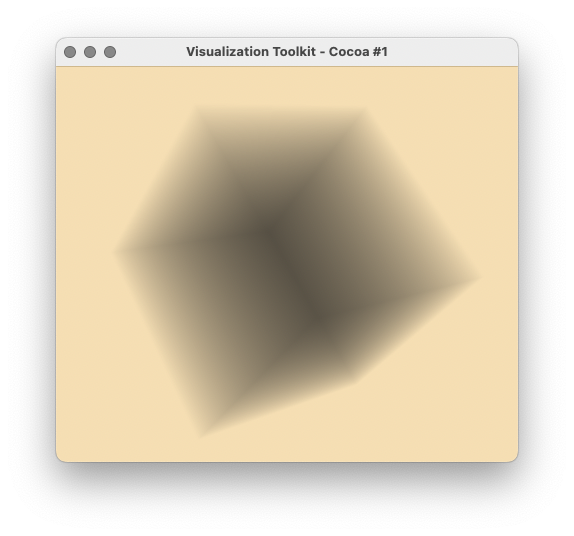
Compiling the same code (see below) on a MacStudio with the M1-Max chipset shows a box around the object. The corresponding message is

```auto
WARN| vtkOpenGLVolumeOpacityTable (0x600002070360): This OpenGL implementation does not support the required texture size of 65536, falling back to maximum allowed, 16384.This may cause an incorrect lookup table mapping

```

which indicates, that something goes wrong with the `vtkPiecewiseFunction` and its OpenGL Implementation which controls the volume opacity.

 ![test_intel64](https://discourse.vtk.org/uploads/default/original/2X/8/803d0e7f48fa7d289ac7744e1eabcde56b1e2009.png) ![test_arm64](https://discourse.vtk.org/uploads/default/original/2X/a/a357f685f6ac6ad3ee01dacf81fca27a97856c80.png)

**REMARKS**  
I was using VTK-9.2.2 compiled natively on both systems as listed below. When running the test program, which was compiled on the Intel-based system over the Rosetta2 framework on the Apple-M1-Chip system, everything works as expected. So the bad results show only on the Apple-M1-Chip system compiled there natively (Xcode Framework 13).

**SYSTEMS**

The used systems are:

```auto
ARM64:

Modellname:	Mac Studio
  Modell-Identifizierung:	Mac13,1
  Chip:	Apple M1 Max
  Gesamtanzahl der Kerne:	10 (8 Leistung und 2 Effizienz)
  Speicher:	32 GB

Apple M1 Max:

  Chipsatz-Modell:	Apple M1 Max
  Typ:	GPU
  Bus:	Integriert
  Gesamtanzahl der Kerne:	24
  Hersteller:	Apple (0x106b)
  Metal-Familie:	Unterstützt, Metal GPUFamily Apple 7

INTEL64:

Modellname:	MacBook Pro
  Modell-Identifizierung:	MacBookPro16,2
  Prozessortyp:	Quad-Core Intel Core i7
  Prozessorgeschwindigkeit:	2,3 GHz
  Anzahl der Prozessoren:	1
  Gesamtanzahl der Kerne:	4
  L2-Cache (pro Kern):	512 KB
  L3-Cache:	8 MB
  Hyper-Threading Technologie:	Aktiviert
  Speicher:	16 GB

Intel Iris Plus Graphics:

  Chipsatz-Modell:	Intel Iris Plus Graphics
  Typ:	GPU
  Bus:	Integriert
  VRAM (dynamisch, maximal):	1536 MB
  Hersteller:	Intel
  Geräte-ID:	0x8a53
  Versions-ID:	0x0007
  Metal-Familie:	Unterstützt, Metal GPUFamily macOS 2

```

**CODE**

For the pipeline the test program is as follows (File TestPipeline.cxx):

```auto
#include <vtkImplicitModeller.h>
#include <vtkNamedColors.h>
#include <vtkNew.h>
#include <vtkSmartVolumeMapper.h>
#include <vtkVolume.h>
#include <vtkVolumeProperty.h>
#include <vtkPiecewiseFunction.h>
#include <vtkProperty.h>
#include <vtkRenderWindow.h>
#include <vtkRenderWindowInteractor.h>
#include <vtkRenderer.h>
#include <vtkSmartPointer.h>
#include <vtkSphereSource.h>
#include <vtkCleanPolyData.h>
#include <vtkImageShiftScale.h>
#include <vtkImageData.h>
#include <vtkAppendPolyData.h>
#include <vtkImageGaussianSmooth.h>
#include <vtkSphereSource.h>
#include <vtksys/SystemTools.hxx>

int main(int argc, char* argv[])
{
  vtkNew<vtkNamedColors> colors;

  // sphere
  vtkNew<vtkSphereSource> sphereSource;
  sphereSource->SetCenter(0.0, 0.0, 0.0);
  sphereSource->SetRadius(5.0);

  // Make the surface smooth.
  sphereSource->SetPhiResolution(100);
  sphereSource->SetThetaResolution(100);

  // append filter
  vtkSmartPointer<vtkAppendPolyData> appendFilter = vtkSmartPointer<vtkAppendPolyData>::New();
  appendFilter->SetInputConnection(sphereSource->GetOutputPort());

  // clean filter
  vtkSmartPointer<vtkCleanPolyData> cleanFilter = vtkSmartPointer<vtkCleanPolyData>::New();
  cleanFilter->SetInputConnection(appendFilter->GetOutputPort());
  cleanFilter->Update();

  // implicit modeler
  vtkNew<vtkImplicitModeller> implicitModeller;
  implicitModeller->SetSampleDimensions(80, 80, 80);
  implicitModeller->SetInputData(cleanFilter->GetOutput());
  implicitModeller->AdjustBoundsOn();
  implicitModeller->SetAdjustDistance(.1); // Adjust by 10%
  implicitModeller->SetMaximumDistance(.01);
  implicitModeller->Update();

  // sfift and scale
  vtkSmartPointer<vtkImageShiftScale> ImageCast = vtkSmartPointer<vtkImageShiftScale>::New();
  ImageCast->SetInputData(implicitModeller->GetOutput());
  ImageCast->SetShift(1);
  ImageCast->SetScale(127);
  ImageCast->SetOutputScalarTypeToUnsignedShort();
  ImageCast->Update();

  // gaussian smooth
  vtkSmartPointer<vtkImageGaussianSmooth> gaussianSmoothFilter =
    vtkSmartPointer<vtkImageGaussianSmooth>::New();
  gaussianSmoothFilter->SetInputConnection(ImageCast->GetOutputPort());
  gaussianSmoothFilter->SetStandardDeviations(1, 1, 1);
  gaussianSmoothFilter->Update();

  // mapper
  vtkNew<vtkSmartVolumeMapper> volumeMapper;
  volumeMapper->SetRequestedRenderModeToRayCast();
  volumeMapper->SetRequestedRenderModeToGPU();
  volumeMapper->SetInterpolationModeToLinear();
  volumeMapper->SetBlendModeToComposite();
  volumeMapper->SetInputData(gaussianSmoothFilter->GetOutput());

  vtkNew<vtkVolume> volume;
  // Opacity transfer function
  vtkSmartPointer<vtkPiecewiseFunction> opacityTransferFunction =
      vtkSmartPointer<vtkPiecewiseFunction>::New();
  opacityTransferFunction->AddPoint(0, 0.0);
  opacityTransferFunction->AddPoint(1, 0.1);

  // Volume property
  vtkSmartPointer<vtkVolumeProperty> volumeProperty = vtkSmartPointer<vtkVolumeProperty>::New();
  volumeProperty->SetScalarOpacity(opacityTransferFunction);
  volumeProperty->ShadeOn();
  volumeProperty->SetInterpolationTypeToLinear();
  volume->SetMapper(volumeMapper);
  volume->SetProperty(volumeProperty);

  // Renderer, Window and Interactor
  vtkNew<vtkRenderer> renderer;
  vtkNew<vtkRenderWindow> renderWindow;
  renderWindow->AddRenderer(renderer);
  vtkNew<vtkRenderWindowInteractor> interactor;
  interactor->SetRenderWindow(renderWindow);

  // add volume
  renderer->AddVolume(volume);
  renderer->SetBackground(colors->GetColor3d("Wheat").GetData());

  renderWindow->SetSize(640, 480);
  renderWindow->SetWindowName("Test Pipeline");
  renderWindow->Render();
  interactor->Start();

  return EXIT_SUCCESS;
}

```

The corresponding CMake file (CMakeLists.txt) is:

```auto
cmake_minimum_required(VERSION 3.12 FATAL_ERROR)

project(TestPipeline)

find_package(VTK COMPONENTS 
  CommonColor
  CommonCore
  CommonDataModel
  FiltersCore
  FiltersHybrid
  FiltersSources
  IOGeometry
  IOLegacy
  IOPLY
  IOXML
  ImagingCore
  ImagingGeneral
  ImagingHybrid
  ImagingMath
  InteractionStyle
  RenderingContextOpenGL2
  RenderingCore
  RenderingFreeType
  RenderingGL2PSOpenGL2
  RenderingOpenGL2
  RenderingVolumeOpenGL2
)

if (NOT VTK_FOUND)
  message(FATAL_ERROR "TestPipeline: Unable to find the VTK build folder.")
endif()

# Prevent a "command line is too long" failure in Windows.
set(CMAKE_NINJA_FORCE_RESPONSE_FILE "ON" CACHE BOOL "Force Ninja to use response files.")
add_executable(TestPipeline MACOSX_BUNDLE TestPipeline.cxx )
  target_link_libraries(TestPipeline PRIVATE ${VTK_LIBRARIES}
)
# vtk_module_autoinit is needed
vtk_module_autoinit(
  TARGETS TestPipeline
  MODULES ${VTK_LIBRARIES}
)

```

---

<div class="post-metadata">

### Author: ![fab672000](https://discourse.vtk.org/user_avatar/discourse.vtk.org/fab672000/32/5808_2.png) [@fab672000](https://discourse.vtk.org/u/fab672000)
#### Post date: [November 29, 2022, 3:15pm UTC](https://discourse.vtk.org/t/vtkimclicitmodeler-in-conjunction-with-vtkpiecewisefunction-vtkopenglvolumeopacitytable-error-on-apple-m1-chip/9892/2 "2022-11-29T15:15:04Z")

</div>

> [@aschrempf](#):
>
> `WARN| vtkOpenGLVolumeOpacityTable (0x600002070360): This OpenGL implementation does not support the required texture size of 65536, falling back to maximum allowed, 16384.This may cause an incorrect lookup table mapping`

Did you try (as a temporary workaround or just to better understand what is happening) to use a smaller image to provide as an input ?

I am thinking of that because the error message be indicates a texture size issue in the apple OpenGL implementation (they seem to not be able to handle more than 16KB size textures).

> WARN| vtkOpenGLVolumeOpacityTable (0x600002070360): This OpenGL implementation does not support the required texture size of 65536, falling back to maximum allowed, 16384.This may cause an incorrect lookup table mapping

---

<div class="post-metadata">

### Author: ![aschrempf](https://discourse.vtk.org/letter_avatar_proxy/v4/letter/a/e19adc/32.png) [@aschrempf](https://discourse.vtk.org/u/aschrempf)
#### Post date: [November 29, 2022, 9:10pm UTC](https://discourse.vtk.org/t/vtkimclicitmodeler-in-conjunction-with-vtkpiecewisefunction-vtkopenglvolumeopacitytable-error-on-apple-m1-chip/9892/3 "2022-11-29T21:10:29Z")

</div>

Thanks for your reply!

I changed the sample dimension for the implicit modeler as follows:

```auto
 implicitModeller->SetSampleDimensions(10, 10, 10);

```

The warning disappeared, however the pipeline does not work as expected (see first image with box). The same code compiled on an intel based Mac provided a correct result (see second image).
 ![test2_arm64](https://discourse.vtk.org/uploads/default/original/2X/7/7eb3315daf063f152822e6d772f631449f4e9a78.png) ![test2_intel64](https://discourse.vtk.org/uploads/default/original/2X/b/bd679b260e4ab276f9a1cc79d86dff3b4c9114f1.jpeg)

As already mentioned in my initial post, the pipline also works as expected, when running the program compiled on an intel based mac over the Rosetta2 framework on the M1-Mac.

I assume the problem arises from the native compilation of vtk (9.2.2) on an M1-Mac (arm64).

---

<div class="post-metadata">

### Author: ![aschrempf](https://discourse.vtk.org/letter_avatar_proxy/v4/letter/a/e19adc/32.png) [@aschrempf](https://discourse.vtk.org/u/aschrempf)
#### Post date: [December 1, 2022, 10:07am UTC](https://discourse.vtk.org/t/vtkimclicitmodeler-in-conjunction-with-vtkpiecewisefunction-vtkopenglvolumeopacitytable-error-on-apple-m1-chip/9892/4 "2022-12-01T10:07:59Z")

</div>

I found the solution. It turns out, that **ClampOverFlowOn()** must be set in _vtkImageShiftScale_ to obtain the same results on different platforms/compilers.

The modified/extended code is as follows:

```auto
<#include <vtkImplicitModeller.h>
#include <vtkNamedColors.h>
#include <vtkNew.h>
#include <vtkSmartVolumeMapper.h>
#include <vtkVolume.h>
#include <vtkVolumeProperty.h>
#include <vtkPiecewiseFunction.h>
#include <vtkProperty.h>
#include <vtkRenderWindow.h>
#include <vtkOpenGLRenderWindow.h>
#include <vtkRenderWindowInteractor.h>
#include <vtkOpenGLRenderer.h>
#include <vtkSmartPointer.h>
#include <vtkSphereSource.h>
#include <vtkCleanPolyData.h>
#include <vtkImageShiftScale.h>
#include <vtkImageData.h>
#include <vtkAppendPolyData.h>
#include <vtkImageGaussianSmooth.h>
#include <vtkSphereSource.h>
#include <vtksys/SystemTools.hxx>
#include <iostream>
#include <vtkOpenGLState.h>
#include <vtkPointData.h>
#include <vtkColorTransferFunction.h>
#include <vtkPoints.h>
#include <vtkDoubleArray.h>
#include <vtkPlanes.h>
#include <vtkClipVolume.h>
#include <vtkDataSetMapper.h>
#include <vtkActor.h>
#include <vtkScalarBarActor.h>
#include <vtkActor2D.h>

int main(int argc, char* argv[])
{
  vtkNew<vtkNamedColors> colors;

  // sphere
  vtkNew<vtkSphereSource> sphereSource;
  sphereSource->SetCenter(0, 0, 0);
  sphereSource->SetRadius(0.5);

  // Make the surface smooth.
  sphereSource->SetPhiResolution(100);
  sphere<Source->SetThetaResolution(100);

  // append filter
  vtkSmartPointer<vtkAppendPolyData> appendFilter = vtkSmartPointer<vtkAppendPolyData>::New();
  appendFilter->SetInputConnection(sphereSource->GetOutputPort());

  // clean filter
  vtkSmartPointer<vtkCleanPolyData> cleanFilter = vtkSmartPointer<vtkCleanPolyData>::New();
  cleanFilter->SetInputConnection(appendFilter->GetOutputPort());
  cleanFilter->Update();

  // implicit modeler
  double maxDistanceRatio = 0.05;
  int sampleSize = 127;
  vtkNew<vtkImplicitModeller> implicitModeller;
  implicitModeller->SetSampleDimensions(sampleSize, sampleSize, sampleSize);
  implicitModeller->SetInputData(appendFilter->GetOutput());
  implicitModeller->AdjustBoundsOn();
  implicitModeller->SetAdjustDistance(.1); // Adjust by 10%
  implicitModeller->SetMaximumDistance(maxDistanceRatio);
  implicitModeller->Update();
 
  // get the bounds and compute diagonal
  double bounds[6];
  appendFilter->GetInput()->GetCellsBounds(bounds);

  std::cout << "bounds:" << bounds[0] << " " << bounds[1] << std::endl
                         << bounds[2] << " " << bounds[3] << std::endl
                         << bounds[4] << " " << bounds[5] << std::endl;

  double diagonal = sqrt(pow(bounds[1]-bounds[0],2)+
                     pow(bounds[3]-bounds[2],2)+
                     pow(bounds[5]-bounds[4],2));

  std::cout << "diagonal:" << diagonal << std::endl;

  // compute shift and scale for image cast in order to keep values in 
  // the range [0, 255] - unsigned char
  double shift = 0;
  double scale = 127.0 / (diagonal>1E-6?diagonal*maxDistanceRatio:1.0);
  std::cout << "shift:" << shift << " scale:" << scale << std::endl;

  // sfift and scale
  vtkSmartPointer<vtkImageShiftScale> ImageCast = vtkSmartPointer<vtkImageShiftScale>::New();
  ImageCast->SetInputData(implicitModeller->GetOutput());
  ImageCast->SetShift(shift);
  ImageCast->SetScale(scale);
  // Enable clamping seems to important to achieve same results on
  // different platforms (macOS Intel/M1, Windows, ...)
  ImageCast->ClampOverflowOn(); // IMPORTANT
  // use unsigned char as data type for output
  ImageCast->SetOutputScalarTypeToUnsignedShort();
  ImageCast->Update();

  // gaussian smooth
  vtkSmartPointer<vtkImageGaussianSmooth> gaussianSmoothFilter =
    vtkSmartPointer<vtkImageGaussianSmooth>::New();
  gaussianSmoothFilter->SetInputConnection(ImageCast->GetOutputPort());
  gaussianSmoothFilter->SetStandardDeviations(1, 1, 1);
  gaussianSmoothFilter->Update();

  // mapper
  vtkNew<vtkSmartVolumeMapper> volumeMapper;
  volumeMapper->SetRequestedRenderModeToRayCast();
  volumeMapper->SetRequestedRenderModeToGPU();
  volumeMapper->SetInterpolationModeToLinear();
  volumeMapper->SetBlendModeToComposite();
  volumeMapper->SetInputData(gaussianSmoothFilter->GetOutput());

  vtkNew<vtkVolume> volume;
  // Volume property
  vtkSmartPointer<vtkVolumeProperty> volumeProperty = vtkSmartPointer<vtkVolumeProperty>::New();
  volumeProperty->ShadeOn();
  volumeProperty->SetInterpolationTypeToLinear();

  // Opacity transfer function
  double opacity = 0.95;
  double edgeValue = 255;
  vtkSmartPointer<vtkPiecewiseFunction> opacityTransferFunction =
      vtkSmartPointer<vtkPiecewiseFunction>::New();
  opacityTransferFunction->AddPoint(0, opacity);
  opacityTransferFunction->AddPoint(edgeValue, opacity);
  opacityTransferFunction->AddPoint(edgeValue+1, 0);
  opacityTransferFunction->AddPoint(edgeValue+2, 0);
  volumeProperty->SetScalarOpacity(opacityTransferFunction);
  
  // set mapper and volume property
  volume->SetMapper(volumeMapper);
  volume->SetProperty(volumeProperty);

  // clip the sampled region
  vtkNew<vtkDoubleArray> normals;
  vtkNew<vtkPoints> clipPts;
  normals->SetNumberOfComponents(3);
  double xnorm[3] = {-1., 0., 0.};
  double xpt[3] = {0, 0., 0.};
  normals->InsertNextTuple(xnorm);
  clipPts->InsertNextPoint(xpt);
  vtkNew<vtkPlanes> clipPlanes;
  clipPlanes->SetNormals(normals);
  clipPlanes->SetPoints(clipPts);

  // clip the region
  vtkNew<vtkClipVolume> clipper;
  clipper->SetClipFunction(clipPlanes);
  clipper->SetInputData(ImageCast->GetOutput());

  // Image mapper for data from Implicit Modeler (over imagecast)
  vtkNew<vtkDataSetMapper> imageMapper;
  imageMapper->SetScalarRange(0,255);
  imageMapper->CreateDefaultLookupTable();
  vtkNew<vtkActor> imageActor;
  imageActor->SetMapper(imageMapper);
  
  // Create a scalar bar
  vtkNew<vtkScalarBarActor> scalarBar;
  scalarBar->SetLookupTable(imageMapper->GetLookupTable());
  scalarBar->SetTitle("Values");
  scalarBar->UnconstrainedFontSizeOn();
  scalarBar->SetNumberOfLabels(5);
  scalarBar->SetMaximumWidthInPixels(640 / 8);
  scalarBar->SetMaximumHeightInPixels(640 / 3);

  // Renderer, Window and Interactor
  vtkNew<vtkRenderer> renderer;
  vtkNew<vtkRenderWindow> renderWindow;
  renderWindow->AddRenderer(renderer);
  vtkNew<vtkRenderWindowInteractor> interactor;
  interactor->SetRenderWindow(renderWindow);

  // add volume
  renderer->AddVolume(volume);
  renderer->AddViewProp(imageActor);
  renderer->AddActor2D(scalarBar);
  imageMapper->SetInputConnection(clipper->GetOutputPort());

  // renderer background
  renderer->SetBackground(colors->GetColor3d("Wheat").GetData());

  // render window
  renderWindow->SetSize(640, 480);
  renderWindow->SetWindowName("Test Pipeline");
  renderWindow->Render();

  interactor->Start();

  return EXIT_SUCCESS;
}

```
