# vtkLagrangianParticleTracker python commands
**URL:** https://discourse.vtk.org/t/vtklagrangianparticletracker-python-commands/6477
**Category:** Support
**Created:** [August 26, 2021, 2:51pm UTC](https://discourse.vtk.org/t/vtklagrangianparticletracker-python-commands/6477 "2021-08-26T14:51:38Z")
**Posts on this page:** 14
**Page:** 1
### Author:  [@kal](https://discourse.vtk.org/u/kal)
#### Post date: [August 26, 2021, 2:51pm UTC](https://discourse.vtk.org/t/vtklagrangianparticletracker-python-commands/6477/1 "2021-08-26T14:51:38Z")
I am trying to understand and implement how the **vtkLagrangianParticleTracker (LPT)** works. I tried to modify the [kitchen example](https://kitware.github.io/vtk-examples/site/Python/Visualization/Kitchen/). Basically, replaced the **vtkStreamTracer** arguments with the **LPT** arguments. My issue is how the particle data is inputted.
I tried something like this…
```auto
paths = vtk.LagrangianParticleTracker()
paths.SetInputConnection(reader.GetOutputPort())
paths.SetSourceConnection(point.GetOutputPort())
matida = vtk.vtkLagrangianMatidaIntegrationModel()
paths.SetIntegrationModel(matida)
paths.Update()
```
The `reader` comes from the [kitchen example](https://kitware.github.io/vtk-examples/site/Python/Visualization/Kitchen/) and I replaced the `line` with `point`. In the code, I am missing particle arguments. I need help with creating a particle with random specifications and inputting this data into the LPT.
Thanks for your help in advance!!
---
### Author:  [@mwestphal](https://discourse.vtk.org/u/mwestphal)
#### Post date: [August 26, 2021, 3:44pm UTC](https://discourse.vtk.org/t/vtklagrangianparticletracker-python-commands/6477/2 "2021-08-26T15:44:48Z")
This example is for the stream tracer.
The LPT is a very special filter that let you define your own integration model, are you sure you need it ?
In any case, you will find an example usage here:
[https://gitlab.kitware.com/vtk/vtk/-/blob/master/Filters/FlowPaths/Testing/Cxx/TestLagrangianParticleTracker.cxx](https://gitlab.kitware.com/vtk/vtk/-/blob/master/Filters/FlowPaths/Testing/Cxx/TestLagrangianParticleTracker.cxx)
---
### Author:  [@kal](https://discourse.vtk.org/u/kal)
#### Post date: [August 30, 2021, 2:00pm UTC](https://discourse.vtk.org/t/vtklagrangianparticletracker-python-commands/6477/3 "2021-08-30T14:00:12Z")
Thanks! 🙂 This really helped me in understanding of how to implement LPT. Could you also elaborate on where the particles are spawned? For example, in the test case you provided, the spawn locations for the particles are not specified. Are they being spawned at random?
To elaborate,
If I have a (x,y,z) location, how would I input it to spawn particles at this location?
OR
If I have a line object, how would I make particles spawn along the line?
---
### Author:  [@mwestphal](https://discourse.vtk.org/u/mwestphal)
#### Post date: [August 30, 2021, 2:03pm UTC](https://discourse.vtk.org/t/vtklagrangianparticletracker-python-commands/6477/4 "2021-08-30T14:03:13Z")
> [@kal](#):
>
> the spawn locations for the particles are not specified. Are they being spawned at random?
Ther are specified here:
` tracker->SetSourceConnection(groupSeed->GetOutputPort());`
You need to create a source input or dataset.
---
### Author:  [@kal](https://discourse.vtk.org/u/kal)
#### Post date: [August 30, 2021, 3:11pm UTC](https://discourse.vtk.org/t/vtklagrangianparticletracker-python-commands/6477/5 "2021-08-30T15:11:59Z")
Thanks for the quick reply. That clarifies things! Could you help me understand what this part of the code is doing?
[Code link](https://gitlab.kitware.com/vtk/vtk/-/blob/master/Filters/FlowPaths/Testing/Cxx/TestLagrangianParticleTracker.cxx#L228)
```auto
tracker->GenerateParticlePathsOutputOn();
tracker->SetInputConnection(ugFlow->GetOutputPort());
tracker->SetMaximumNumberOfSteps(30);
tracker->SetCellLengthComputationMode(vtkLagrangianParticleTracker::STEP_CUR_CELL_DIV_THEO);
tracker->Update();
```
I am trying to better understand the code. I was able to port your test code to python and modify the kitchen example. I will post the codes to both for reference shortly.
---
### Author:  [@mwestphal](https://discourse.vtk.org/u/mwestphal)
#### Post date: [August 30, 2021, 3:17pm UTC](https://discourse.vtk.org/t/vtklagrangianparticletracker-python-commands/6477/6 "2021-08-30T15:17:45Z")
```auto
tracker->GenerateParticlePathsOutputOn();
```
With this option to on, the path will be generated, not only the interactions
```auto
tracker->SetInputConnection(ugFlow->GetOutputPort());
```
Set the volumic flow input
```auto
tracker->SetMaximumNumberOfSteps(30);
```
Set the number of maximum of steps per paticle to 30 (quite a low number for real life data)
```auto
tracker->SetCellLengthComputationMode(vtkLagrangianParticleTracker::STEP_CUR_CELL_DIV_THEO);
```
See here: [https://vtk.org/doc/nightly/html/classvtkLagrangianParticleTracker.html#a931ba3f4ef4258e95fa1fc521a474478](https://vtk.org/doc/nightly/html/classvtkLagrangianParticleTracker.html#a931ba3f4ef4258e95fa1fc521a474478)
```auto
tracker->Update();
```
Actual computation
---
### Author:  [@kal](https://discourse.vtk.org/u/kal)
#### Post date: [September 2, 2021, 12:58pm UTC](https://discourse.vtk.org/t/vtklagrangianparticletracker-python-commands/6477/7 "2021-09-02T12:58:39Z")
Hello again,
Sorry for the delayed reply. As I have mentioned, I have been trying to get the kitchen example to work. For some reason, creating a surface and setting it’s component to `vtk.vtkLagrangianBasicIntegrationModel.SURFACE_TYPE_BOUNCE` is not working as expected. Here’s a part of the code I have written, trying to replicate the test code you provided…
```auto
# Create a plane
surfaceBounce = vtk.vtkPlaneSource()
surfaceBounce.SetOrigin(4, 0, 0)
surfaceBounce.SetPoint1(4, 3, 0)
surfaceBounce.SetPoint2(4, 0, 1)
bouncePd = surfaceBounce.GetOutput()
# Plane actor
surfaceMapper = vtk.vtkPolyDataMapper()
surfaceMapper.SetInputConnection(surfaceBounce.GetOutputPort())
surfaceActor = vtk.vtkActor()
surfaceActor.SetMapper(surfaceMapper)
surfaceActor.GetProperty().SetColor(colors.GetColor3d('Blue'))
# Set the surface tpe to bounce
surfaceTypeBounce = vtk.vtkDoubleArray()
surfaceTypeBounce.SetNumberOfComponents(1)
surfaceTypeBounce.SetName('SurfaceType')
surfaceTypeBounce.SetNumberOfTuples(bouncePd.GetNumberOfCells())
surfaceTypeBounce.FillComponent(0, vtk.vtkLagrangianBasicIntegrationModel.SURFACE_TYPE_BOUNCE)
bouncePd.GetCellData().AddArray(surfaceTypeBounce)
# Group it to send it to tracker
groupSurface = vtk.vtkMultiBlockDataGroupFilter()
groupSurface.AddInputDataObject(bouncePd)
```
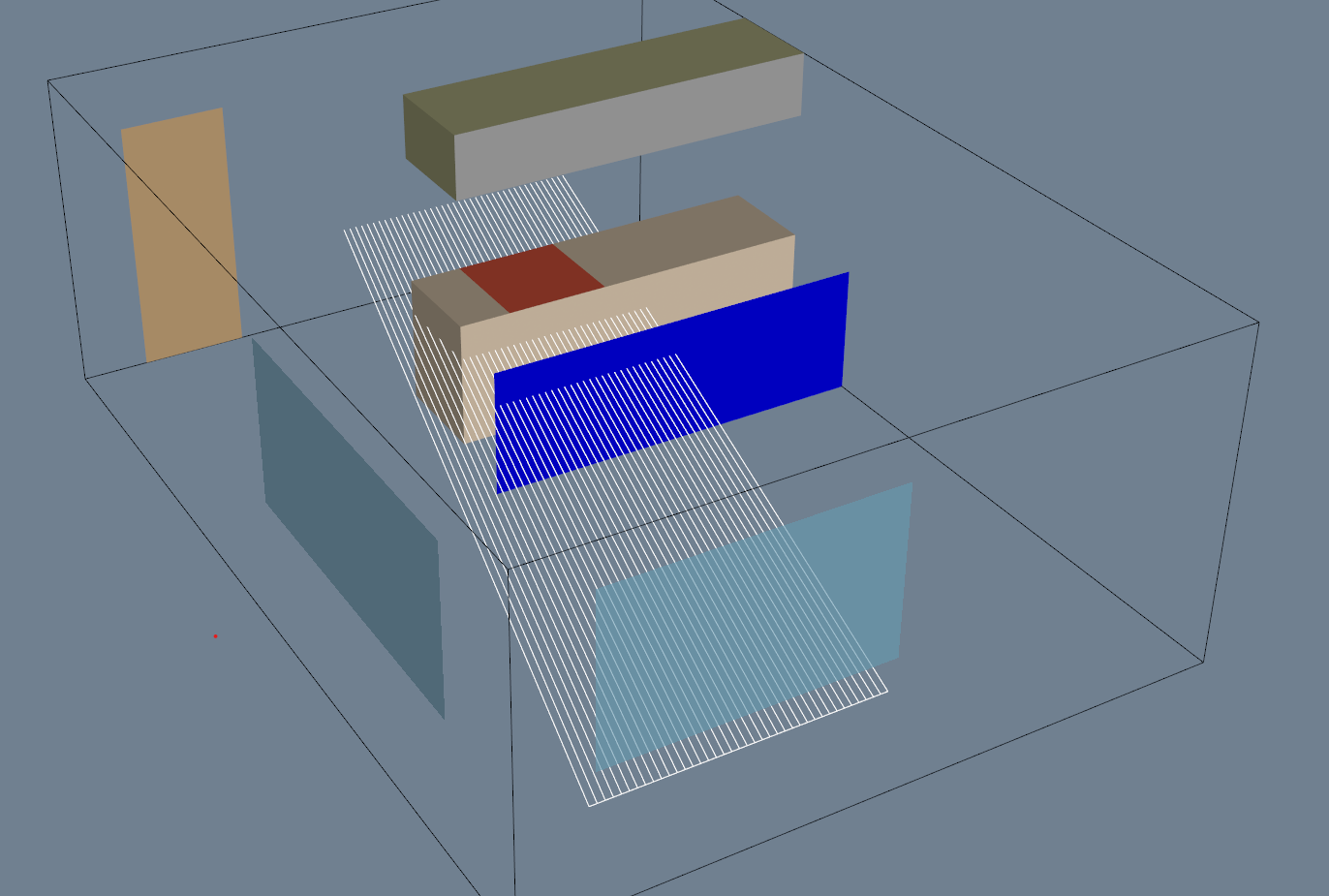
The rest of the code is same as yours! Below is the result I am getting, the blue surface is the one I created. Do you have any **debugging steps/ideas** I could use to figure out what’s happening? Thanks!
---
### Author:  [@mwestphal](https://discourse.vtk.org/u/mwestphal)
#### Post date: [September 2, 2021, 1:12pm UTC](https://discourse.vtk.org/t/vtklagrangianparticletracker-python-commands/6477/8 "2021-09-02T13:12:53Z")
I’d put a breakpoint in the surface interaction code to see what is going on.
---
### Author:  [@kal](https://discourse.vtk.org/u/kal)
#### Post date: [September 2, 2021, 1:35pm UTC](https://discourse.vtk.org/t/vtklagrangianparticletracker-python-commands/6477/9 "2021-09-02T13:35:13Z")
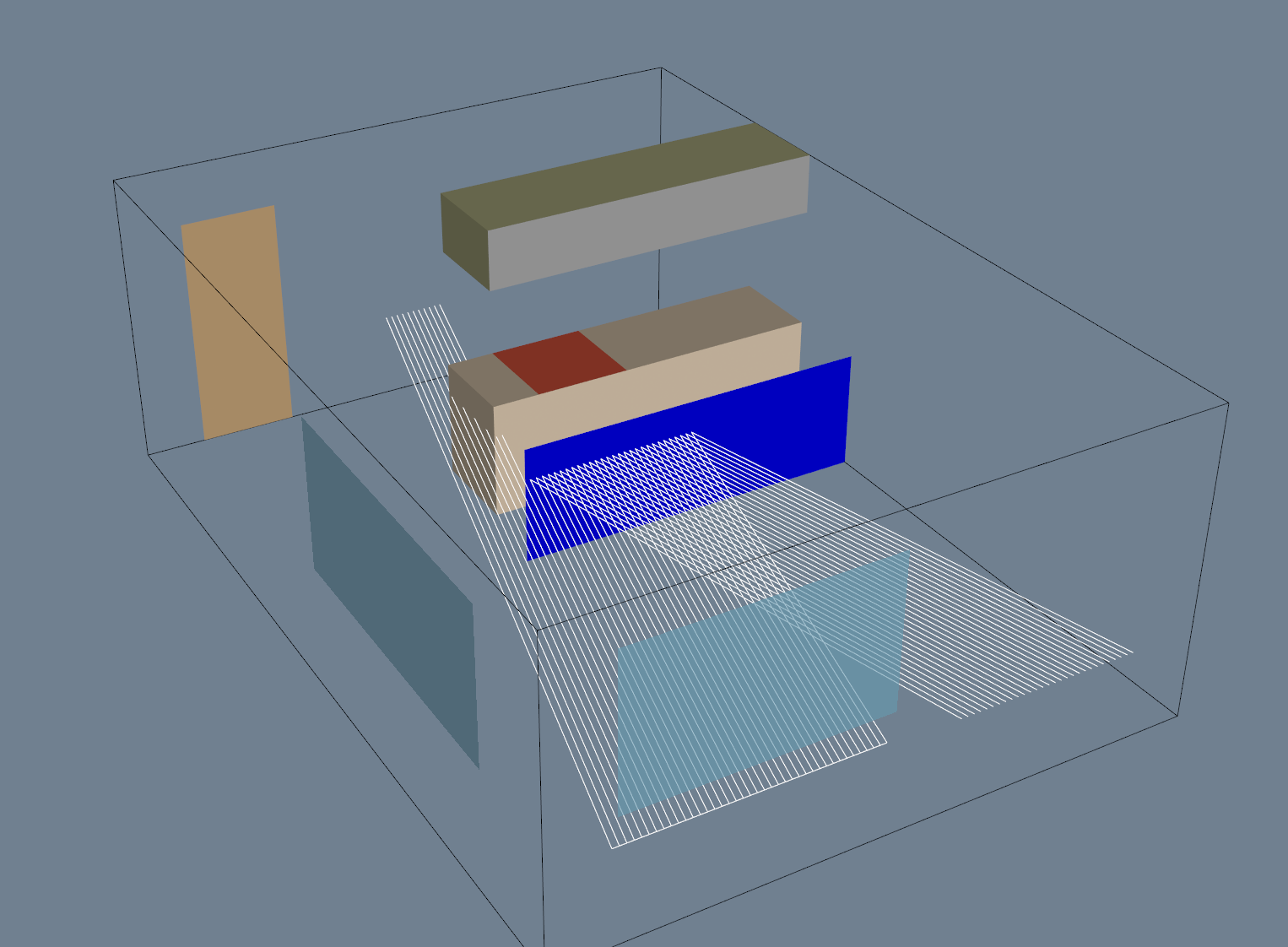
I think it’s an issue with using jupyter-notebook. When I ran the same code in PyCharm, it worked fine. I tried running the whole code from a single cell in jupyter-notebook, still did not work. **Do you know of any reasons what might cause this issue?**
Here’s the result from PyCharm…
---
### Author:  [@mwestphal](https://discourse.vtk.org/u/mwestphal)
#### Post date: [September 2, 2021, 1:39pm UTC](https://discourse.vtk.org/t/vtklagrangianparticletracker-python-commands/6477/10 "2021-09-02T13:39:20Z")
I do not see any reasons for this, but I’m not using LPT with python.
---
### Author:  [@kal](https://discourse.vtk.org/u/kal)
#### Post date: [September 3, 2021, 3:51pm UTC](https://discourse.vtk.org/t/vtklagrangianparticletracker-python-commands/6477/11 "2021-09-03T15:51:51Z")
Thanks for all the help! I really appreciate it. 👍
I made a mistake in the code. Forgot to do `surfaceBounce.Update()`. The code works fine now. Nothing to do with the IDEs. I’ll post links to the code as soon as I am done cleaning it up.
---
### Author:  [@kal](https://discourse.vtk.org/u/kal)
#### Post date: [September 20, 2021, 1:15pm UTC](https://discourse.vtk.org/t/vtklagrangianparticletracker-python-commands/6477/12 "2021-09-20T13:15:20Z")
I added the test-cases in python [here](https://github.com/kalagotla/test-cases). Hope this will help anyone wanting to do LPT in python
---
### Author:  [@mwestphal](https://discourse.vtk.org/u/mwestphal)
#### Post date: [September 20, 2021, 1:17pm UTC](https://discourse.vtk.org/t/vtklagrangianparticletracker-python-commands/6477/13 "2021-09-20T13:17:30Z")
@amaclean : this may be of interest to you
---
### Author:  [@amaclean](https://discourse.vtk.org/u/amaclean)
#### Post date: [September 22, 2021, 10:39pm UTC](https://discourse.vtk.org/t/vtklagrangianparticletracker-python-commands/6477/14 "2021-09-22T22:39:45Z")
@kal this would make a nice addition to the VTK Examples. You would need to convert it to a Python script, and create a MR. Please see [ForDevelopers](https://kitware.github.io/vtk-examples/site/Instructions/ForDevelopers/) for instructions and [Guidelines](https://kitware.github.io/vtk-examples/site/Instructions/Guidelines/) for guidelines. I would recommend calling it **KitchenLPT** and putting it in the **Visualization** folder where the original **Kitchen** example is.