# vtkLineWidget not follow mouse after rerender on vtkImageData change
**URL:** https://discourse.vtk.org/t/vtklinewidget-not-follow-mouse-after-rerender-on-vtkimagedata-change/10364
**Category:** Web
**Created:** [January 3, 2023, 4:45am UTC](https://discourse.vtk.org/t/vtklinewidget-not-follow-mouse-after-rerender-on-vtkimagedata-change/10364 "2023-01-03T04:45:03Z")
**Posts on this page:** 6
**Page:** 1
### Author:  [@tina](https://discourse.vtk.org/u/tina)
#### Post date: [January 3, 2023, 4:45am UTC](https://discourse.vtk.org/t/vtklinewidget-not-follow-mouse-after-rerender-on-vtkimagedata-change/10364/1 "2023-01-03T04:45:03Z")
So I am working on a react app to display live images from backend, on the web page initialise, it will create a live frame scene, which showing a default vtkImageData of size 256 \* 256, then the page will receive a data array of size 1024 \* 1024 from backend. So I update the vtkImageData and rerender the scene, I notice that I have to call scene.renderer.resetCamera(); to make sure the data shows properly in the page. But after that, when I use the vtkLinewidget, it doesn’t follow the position of my mouse. The related code and the behaviour is shoing as below, so my question is what should I change to make the line widget working again?
export const createLiveFrameScene = (container, dataArray, colorMap, maskDataArray, opacityFunction) =\> {
```
const renderWindow = vtkRenderWindow.newInstance({
rootContainer: container,
});
const renderer = vtkRenderer.newInstance();
renderWindow.addRenderer(renderer);
const apiSpecificRenderWindow = renderWindow.newAPISpecificView();
apiSpecificRenderWindow.setContainer(container);
const { width, height } = container.getBoundingClientRect();
apiSpecificRenderWindow.setSize(width, height);
renderWindow.addView(apiSpecificRenderWindow);
const interactor = vtkRenderWindowInteractor.newInstance();
interactor.setView(apiSpecificRenderWindow);
interactor.initialize();
interactor.bindEvents(container);
// interactor style
const styleInteractor = vtkInteractorStyleTrackballCamera.newInstance();
// styleInteractor.
// styleInteractor.setInteractionMode('IMAGE_SLICING');
interactor.setInteractorStyle(styleInteractor);
// mapper and actor
const actorImage = vtkImageSlice.newInstance();
const mapperImage = vtkImageMapper.newInstance();
mapperImage.setSliceAtFocalPoint(true);
mapperImage.setSlicingMode(SlicingMode.Z);
// Create a VTKImageData object
const imageData = createVTKImageData(dataArray.data, dataArray.sizeX, dataArray.sizeY);
const scalars = imageData.getPointData().getScalars();
const lookupTable = vtkColorTransferFunction.newInstance();
const colorMapScene = colorMap;
updateLookupTable(scalars, lookupTable, colorMapScene);
mapperImage.setInputData(imageData);
actorImage.setMapper(mapperImage);
renderer.addActor(actorImage);
actorImage.getProperty().setRGBTransferFunction(0, lookupTable);
actorImage.getProperty().setPiecewiseFunction(opacityFunction);
actorImage.getProperty().setInterpolationTypeToLinear();
// --- Reset camera and render the scene ---
renderer.resetCamera();
renderWindow.render();
// ----------------------------------------------------------------------------
// Setup picking interaction
// ----------------------------------------------------------------------------
// Only try to pick image points
const picker = vtkPointPicker.newInstance();
picker.setPickFromList(1);
picker.setTolerance(0);
picker.initializePickList();
picker.addPickList(actorImage);
// picker.
interactor.setPicker(picker);
// Create a widget manager
const widgetManager = vtkWidgetManager.newInstance();
widgetManager.setRenderer(renderer);
return {
renderWindow: renderWindow,
renderer: renderer,
apiSpecificRenderWindow: apiSpecificRenderWindow,
interactor: interactor,
styleInteractor: styleInteractor,
actorImage: actorImage,
actorMaskImage: actorMaskImage,
mapperImage: mapperImage,
imageData: imageData,
maskImageData: maskImageData,
lookupTable: lookupTable,
colorMap: colorMapScene,
picker: picker,
widgetManager: widgetManager,
renderMask: renderMask
};
```
}
export const updateLiveFrameDataArray = (scene, dataArray, maskDataArray) =\> {
// Get the dimensions of the current imageData
const dimensionsCurrent = scene.imageData.getDimensions();
```
if ((dataArray.sizeX !== dimensionsCurrent[0]) || (dataArray.sizeY !== dimensionsCurrent[1])) {
// The new image dimensions don't match the current image.
// Adjust imageData accordingly
scene.imageData.setExtent(0, dataArray.sizeX - 1, 0, dataArray.sizeY - 1, 0, 0);
console.log("imageData extent adjusted: sizeX: " + dataArray.sizeX + ", sizeY: " + dataArray.sizeY);
}
// Update the data array of the ImageData object
updateVTKImageData(scene.imageData, dataArray.data);
updateVTKImageData(scene.maskImageData, maskDataArray.data);
scene.imageData.modified();
scene.actorMaskImage.modified();
scene.actorImage.modified();
scene.renderer.resetCamera();
scene.renderWindow.render();
// scene.openglRenderWindow.modified();
scene.renderer.getActiveCamera().modified();
```
}
const AddLineWidget = useCallback(() =\> {
sceneLiveFrame.widgetManager.releaseFocus(activeWidget);
const { widgetLine, handleLine } = createLineWidget(sceneLiveFrame.widgetManager);
setWidgetLine(widgetLine);
setActiveWidget(widgetLine);
// sceneLiveFrame.renderer.resetCamera();
sceneLiveFrame.renderWindow.render();
// sceneLiveFrame.renderer.resetCamera();
sceneLiveFrame.widgetManager.grabFocus(widgetLine);
handleLine.onInteractionEvent(() =\> {
setLineDistance(widgetLine.getDistance().toFixed(2));
// Update point positions
const p1 = handleLine.getWidgetState().getHandle1().getOrigin();
```
if (p1) {
console.log("getPickedPoint Widget", p1);
setLineP1({ x: p1[0].toFixed(2), y: p1[1].toFixed(2) });
const p2 = handleLine.getWidgetState().getMoveHandle().getOrigin();
if (p2) {
setLineP2({ x: p2[0].toFixed(2), y: p2[1].toFixed(2) });
}
}
});
handleLine.onEndInteractionEvent(() => {
console.log("onEndInteractionEvent");
});
}, [sceneLiveFrame, activeWidget, setLineDistance, setLineP1, setLineP2])
```
export const updateVTKImageData = (imageData, dataArray) =\> {
imageData.getPointData().setScalars(dataArray);
imageData.modified();
}
export const createLineWidget = (widgetManager) =\> {
// Create a line widget
const widgetLine = vtkLineWidget.newInstance();
const handleWidgetLine = widgetManager.addWidget(widgetLine, ViewTypes.SLICE);
console.log(“create line widget”);
// Set line widget handles to CUBE
handleWidgetLine.getInteractor().render();
handleWidgetLine.getWidgetState().getHandle1().setVisible(true);
handleWidgetLine.updateHandleVisibility(0);
handleWidgetLine.getWidgetState().getHandle1().setShape(ShapeType.CUBE);
handleWidgetLine.getWidgetState().getHandle2().setShape(ShapeType.CUBE);
handleWidgetLine.setActiveScaleFactor(0.2);
handleWidgetLine.getWidgetState().getHandle1().setScale1(15);
handleWidgetLine.getWidgetState().getHandle2().setScale1(15);
// return { widgetLine, handleWidgetLine };
return { widgetLine: widgetLine, handleLine: handleWidgetLine };
}
before call resetCamera
the data doesn’t show properly, if only shows the left bottom corner of the 1024\*1024 data
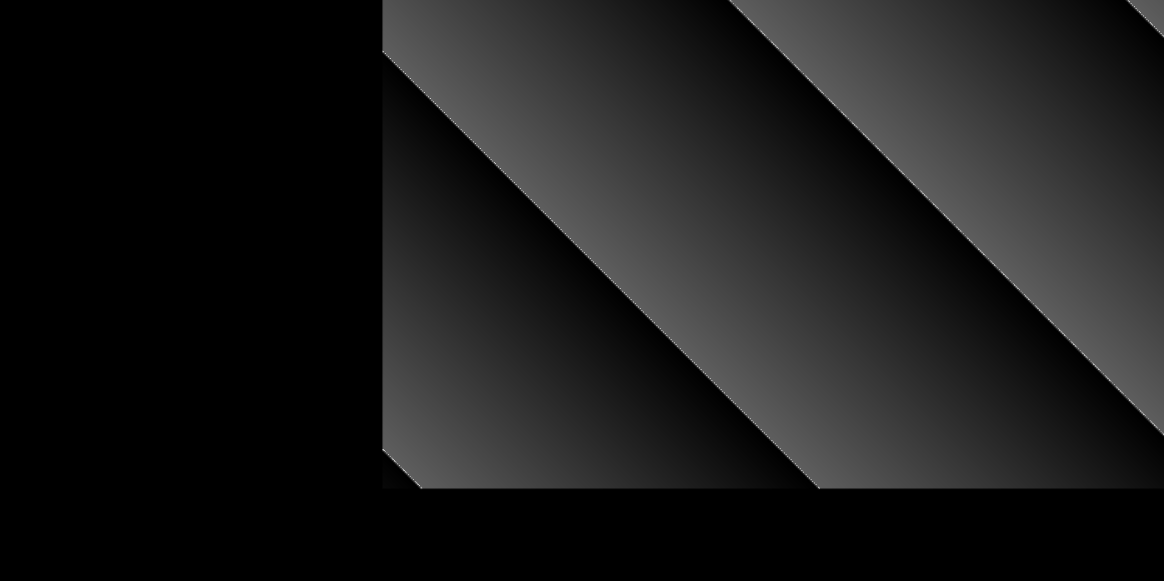
but the greent dot of the line widget works fine
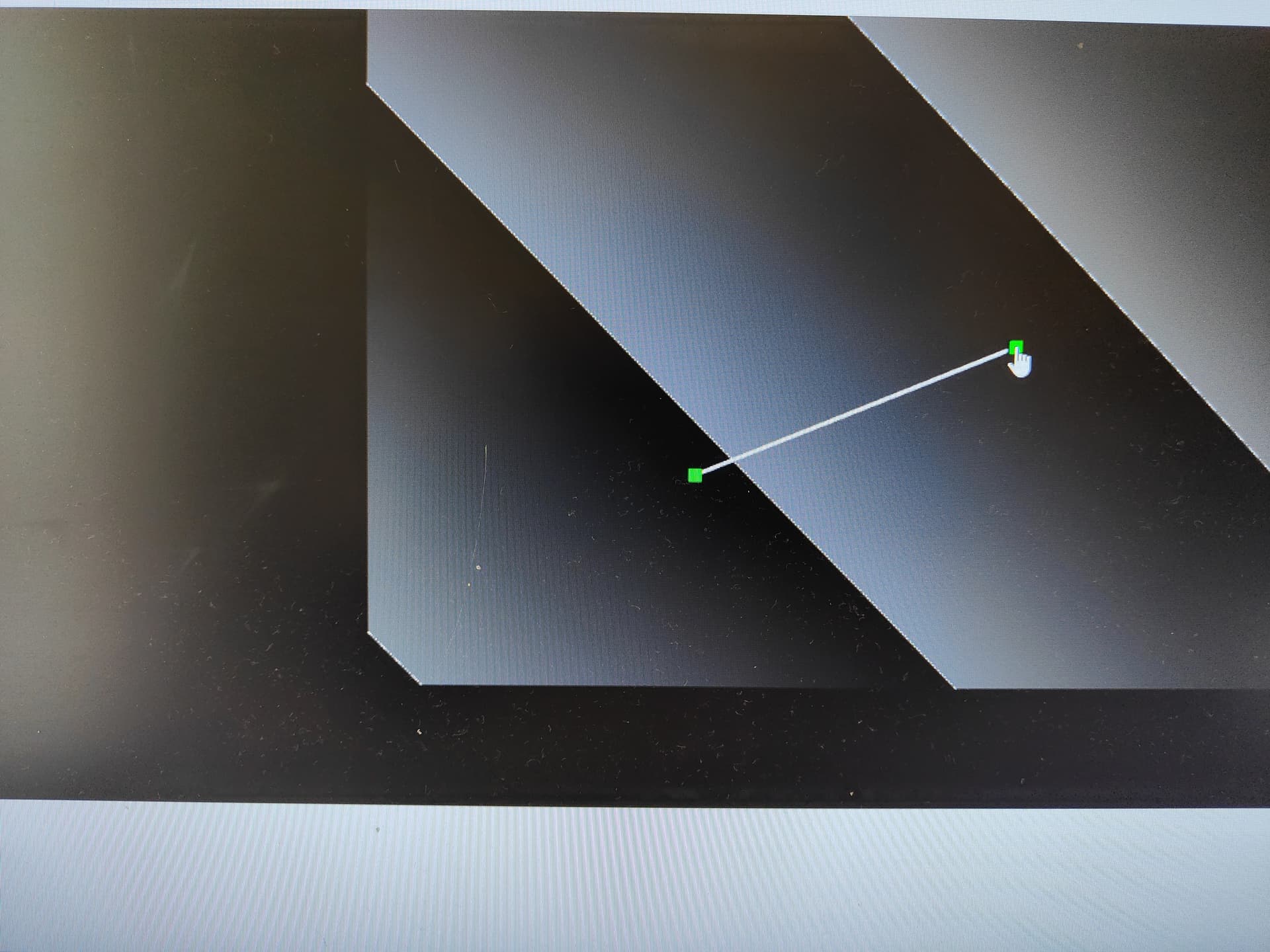
after call resetCamera, the green dot of line widget doesn’t follow the mouse

---
### Author:  [@Forrest](https://discourse.vtk.org/u/Forrest)
#### Post date: [January 3, 2023, 3:56pm UTC](https://discourse.vtk.org/t/vtklinewidget-not-follow-mouse-after-rerender-on-vtkimagedata-change/10364/2 "2023-01-03T15:56:32Z")
Are you adding your line widget before or after the image data is updated? If you move your mouse outside the bounds of the image data, do you see a handle + line? If not, then it would appear that you are losing the widget focus after your camera reset.
---
### Author:  [@tina](https://discourse.vtk.org/u/tina)
#### Post date: [January 3, 2023, 11:29pm UTC](https://discourse.vtk.org/t/vtklinewidget-not-follow-mouse-after-rerender-on-vtkimagedata-change/10364/3 "2023-01-03T23:29:31Z")
I add the line widget after the image data is updated, so I have a button on the page which when clicked will add line widget instance to the widget manager, and it will grab focus then. I click that button after the data is updated. And when moving mouse, I notice the green dot of the line widget only active in the left bottom area of the scene,even my mouse is moving to the right top
---
### Author:  [@Forrest](https://discourse.vtk.org/u/Forrest)
#### Post date: [January 4, 2023, 3:21pm UTC](https://discourse.vtk.org/t/vtklinewidget-not-follow-mouse-after-rerender-on-vtkimagedata-change/10364/4 "2023-01-04T15:21:04Z")
Try `widget.placeWidget(imageActor.getBounds())` after calling `widget = widgetManager.addWidget(widgetLine)` to see if that fixes your issue.
---
### Author:  [@tina](https://discourse.vtk.org/u/tina)
#### Post date: [January 5, 2023, 12:36am UTC](https://discourse.vtk.org/t/vtklinewidget-not-follow-mouse-after-rerender-on-vtkimagedata-change/10364/5 "2023-01-05T00:36:34Z")
Thanks for the suggestion, I just tried but it’s not working, actually I was thinking should I call resetCamera when I change the image data, even the data size is changed, or I should?
---
### Author:  [@tina](https://discourse.vtk.org/u/tina)
#### Post date: [January 8, 2023, 11:48pm UTC](https://discourse.vtk.org/t/vtklinewidget-not-follow-mouse-after-rerender-on-vtkimagedata-change/10364/6 "2023-01-08T23:48:33Z")
I found the reason, actually I kept thinking the mask was not relating to this problem but it did. So there are two renderers in the renderwindow, one for the image and one for the mask, the mask one is layered on top of the image one, so when I update the image to size 1024 \* 1024, the mask size was not changed (256 \* 256), that’s why the widget was on working in the bottom left area