# vtkMFCWindow - Upgrading to VTK 9.1.0
**URL:** https://discourse.vtk.org/t/vtkmfcwindow-upgrading-to-vtk-9-1-0/6998
**Category:** Support
**Created:** [October 28, 2021, 5:55am UTC](https://discourse.vtk.org/t/vtkmfcwindow-upgrading-to-vtk-9-1-0/6998 "2021-10-28T05:55:09Z")
**Posts on this page:** 13
**Page:** 1
### Author:  [@dwventer](https://discourse.vtk.org/u/dwventer)
#### Post date: [October 28, 2021, 5:55am UTC](https://discourse.vtk.org/t/vtkmfcwindow-upgrading-to-vtk-9-1-0/6998/1 "2021-10-28T05:55:09Z")
I’ve been using VTK 8.2.0 for a while and had no issues with integrating it into MFC in Visual Studio.
After I upgraded to VTK 9.1d I get the following message in the VTK output window:
> “ERROR: In C:\Work\3DMetrix\dev\master\3DLymph\packages\VTK-9.1.0\CMAKE-SRC\Rendering\OpenGL2\vtkOpenGLFramebufferObject.cxx, line 367
> vtkOpenGLFramebufferObject (000002651F166E20): failed at glDeleteFramebuffers 16 OpenGL errors detected
> 0 : (1282) Invalid operation
> 1 : (1282) Invalid operation
> 2 : (1282) Invalid operation
> 3 : (1282) Invalid operation
> 4 : (1282) Invalid operation
> 5 : (1282) Invalid operation
> 6 : (1282) Invalid operation
> 7 : (1282) Invalid operation
> 8 : (1282) Invalid operation
> 9 : (1282) Invalid operation
> 10 : (1282) Invalid operation
> 11 : (1282) Invalid operation
> 12 : (1282) Invalid operation
> 13 : (1282) Invalid operation
> 14 : (1282) Invalid operation
> 15 : (1282) Invalid operation”
…repeated about 9 times.
It seemed to be linked to using vtkMFCWindow. I have several vtkMFCWindow objects in different panes in my window. If I only have one vtkMFCWindow object then I do not get the errors but anything more than one gives me these errors.
Any ideas?
Thanks
---
### Author:  [@Cameron](https://discourse.vtk.org/u/Cameron)
#### Post date: [October 29, 2021, 10:04pm UTC](https://discourse.vtk.org/t/vtkmfcwindow-upgrading-to-vtk-9-1-0/6998/2 "2021-10-29T22:04:14Z")
I am experiencing the same issue. This happens when I use ReleaseGraphicsResources()
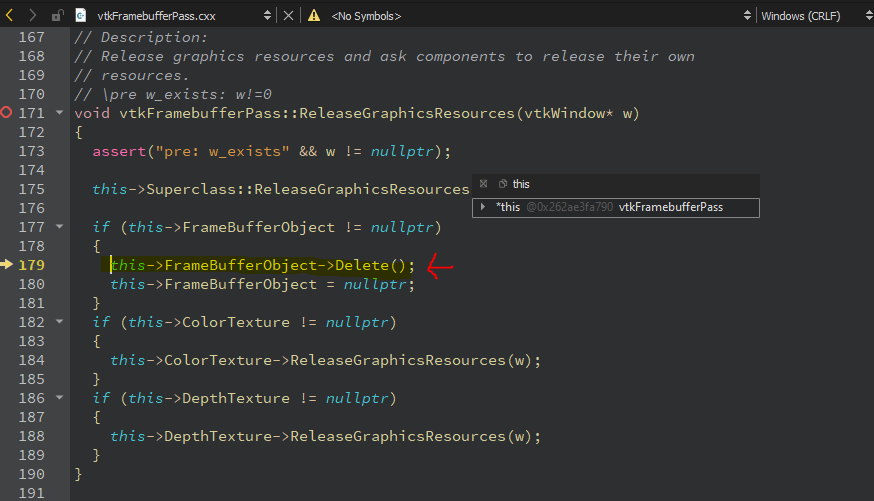
Do you resolve it?
Thanks,
Cameron
---
### Author:  [@dwventer](https://discourse.vtk.org/u/dwventer)
#### Post date: [November 1, 2021, 1:36am UTC](https://discourse.vtk.org/t/vtkmfcwindow-upgrading-to-vtk-9-1-0/6998/3 "2021-11-01T01:36:46Z")
No, I’m still struggling with it.
---
### Author:  [@Cameron](https://discourse.vtk.org/u/Cameron)
#### Post date: [November 1, 2021, 4:16pm UTC](https://discourse.vtk.org/t/vtkmfcwindow-upgrading-to-vtk-9-1-0/6998/4 "2021-11-01T16:16:41Z")
I tested the exact same codebase on macos and there is no error. I wonder if this error only shows on Windows platform and it’s not critical so we can ignore it?
---
### Author:  [@dwventer](https://discourse.vtk.org/u/dwventer)
#### Post date: [November 1, 2021, 10:56pm UTC](https://discourse.vtk.org/t/vtkmfcwindow-upgrading-to-vtk-9-1-0/6998/5 "2021-11-01T22:56:03Z")
From my test, it was only relevant to vtkMFCWindow, which is windows only. I’m not sure if we can ignore this. I wouldn’t.
---
### Author:  [@dwventer](https://discourse.vtk.org/u/dwventer)
#### Post date: [November 2, 2021, 5:30am UTC](https://discourse.vtk.org/t/vtkmfcwindow-upgrading-to-vtk-9-1-0/6998/6 "2021-11-02T05:30:27Z")
I’ve managed to create some sort of workaround. I basically have called the SetRenderWindow to null on my main form closing.
`pMFCWindow->SetRenderWindow(nullptr);`
No more errors! I think there is still some problem with the VTK library or maybe the way I’m using it.
---
### Author:  [@toddy](https://discourse.vtk.org/u/toddy)
#### Post date: [November 2, 2021, 5:56am UTC](https://discourse.vtk.org/t/vtkmfcwindow-upgrading-to-vtk-9-1-0/6998/7 "2021-11-02T05:56:03Z")
Both `vtkGenericOpenGLRenderWindow` and `vtkWin32OpenGLRenderWindow` call _Finalize()_ in their destructors.
```auto
void vtkGenericOpenGLRenderWindow::Finalize()
{
this->ReleaseGraphicsResources();
}
```
and
```auto
void vtkWin32OpenGLRenderWindow::Finalize(void)
{
this->DestroyWindow();
}
```
However
_vtkWin32OpenGLRenderWindow::DestroyWindow()_ =\> _Clean()_ =\> _CleanUpRenderers()_ =\> _ReleaseGraphicsResources()_
only happens when WindowIdReferenceCount == 1
It could be worth putting a break point in _DestroyWindow()_ to see what is happening. I suspect calling `vktMFCWindow::SetRenderWindow(nullptr)` reduces WindowIdReferenceCount so that the destructor works correctly.
---
### Author:  [@dwventer](https://discourse.vtk.org/u/dwventer)
#### Post date: [November 2, 2021, 8:10am UTC](https://discourse.vtk.org/t/vtkmfcwindow-upgrading-to-vtk-9-1-0/6998/8 "2021-11-02T08:10:41Z")
The problem is that it looks like that ‘Finalize’ is called too late when I do not use the workaround.
I tried to debug the positions you mentioned here and noticed at first glance that wglGetCurrentContext always returns NULL. With my workaround, it does not return NULL.
---
### Author:  [@toddy](https://discourse.vtk.org/u/toddy)
#### Post date: [November 2, 2021, 11:29am UTC](https://discourse.vtk.org/t/vtkmfcwindow-upgrading-to-vtk-9-1-0/6998/9 "2021-11-02T11:29:31Z")
And what about when you create only one vtkWindow?
---
### Author:  [@dwventer](https://discourse.vtk.org/u/dwventer)
#### Post date: [November 3, 2021, 1:11am UTC](https://discourse.vtk.org/t/vtkmfcwindow-upgrading-to-vtk-9-1-0/6998/10 "2021-11-03T01:11:46Z")
I double-checked it. It works fine with only one vtkWindow. No workaround needed then.
---
### Author:  [@toddy](https://discourse.vtk.org/u/toddy)
#### Post date: [November 3, 2021, 2:32am UTC](https://discourse.vtk.org/t/vtkmfcwindow-upgrading-to-vtk-9-1-0/6998/11 "2021-11-03T02:32:11Z")
Yes I understand that. So a break point in `vtkWin32OpenGLRenderWindow::DestroyWindow()` shows an assigned rendering context in that case?
I suggest you break point all occurrences of _wglDeleteContext_ to see where the context is being destroyed.
---
### Author:  [@dwventer](https://discourse.vtk.org/u/dwventer)
#### Post date: [November 3, 2021, 4:41am UTC](https://discourse.vtk.org/t/vtkmfcwindow-upgrading-to-vtk-9-1-0/6998/12 "2021-11-03T04:41:55Z")
> [@toddy](#):
>
> DestroyWindow
The " failed at glDeleteFramebuffers…" errors happen before _DestroyWindow_ is called or any of the _wglDeleteContext_ methods.
---
### Author:  [@toddy](https://discourse.vtk.org/u/toddy)
#### Post date: [November 5, 2021, 2:07am UTC](https://discourse.vtk.org/t/vtkmfcwindow-upgrading-to-vtk-9-1-0/6998/13 "2021-11-05T02:07:30Z")
I recommend you log the issue here [https://gitlab.kitware.com/vtk/vtk/-/issues](https://gitlab.kitware.com/vtk/vtk/-/issues) and provide a minimal working project to reproduce the fault.