# vtkOpenGLContextDevice2D::DrawPointSprites issues with buffer
**URL:** https://discourse.vtk.org/t/vtkopenglcontextdevice2d-drawpointsprites-issues-with-buffer/15348
**Category:** Development
**Created:** [March 7, 2025, 3:14am UTC](https://discourse.vtk.org/t/vtkopenglcontextdevice2d-drawpointsprites-issues-with-buffer/15348 "2025-03-07T03:14:09Z")
**Posts on this page:** 3
**Page:** 1
### Author:  [@PeterFranzSeequent](https://discourse.vtk.org/u/PeterFranzSeequent)
#### Post date: [March 7, 2025, 3:14am UTC](https://discourse.vtk.org/t/vtkopenglcontextdevice2d-drawpointsprites-issues-with-buffer/15348/1 "2025-03-07T03:14:09Z")
I have recently upgraded to new VTK version 9.4.1 and have issues with the behaviour of my applications.
I am using `vtkPlotPoints` to draw a plot with certain markerstyle, linestyle etc. The plot receives its data via an algorithm, i.e. `QVTKTableModelAdapter` is used to generate the table.
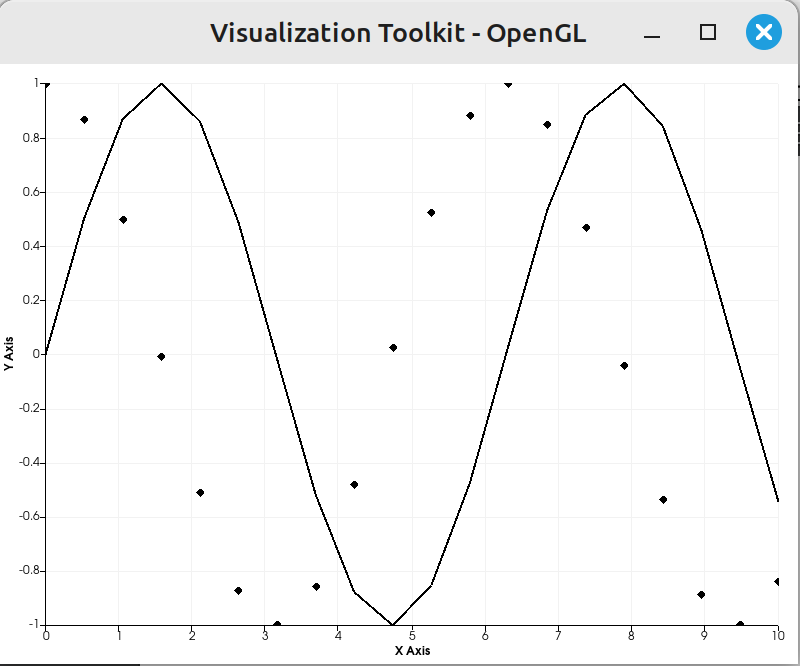
When using the plot in a chart it draws as intended. However, if the algorithm changes to columns to be used from the adapter then the plot uses a different style (marker style, line style etc). When the adapter goes back to using the original columns it reverts back to the original style.
Sneaking in a line `this->Storage->BufferObjectBuilder.Erase(cacheIdentifier, this->RenderWindow);` into `vtkOpenGLContextDevice2D::DrawPointSprites` just before building the buffer with `this->Storage->BufferObjectBuilder.BuildVBO` resolves the issue.
From git blame I can see that this section in `vtkOpenGLContextDevice2D::DrawPointSprites` has changed about a year ago and was edited by @jaswantp
Could I get some help with this please?
---
### Author:  [@jaswantp](https://discourse.vtk.org/u/jaswantp)
#### Post date: [March 7, 2025, 12:39pm UTC](https://discourse.vtk.org/t/vtkopenglcontextdevice2d-drawpointsprites-issues-with-buffer/15348/2 "2025-03-07T12:39:07Z")
Hi @PeterFranzSeequent
The cache was introduced to avoid expensive buffer uploads.
> [@PeterFranzSeequent](#):
>
> When using the plot in a chart it draws as intended. However, if the algorithm changes to columns to be used from the adapter then the plot uses a different style (marker style, line style etc). When the adapter goes back to using the original columns it reverts back to the original style.
Does it happen when a new column (a vtkDataArray) gets selected for the Y-Axis? Or does it happen when the contents of a column change?
Can you provide a minimal reproducible sample in C++/Python? It would speed things up and let us release the fix in 9.4.2
---
### Author:  [@PeterFranzSeequent](https://discourse.vtk.org/u/PeterFranzSeequent)
#### Post date: [March 10, 2025, 2:00am UTC](https://discourse.vtk.org/t/vtkopenglcontextdevice2d-drawpointsprites-issues-with-buffer/15348/3 "2025-03-10T02:00:41Z")
[TestLinePlotMarkerBuffer.cxx](https://discourse.vtk.org/uploads/short-url/cwBGY7DnePDu7QWxr5ytGesZyj4.cxx) (2.0 KB)
@jaswantp I think this small example highlights the problem.
The plot starts using the #1 column in the table as y axis and gets rendered. Then the pot changes to using the #2 column. The data is correctly displayed, but now as line only; the markers seem to use their buffer. That’s not exactly the same behaviour as I am getting in my application (there the markers are gone), but is probably a good starting point for debugging it.
Note in my application I also see buffered behaviour when the data in the table has changed, but maybe fix this one step at a time.
If you create a branch please let me have access to it, would like to test this out as good as possible.