# vtkPointGaussianMapper - SetSplatShaderCode
**URL:** https://discourse.vtk.org/t/vtkpointgaussianmapper-setsplatshadercode/1748
**Category:** Support
**Created:** [September 11, 2019, 1:24pm UTC](https://discourse.vtk.org/t/vtkpointgaussianmapper-setsplatshadercode/1748 "2019-09-11T13:24:08Z")
**Posts on this page:** 6
**Page:** 1
### Author:  [@mallikarjun49](https://discourse.vtk.org/u/mallikarjun49)
#### Post date: [September 11, 2019, 1:24pm UTC](https://discourse.vtk.org/t/vtkpointgaussianmapper-setsplatshadercode/1748/1 "2019-09-11T13:24:08Z")
Dear VTK Users,
I am using vtkPointGaussianMapper and set the SplatShaderCode as below:
mapper-\>SetSplatShaderCode(
“//VTK::Color::Impl\n”
“float dist = dot(offsetVCVSOutput.xy,offsetVCVSOutput.xy);\n”
“if (dist \> 1.0) {\n”
" discard;\n"
“} else {\n”
" float scale = (1.0 - dist);\n"
" ambientColor \*= scale;\n"
" diffuseColor \*= scale;\n"
“}\n”);
which render the points as spheres as shown below .
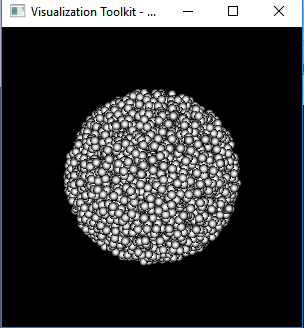
I want to render these points as **Cubes** , Can anyone provide me an example shader code for cubes?
Thanks in advance.
---
### Author:  [@Michael](https://discourse.vtk.org/u/Michael)
#### Post date: [September 12, 2019, 12:09pm UTC](https://discourse.vtk.org/t/vtkpointgaussianmapper-setsplatshadercode/1748/2 "2019-09-12T12:09:55Z")
Please note that the points are not rendered as spheres but as disks with a fake shading.
You cannot render cubes with this mapper (you can render squares but I guess you do not want that).
You might be interested by `vtkGlyph3DMapper` (use `SetSourceData` with a box).
---
### Author:  [@mallikarjun49](https://discourse.vtk.org/u/mallikarjun49)
#### Post date: [September 12, 2019, 1:50pm UTC](https://discourse.vtk.org/t/vtkpointgaussianmapper-setsplatshadercode/1748/3 "2019-09-12T13:50:39Z")
Thank you Michael for the reply .
Yes, I don’t want squares… Even I don’t want to render cubes.
If not with this mapper, Is there any other mapper where there is an option to do fake shading these points as Cubes…
Thank you.
With Kind Regards,
Mallikarjun
---
### Author:  [@Michael](https://discourse.vtk.org/u/Michael)
#### Post date: [September 12, 2019, 1:53pm UTC](https://discourse.vtk.org/t/vtkpointgaussianmapper-setsplatshadercode/1748/4 "2019-09-12T13:53:02Z")
Is there any reason why you do not want to render cubes with `vtkGlyph3DMapper`? This is pretty cheap compared to spheres.
---
### Author:  [@dmreagan](https://discourse.vtk.org/u/dmreagan)
#### Post date: [September 16, 2019, 2:43pm UTC](https://discourse.vtk.org/t/vtkpointgaussianmapper-setsplatshadercode/1748/5 "2019-09-16T14:43:32Z")
I’m not sure if it’s any faster than `vtkGlyph3DMapper`, but you could try generating your own cubes in a geometry shader. I linked to a simple example in [another post here](https://discourse.vtk.org/t/geometry-shader-implementation/1189/3).
---
### Author:  [@mallikarjun49](https://discourse.vtk.org/u/mallikarjun49)
#### Post date: [September 20, 2019, 7:43am UTC](https://discourse.vtk.org/t/vtkpointgaussianmapper-setsplatshadercode/1748/6 "2019-09-20T07:43:52Z")
Hi Michael,
I tried using vtkGlyph3DMapper and set actor-\>GetProperty()-\>SetInterpolationToGouraud(), I get the output like as shown below.

I see steps in the rendered object surface but I want to render it as a smooth surface. Are there any property settings/ shading effects to set to make it smoothed surface?
Thank you @dmreagan for the example. I will check it.