# VtkPolyData clip
**URL:** https://discourse.vtk.org/t/vtkpolydata-clip/7006
**Category:** Support
**Created:** [October 28, 2021, 7:04pm UTC](https://discourse.vtk.org/t/vtkpolydata-clip/7006 "2021-10-28T19:04:04Z")
**Posts on this page:** 6
**Page:** 1
### Author:  [@Hanxin\_Hua](https://discourse.vtk.org/u/Hanxin_Hua)
#### Post date: [October 28, 2021, 7:04pm UTC](https://discourse.vtk.org/t/vtkpolydata-clip/7006/1 "2021-10-28T19:04:04Z")
Hi everyone,
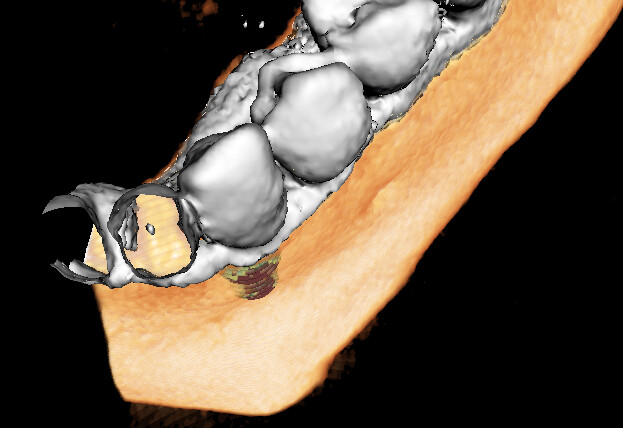
I have a problem. So in the image, the white part is a polydata of an iso surface. And I defined the implicit function of a sphere and cut it.
```
vtkNew isoClip;
skinClip->SetInputData(m_IsoSurfacePolyData);
skinClip->SetClipFunction(sphere);
skinClip->SetValue(0);
skinClip->GenerateClipScalarsOn();
skinClip->Update();
```
And it worked well, the sphere is cut from the iso surface.
But I don’t want it to be hollow. Can I add the interaction part’s surface.
I used vtlProbeFilter, but it did not work right.
Thank you!
---
### Author:  [@Charles\_Gueunet](https://discourse.vtk.org/u/Charles_Gueunet)
#### Post date: [October 29, 2021, 8:00am UTC](https://discourse.vtk.org/t/vtkpolydata-clip/7006/2 "2021-10-29T08:00:34Z")
The isosurface of a scalar field in a 3D mesh is expected to be a surface, and not necessarily a watershed one. If you want to extract region with a scalar value above a given threshold, you may use the threshold filter. This way, you will have a dense result.
---
### Author:  [@Hanxin\_Hua](https://discourse.vtk.org/u/Hanxin_Hua)
#### Post date: [October 29, 2021, 2:37pm UTC](https://discourse.vtk.org/t/vtkpolydata-clip/7006/4 "2021-10-29T14:37:12Z")
Thank you for the reply.
What I really want is something like this [https://kitware.github.io/vtk-examples/site/Cxx/Medical/TissueLens/#description](https://kitware.github.io/vtk-examples/site/Cxx/Medical/TissueLens/#description)
But apparently this is not working
---
### Author:  [@Charles\_Gueunet](https://discourse.vtk.org/u/Charles_Gueunet)
#### Post date: [October 29, 2021, 2:41pm UTC](https://discourse.vtk.org/t/vtkpolydata-clip/7006/5 "2021-10-29T14:41:24Z")
Can you also show how you use the probe filter ?
In the given example there are these lines to create the sphere with the right geometry, probe the values and cut it to match the whole.
```auto
// Define a model for the "lens". Its geometry matches the implicit
// sphere used to clip the isosurface
vtkNew lensModel;
lensModel->SetRadius(50);
lensModel->SetCenter(73, 52, 15);
lensModel->SetPhiResolution(201);
lensModel->SetThetaResolution(101);
// Sample the input volume with the lens model geometry
vtkNew lensProbe;
lensProbe->SetInputConnection(lensModel->GetOutputPort());
lensProbe->SetSourceConnection(reader->GetOutputPort());
// Clip the lens data with the isosurface value
vtkNew lensClip;
lensClip->SetInputConnection(lensProbe->GetOutputPort());
lensClip->SetValue(500);
lensClip->GenerateClipScalarsOff();
lensClip->Update();
```
---
### Author:  [@Hanxin\_Hua](https://discourse.vtk.org/u/Hanxin_Hua)
#### Post date: [October 29, 2021, 2:57pm UTC](https://discourse.vtk.org/t/vtkpolydata-clip/7006/6 "2021-10-29T14:57:57Z")
Here it is
m\_IsoSurfaceMapperBR has the input of the iso surface
m\_BoneReductionImageBR is the imagedata used to generate the iso surface
```
vtkSmartPointer sphere = vtkSmartPointer::New();
vtkSmartPointer spherePoly = vtkSmartPointer::New();
double tip[3];
m_drillModel->GetDrillTip(tip);
sphere->SetCenter(tip);
sphere->SetRadius(6.0);
spherePoly->SetCenter(tip);
spherePoly->SetRadius(6.0);
spherePoly->SetPhiResolution(200);
spherePoly->SetThetaResolution(200);
vtkNew isoClip;
skinClip->SetInputData(m_IsoSurfaceMapperBR->GetInput());
skinClip->SetClipFunction(sphere);
skinClip->SetValue(0);
skinClip->GenerateClipScalarsOn();
skinClip->Update();
vtkNew probe;
probe->SetInputData(spherePoly);
probe->SetSourceData(m_BoneReductionImageBR);
probe->Update();
vtkNew probeClip;
probeClip->SetInputConnection(probe->GetOutputPort());
probeClip->SetValue(30);
probeClip->GenerateClipScalarsOff();
probeClip->Update();
vtkSmartPointer appendData = vtkSmartPointer::New();
appendData->AddInputData(isoClip->GetOutPut());
appendData->AddInputData(probeClip->GetOutPut());
appendData->Update();
vtkSmartPointer clean = vtkSmartPointer::New();
clean->SetInputData(appendData->GetOutput());
clean->Update();
m_IsoSurfaceMapperBR->SetInputData(clean->GetOutput());
m_IsoSurfaceMapperBR->ScalarVisibilityOff();
m_IsoSurfaceMapperBR->Update();
```
---
### Author:  [@Hanxin\_Hua](https://discourse.vtk.org/u/Hanxin_Hua)
#### Post date: [October 29, 2021, 3:04pm UTC](https://discourse.vtk.org/t/vtkpolydata-clip/7006/7 "2021-10-29T15:04:58Z")
I append the two polydata to a single one and use the same mapper for that