# vtkPolyData rendered upside down and reversed, why?

**URL:** https://discourse.vtk.org/t/vtkpolydata-rendered-upside-down-and-reversed-why/6550
**Category:** Support
**Created:** [September 3, 2021, 9:18pm UTC](https://discourse.vtk.org/t/vtkpolydata-rendered-upside-down-and-reversed-why/6550 "2021-09-03T21:18:36Z")
**Posts on this page:** 5
**Page:** 1

<div class="post-metadata">

### Author: ![Tomasso](https://discourse.vtk.org/user_avatar/discourse.vtk.org/tomasso/32/5786_2.png) [@Tomasso](https://discourse.vtk.org/u/Tomasso)
#### Post date: [September 3, 2021, 9:18pm UTC](https://discourse.vtk.org/t/vtkpolydata-rendered-upside-down-and-reversed-why/6550/1 "2021-09-03T21:18:36Z")

</div>

I’m using VTK-8.2.0 on ubuntu 18.04.5.  
I’ve implemented rendering of VTK data with QtQuick via QQuickFramebufferObject, using the C++ [approach described here](https://www.qt.io/blog/2015/05/11/integrating-custom-opengl-rendering-with-qt-quick-via-qquickframebufferobject); I subclass QQuickFramebufferObject (I call it QVtkItem) and QQuickFramebufferOject::Renderer (I call it QVtkRenderer). QVtkRenderer creates a VTK pipeline which loads a vtkPolyData object and communicates with a QVtkItem; the QVtkItem is specified in QML. But for some reason my code renders the VTK data reveresed and upside down. Here is a test case adapted from the [VTK TextOrigin example](https://kitware.github.io/vtk-examples/site/Cxx/Annotation/TextOrigin/). This case loads vtkPolyData from 3D text and maps it to a vtkFollower, and the original example displays it like this:  
 ![image](https://discourse.vtk.org/uploads/default/original/2X/a/ab61b465af962217d15858a4aa9b15fa441ab0bc.png)  
Here is the result of my software, where the same pipeline logic is implemented by my QVtkRenderer:

 ![image](https://discourse.vtk.org/uploads/default/original/2X/0/0a540f1c80dcf1f99c828798556767c698ac1c1c.png)

Here’s code from the [VTK TextOrigin example](https://kitware.github.io/vtk-examples/site/Cxx/Annotation/TextOrigin/):

```auto
int main(int, char*[])
{
  vtkNew<vtkNamedColors> colors;

  // Create the axes and the associated mapper and actor.
  vtkNew<vtkAxes> axes;
  axes->SetOrigin(0, 0, 0);
  vtkNew<vtkPolyDataMapper> axesMapper;
  axesMapper->SetInputConnection(axes->GetOutputPort());
  vtkNew<vtkActor> axesActor;
  axesActor->SetMapper(axesMapper);

  // Create the 3D text and the associated mapper and follower (a type of
  // actor). Position the text so it is displayed over the origin of the
  // axes.
  vtkNew<vtkVectorText> atext;
  atext->SetText("Origin");
  vtkNew<vtkPolyDataMapper> textMapper;
  textMapper->SetInputConnection(atext->GetOutputPort());
  vtkNew<vtkFollower> textActor;
  textActor->SetMapper(textMapper);
  textActor->SetScale(0.2, 0.2, 0.2);
  textActor->AddPosition(0, -0.1, 0);
  textActor->GetProperty()->SetColor(colors->GetColor3d("Peacock").GetData());

  // Create the Renderer, RenderWindow, and RenderWindowInteractor.
  vtkNew<vtkRenderer> renderer;
  vtkNew<vtkRenderWindow> renderWindow;
  renderWindow->AddRenderer(renderer);
  renderWindow->SetSize(640, 480);

  vtkNew<vtkRenderWindowInteractor> interactor;
  interactor->SetRenderWindow(renderWindow);

  vtkNew<vtkInteractorStyleTrackballCamera> style;
  interactor->SetInteractorStyle(style);

  // Add the actors to the renderer.
  renderer->AddActor(axesActor);
  renderer->AddActor(textActor);
  renderer->SetBackground(colors->GetColor3d("Silver").GetData());

  // Zoom in closer.
  renderer->ResetCamera();
  renderer->GetActiveCamera()->Zoom(1.6);

  // Reset the clipping range of the camera; set the camera of the
  // follower; render.
  renderer->ResetCameraClippingRange();
  textActor->SetCamera(renderer->GetActiveCamera());

  interactor->Initialize();
  renderWindow->SetWindowName("TextOrigin");
  renderWindow->Render();
  interactor->Start();

  return EXIT_SUCCESS;
}

```

And here is the “equivalent” code from my QVtkRenderer:

```auto
bool QVtkRenderer::assembleTestPipeline(
                                    vtkRenderer *renderer,
                                    vtkGenericOpenGLRenderWindow *renderWindow,
                                    vtkGenericRenderWindowInteractor *interactor,
                                    PickerInteractorStyle *style) {

  vtkNew<vtkNamedColors> colors;

  // Create the axes and the associated mapper and actor.
  vtkNew<vtkAxes> axes;
  axes->SetOrigin(0, 0, 0);
  vtkNew<vtkPolyDataMapper> axesMapper;
  axesMapper->SetInputConnection(axes->GetOutputPort());
  vtkNew<vtkActor> axesActor;
  axesActor->SetMapper(axesMapper);

  // Create the 3D text and the associated mapper and follower (a type of
  // actor). Position the text so it is displayed over the origin of the
  // axes.
  vtkNew<vtkVectorText> atext;
  atext->SetText("Origin");
  vtkNew<vtkPolyDataMapper> textMapper;
  textMapper->SetInputConnection(atext->GetOutputPort());
  vtkNew<vtkFollower> textActor;
  textActor->SetMapper(textMapper);
  textActor->SetScale(0.2, 0.2, 0.2);
  textActor->AddPosition(0, -0.1, 0);
  textActor->GetProperty()->SetColor(colors->GetColor3d("Peacock").GetData());

  renderWindow->AddRenderer(renderer);
  renderWindow->SetSize(640, 480);

  interactor->SetRenderWindow(renderWindow);

  interactor->SetInteractorStyle(style);
  
  // Per QtVTK example
  interactor->EnableRenderOff();
  
  // Add the actors to the renderer.
  renderer->AddActor(axesActor);
  renderer->AddActor(textActor);
  renderer->SetBackground(colors->GetColor3d("Silver").GetData());

  // Zoom in closer.
  renderer->ResetCamera();
  renderer->GetActiveCamera()->Zoom(1.6);

  // Reset the clipping range of the camera; set the camera of the
  // follower; render.
  renderer->ResetCameraClippingRange();
  textActor->SetCamera(renderer->GetActiveCamera());

  // Initialize the OpenGL context for the renderer
  renderWindow->OpenGLInitContext();

  return true;
  
}

```

What can cause this? I’ve been trying to solve this for a while, with no luck yet. How can I debug this? Any suggestions are greatly appreciated!

---

<div class="post-metadata">

### Author: ![Paulo\_Carvalho](https://discourse.vtk.org/user_avatar/discourse.vtk.org/paulo_carvalho/32/370_2.png) [@Paulo\_Carvalho](https://discourse.vtk.org/u/Paulo_Carvalho)
#### Post date: [September 4, 2021, 2:30pm UTC](https://discourse.vtk.org/t/vtkpolydata-rendered-upside-down-and-reversed-why/6550/2 "2021-09-04T14:30:02Z")

</div>

Hello,

It seems that the handedness (3D rendering can be right- or left-handed) of your scene is not what you expected. Please, take a look at this: [Change coordinate system from right to left-handed (change direction of Z axis)](https://discourse.vtk.org/t/change-coordinate-system-from-right-to-left-handed-change-direction-of-z-axis/4635).

I hope this helps,

Paulo

---

<div class="post-metadata">

### Author: ![Tomasso](https://discourse.vtk.org/user_avatar/discourse.vtk.org/tomasso/32/5786_2.png) [@Tomasso](https://discourse.vtk.org/u/Tomasso)
#### Post date: [September 7, 2021, 4:14pm UTC](https://discourse.vtk.org/t/vtkpolydata-rendered-upside-down-and-reversed-why/6550/3 "2021-09-07T16:14:55Z")

</div>

Interesting, thanks!  
I’m wondering how my coordinate system is reversed, since my app uses the same pipeline logic as the [VTK Text Origin example](https://kitware.github.io/vtk-examples/site/Cxx/Annotation/TextOrigin/), displaying the polydata of a vtkVectorText object, which no explicit coordinate rotation. Any common ways that the coordinate system could be “inadvertently” rotated? Thanks!

---

<div class="post-metadata">

### Author: ![Paulo\_Carvalho](https://discourse.vtk.org/user_avatar/discourse.vtk.org/paulo_carvalho/32/370_2.png) [@Paulo\_Carvalho](https://discourse.vtk.org/u/Paulo_Carvalho)
#### Post date: [September 8, 2021, 12:23pm UTC](https://discourse.vtk.org/t/vtkpolydata-rendered-upside-down-and-reversed-why/6550/4 "2021-09-08T12:23:31Z")

</div>

Judging from your secreen captures, it’s not rotation, but handedness. These are two different concepts. A 3D coordinate system can either be right-handed or left-handed:
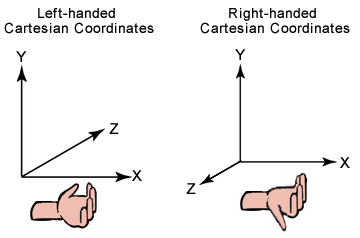
![image](https://discourse.vtk.org/uploads/default/original/2X/0/03d72fa9564d0162198c591f01954a47e861b6e1.png)

Either this or there is something ill-coded in your `QVtkItem` class. It is possible that you’re not properly handling the fact that the origin of screen coordinates is in the top left corner of the widget. Check the `mirrorVertically` property of your class: [QQuickFramebufferObject Class | Qt Quick 5.15.6](https://doc.qt.io/qt-5/qquickframebufferobject.html#mirrorVertically-prop)

---

<div class="post-metadata">

### Author: ![Tomasso](https://discourse.vtk.org/user_avatar/discourse.vtk.org/tomasso/32/5786_2.png) [@Tomasso](https://discourse.vtk.org/u/Tomasso)
#### Post date: [September 16, 2021, 11:20pm UTC](https://discourse.vtk.org/t/vtkpolydata-rendered-upside-down-and-reversed-why/6550/5 "2021-09-16T23:20:23Z")

</div>

Thanks! Wasn’t able to identify the bug in my code, but I set QVtkItem::mirrorVertically = true and now it works.
