actor;
actor->GetProperty()->SetColor(colors->GetColor3d("Snow").GetData());
actor->SetMapper(mapper);
modelStore.renderer->AddActor(actor);
}
modelStore.renderer->SetBackground(.4, .5, .7);
modelStore.renderWindow->AddRenderer(modelStore.renderer);
ui.openGLWidget->setRenderWindow(modelStore.renderWindow);
ui.openGLWidget->setVisible(true);
```
---
### Author:  [@YuxuanHuang](https://discourse.vtk.org/u/YuxuanHuang)
#### Post date: [November 21, 2023, 9:04am UTC](https://discourse.vtk.org/t/vtkruledsurface-bug/8102/4 "2023-11-21T09:04:28Z")
Hi 段凡,
I am having some problems when applying the vtkFrenetSerretFrame class in a qt c++ vtk program. Do you have any tips when you implemented your codes?
Kind regards,
Yuxuan
---
### Author:  [@mau\_igna\_06](https://discourse.vtk.org/u/mau_igna_06)
#### Post date: [January 13, 2025, 6:46pm UTC](https://discourse.vtk.org/t/vtkruledsurface-bug/8102/5 "2025-01-13T18:46:54Z")
Hi,
I have made a code example that shows exactly the same problem reported by the original poster using `vtkRuledSurfaceFilter` with `PointWalk` mode 🙂
All the code is vtk, except I had to replace `vtk.vtkFrenetSerretFrame()` with `slicer.vtkParallelTransportFrame()`
```auto
# Create profile
vtk.vtkMath.RandomSeed(7859821)
diskSource = vtk.vtkDiskSource()
diskSource.SetCircumferentialResolution(5)
clean = vtk.vtkCleanPolyData()
clean.SetInputConnection(diskSource.GetOutputPort())
edges = vtk.vtkFeatureEdges()
edges.SetInputConnection(clean.GetOutputPort())
edges.NonManifoldEdgesOff()
edges.ManifoldEdgesOff()
edges.BoundaryEdgesOn()
edges.FeatureEdgesOff()
stripper = vtk.vtkStripper()
stripper.SetInputConnection(edges.GetOutputPort())
stripper.Update()
profilePolyData = stripper.GetOutput()
# Create a parametric spline
## Generate some random points
numberOfPoints = 5
pointSource = vtk.vtkPointSource()
pointSource.SetNumberOfPoints(numberOfPoints)
pointSource.Update()
points = pointSource.GetOutput().GetPoints()
## Generate the spline
spline = vtk.vtkParametricSpline()
spline.SetPoints(points)
functionSource = vtk.vtkParametricFunctionSource()
functionSource.SetParametricFunction(spline)
functionSource.SetUResolution(50 * numberOfPoints)
functionSource.SetVResolution(50 * numberOfPoints)
functionSource.SetWResolution(50 * numberOfPoints)
functionSource.Update()
splinePolyData = functionSource.GetOutput()
# Create the frame
frame = slicer.vtkParallelTransportFrame() # equivalent to vtk.vtkFrenetSerretFrame()
frame.SetInputData(splinePolyData)
frame.Update()
frame.GetOutput().GetPointData().SetActiveVectors("Normals")
frame.GetOutput().GetPointData().SetActiveVectors("Tangents")
frame.GetOutput().GetPointData().SetActiveVectors("Binormals")
linePoints = frame.GetOutput().GetPoints()
skeleton = vtk.vtkAppendPolyData()
for i in range(linePoints.GetNumberOfPoints()):
transform = vtk.vtkTransform()
# Compute a basis
normalizedX = [0, 0, 0]
frame.GetOutput().GetPointData().SetActiveVectors("Normals")
frame.GetOutput().GetPointData().GetVectors().GetTuple(i, normalizedX)
normalizedY = [0, 0, 0]
frame.GetOutput().GetPointData().SetActiveVectors("Binormals")
frame.GetOutput().GetPointData().GetVectors().GetTuple(i, normalizedY)
normalizedZ = [0, 0, 0]
frame.GetOutput().GetPointData().SetActiveVectors("Tangents")
frame.GetOutput().GetPointData().GetVectors().GetTuple(i, normalizedZ)
# Create the direction cosine matrix
matrix = vtk.vtkMatrix4x4()
matrix.Identity()
for j in range(3):
matrix.SetElement(j, 0, normalizedX[j])
matrix.SetElement(j, 1, normalizedY[j])
matrix.SetElement(j, 2, normalizedZ[j])
transform.Translate(linePoints.GetPoint(i)[0], linePoints.GetPoint(i)[1],
linePoints.GetPoint(i)[2])
transform.Scale(.02, .02, .02)
transform.Concatenate(matrix)
transformPD = vtk.vtkTransformPolyDataFilter()
polyDataCopy = vtk.vtkPolyData()
polyDataCopy.DeepCopy(profilePolyData)
transformPD.SetTransform(transform)
transformPD.SetInputData(polyDataCopy)
transformPD.Update()
contours = vtk.vtkPolyDataConnectivityFilter()
contours.SetInputConnection(transformPD.GetOutputPort())
contours.SetExtractionModeToLargestRegion()
contours.Update()
skeleton.AddInputData(contours.GetOutput())
ruled = vtk.vtkRuledSurfaceFilter()
ruled.SetRuledModeToPointWalk()
ruled.CloseSurfaceOff()
ruled.SetOnRatio(1)
ruled.SetDistanceFactor(10000000)
ruled.SetOrientLoops(True)
ruled.SetInputConnection(skeleton.GetOutputPort())
ruled.Update()
# Slicer code
modelsLogic = slicer.modules.models.logic()
profileModel = modelsLogic.AddModel(profilePolyData)
splineModel = modelsLogic.AddModel(splinePolyData)
skeletonModel = modelsLogic.AddModel(skeleton.GetOutput())
ruledExtrusionModel = modelsLogic.AddModel(ruled.GetOutput())
```
Please see figures below that show the missing triangle between each neighboring loops triangles creation
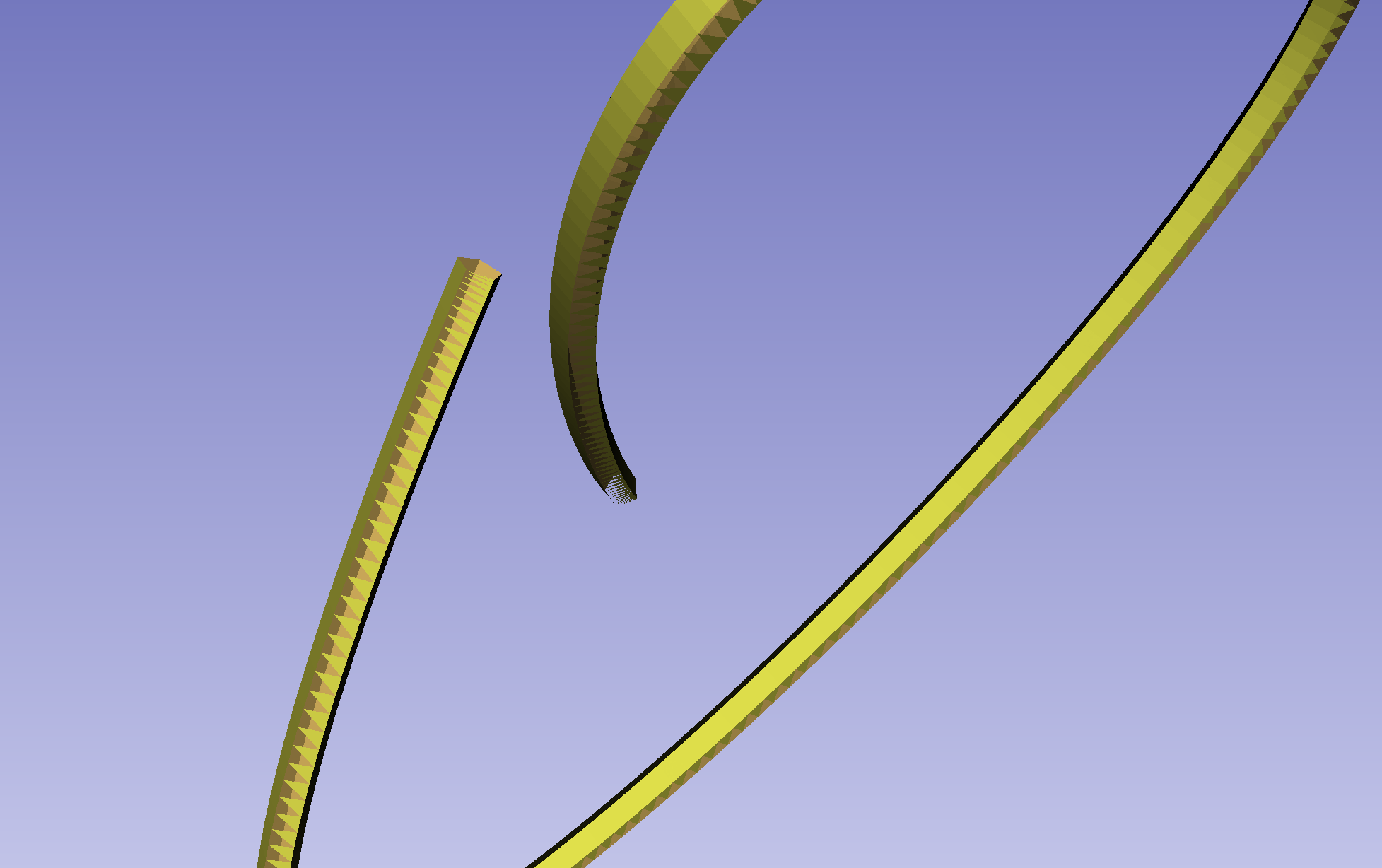
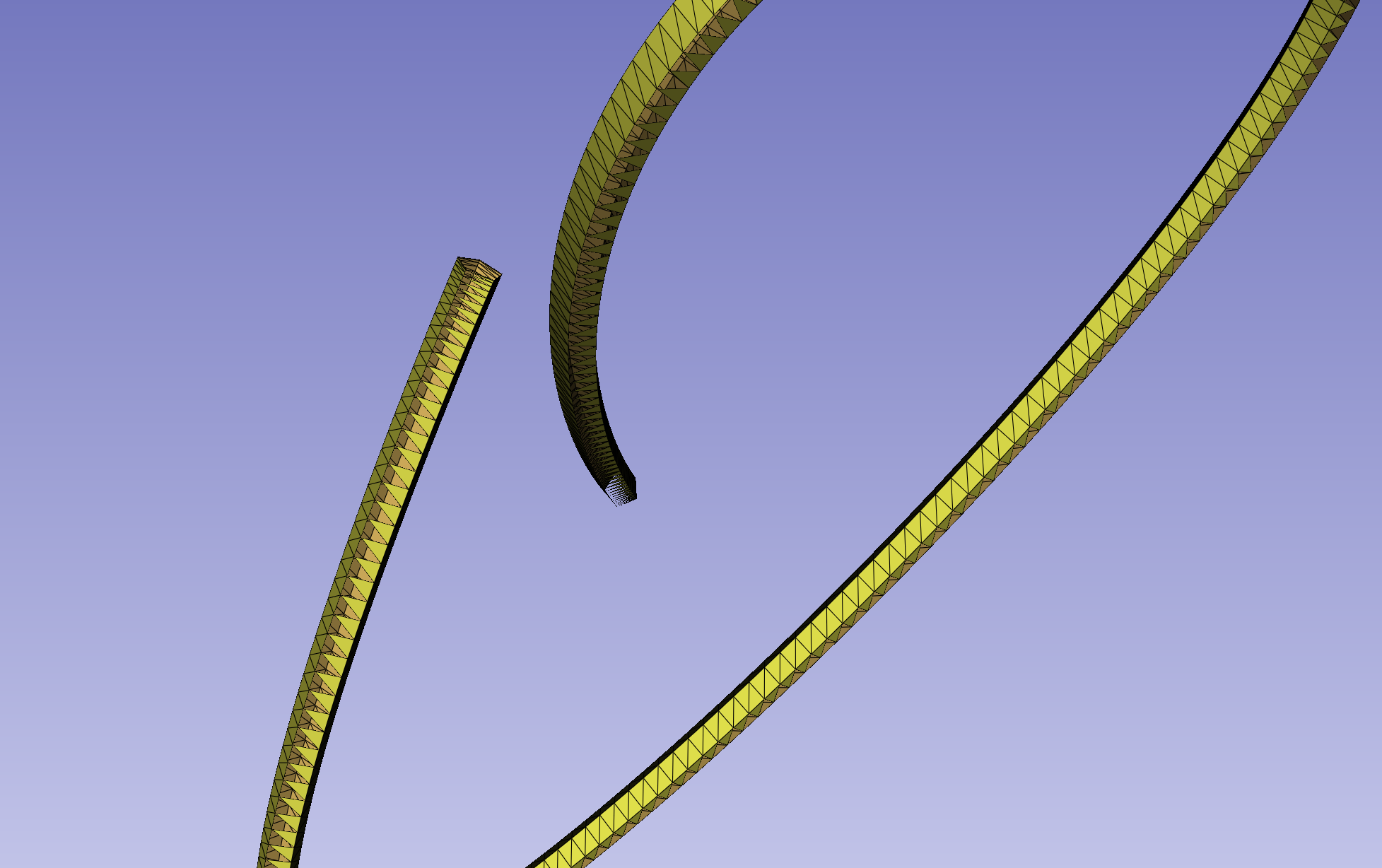
Thank you 🙂 🙂 🙂
---
### Author:  [@mau\_igna\_06](https://discourse.vtk.org/u/mau_igna_06)
#### Post date: [January 21, 2025, 3:52pm UTC](https://discourse.vtk.org/t/vtkruledsurface-bug/8102/6 "2025-01-21T15:52:19Z")
Hi,
I just wanted to write again to see if someone has feedback on this problem
Thank you
---
### Author:  [@mau\_igna\_06](https://discourse.vtk.org/u/mau_igna_06)
#### Post date: [February 12, 2025, 6:06pm UTC](https://discourse.vtk.org/t/vtkruledsurface-bug/8102/7 "2025-02-12T18:06:38Z")
Does anyone have any hints in how to solve it? I may be able to put time into fixing it
---
### Author:  [@will.schroeder](https://discourse.vtk.org/u/will.schroeder)
#### Post date: [February 13, 2025, 2:23pm UTC](https://discourse.vtk.org/t/vtkruledsurface-bug/8102/8 "2025-02-13T14:23:00Z")
It’s likely that there is an indexing problem that causes triangles to be dropped, or even possibly degenerate triangles created. etc. I suggest that you create a minimal example, and then walk through the code to see what’s going on. We’ve seen this problem before, so if you can help solve it that would be great.
---
### Author:  [@mau\_igna\_06](https://discourse.vtk.org/u/mau_igna_06)
#### Post date: [June 3, 2025, 9:09pm UTC](https://discourse.vtk.org/t/vtkruledsurface-bug/8102/9 "2025-06-03T21:09:17Z")
Hi
Here is a straight-forward example with python’s vtk
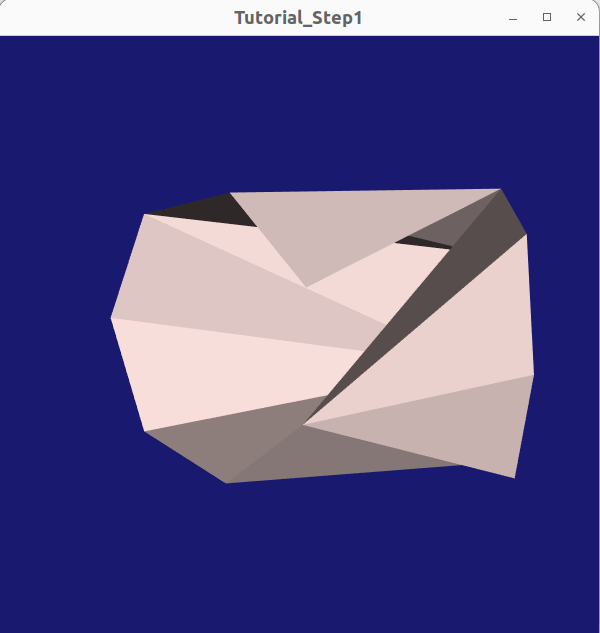
(Please note the missing triangle in front of the picture)
Code below:
```python
def polylineSource(numberOfSides):
polygonSource = vtk.vtkRegularPolygonSource()
polygonSource.SetNumberOfSides(numberOfSides)
polygonSource.SetRadius(1.0)
polygonSource.SetCenter(0, 0, 0)
polygonSource.GeneratePolygonOff()
polygonSource.GeneratePolylineOn()
polygonSource.Update()
return polygonSource.GetOutput()
polyline = polylineSource(numberOfSides=7)
transform = vtk.vtkTransform()
transform.PostMultiply()
transform.RotateX(15)
transform.RotateY(45)
transform.RotateZ(30)
transform.Translate(0, 0, -2)
transformFilter = vtk.vtkTransformPolyDataFilter()
transformFilter.SetTransform(transform)
transformFilter.SetInputData(polyline)
transformFilter.Update()
transformedPolyline = transformFilter.GetOutput()
appendedPolylines = vtk.vtkAppendPolyData()
appendedPolylines.AddInputData(polyline)
appendedPolylines.AddInputData(transformedPolyline)
appendedPolylines.Update()
ruledSurfaceFilter = vtk.vtkRuledSurfaceFilter()
ruledSurfaceFilter.SetRuledModeToPointWalk()
ruledSurfaceFilter.CloseSurfaceOff()
ruledSurfaceFilter.SetOnRatio(1)
ruledSurfaceFilter.SetDistanceFactor(10000000)
ruledSurfaceFilter.SetOrientLoops(True)
ruledSurfaceFilter.SetInputData(appendedPolylines.GetOutput())
ruledSurfaceFilter.Update()
# From this rendering example:
# https://examples.vtk.org/site/Python/Tutorial/Tutorial_Step1/
coneMapper = vtk.vtkPolyDataMapper()
coneMapper.SetInputConnection(ruledSurfaceFilter.GetOutputPort())
coneActor = vtk.vtkActor()
coneActor.SetMapper(coneMapper)
colors = vtk.vtkNamedColors()
coneActor.GetProperty().SetColor(colors.GetColor3d('MistyRose'))
ren1 = vtk.vtkRenderer()
ren1.AddActor(coneActor)
ren1.SetBackground(colors.GetColor3d('MidnightBlue'))
renWin = vtk.vtkRenderWindow()
renWin.AddRenderer(ren1)
renWin.SetSize(600, 600)
renWin.SetWindowName('Tutorial_Step1')
for i in range(0, 270):
# Render the image
renWin.Render()
# Rotate the active camera by one degree.
ren1.GetActiveCamera().Azimuth(1)
# Slicer code to visualize the models
#modelsLogic = slicer.modules.models.logic()
#triangleModel = modelsLogic.AddModel(polyline)
#pentagonModel = modelsLogic.AddModel(transformedPolyline)
#bothModel = modelsLogic.AddModel(appendedPolylines.GetOutput())
#ruledExtrusionModel = modelsLogic.AddModel(ruledSurfaceFilter.GetOutput())
```
As a side note, I tried adding some logging statements to the vtkRuledSurfaceFilter and I noted some things using different input data:
- A very high number of times [the first if statement](https://github.com/Kitware/VTK/blob/6dea97ad619c8483d27235ce8a05b2b94d504aa7/Filters/Modeling/vtkRuledSurfaceFilter.cxx#L454) is never entered while executing the filter
- Sometimes [the second if statement](https://github.com/Kitware/VTK/blob/6dea97ad619c8483d27235ce8a05b2b94d504aa7/Filters/Modeling/vtkRuledSurfaceFilter.cxx#L470) is never entered while executing the filter
- The [third and forth if blocks](https://github.com/Kitware/VTK/blob/6dea97ad619c8483d27235ce8a05b2b94d504aa7/Filters/Modeling/vtkRuledSurfaceFilter.cxx#L486-L517) are always entered by executing the filter
In my opinion this implies that the [while loop that controls the creation of new triangles](https://github.com/Kitware/VTK/blob/6dea97ad619c8483d27235ce8a05b2b94d504aa7/Filters/Modeling/vtkRuledSurfaceFilter.cxx#L427) has some faulty logic.
Hope you can help
Mauro
---
### Author:  [@mau\_igna\_06](https://discourse.vtk.org/u/mau_igna_06)
#### Post date: [September 21, 2026, 5:48pm UTC](https://discourse.vtk.org/t/vtkruledsurface-bug/8102/10 "2026-09-21T17:48:50Z")
I was able to write a test for the ruledsurface filter based on the reproduction steps above. Then I was able to fix the incorrect behavior on point walk mode.
[https://gitlab.kitware.com/vtk/vtk/-/merge\_requests/13731](https://gitlab.kitware.com/vtk/vtk/-/merge_requests/13731)