# vtkScalarBarActor usage
**URL:** https://discourse.vtk.org/t/vtkscalarbaractor-usage/4163
**Category:** Support
**Created:** [September 7, 2020, 4:14am UTC](https://discourse.vtk.org/t/vtkscalarbaractor-usage/4163 "2020-09-07T04:14:08Z")
**Posts on this page:** 3
**Page:** 1
### Author:  [@Deepa](https://discourse.vtk.org/u/Deepa)
#### Post date: [September 7, 2020, 4:14am UTC](https://discourse.vtk.org/t/vtkscalarbaractor-usage/4163/1 "2020-09-07T04:14:08Z")
Hello Everyone,
I’m using `vedo` to create a network with nodes and edges and color the nodes using the scalar values stored in an array. From what I understand, `vedo` uses `vtkScalarBarActor` to associate the scalar values to colors.
Code:
```
import networkx as nx
from vedo import *
G = nx.gnm_random_graph(n=10, m=15, seed=1)
nxpos = nx.spring_layout(G)
nxpts = [nxpos[pt] for pt in sorted(nxpos)]
nx_lines = []
for i, j in G.edges():
p1 = nxpos[i].tolist() + [0] # add z-coord
p2 = nxpos[j].tolist() + [0]
nx_lines.append([p1, p2])
nx_pts = Points(nxpts, r=12)
nx_edg = Lines(nx_lines).lw(2)
# node values
vals = [100, .80, .10, .79, .70, .60, .75, .78, .65, .90]
nx_pts.pointColors(vals, cmap='YlGn', vmin=min(vals), vmax=max(vals)).addScalarBar()
show(nx_pts, nx_edg, nx_pts.labels('id'), interactive=True, bg='black', title='plot')
```
I’m facing a problem when there are outliers in the scalar values.
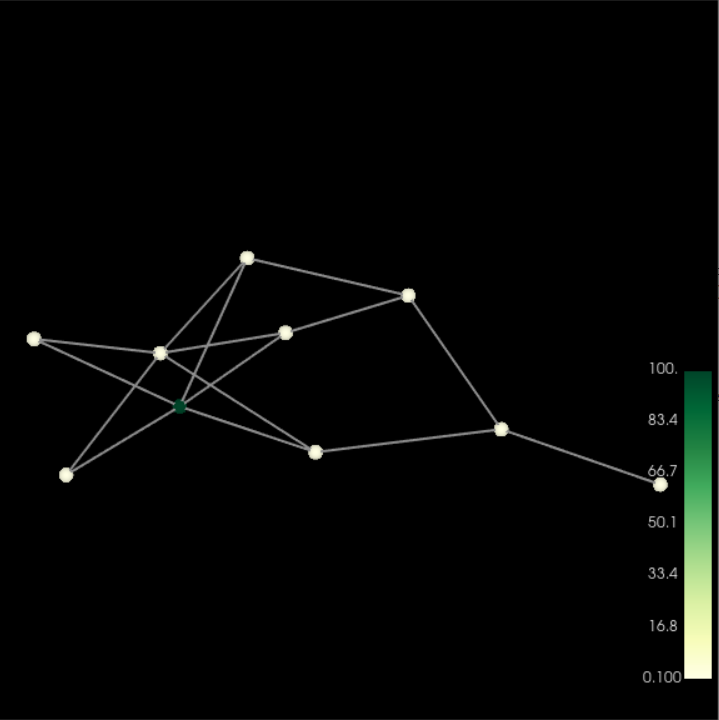
` vals = [100, .80, .10, .79, .70, .60, .75, .78, .65, .90]` in here there is one outlier and due to this the rest of the values are assigned a single color. I would like to ask for suggestions on how to avoid the above and create a scalarbar like the following
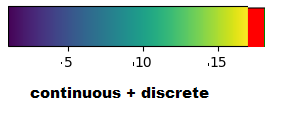
The red discrete patch in the bottom representation is for the outliers (i.e 100 in vals = [100, .80, .10, .79, .70, .60, .75, .78, .65, .90])
More details on the same issue can be found [here](https://github.com/marcomusy/vedo/issues/182)
---
### Author:  [@Paulo\_Carvalho](https://discourse.vtk.org/u/Paulo_Carvalho)
#### Post date: [September 8, 2020, 12:49pm UTC](https://discourse.vtk.org/t/vtkscalarbaractor-usage/4163/2 "2020-09-08T12:49:05Z")
Hello,
I suggest you to study or find examples using `vtkColorTransferFunction` class: [https://vtk.org/doc/nightly/html/classvtkColorTransferFunction.html](https://vtk.org/doc/nightly/html/classvtkColorTransferFunction.html). You programmaticaly build it with calls to its `addRGBSegment()` method. First, make sure the transfer function is clear by making a prior call to `RemoveAllPoints()`. For the valid continous values you do something like `addRGBSegment(0.7, r1, g1, b1, 0.8, r2, g2, b2)`. For the outlier code (e.g. 100) you do like `addRGBSegment(99.5, r, g, b, 100.5, r, g, b)`. Notice the usage of the same RGB values for the range that includes the 100 value.
After your transfer function is defined, you build a LUT with this recipe (in C++, sorry):
```cpp
//create the color table object
vtkSmartPointer lut = vtkSmartPointer::New();
lut->SetTableRange(0.0, 100.5);
lut->SetNumberOfTableValues(64);
for(size_t i = 0; i < tableSize; ++i)
{
double *rgb;
double value = /* lookup/compute value from i and 0.0-1.0; 100 values */;
rgb = transferFunction->GetColor( value ); //value can be 0.0-1.0 and 100
lut->SetTableValue(i, rgb[0], rgb[1], rgb[2]);
}
lut->SetRampToLinear(); //you may play with other interpolation methods
lut->Build();
```
I hope this helps.
regards,
Paulo
---
### Author:  [@Deepa](https://discourse.vtk.org/u/Deepa)
#### Post date: [September 9, 2020, 8:57am UTC](https://discourse.vtk.org/t/vtkscalarbaractor-usage/4163/3 "2020-09-09T08:57:30Z")
Hi Paulo, Thank you so much for the details.
@marcomusy Could you please check if this will be helpful?