# vtkScalarBarActor using trame's VtkLocalView
**URL:** https://discourse.vtk.org/t/vtkscalarbaractor-using-trames-vtklocalview/11771
**Category:** Support
**Tags:** python
**Created:** [June 20, 2023, 8:38am UTC](https://discourse.vtk.org/t/vtkscalarbaractor-using-trames-vtklocalview/11771 "2023-06-20T08:38:16Z")
**Posts on this page:** 5
**Page:** 1
### Author:  [@raz](https://discourse.vtk.org/u/raz)
#### Post date: [June 20, 2023, 8:38am UTC](https://discourse.vtk.org/t/vtkscalarbaractor-using-trames-vtklocalview/11771/1 "2023-06-20T08:38:16Z")
Hello,
I’m trying to display a vtkScalarBarActor using a trame app’s VtkLocalView. However, the trame app displays only the 2 extreme colors of the bar, without all the intermediate colors. Additionally, the trame app’s bar doesn’t contain 5 labels (Although I specify it), and the font of the bar is bad as well.
Here’s a short code:
```auto
import vtk
import vtk.util.numpy_support
import numpy as np
# trame imports
import trame.app
from trame.ui.vuetify import SinglePageLayout
from trame.widgets import vuetify, vtk as vtk_widgets
def get_scalar_bar(colorTransferFunction):
scalar_bar = vtk.vtkScalarBarActor()
scalar_bar.SetLookupTable(colorTransferFunction)
scalar_bar.SetTitle("Color Temp")
scalar_bar.UnconstrainedFontSizeOn()
scalar_bar.SetNumberOfLabels(5)
scalar_bar.SetMaximumWidthInPixels(800 // 8)
scalar_bar.SetMaximumHeightInPixels(800 // 3)
scalar_bar.SetObjectName('ScalarBar')
return scalar_bar
def plot_color_bar():
ren1 = vtk.vtkRenderer()
colorTransferFunction = vtk.vtkColorTransferFunction()
colorTransferFunction.AddRGBPoint(0.0, 0.69, 0.69, 0.69)
colorTransferFunction.AddRGBPoint(1.0, 1.0, 0.3, 0.3)
scalar_bar = get_scalar_bar(colorTransferFunction)
ren1.AddActor2D(scalar_bar)
renderWindow = vtk.vtkRenderWindow()
renderWindow.AddRenderer(ren1)
renderWindowInteractor = vtk.vtkRenderWindowInteractor()
renderWindowInteractor.SetRenderWindow(renderWindow)
renderWindowInteractor.Initialize()
renderWindow.Render()
renderWindowInteractor.Start()
# trame
if True:
server = trame.app.get_server(name="1234")
state, ctrl = server.state, server.controller
with SinglePageLayout(server) as layout:
layout.title.set_text("2D View")
with layout.content:
with vuetify.VContainer(
fluid=True,
classes="pa-0 fill-height",
):
view = vtk_widgets.VtkLocalView(renderWindow, ref="view")
ctrl.view_update = view.update
server.start(port=1234, open_browser=True)
```
The bar should look like this (This is what I get using pure vtk without trame):
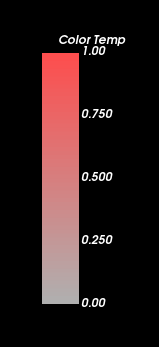
When I run the code above I get the following bar with trame:

Note:
This problem doesn’t occur when using VtkRemoteLocalView or VtkRemoteView.
Is there some kind of workaround to make the bar work on VtkLocalView? VtkRemoteLocalView and VtkRemoteView run slow on my computer.
**I use the following versions (displaying “conda list” output):**
python 3.11.3 h2755cc3\_0\_cpython conda-forge
trame 2.5.0 pyhd8ed1ab\_1 conda-forge
trame-client 2.8.0 pyhd8ed1ab\_0 conda-forge
trame-components 2.1.1 pyhd8ed1ab\_0 conda-forge
trame-deckgl 2.0.2 pyhd8ed1ab\_0 conda-forge
trame-markdown 2.0.2 pyhd8ed1ab\_0 conda-forge
trame-matplotlib 2.0.2 pyhd8ed1ab\_0 conda-forge
trame-plotly 2.1.1 pyhd8ed1ab\_0 conda-forge
trame-rca 0.3.1 pyhd8ed1ab\_0 conda-forge
trame-router 2.0.2 pyhd8ed1ab\_0 conda-forge
trame-server 2.11.2 pyhd8ed1ab\_0 conda-forge
trame-simput 2.3.2 pyhd8ed1ab\_0 conda-forge
trame-vega 2.0.3 pyhd8ed1ab\_0 conda-forge
trame-vtk 2.4.4 pyhd8ed1ab\_0 conda-forge
trame-vuetify 2.2.4 pyhd8ed1ab\_0 conda-forge
vtk 9.2.6 qt\_py311h1234567\_206 conda-forge
vtk-base 9.2.6 qt\_py311h1234567\_206 conda-forge
vtk-io-ffmpeg 9.2.6 qt\_py311h1234567\_206 conda-forge
Thanks in advance!
---
### Author:  [@raz](https://discourse.vtk.org/u/raz)
#### Post date: [June 21, 2023, 8:42am UTC](https://discourse.vtk.org/t/vtkscalarbaractor-using-trames-vtklocalview/11771/2 "2023-06-21T08:42:24Z")
I found a workaround. It turns out it doesn’t interpolate the colors added to the transfer function. The workaround is to put more colors manually in the transfer function according to the original interpolation:
```auto
for val in np.linspace(0, 1, 100):
color = colorTransferFunction.GetColor(val)
colorTransferFunction.AddRGBPoint(val, *color)
```
---
### Author:  [@Sebastien\_Jourdain](https://discourse.vtk.org/u/Sebastien_Jourdain)
#### Post date: [June 22, 2023, 1:18pm UTC](https://discourse.vtk.org/t/vtkscalarbaractor-using-trames-vtklocalview/11771/3 "2023-06-22T13:18:33Z")
I guess we have 2 problems here. The first one is that the implementation/capabilities of the scalar bar in vtk.js are not fully inlined with the VTK/C++ one (nb labels, style). Secondly the colors should have been interpolated. And that second part is a bug in the way we capture the server state and set it on the client side.
Thanks for reporting such issue.
---
### Author:  [@Sebastien\_Jourdain](https://discourse.vtk.org/u/Sebastien_Jourdain)
#### Post date: [June 23, 2023, 1:55pm UTC](https://discourse.vtk.org/t/vtkscalarbaractor-using-trames-vtklocalview/11771/4 "2023-06-23T13:55:29Z")
The bug is going to be fix today in the next release of trame-vtk.
---
### Author:  [@Sebastien\_Jourdain](https://discourse.vtk.org/u/Sebastien_Jourdain)
#### Post date: [June 23, 2023, 9:17pm UTC](https://discourse.vtk.org/t/vtkscalarbaractor-using-trames-vtklocalview/11771/5 "2023-06-23T21:17:56Z")
Should be fixed in `trame-vtk>=2.5.1` but another one for the basic lookup table is pending a vtk.js release.