# vtkSmartVolumeMapper sample distance
**URL:** https://discourse.vtk.org/t/vtksmartvolumemapper-sample-distance/4375
**Category:** Development
**Created:** [October 7, 2020, 5:56pm UTC](https://discourse.vtk.org/t/vtksmartvolumemapper-sample-distance/4375 "2020-10-07T17:56:35Z")
**Posts on this page:** 13
**Page:** 1
### Author:  [@aowen](https://discourse.vtk.org/u/aowen)
#### Post date: [October 7, 2020, 5:56pm UTC](https://discourse.vtk.org/t/vtksmartvolumemapper-sample-distance/4375/1 "2020-10-07T17:56:35Z")
I’ve been running into an issue with using the vtkSmartVolumeMapper to visualize datasets that exist in very small ranges. What happens is the opacity changes are very dramatic. If I change the opacity from 100% opaque to 95% opaque, it basically looks invisible.
I’ve encountered a similar issue with ray casting before, and I resolved it by changing the sample distance to something that works better across datasets of different sizes, so I figured that would be a good place to start here as well. Setting the sample distance for the vtkSmartVolumeMapper seems to have no effect whatsoever, though.
My code looks something like this:
vtkSmartVolumeMapper \*mapper = vtkSmartVoluemMapper::New();
…
mapper-\>SetInteractiveAdjustSampleDistances(false);
mapper-\>SetAutoAdjustSampleDistances(false);
mapper-\>SetSampleDistance(sampleDistance);
mapper-\>Render(renderer, volume);
Does this look right? Am I missing something here? No matter what I set the sample distance to, the rendered image always looks exactly the same.
---
### Author:  [@aowen](https://discourse.vtk.org/u/aowen)
#### Post date: [October 8, 2020, 4:33pm UTC](https://discourse.vtk.org/t/vtksmartvolumemapper-sample-distance/4375/2 "2020-10-08T16:33:52Z")
I tracked this down in the vtkSmartVolumeMapper class (this is in VTK-8.1.0, but I also confirmed that this still exists on the git master branch).
On line 90 of Rendering/VolumeOpenGL2/vtkSmartVolumeMapper.cxx, LockSampleDistanceToInputSpacingOn() is called on the available mappers. I believe this prevents setting the sample distance from having any affect.
---
### Author:  [@estan](https://discourse.vtk.org/u/estan)
#### Post date: [October 9, 2020, 6:48am UTC](https://discourse.vtk.org/t/vtksmartvolumemapper-sample-distance/4375/3 "2020-10-09T06:48:53Z")
Have you tried setting the scalar opacity unit distance? I believe the setter is called SetScalarOpacityUnitDistance.
---
### Author:  [@aowen](https://discourse.vtk.org/u/aowen)
#### Post date: [October 9, 2020, 3:37pm UTC](https://discourse.vtk.org/t/vtksmartvolumemapper-sample-distance/4375/4 "2020-10-09T15:37:00Z")
Thanks for the suggestion, Elvis. I tried this method as well, but I still didn’t see any difference.
---
### Author:  [@estan](https://discourse.vtk.org/u/estan)
#### Post date: [October 10, 2020, 2:36pm UTC](https://discourse.vtk.org/t/vtksmartvolumemapper-sample-distance/4375/5 "2020-10-10T14:36:44Z")
Hm, okay. At this point, it would help to see more of the code, and if possible a sample data set. The mapper settings you posted look reasonable.
What is the range of your data (min/max), and what does your transfer functions look like?
---
### Author:  [@aowen](https://discourse.vtk.org/u/aowen)
#### Post date: [October 12, 2020, 7:11pm UTC](https://discourse.vtk.org/t/vtksmartvolumemapper-sample-distance/4375/6 "2020-10-12T19:11:46Z")
I’ve created a very simplified example with a couple of datasets for you, but it looks like I can’t upload them because my account is fairly new… I’ve added them to my google drive here: [https://drive.google.com/file/d/1mMDnAAQQBnUY5tNtO7mApp9CIXRXh36a/view?usp=sharing](https://drive.google.com/file/d/1mMDnAAQQBnUY5tNtO7mApp9CIXRXh36a/view?usp=sharing)
Usage is: ./volReader vtk\_dataset opacity
There are two very simple datasets included: TINY\_RECT3D.vtk and NORMAL\_RECT3D.vtk. The only difference between the two is the coordinates. TINY has very small coordinates that result in the opacity issue I’m trying to solve.
Let me know if you have any issues or questions. Thanks for taking the time to look into this!
---
### Author:  [@aowen](https://discourse.vtk.org/u/aowen)
#### Post date: [October 12, 2020, 8:51pm UTC](https://discourse.vtk.org/t/vtksmartvolumemapper-sample-distance/4375/7 "2020-10-12T20:51:36Z")
FWIW, the vtkGPUVolumeRayCastMapper is what’s being used under the hood on my system. I tried disabling LockSampleDistanceToInputSpacing, and this does allow me to set the sampling distance so that the opacity looks right, but the actual image is then wrong (I only see a single color)… It looks like my initial guess of this lock being the primary issue is probably wrong. I’m not really sure what’s going on here.
---
### Author:  [@estan](https://discourse.vtk.org/u/estan)
#### Post date: [October 13, 2020, 4:47pm UTC](https://discourse.vtk.org/t/vtksmartvolumemapper-sample-distance/4375/8 "2020-10-13T16:47:57Z")
From your commented code:
```cpp
//volumeProperty->SetScalarOpacityUnitDistance(10.0);
```
In order for the volume with tiny spacing to be rendered the same, opacity-wise, as the one with “normal” spacing, when rendered using the same opacity transfer function, you would need to set this not to 10, but to `SpacingOfTinyVolume / SpacingOfNormalVolume`.
From the docs for ScalarOpacityUnitDistance:
> By default this is 1.0, meaning that over a distance of 1.0 units, a given opacity (from the transfer function) is accumulated.
So for your tiny-spaced volume, you want this to be set to a very small number, for the renderings to look the same.
E.g if I uncomment your line, but change it to
```cpp
volumeProperty->SetScalarOpacityUnitDistance(spacingX / 0.11111111111);
```
Then I get with `./volReader NORMAL_RECT3D.vtk 0.5` and `./volReader TINY_RECT3D.vtk 0.5`:
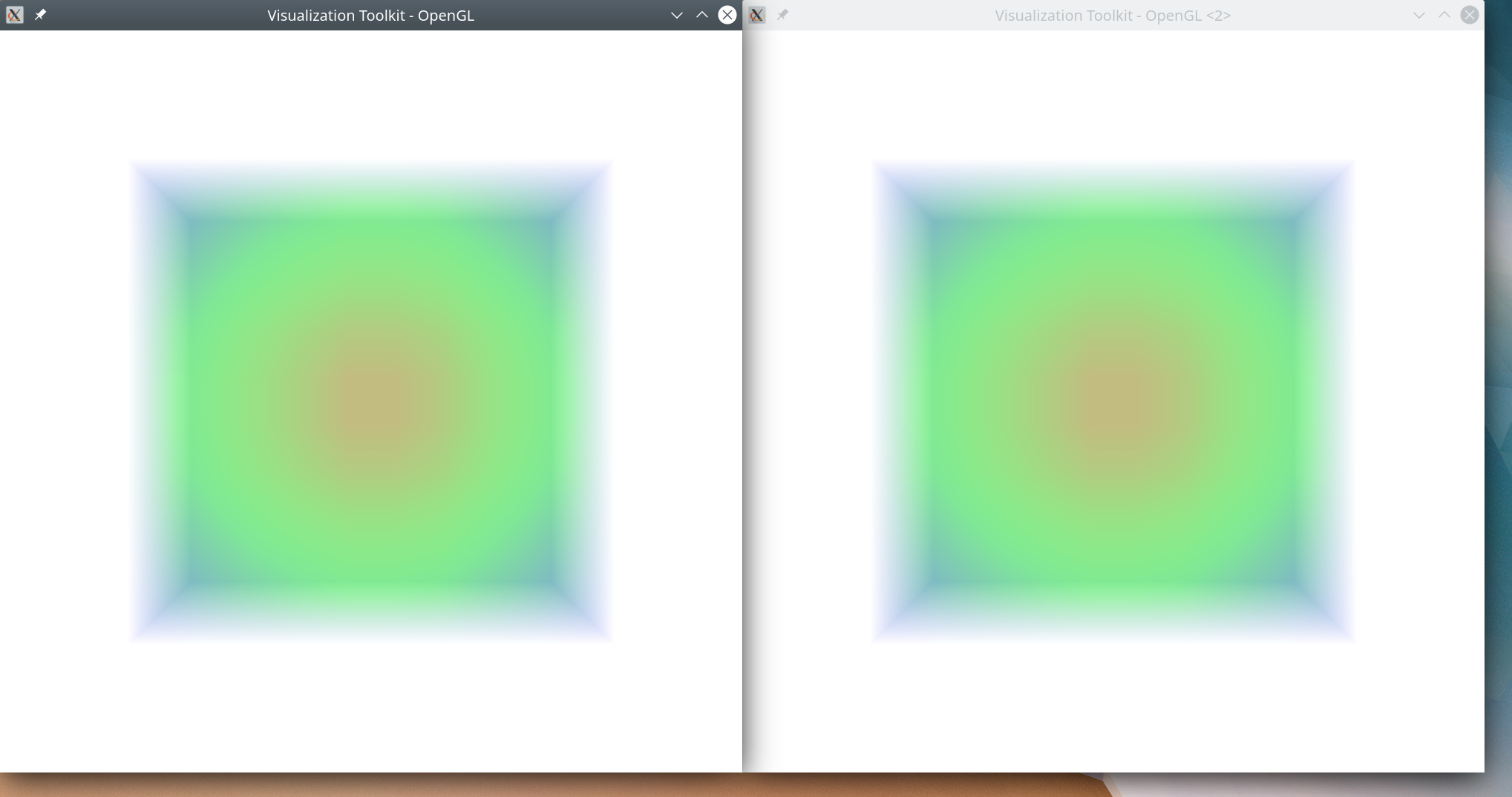
Hope that helps.
There might be a very slight difference in the above pictures still, but I believe that may be down to rounding errors when working with such very small numbers… It may be a good idea to “scale up” the tiny volume before rendering, by adjusting its spacing.
---
### Author:  [@aowen](https://discourse.vtk.org/u/aowen)
#### Post date: [October 13, 2020, 11:41pm UTC](https://discourse.vtk.org/t/vtksmartvolumemapper-sample-distance/4375/9 "2020-10-13T23:41:43Z")
Hmm… I thought I had tried this, but maybe I didn’t spend enough time with it. I’ll give it another shot later this week. Thanks for testing this out.
---
### Author:  [@aowen](https://discourse.vtk.org/u/aowen)
#### Post date: [October 14, 2020, 4:22pm UTC](https://discourse.vtk.org/t/vtksmartvolumemapper-sample-distance/4375/10 "2020-10-14T16:22:47Z")
I was able to reproduce your results in the example I sent you, but I can’t seem to reproduce this in my actual application. I think it has to do with the fact that I’m using 2 components (one for scalars and one for opacity) in the image data of my application and then disabling independent components. If I replicate this in the example I sent you, the tiny data is again invisible at lower opacities. Any ideas why this is the case?
---
### Author:  [@aowen](https://discourse.vtk.org/u/aowen)
#### Post date: [October 14, 2020, 4:31pm UTC](https://discourse.vtk.org/t/vtksmartvolumemapper-sample-distance/4375/11 "2020-10-14T16:31:26Z")
Looking closer at the application, though, I think we can get by without setting the second opacity component and just using the volume property’s opacity. Doing this allows the SetScalarOpacityUnitDistance to take effect, so I’ll use this as a way forward. Thanks again!
---
### Author:  [@aowen](https://discourse.vtk.org/u/aowen)
#### Post date: [October 14, 2020, 4:42pm UTC](https://discourse.vtk.org/t/vtksmartvolumemapper-sample-distance/4375/12 "2020-10-14T16:42:21Z")
I just realized there is a version of SetOpacityUnitDistance that allows you to choose a component (no idea how I overlooked that one). Using this version works with setting the opacity component in the image data as well. All is good now!
---
### Author:  [@estan](https://discourse.vtk.org/u/estan)
#### Post date: [October 14, 2020, 5:48pm UTC](https://discourse.vtk.org/t/vtksmartvolumemapper-sample-distance/4375/13 "2020-10-14T17:48:17Z")
That’s more than I knew, so thanks for teaching me something. Glad it worked out 👍