# vtkSplineWidget(2) vtkMarchingSquares and vtkImageData
**URL:** https://discourse.vtk.org/t/vtksplinewidget-2-vtkmarchingsquares-and-vtkimagedata/464
**Category:** Support
**Created:** [March 12, 2019, 6:21pm UTC](https://discourse.vtk.org/t/vtksplinewidget-2-vtkmarchingsquares-and-vtkimagedata/464 "2019-03-12T18:21:02Z")
**Posts on this page:** 2
**Page:** 1
### Author:  [@Romain](https://discourse.vtk.org/u/Romain)
#### Post date: [March 12, 2019, 6:21pm UTC](https://discourse.vtk.org/t/vtksplinewidget-2-vtkmarchingsquares-and-vtkimagedata/464/1 "2019-03-12T18:21:02Z")
Hello everyone,
I’m working with vtk 8.2 on Windows 10 with VS 2017.
I try to create a closed Spline around the contour of a binary image in purpose to change the value of each pixels inside the closed spline.
To do this, I use vtkMarchingSquares to extract the contour of the binary image.
After that, I try to put the points from the output polydata of the vtkMarchingSquares but the spline is not set at the expected position.
I’m not sure what I did wrong. Maybe there is too much points on the contour?
```
#include
#include
#include
#include
#include
#include
#include
#include
#include
#include
#include
#include
#include
#include
#include
#include
#include
#include
#include
#include
#include
#include
#include
int main(int, char *[])
{
vtkNew image;
image->SetDimensions(512, 512, 2);
image->SetOrigin(0, 0, 0);
image->SetSpacing(0.97, 0.97, 1);
image->AllocateScalars(VTK_SHORT, 1);
for (int k = 0; k < 2; ++k)
{
for (int j = 0; j < 512; ++j)
{
for (int i = 0; i < 512; ++i)
{
short * pixel = static_cast(image->GetScalarPointer(i, j, k));
if (i > 100 && i < 300 && j > 100 && j < 300)
{
pixel[0] = 255;
}
else
{
pixel[0] = 0;
}
}
}
}
vtkNew contourFilter;
contourFilter->SetInputData(image);
contourFilter->GenerateValues(1, 255, 255);
contourFilter->Update();
vtkSmartPointer contourPolyData = contourFilter->GetOutput();
// vtkNew imageMapper;
// imageMapper->SetInputData(image);
vtkNew imageActor;
imageActor->SetInputData(image);
vtkNew contourMapper;
contourMapper->SetInputData(contourPolyData);
vtkNew contourActor;
contourActor->SetMapper(contourMapper);
contourActor->GetProperty()->SetLineWidth(2);
contourActor->GetProperty()->SetColor(1, 0, 0);
// A renderer and render window
vtkSmartPointer renderer =
vtkSmartPointer::New();
vtkSmartPointer renderWindow =
vtkSmartPointer::New();
renderWindow->AddRenderer(renderer);
// An interactor
vtkSmartPointer renderWindowInteractor =
vtkSmartPointer::New();
renderWindowInteractor->SetRenderWindow(renderWindow);
vtkNew parametricSpline;
parametricSpline->SetPoints(contourPolyData->GetPoints());
vtkNew splineRepresentation;
splineRepresentation->SetParametricSpline(parametricSpline);
vtkNew xSpline;
vtkNew ySpline;
vtkNew zSpline;
splineRepresentation->GetParametricSpline()->SetXSpline(xSpline);
splineRepresentation->GetParametricSpline()->SetYSpline(ySpline);
splineRepresentation->GetParametricSpline()->SetZSpline(zSpline);
splineRepresentation->GetParametricSpline()->SetPoints(contourPolyData->GetPoints());
splineRepresentation->ClosedOn();
vtkSmartPointer splineWidget =
vtkSmartPointer::New();
splineWidget->SetRepresentation(splineRepresentation);
splineWidget->SetInteractor(renderWindowInteractor);
renderWindowInteractor->Initialize();
renderWindow->Render();
splineWidget->On();
renderer->AddActor(imageActor);
renderer->ResetCamera();
renderWindowInteractor->Start();
return EXIT_SUCCESS;
}
```
---
### Author:  [@Romain](https://discourse.vtk.org/u/Romain)
#### Post date: [March 14, 2019, 8:22am UTC](https://discourse.vtk.org/t/vtksplinewidget-2-vtkmarchingsquares-and-vtkimagedata/464/2 "2019-03-14T08:22:58Z")
Hi everyone,
I really don’t understand the behavior of vtkSplineWidget and vtkSplineWidget2.
I do some tests like this:
I create a vtkParametricSpline with the same points that represents a square:
> vtkNew\ points;
> points-\>InsertNextPoint(0.97, 0.97, 0);
> points-\>InsertNextPoint(0.97, 1.94, 0);
> points-\>InsertNextPoint(0.97, 2.91, 0);
> points-\>InsertNextPoint(1.94, 2.91, 0);
> points-\>InsertNextPoint(2.91, 2.91, 0);
> points-\>InsertNextPoint(2.91, 1.94, 0);
> points-\>InsertNextPoint(2.91, 0.97, 0);
> points-\>InsertNextPoint(1.94, 0.97, 0);
> vtkNew\ spline;
> spline-\>SetPoints(edgeCoords);
> spline-\>ClosedOn();
Once I display this spline using vtkSplineWidget:
> vtkNew\ splineWidget;
> splineWidget-\>SetParametricSpline(spline);
> splineWidget-\>SetInteractor(renderWindowInteractor);
I obtain this result:
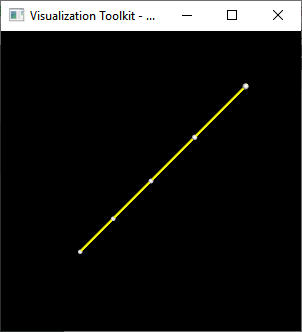
Once I display the same spline using vtkSplineWidget2:
> vtkNew\ splineWidget;
> vtkNew\ splineRepresentation;
> splineRepresentation-\>SetParametricSpline(spline);
> splineWidget-\>SetRepresentation(splineRepresentation);
> splineWidget-\>SetInteractor(renderWindowInteractor);
I obtain this:
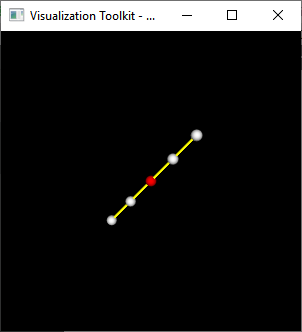
And finally when I put the spline inside a vtkParametricFunctionSource and display it using a vtkPolydataMapper/vtkActor:
> vtkNew\ functionSource;
> functionSource-\>SetParametricFunction(spline);
> functionSource-\>Update();
> vtkNew\ splineMapper;
> splineMapper-\>SetInputConnection(functionSource-\>GetOutputPort());
> vtkNew\ splineActor;
> splineActor-\>SetMapper(splineMapper);
> splineActor-\>GetProperty()-\>SetLineWidth(2.0f);
> splineActor-\>GetProperty()-\>SetColor(1.0, 0.0, 0.0);
I obtain the expected result:
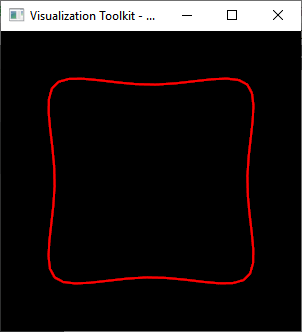
I really don’t understand what I did wrong using the vtkSplineWidget\* object to not obtain the same result.
I read the documentation of those two widgets but I found nothing that can explain this behavior.