# vtkSplineWidget with undo/redo buttons
**URL:** https://discourse.vtk.org/t/vtksplinewidget-with-undo-redo-buttons/13310
**Category:** Web
**Created:** [February 13, 2024, 2:14pm UTC](https://discourse.vtk.org/t/vtksplinewidget-with-undo-redo-buttons/13310 "2024-02-13T14:14:35Z")
**Posts on this page:** 5
**Page:** 1
### Author:  [@antonskrebkov](https://discourse.vtk.org/u/antonskrebkov)
#### Post date: [February 13, 2024, 2:14pm UTC](https://discourse.vtk.org/t/vtksplinewidget-with-undo-redo-buttons/13310/1 "2024-02-13T14:14:36Z")
Hello!
I’m working with `vtkSplineWidget` based on the example [vtk.js](https://kitware.github.io/vtk-js/examples/PaintWidget.html).
My task is to draw a figure on a 3D image and being able to delete and return a deleted point during the drawing process (undo/redo buttons). Everything worked well until I noticed that when I first press undo (remove the point), and then redo (return this point which saved in a variable back), and then hovering over this point to be able to move it (I set resetAfterPointPlacement: false) I get the following error:
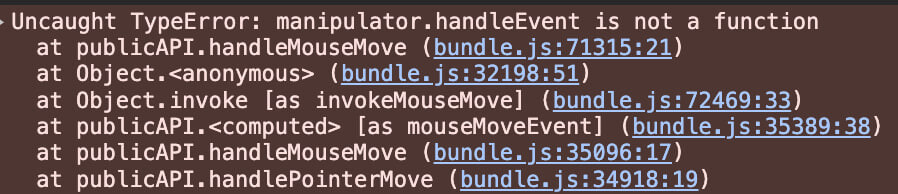

At the same time, if I don’t use the undo and redo buttons, then everything works as it should. Buttons code:
```auto
const undo = () => {
const { splineWidgetManager, renderWindow } = context.current
const coordinatesList = splineWidgetManager
.getWidgets()
[splineWidgetManager.getWidgets().length - 1].getWidgetState()
.getState().handleList
const currentWidget = splineWidgetManager
.getWidgets()
[splineWidgetManager.getWidgets().length - 1].getWidgetState()
setRemovedCoordinate(coordinatesList[coordinatesList.length - 1])
currentWidget.removeHandle(coordinatesList.length - 1)
renderWindow.render()
}
```
```auto
const redo = () => {
const { splineWidgetManager, renderWindow } = context.current
const currentWidget = splineWidgetManager
.getWidgets()
[splineWidgetManager.getWidgets().length - 1].getWidgetState()
currentWidget.addHandle(removedCoordinate)
renderWindow.render()
}
```
I also noticed that if I use the undo/redo scenario while drawing, then in the widgetManager the coordinate that was deleted and returned will not have a **handleOrigin** property inside **manipulator** object when the drawing of the figure is completed.
Coordinate which was just drawn:

Coordinate which was drawn, deleted and returned:

So, what can cause these errors?
---
### Author:  [@Forrest](https://discourse.vtk.org/u/Forrest)
#### Post date: [February 13, 2024, 8:41pm UTC](https://discourse.vtk.org/t/vtksplinewidget-with-undo-redo-buttons/13310/2 "2024-02-13T20:41:55Z")
Calling `getState()` will serialize your widget state. When you go add it back, it doesn’t get serialized. I would just use `getWidgetState().getHandleList()`, unless you need to serialize the widget state.
---
### Author:  [@finetjul](https://discourse.vtk.org/u/finetjul)
#### Post date: [February 13, 2024, 8:43pm UTC](https://discourse.vtk.org/t/vtksplinewidget-with-undo-redo-buttons/13310/3 "2024-02-13T20:43:20Z")
Currently most widgets assume to be controlled uniquely by the mouse events and not programatically. If you look at `SplineWidget/behavior.js` you will notice that `setOrigin()` (and other important calls) is called on each new handle.
`addPoint()` should probably made public so that your undo/redo mechanism could call it (and it could correctly initialize each created handle.
---
### Author:  [@antonskrebkov](https://discourse.vtk.org/u/antonskrebkov)
#### Post date: [February 14, 2024, 11:04am UTC](https://discourse.vtk.org/t/vtksplinewidget-with-undo-redo-buttons/13310/4 "2024-02-14T11:04:35Z")
Thanks for your reply.
It turns out that within the current version of vtk.js the behavior described by me cannot be implemented with the functions of the `vtkSplineWidget` that comes out of the box?
And then question arises: for what purposes is the `addHandle()` function needed and what use cases might it have if interaction with the mouse is necessary to correctly add a point?
I would also like to know if it is possible to control the position of the drawn figure on the 3D image so that the drawing happen on the side that is facing the camera. For example, considering this example [vtk.js](https://kitware.github.io/vtk-js/examples/LineWidget.html) the line always appears strictly inside and in the center of the cube, regardless the side of cube that is facing the camera. So, is it possible to do it like this:
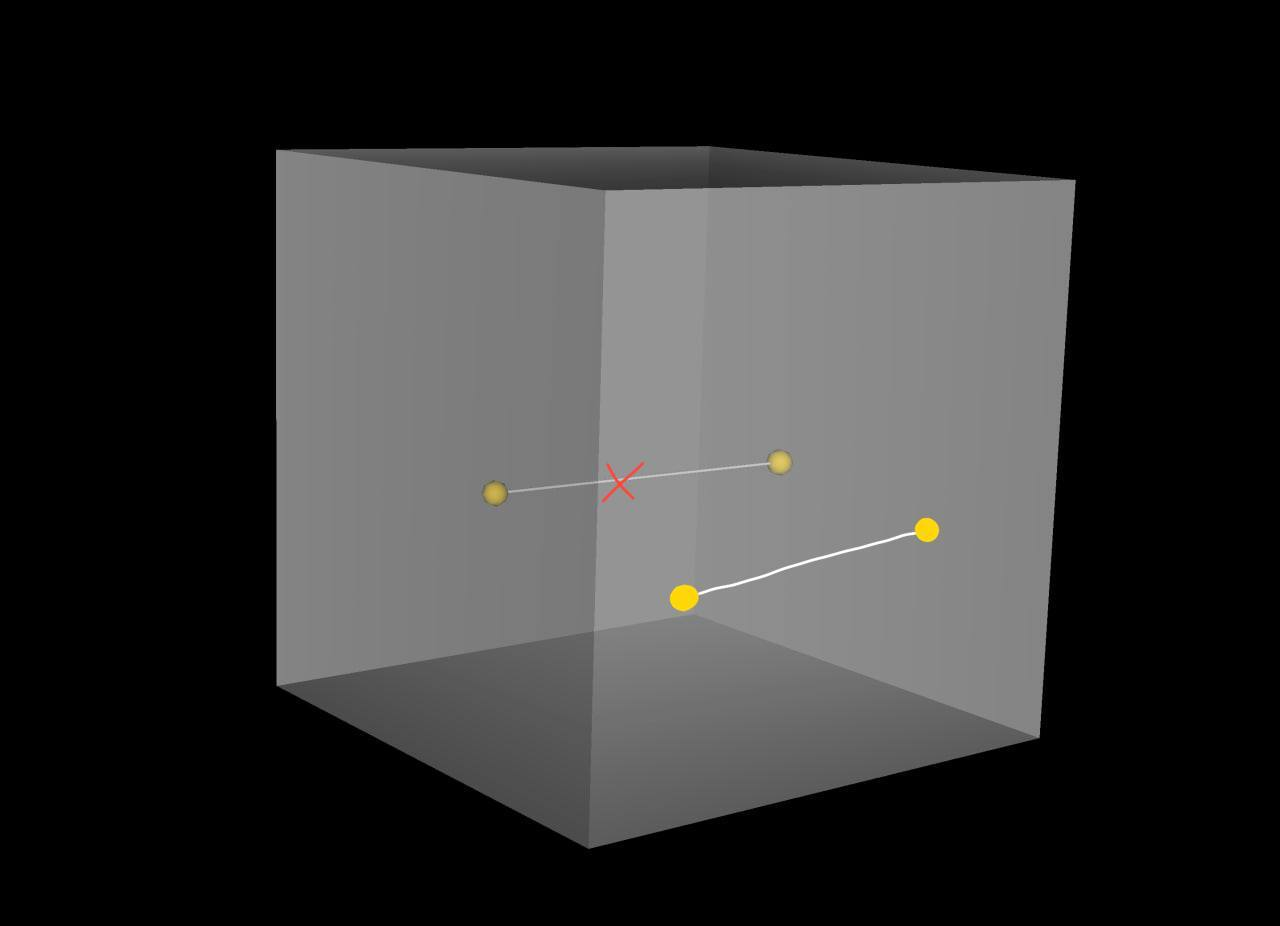
taking into account that if the cube is turned with the opposite side towards the camera, the next new drawing will appear exactly on that side?
---
### Author:  [@finetjul](https://discourse.vtk.org/u/finetjul)
#### Post date: [February 14, 2024, 1:26pm UTC](https://discourse.vtk.org/t/vtksplinewidget-with-undo-redo-buttons/13310/5 "2024-02-14T13:26:44Z")
> It turns out that within the current version of vtk.js the behavior described by me cannot be implemented with the functions of the vtkSplineWidget that comes out of the box?
From what you describe, it seems that your statement is correct. Small VTK.js internal changes are required.
> And then question arises: for what purposes is the addHandle() function needed and what use cases might it have if interaction with the mouse is necessary to correctly add a point?
`addHandle()` is a low-level function (to modify the Model in the ModelViewController paradigm), however there must be other configuration required (the Controller part in the ModelViewController paradigm).
> I would also like to know if it is possible to control the position of the drawn figure on the 3D image so that the drawing happen on the side that is facing the camera. For example, considering this example [vtk.js](https://kitware.github.io/vtk-js/examples/LineWidget.html) the line always appears strictly inside and in the center of the cube, regardless the side of cube that is facing the camera. So, is it possible to do it like this:
It should be possible. This depends on the type of manipulator. You should use a `PickerManipulator` instead of a `PlaneManipulator`.